View Search Agent performance reports
View Search Agent performance reports


|
Coveo Conversational Search is a paid product extension that enables the Coveo Search Agent. Contact Coveo Sales or your Account Manager to add Coveo Conversational Search to your organization license. |
To track the usage of the Search Agent, Coveo Analytics logs events for actions performed on the Search Agent component in your search interface.
This article explains how to create a report that helps you analyze the performance of your Search Agent implementation and the conversational search experience it delivers.

|
For complete implementation steps for the Coveo Search Agent, see Search Agent implementation overview. |
To view Search Agent event data in a report, you must:
-
Add custom dimensions to your Coveo organization to log the events.
-
Create the report using the preconfigured Search Agent Performance dashboard template. == Prerequisites
-
Your search interface must include a Search Agent component so that Coveo Analytics logs the required custom events.
-
You must have the required privileges to manage dimensions and to create report dashboards.
-
Add custom dimensions
To view data on the Search Agent custom events in a report, you must add the following custom dimensions to your Coveo organization:
-
c_answergenerated -
c_conversationid -
c_generativequestionansweringid
To add the custom dimensions for Search Agent reports
Add a custom dimension for each of the dimensions listed above using the following criteria:
-
For the
c_answergenerateddimension:-
In the Display name field, enter a descriptive name for the dimension.
-
In the API name field, enter
c_answergenerated. -
Set Type to Text.
-
Under Related events, select Custom.
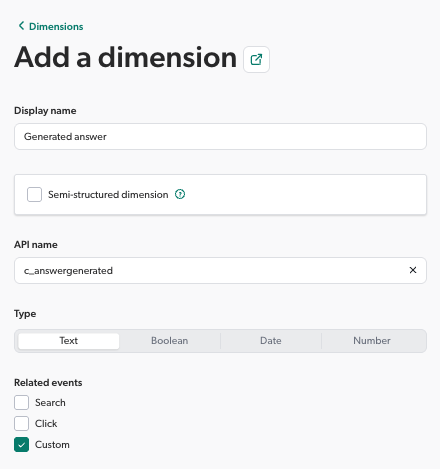
-
-
For the
c_conversationidandc_generativequestionansweringiddimensions:-
In the Display name field, enter a descriptive name for the dimension.
-
Select Semi-structured dimension. In the Step field, enter
c_conversationidorc_generativequestionansweringidfor the path step depending on the dimension you’re creating.
You must create the
c_conversationidandc_generativequestionansweringiddimensions as a semi-structured dimension. If you create a regular custom dimension instead, Coveo prefixes its API name with the event category (for example,custom_events.c_conversationid), and the report template can’t find it, causing errors such asMetric(s) 'countDistinct(c_conversationid)' were not found. -
The API name is automatically created to match the semi-structured path step you entered. From the API name list, select the name that corresponds to the semi-structured path step:
c_conversationidorc_generativequestionansweringid. -
Set Type to Text.
-
Under Related events, select Custom.
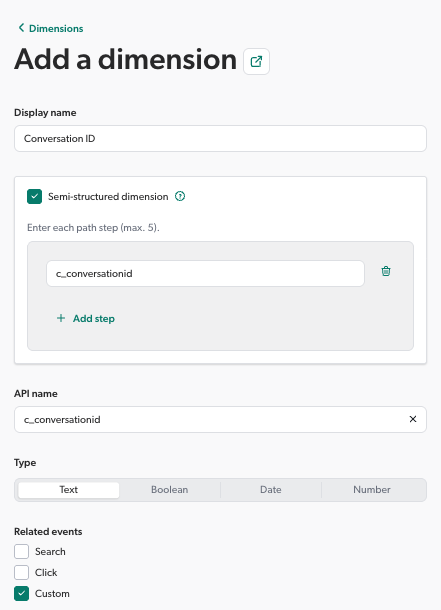
-
Create a Search Agent report
You can quickly create a report to analyze the performance of your Search Agent implementation by using the preconfigured Search Agent Performance dashboard template.
This template provides a convenient way to build a report that surfaces key Search Agent metrics and insights related to your conversational search experience, helping you evaluate user engagement, answer rate, and business impact.
The template creates a report with three tabs:
-
Search Metrics: Contains report cards that show metrics such as the number of queries with and without generated answers (conversations), click-through rate, and average number of follow-up queries per conversation.
-
User Feedback: Displays user feedback data collected through the Search Agent component.
-
Self Service: Lets you see the impact of Search Agent’s answer generation on case submission, and by extension on self-service success, if you’re logging a custom event when a user submits a case during the same visit when accessing the Search Agent’s associated search interface.
To create a Search Agent report
-
If you haven’t done so already, add the custom dimensions to your Coveo organization.
-
Add a report dashboard using the preconfigured Search Agent Performance template.
Search Agent analytics events
This section lists the custom Coveo Analytics events that the Search Agent logs for the actions that users perform on the Search Agent component.

|
Note
In a conversational, multi-turn experience, the Search Agent also includes a |
| Value | Event | ||
|---|---|---|---|
|
The answer was successfully streamed in the search interface. This event won’t be logged if the user initiates another search while the answer is being generated. |
||
In customData: |
An answer was successfully generated for the query. |
||
In customData: |
An answer wasn’t generated for the query because there wasn’t enough relevant information to generate an answer.
|
||
|
A citation link was clicked.
|
||
|
A user hovered over a citation link. |
||
|
A user clicked the thumbs-up icon to provide positive feedback for the generated answer. |
||
|
A user clicked the thumbs-down icon to provide negative feedback for the generated answer. |
||
|
A user clicked the copy button to copy the generated answer to their clipboard. |
||
|
A user closed (hid) the Search Agent component. |
||
|
A user opened (showed) the Search Agent component. |
||
|
A user expanded the generated answer to view it in full. |
||
|
A user collapsed the generated answer. |
Inspect your search page
Use your browser developer tools to retrieve what’s being tracked:
-
Open a Coveo-powered search interface that uses the Search Agent.
-
Open your web browser’s developer tools.
NoteThis article uses the Google Chrome developer tools. For browser-specific information, see:
-
Select the Network tab.
-
On the search page, perform a query that will generate an answer.
-
Back in the developer tools window, under the Name column, click the latest
customcall to Coveo Analytics. -
Select the Payload tab. You should now see the tracked Coveo Analytics events.