About Commerce Health
About Commerce Health

This is for:
Merchandiser

|
The Commerce Health dashboard is in early release and is being rolled out progressively. If it isn’t yet visible in your Coveo Merchandising Hub (CMH) interface, check back soon. |
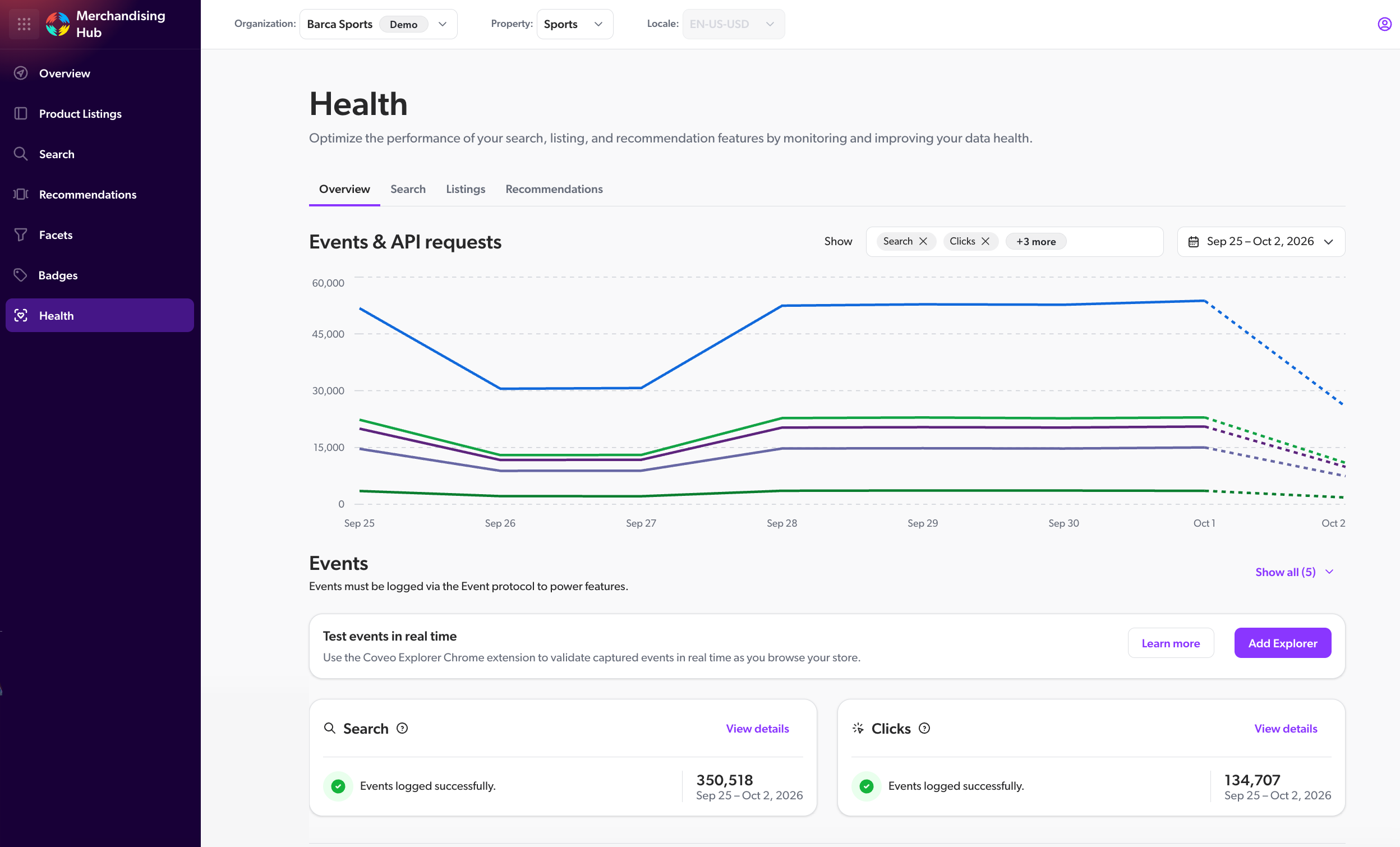
The Health dashboard in the Coveo Merchandising Hub (CMH) helps teams maintaining Coveo for Commerce assess whether their implementation meets the requirements of Coveo-powered Commerce features. Use the Health dashboard to review events, catalog data, platform resources, and configuration a feature depends on, and confirm they’re complete and valid.
What is Commerce Health?
The Health dashboard is intended as a validation and readiness layer for your Commerce implementation. Rather than focusing on a single data type, it checks whether a feature’s underlying requirements, such as data, platform resources, and configuration, are met. Meeting these requirements helps support AI-powered features and reliable reporting.

|
Note
Commerce Health complements the Coveo Explorer. The Explorer gives you real-time visibility into individual tracking calls and requests, which makes it the right tool immediately after a deployment or configuration change. Commerce Health works from data that’s processed ahead of time, giving you an aggregated readiness view once that processing is complete. |
How the Health dashboard fits in the system
The Health dashboard sits alongside the other tools you use to monitor and improve a Commerce implementation, but it serves a different purpose.
It brings together the event, catalog data, platform resources, and configuration that a Commerce feature depends on, giving you a single place to assess whether a feature’s requirements are met, such as those for Catalog Semantic Encoder (CSE) and Listing Page Optimizer (LPO).
When to use the Health dashboard
Use the Health dashboard to assess feature readiness during implementation and ongoing maintenance. For example, before activating CSE or LPO, or when investigating their performance, review whether their data, platform resource, and configuration requirements are met.
Other examples include:
-
After an implementation change, such as a new tracking ID or updated catalog fields, to validate that the change didn’t introduce gaps.
-
On a recurring basis, to catch data quality issues, such as missing catalog fields, before they affect feature performance.
What you can review
You can use the Health dashboard to answer questions such as:
-
Are the expected commerce events and Commerce API requests being recorded?
-
Are required event properties and catalog field values present and valid?
-
Which data checks have detected issues?
-
Which AI and reporting features could those issues affect?
Scope and filters
The data shown in the Health dashboard depends on the selected CMH context and filters. Use the Overview tab to review health across your Commerce solutions and use the Search, Listings, and Recommendations tabs to review data for a specific solution. Each of those tabs organize health information by Commerce solutions. Some events, requests, catalog data, and data checks are shared across solutions. You can adjust the date range with the date picker to review event and request activity over a specific period, such as after an implementation change.
Depending on the view, results can be scoped by:
Data freshness
Commerce Health relies on catalog data, event data, platform resources, and configuration that’s processed ahead of time. event and request health views refresh hourly and display new data when it becomes available. Catalog health data refreshes as catalog products change. Check the Latest available data timestamp in the relevant section before using the results to validate a recent change.