Indexing guide
Indexing guide

You should now be set to index content in your Coveo organization.

|
If you installed the Coveo for Sitecore package, review the Coveo Diagnostic Page documentation to ensure that your environment is correctly set up before proceeding with indexing. |
The indexing phase of the process requires some prior planning. You need to:
-
Identify all sources of content you want to index and the type of connector to use for each source.
-
Identify the content that should and shouldn’t be indexed in each source.
At the end of this phase, content from Sitecore and all necessary non-Sitecore repositories will be indexed. The indexed data will be limited to meaningful information, which will be easy to locate by keyword search or by using search interface filtering controls.
Index Sitecore XP/XM content
The recommended way to index Sitecore XP/XM content is by using the native connector included in the Coveo for Sitecore package. Installed in Sitecore, the connector uses Sitecore APIs and supports multiple Sitecore databases, item languages, and their permissions. The package also includes the Command Center, a user interface for managing connector indexing configurations and monitoring indexing operations. When indexing with the Coveo for Sitecore package, the process of mapping Sitecore fields to Coveo fields is handled automatically.
Alternatively, if your content is public, you can use the Sitemap connector or Web connector to index your Sitecore content.
Flow diagrams for both indexing options
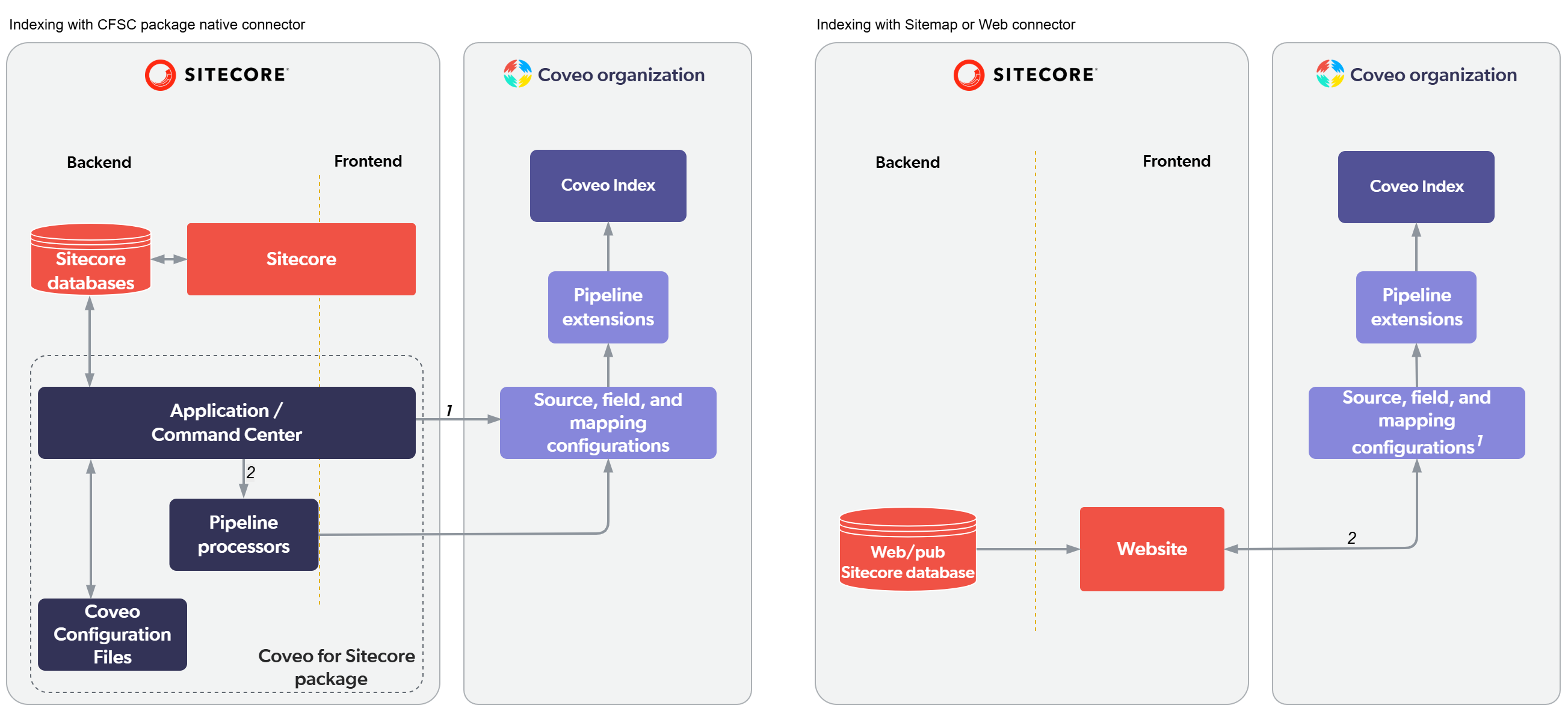
1. With the native connector, Sitecore field indexing selection is done in the Command Center and the application handles Coveo field creation and mappings automatically. With the Sitemap or Web connector, you must create and manage most Coveo fields and mappings manually to index Sitecore metadata.
2. With the native connector, indexing is triggered automatically on item save or publish. Sitecore items are pushed to the Coveo Platform. With the Sitemap or Web connector, indexing operations are scheduled in the Coveo Platform and the connector pulls your published Sitecore site content.
The Index Sitecore XP/XM content section includes information and procedures on how to configure the native connector to scope indexing to the meaningful content that you want to make available through search. You will learn why indexing Sitecore fields and item HTML content is instrumental in producing a quality search experience and how you carry this out in Coveo for Sitecore. The section also contains many indexing leading practices and tips to help you browse and analyze your indexed data.
If you decide to use the Sitemap or Web connector instead of the native connector, you’ll find information and procedures on how to configure these connectors in the Sitemap connector and Web connector articles and their respective child articles.
Index Sitecore XM Cloud content
The Coveo for Sitecore package is not supported in Sitecore XM Cloud. However, you can still index your Sitecore XM Cloud content using one of Coveo’s generic connectors. See Index Sitecore XM Cloud content to determine which connector best fits your needs, get configuration details, and learn how to index your metadata.
Index Sitecore Content Hub
You can use the Coveo REST API source to index Sitecore Content Hub. Coveo provides a REST API source example configuration and guidance so that you may adjust this example to fit your needs.
Index external content
From a single search interface in your Sitecore website, your users will have the ability to query for information in the site but also from other sources. Hence, you will want to configure the indexing of these external sources. You can do this in the Coveo Administration Console.
The Index external content section articles guide you to the relevant Coveo Platform resources and documentation pertaining to external content indexing. The section also provides forward instructions regarding the configuration of a search interface which targets external content.
Modify your content
Indexing Sitecore items involves several stages, first in the Sitecore context, and afterward, in the Coveo Platform. The indexing of external content items, on the other hand, takes place entirely in Coveo.
The Modify your content section presents the options available to tweak your indexed content programmatically, within the Sitecore context (for Sitecore items only) or in Coveo.