Review your license and usage
Review your license and usage

This is for:
System AdministratorThe License & Usage (platform-ca | platform-eu | platform-au) page gives you a clear view of your Coveo license and its metrics. You can use it to review the products and features included in your plan and track how your current usage aligns with your entitlements and quotas.
The page also offers insights into your usage trends over time, helping you monitor and make informed adjustments to maintain optimal performance for your users. For example, if you notice a sudden increase in the number of items in your index, you can investigate its source and take steps to reduce your item count. Similarly, if you notice that you’re regularly nearing your entitled usage level, you may consider contacting your Coveo representative to discuss increasing your entitlement or optimizing your usage.
As explained under Concepts, exceeding an entitlement may result in certain activities in your Coveo organization being throttled or blocked. Regularly monitoring your usage helps you take proactive steps to prevent service disruptions and maintain consistent performance.
Concepts
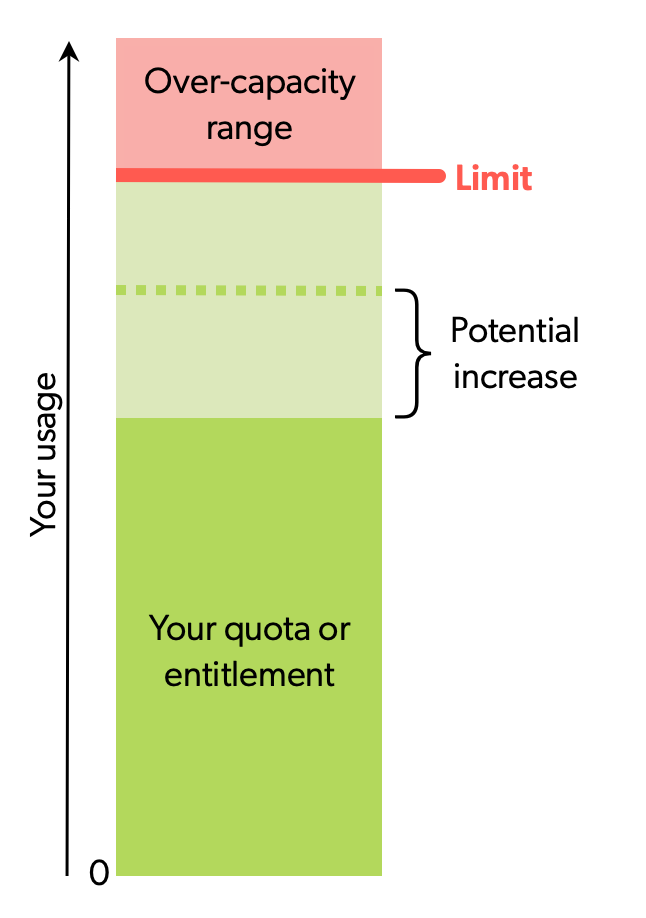
Understanding the following concepts will help you interpret the information presented on the License & Usage (platform-ca | platform-eu | platform-au) page.
A quota is a usage threshold set by Coveo to ensure platform performance and fair use. If your usage exceeds a quota, certain activities may be throttled or blocked, depending on the quota.
Some quotas can be increased upon request. If you’re regularly close to your usage quota, reach out to your Coveo representative to discuss possible adjustments.
An entitlement is a usage allowance defined in your Coveo contract. While entitlements are a type of quota, not all quotas are entitlements. If your usage exceeds an entitlement, certain activities may be throttled or blocked, and a Coveo representative may reach out if overuse persists.
A limit is a maximum usage level that can’t be exceeded without impacting platform performance and stability. Limits apply to all Coveo customers and can’t be increased. If your usage reaches a limit, Coveo blocks or throttles further activity, depending on the limit. The License & Usage page doesn’t display Coveo’s limits.
Overview
1 |
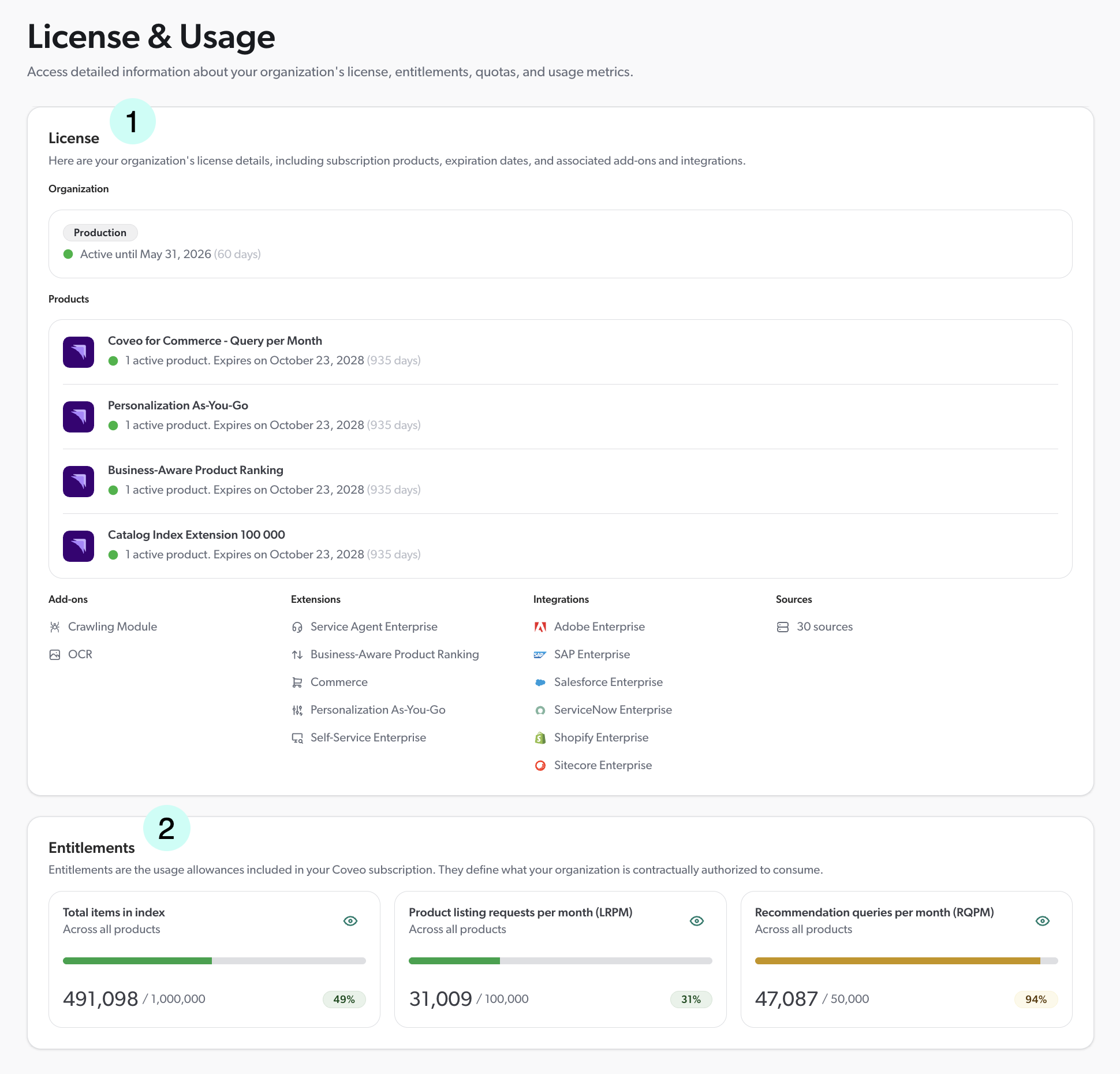
The tabs at the top of the page allow you to switch views. On the Quotas tab, you can see your organization’s quotas and your current usage. |
2 |
On the Overview tab, the License section displays the products, add-ons, integrations, and other features included in your Coveo license. It also shows the expiration dates for your license and products. |
3 |
On the Overview tab, the Entitlements section displays the usage allowances defined in your Coveo contract, such as the number of items in your index or the number of queries your search interface users can perform each month. It also shows your current usage. Click an entitlement to view its details, including usage history and the list of contributing products. |
4 |
On the Overview tab, the Quotas at risk section displays the quotas that you’re at risk of exceeding based on your current usage trends. |
Entitlement details
On the Overview tab of the License & Usage (platform-ca | platform-eu | platform-au) page, clicking an entitlement card opens a detail page for that entitlement. Entitlement details are available for:
-
Total items in index
-
Generative queries per month (GQPM)
-
Passage queries per month (PQPM)
-
Product listing requests per month (LRPM)
-
Recommendation queries per month (RQPM)
1 |
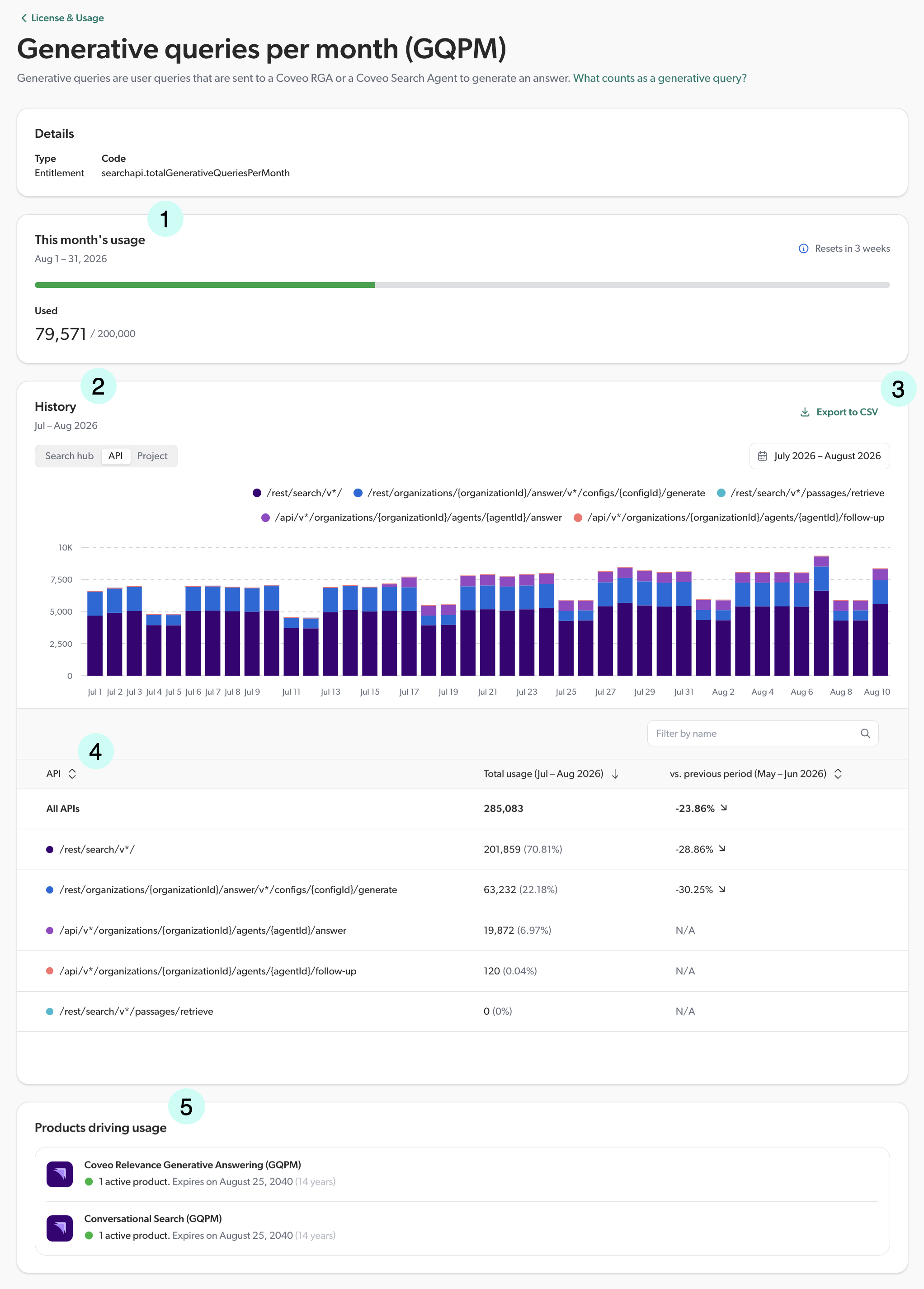
The This month’s usage section shows what your organization has used so far. The progress bar changes to yellow when your organization reaches 75% of its entitlement and to red when it exceeds 100%. |
||
2 |
The History section displays your organization’s usage over time. For GQPM and PQPM entitlements, you can break down usage by search hub, API, or project using the tabs above the chart. Selecting a different tab or date range updates both the chart and the table that follows. Hover over a bar to view the values of its segments, or hover over a legend entry to highlight the corresponding segments in the chart.
|
||
3 |
Click Export to CSV to download the consumption data displayed in the current view, respecting the selected date range and grouping (for example, by search hub or API endpoint) if applicable. |
||
4 |
For GQPM and PQPM entitlements, the table lists each group with:
|
||
5 |
The Products driving usage section lists the Coveo products that contribute to your organization’s consumption of this entitlement, along with their expiration dates. |

About your entitlements
The following sections explain the entitlements that you can find on the License & Usage (platform-ca | platform-eu | platform-au) page, along with what counts toward them and tips to optimize your usage, where applicable.
Not all of the following entitlements may apply to your organization, depending on the products and features included in your license. Refer to your License & Usage page to see which entitlements are relevant to your organization.
Items
An item is a piece of content indexed by a source that can be returned as a single search result, such as a PDF document, an HTML page, or a database record.
The number of items in your index is a key entitlement of your Coveo license. Monitoring and optimizing your item count can help you stay within your entitlement. Moreover, a clean index yields faster, more relevant search, and prevents you from having to maintain complex rules to filter out useless data at query time.
To optimize your item count, consider the following best practices:
-
Delete unused sources. Do you have test or duplicate sources that are no longer needed? Consider using non-production organizations and resource snapshots for testing purposes.
-
Refine your original content directly in its repository. Are there any duplicates that could be removed? Are there any items that could be deleted? You can review what your sources have indexed in the Content Browser (platform-ca | platform-eu | platform-au). Refining your content before it’s even indexed also helps improve indexing time and efficiency.
-
Review each source’s scope. If you can filter out unwanted content before it’s indexed, the indexing process becomes lighter and easier to troubleshoot. Several sources provide inclusion, exclusion, and filtering options that help narrow the scope of indexed content. For example, a Google Drive source can be configured to index content from specific users or folders only. If the options in your source’s configuration panel are insufficient, consider adding JSON source filters to better control what is indexed.
-
With a Push source, only push items that are relevant to your search interface users.
-
With a Crawling Module source, consider using a pre-push extension to filter out unwanted items before they’re indexed.
-
Consider indexing pipeline extensions to discard items that have been indexed but that aren’t relevant to your search interface users. However, it’s best to narrow a source’s scope to prevent such items from being indexed in the first place if you can. This makes the indexing process more efficient and easier to troubleshoot.
-
Check your analytics Reports (platform-ca | platform-eu | platform-au) to identify items that receive no traffic. Adjust your sources' scope or filters to exclude them.
You can review your item entitlement on the License & Usage (platform-ca | platform-eu | platform-au) page, along with your current usage.
You can also use the System Performance (platform-ca | platform-eu | platform-au) page to investigate other aspects of your indexing activity, including indexing pipeline errors and API rate-limit events.
Queries per month
Your queries per month (QPM) entitlement is the total number of requests your organization can make to Coveo’s Search API each month. See About queries for details on what counts as a query.
For troubleshooting purposes, you can access query data for each search hub, including the total number of queries and a list of executed queries, through the consumption dashboard. See Access a resource consumption graph and Access query logs for more details.
You can review your queries per month (QPM) entitlement on the License & Usage (platform-ca | platform-eu | platform-au) page, along with your current usage.
Generative queries per month
Generative queries are user queries that are sent to a Coveo RGA model or a Coveo Search Agent to generate an answer.
The following scenarios trigger a generative query that counts toward your entitlement:
-
A search interface user performs a search that is sent to a Coveo RGA model or a Coveo Search Agent. This counts toward your generative queries per month (GQPM) entitlement whether or not an answer is generated.
-
A search interface user applies filters (for example, facet values) to a search that already generated an answer. This triggers a new request to update the answer based on the applied filters.
If your RGA-enabled search interface is associated with an answer configuration in the Answer Manager, ensure that duplicate generative queries are avoided by adding the answerAPI condition to your query pipeline’s RGA model association.
You can review your generative queries per month (GQPM) entitlement on the License & Usage (platform-ca | platform-eu | platform-au) page, along with your current usage. For a breakdown of your GQPM consumption by search hub, API, or project, see the details subpage.
Passage queries per month
Your passage queries per month (PQPM) entitlement is the total number of requests your LLM applications can make to Coveo’s passage retrieval API each month. These requests can be triggered by user interactions, automated scripts, agents, and other processes. To learn more about this process, see Using CPR with the Passage Retrieval API.
You can review your passage queries per month (PQPM) entitlement on the License & Usage (platform-ca | platform-eu | platform-au) page, along with your current usage. For a detailed breakdown of your PQPM consumption by search hub, API, or project, see the details subpage.
Recommendation queries per month
Your recommendation queries per month (RQPM) entitlement is the total number of queries used to display content recommendations each month.
Recommendation queries originate from search interfaces that use Coveo ML Content Recommendations (CR), Product Recommendations (PR), or IPX Recommendations (IPXRECS) models.
What counts as a recommendation query, however, varies by ML feature:
-
CR and PR: Each time recommendations are returned by the model, it counts toward your recommendation queries per month (RQPM) entitlement.
-
IPXRECS: Like CR and PR, each time the model returns IPX recommendations, it counts toward your RQPM entitlement. One recommendation query is consumed each time a list of IPX recommendations is generated, which occurs whenever the IPX search interface loads.
However, submitting a search request in an IPX search interface is considered a standard query, which counts against your queries per month (QPM) entitlement.
You can review your recommendation queries per month (RQPM) entitlement on the License & Usage (platform-ca | platform-eu | platform-au) page, along with your current usage.
Agents per 3 months
Agents are autonomous entities that can perform various tasks, such as sending messages, creating cases, or executing scripts. Your agents entitlement is the total number of agents that can access your Coveo search interfaces within a three-month period to perform queries and receive results, recommendations, or generated answers.
You can review your agents entitlement on the License & Usage (platform-ca | platform-eu | platform-au) page, along with your current usage.
Required privileges
The following table lists the privileges required to access the License & Usage (platform-ca | platform-eu | platform-au) page and its subpages. See Manage privileges for more information on granting privileges, and the Privilege reference for details on each privilege.
| Action | Service | Domain | Required access level |
|---|---|---|---|
View the License & Usage page |
Organization |
Organization |
View |
View the entitlement history per project |
Organization |
Projects |
View |