Push API reference
Push API reference

This article provides reference material describing the Push API requests, along with the item and security identity models required for the request bodies.
API resources
The Push API exposes the following resources:
Source status
The Source status resource exposes a request to modify the status of a Push source.
"Set the status of a push source"
This request updates the source Status value on the Sources (platform-ca | platform-eu | platform-au) page of the Coveo Administration Console, and it creates activity logs.

|
Note
The Push API still uses region-specific endpoints. Use the endpoint that matches the primary deployment region of your Coveo organization. |
US East region
POST https://api.cloud.coveo.com/push/v1/organizations/{organizationId}/sources/{sourceId}/status?statusType={statusType} HTTP/1.1

Accept: application/json
Authorization: Bearer {accessToken}
Canada region
POST https://api-ca.cloud.coveo.com/push/v1/organizations/{organizationId}/sources/{sourceId}/status?statusType={statusType} HTTP/1.1

Accept: application/json
Authorization: Bearer {accessToken}
Ireland region
POST https://api-eu.cloud.coveo.com/push/v1/organizations/{organizationId}/sources/{sourceId}/status?statusType={statusType} HTTP/1.1

Accept: application/json
Authorization: Bearer {accessToken}
Australia region
POST https://api-au.cloud.coveo.com/push/v1/organizations/{organizationId}/sources/{sourceId}/status?statusType={statusType} HTTP/1.1

Accept: application/json
Authorization: Bearer {accessToken}
HIPAA region
POST https://apihipaa.cloud.coveo.com/push/v1/organizations/{organizationId}/sources/{sourceId}/status?statusType={statusType} HTTP/1.1

Accept: application/json
Authorization: Bearer {accessToken}
The request parameters are:
organizationId (path, string, required)
The unique identifier of the target Coveo organization which appears after #/ in the URL of your Coveo Administration Console pages and can also be found using other methods.

Example: mycoveoorganizationg8tp8wu3
sourceId (path, string, required)
The unique identifier of the target Push source. You can get this ID on the Sources (platform-ca | platform-eu | platform-au) page.

Example: mycoveoorganizationg8tp8wu3-xavb2urm6i6zagfhut2bgmsoee
statusType (query, string, required)
The status you want to set the source to.
Possible values are: IDLE, INCREMENTAL, REBUILD, REFRESH.
Setting the source status to REBUILD, REFRESH, or INCREMENTAL creates an activity.
Setting the status to IDLE terminates the activity and marks it as completed.
Example: IDLE
accessToken (Authorization header, string, required)
A valid access token with the required privileges to perform the operation.
We recommend replacing {accessToken} with an API key generated from the relevant Push source because it will automatically have the required privileges.
Example: xsf7a197f1-981b-4mb5-59c9-d347267597p8
Request body: None
Coveo provides a Swagger UI that generates real Push API requests on your Coveo organization data, allowing you to validate your requests before integrating them into your code. You can try this request in the Swagger UI corresponding to your Coveo organization region ( US | CA | EU | AU ).
See Manage the Push source for more details and usage examples.
Item
The item resource exposes requests to add, update, and delete items or batches of items.
"Add or update an item"
This request adds or updates a source item.
|
|
Note
The Push API still uses region-specific endpoints. Use the endpoint that matches the primary deployment region of your Coveo organization. |
US East region
PUT https://api.cloud.coveo.com/push/v1/organizations/{organizationId}/sources/{sourceId}/documents?documentId={documentId}&compressionType={compressionType} HTTP/1.1

Content-Type: application/json
Accept: application/json
Authorization: Bearer {accessToken}
Canada region
PUT https://api-ca.cloud.coveo.com/push/v1/organizations/{organizationId}/sources/{sourceId}/documents?documentId={documentId}&compressionType={compressionType} HTTP/1.1

Content-Type: application/json
Accept: application/json
Authorization: Bearer {accessToken}
Ireland region
PUT https://api-eu.cloud.coveo.com/push/v1/organizations/{organizationId}/sources/{sourceId}/documents?documentId={documentId}&compressionType={compressionType} HTTP/1.1

Content-Type: application/json
Accept: application/json
Authorization: Bearer {accessToken}
Australia region
PUT https://api-au.cloud.coveo.com/push/v1/organizations/{organizationId}/sources/{sourceId}/documents?documentId={documentId}&compressionType={compressionType} HTTP/1.1

Content-Type: application/json
Accept: application/json
Authorization: Bearer {accessToken}
HIPAA region
PUT https://apihipaa.cloud.coveo.com/push/v1/organizations/{organizationId}/sources/{sourceId}/documents?documentId={documentId}&compressionType={compressionType} HTTP/1.1

Content-Type: application/json
Accept: application/json
Authorization: Bearer {accessToken}
The request parameters are:
organizationId (path, string, required)
The unique identifier of the target Coveo organization which appears after #/ in the URL of your Coveo Administration Console pages and can also be found using other methods.
Example: mycoveoorganizationg8tp8wu3
sourceId (path, string, required)
The unique identifier of the target Push source. You can get this ID on the Sources (platform-ca | platform-eu | platform-au) page.
Example: mycoveoorganizationg8tp8wu3-xavb2urm6i6zagfhut2bgmsoee
documentId (query, string, required)
The unique identifier of the item. The Coveo item URI. You can get it from the Content Browser (platform-ca | platform-eu | platform-au).

The raw documentId value must respect the following format: <scheme>://<hier_part>[?<query>][#<fragment>], where:
-
The
<scheme>,://, and<hier_part>parts are required. -
The
[?<query>]and[#<fragment>]parts are optional.
Examples of valid raw documentId values:
-
file://folder/my-file.html -
http://www.mysite.com/my-page.html -
https://test.abc.com/support/test030?productcode=R750 -
entity://1#en
When you pass documentId in the request query string, URL-encode the value.
Otherwise, ? and # will be treated as URL delimiters instead of literal characters in the documentId.
Equivalent URL-encoded values:
-
file%3A%2F%2Ffolder%2Fmy-file.html -
http%3A%2F%2Fwww.mysite.com%2Fmy-page.html -
https%3A%2F%2Ftest.abc.com%2Fsupport%2Ftest030%3Fproductcode%3DR750 -
entity%3A%2F%2F1%23en
orderingId (query, integer)
A value indicating the order of arrival of the Push operation.
The default value is the current 13-digit timestamp (number of milliseconds since Unix Epoch).

|
Specifying an |
Example: 1506700606240
compressionType (query, string)
The algorithm that was used to compress the item data.
Specifying a value for this parameter is only necessary when using the compressedBinaryData or the compressedBinaryDataFileId property to push item data.
The possible values are: Uncompressed, ZLib, GZip, LZMA, and Deflate.
These values are case-sensitive and the default value is ZLib.
Example: "Uncompressed"
accessToken (Authorization header, string, required)
A valid access token with the required privileges to perform the operation.
We recommend replacing {accessToken} with an API key generated from the relevant Push source because it will automatically have the required privileges.
Example: xsf7a197f1-981b-4mb5-59c9-d347267597p8
Request body:
See DocumentBody model.
Coveo provides a Swagger UI that generates real Push API requests on your Coveo organization data, allowing you to validate your requests before integrating them into your code. You can try this request in the Swagger UI that’s associated with your Coveo organization region ( US | CA | EU | AU ).
See Add or update a single item in a Push source for more details and usage examples.
For help troubleshooting this and other Push API requests, refer to the Common Push API errors and Indexing process and other issues sections.
"Delete an item and optionally its children"
This request deletes a specific item.
Optionally, you can also delete the item’s children: items whose documentId values start with the documentId of the item being deleted.
|
|
Note
The Push API still uses region-specific endpoints. Use the endpoint that matches the primary deployment region of your Coveo organization. |
US East region
DELETE https://api.cloud.coveo.com/push/v1/organizations/{organizationId}/sources/{sourceId}/documents?documentId={documentId}&deleteChildren=true|false HTTP/1.1

Accept: application/json
Authorization: Bearer {accessToken}
Canada region
DELETE https://api-ca.cloud.coveo.com/push/v1/organizations/{organizationId}/sources/{sourceId}/documents?documentId={documentId}&deleteChildren=true|false HTTP/1.1

Accept: application/json
Authorization: Bearer {accessToken}
Ireland region
DELETE https://api-eu.cloud.coveo.com/push/v1/organizations/{organizationId}/sources/{sourceId}/documents?documentId={documentId}&deleteChildren=true|false HTTP/1.1

Accept: application/json
Authorization: Bearer {accessToken}
Australia region
DELETE https://api-au.cloud.coveo.com/push/v1/organizations/{organizationId}/sources/{sourceId}/documents?documentId={documentId}&deleteChildren=true|false HTTP/1.1

Accept: application/json
Authorization: Bearer {accessToken}
HIPAA region
DELETE https://apihipaa.cloud.coveo.com/push/v1/organizations/{organizationId}/sources/{sourceId}/documents?documentId={documentId}&deleteChildren=true|false HTTP/1.1

Accept: application/json
Authorization: Bearer {accessToken}
The request parameters are:
organizationId (path, string, required)
The unique identifier of the target Coveo organization which appears after #/ in the URL of your Coveo Administration Console pages and can also be found using other methods.
Example: mycoveoorganizationg8tp8wu3
sourceId (path, string, required)
The unique identifier of the target Push source. You can get this ID on the Sources (platform-ca | platform-eu | platform-au) page.
Example: mycoveoorganizationg8tp8wu3-xavb2urm6i6zagfhut2bgmsoee
documentId (query, string, required)
The unique identifier of the item. The Coveo item URI. You can get it from the Content Browser (platform-ca | platform-eu | platform-au).
The raw documentId value must respect the following format: <scheme>://<hier_part>[?<query>][#<fragment>], where:
-
The
<scheme>,://, and<hier_part>parts are required. -
The
[?<query>]and[#<fragment>]parts are optional.
Examples of valid raw documentId values:
-
file://folder/my-file.html -
http://www.mysite.com/my-page.html -
https://test.abc.com/support/test030?productcode=R750 -
entity://1#en
When you pass documentId in the request query string, URL-encode the value.
Otherwise, ? and # will be treated as URL delimiters instead of literal characters in the documentId.
Equivalent URL-encoded values:
-
file%3A%2F%2Ffolder%2Fmy-file.html -
http%3A%2F%2Fwww.mysite.com%2Fmy-page.html -
https%3A%2F%2Ftest.abc.com%2Fsupport%2Ftest030%3Fproductcode%3DR750 -
entity%3A%2F%2F1%23en
deleteChildren (query, boolean)
Whether to delete the children of the item, that is, items whose documentId values start with the documentId of the item being deleted.
The default value is false.
Example: true
orderingId (query, integer)
A value indicating the order of arrival of the Push operation.
The default value is the current 13-digit timestamp (number of milliseconds since Unix Epoch).
|
|
Specifying an |
Example: 1506700606240
accessToken (Authorization header, string, required)
A valid access token with the required privileges to perform the operation.
We recommend replacing {accessToken} with an API key generated from the relevant Push source because it will automatically have the required privileges.
Example: xsf7a197f1-981b-4mb5-59c9-d347267597p8
Request body: None
Coveo provides a Swagger UI that generates real Push API requests on your Coveo organization data, allowing you to validate your requests before integrating them into your code. You can try this request in the Swagger UI that’s associated with your Coveo organization region ( US | CA | EU | AU ).
See Delete an item and optionally, its children in a Push source for more details and usage examples.
For help troubleshooting this and other Push API requests, refer to the Common Push API errors and Indexing process and other issues sections.
"Add, update, and/or delete a batch of items"
This request pushes the content of a file container to the Coveo indexing pipeline.
|
|
Note
The Push API still uses region-specific endpoints. Use the endpoint that matches the primary deployment region of your Coveo organization. |
US East region
PUT https://api.cloud.coveo.com/push/v1/organizations/{organizationId}/sources/{sourceId}/documents/batch?fileId={fileId} HTTP/1.1

Accept: application/json
Authorization: Bearer {accessToken}
Canada region
PUT https://api-ca.cloud.coveo.com/push/v1/organizations/{organizationId}/sources/{sourceId}/documents/batch?fileId={fileId} HTTP/1.1

Accept: application/json
Authorization: Bearer {accessToken}
Ireland region
PUT https://api-eu.cloud.coveo.com/push/v1/organizations/{organizationId}/sources/{sourceId}/documents/batch?fileId={fileId} HTTP/1.1

Accept: application/json
Authorization: Bearer {accessToken}
Australia region
PUT https://api-au.cloud.coveo.com/push/v1/organizations/{organizationId}/sources/{sourceId}/documents/batch?fileId={fileId} HTTP/1.1

Accept: application/json
Authorization: Bearer {accessToken}
HIPAA region
PUT https://apihipaa.cloud.coveo.com/push/v1/organizations/{organizationId}/sources/{sourceId}/documents/batch?fileId={fileId} HTTP/1.1

Accept: application/json
Authorization: Bearer {accessToken}
The request parameters are:
organizationId (path, string, required)
The unique identifier of the target Coveo organization which appears after #/ in the URL of your Coveo Administration Console pages and can also be found using other methods.
Example: mycoveoorganizationg8tp8wu3
sourceId (path, string, required)
The unique identifier of the target Push source. You can get this ID on the Sources (platform-ca | platform-eu | platform-au) page.
Example: mycoveoorganizationg8tp8wu3-xavb2urm6i6zagfhut2bgmsoee
fileId (query, string, required)
The unique identifier of the file container into which the JSON definition of the content update was previously uploaded.
This fileId is returned in the response of the Create a file container request.
Example: d22778ca-7f42-4e13-9d9a-47d01bce866c
orderingId (query, integer)
A value indicating the order of arrival of the Push operation.
The default value is the current 13-digit timestamp (number of milliseconds since Unix Epoch).
|
|
Specifying an |
Example: 1506700606240
accessToken (Authorization header, string, required)
A valid access token with the required privileges to perform the operation.
We recommend replacing {accessToken} with an API key generated from the relevant Push source because it will automatically have the required privileges.
Example: xsf7a197f1-981b-4mb5-59c9-d347267597p8
Request body: None
Coveo provides a Swagger UI that generates real Push API requests on your Coveo organization data, allowing you to validate your requests before integrating them into your code. You can try this request in the Swagger UI that’s associated with your Coveo organization region ( US | CA | EU | AU ).
See Manage batches of items in a Push source for more details and usage examples.
For help troubleshooting this and other Push API requests, refer to the Common Push API errors and Indexing process and other issues sections.
"Delete old items"
This request deletes all items whose last update orderingId value is lower than the orderingId value specified in the request query string.
|
|
Note
The Push API still uses region-specific endpoints. Use the endpoint that matches the primary deployment region of your Coveo organization. |
US East region
DELETE https://api.cloud.coveo.com/push/v1/organizations/{organizationId}/sources/{sourceId}/documents/olderthan?orderingId={orderingId}&queueDelay={queueDelay} HTTP/1.1

Accept: application/json
Authorization: Bearer {accessToken}
Canada region
DELETE https://api-ca.cloud.coveo.com/push/v1/organizations/{organizationId}/sources/{sourceId}/documents/olderthan?orderingId={orderingId}&queueDelay={queueDelay} HTTP/1.1

Accept: application/json
Authorization: Bearer {accessToken}
Ireland region
DELETE https://api-eu.cloud.coveo.com/push/v1/organizations/{organizationId}/sources/{sourceId}/documents/olderthan?orderingId={orderingId}&queueDelay={queueDelay} HTTP/1.1

Accept: application/json
Authorization: Bearer {accessToken}
Australia region
DELETE https://api-au.cloud.coveo.com/push/v1/organizations/{organizationId}/sources/{sourceId}/documents/olderthan?orderingId={orderingId}&queueDelay={queueDelay} HTTP/1.1

Accept: application/json
Authorization: Bearer {accessToken}
HIPAA region
DELETE https://apihipaa.cloud.coveo.com/push/v1/organizations/{organizationId}/sources/{sourceId}/documents/olderthan?orderingId={orderingId}&queueDelay={queueDelay} HTTP/1.1

Accept: application/json
Authorization: Bearer {accessToken}
The request parameters are:
organizationId (path, string, required)
The unique identifier of the target Coveo organization which appears after #/ in the URL of your Coveo Administration Console pages and can also be found using other methods.
Example: mycoveoorganizationg8tp8wu3
sourceId (path, string, required)
The unique identifier of the target Push source. You can get this ID on the Sources (platform-ca | platform-eu | platform-au) page.
Example: mycoveoorganizationg8tp8wu3-xavb2urm6i6zagfhut2bgmsoee
orderingId (query, integer, required)
The 13-digit Push API Unix Epoch operation timestamp value that determines the items that will be deleted.
All items whose last update occurred before the specified orderingId will be deleted.
For reference, the last update time of an item is recorded in its orderingId field and may be seen in the Content Browser properties panel.

Example: 1506700606240
queueDelay (query, integer)
A grace period (in minutes) whose purpose is to give the Coveo Platform enough time to finish processing any previously enqueued operation that would affect the target Push source.
The default value is 15 minutes.
Example: 5
accessToken (Authorization header, string, required)
A valid access token with the required privileges to perform the operation.
We recommend replacing {accessToken} with an API key generated from the relevant Push source because it will automatically have the required privileges.
Example: xsf7a197f1-981b-4mb5-59c9-d347267597p8
Request body: None
Coveo provides a Swagger UI that generates real Push API requests on your Coveo organization data, allowing you to validate your requests before integrating them into your code. You can try this request in the Swagger UI that’s associated with your Coveo organization region ( US | CA | EU | AU ).
See Delete old items in a Push source for more details and usage examples.
For help troubleshooting this and other Push API requests, refer to the Common Push API errors and Indexing process and other issues sections.
Security identity
The security identity resource exposes requests to manage security identities in a security identity provider.
"Add or update a security identity"
This request adds or updates a security identity in the specified security identity provider.
|
|
Note
The Push API still uses region-specific endpoints. Use the endpoint that matches the primary deployment region of your Coveo organization. |
US East region
PUT https://api.cloud.coveo.com/push/v1/organizations/{organizationId}/providers/{providerId}/permissions HTTP/1.1

Content-Type: application/json
Accept: application/json
Authorization: Bearer {accessToken}
Canada region
PUT https://api-ca.cloud.coveo.com/push/v1/organizations/{organizationId}/providers/{providerId}/permissions HTTP/1.1

Content-Type: application/json
Accept: application/json
Authorization: Bearer {accessToken}
Ireland region
PUT https://api-eu.cloud.coveo.com/push/v1/organizations/{organizationId}/providers/{providerId}/permissions HTTP/1.1

Content-Type: application/json
Accept: application/json
Authorization: Bearer {accessToken}
Australia region
PUT https://api-au.cloud.coveo.com/push/v1/organizations/{organizationId}/providers/{providerId}/permissions HTTP/1.1

Content-Type: application/json
Accept: application/json
Authorization: Bearer {accessToken}
HIPAA region
PUT https://apihipaa.cloud.coveo.com/push/v1/organizations/{organizationId}/providers/{providerId}/permissions HTTP/1.1

Content-Type: application/json
Accept: application/json
Authorization: Bearer {accessToken}
The request parameters are:
organizationId (path, string, required)
The unique identifier of the target Coveo organization which appears after #/ in the URL of your Coveo Administration Console pages and can also be found using other methods.
Example: mycoveoorganizationg8tp8wu3
providerId (path, string, required)
The unique identifier of the target security identity provider. You can get this ID on the Security Identities (platform-ca | platform-eu | platform-au) page.

See Create or update a security identity provider for a secured Push source for more information.
orderingId (query, integer)
A value indicating the order of arrival of the Push operation.
The default value is the current 13-digit timestamp (number of milliseconds since Unix Epoch).
|
|
Specifying an |
Example: 1506700606240
accessToken (Authorization header, string, required)
A valid access token with the required privileges to perform the operation.
We recommend replacing {accessToken} with an API key generated from the relevant Push source because it will automatically have the required privileges.
Example: xsf7a197f1-981b-4mb5-59c9-d347267597p8
Request body:
See IdentityBody model.
Coveo provides a Swagger UI that generates real Push API requests on your Coveo organization data, allowing you to validate your requests before integrating them into your code. You can try this request in the Swagger UI that’s associated with your Coveo organization region ( US | CA | EU | AU ).
See Add or update a single security identity for more details and usage examples.
For help troubleshooting this and other Push API requests, refer to the Common Push API errors and Indexing process and other issues sections.
"Add or update an alias"
This request adds or updates alias and granted identity relationships for the specified security identity.
|
|
Note
The Push API still uses region-specific endpoints. Use the endpoint that matches the primary deployment region of your Coveo organization. |
US East region
PUT https://api.cloud.coveo.com/push/v1/organizations/{organizationId}/providers/{providerId}/mappings HTTP/1.1

Content-Type: application/json
Accept: application/json
Authorization: Bearer {accessToken}
Canada region
PUT https://api-ca.cloud.coveo.com/push/v1/organizations/{organizationId}/providers/{providerId}/mappings HTTP/1.1

Content-Type: application/json
Accept: application/json
Authorization: Bearer {accessToken}
Ireland region
PUT https://api-eu.cloud.coveo.com/push/v1/organizations/{organizationId}/providers/{providerId}/mappings HTTP/1.1

Content-Type: application/json
Accept: application/json
Authorization: Bearer {accessToken}
Australia region
PUT https://api-au.cloud.coveo.com/push/v1/organizations/{organizationId}/providers/{providerId}/mappings HTTP/1.1

Content-Type: application/json
Accept: application/json
Authorization: Bearer {accessToken}
HIPAA region
PUT https://apihipaa.cloud.coveo.com/push/v1/organizations/{organizationId}/providers/{providerId}/mappings HTTP/1.1

Content-Type: application/json
Accept: application/json
Authorization: Bearer {accessToken}
The request parameters are:
organizationId (path, string, required)
The unique identifier of the target Coveo organization which appears after #/ in the URL of your Coveo Administration Console pages and can also be found using other methods.
Example: mycoveoorganizationg8tp8wu3
providerId (path, string, required)
The unique identifier of the target security identity provider. You can get this ID on the Security Identities (platform-ca | platform-eu | platform-au) page.
See Create or update a security identity provider for a secured Push source for more information.
orderingId (query, integer)
A value indicating the order of arrival of the Push operation.
The default value is the current 13-digit timestamp (number of milliseconds since Unix Epoch).
|
|
Specifying an |
Example: 1506700606240
accessToken (Authorization header, string, required)
A valid access token with the required privileges to perform the operation.
We recommend replacing {accessToken} with an API key generated from the relevant Push source because it will automatically have the required privileges.
Example: xsf7a197f1-981b-4mb5-59c9-d347267597p8
Request body:
Coveo provides a Swagger UI that generates real Push API requests on your Coveo organization data, allowing you to validate your requests before integrating them into your code. You can try this request in the Swagger UI that’s associated with your Coveo organization region ( US | CA | EU | AU ).
See Add or update a single alias for more details and usage examples.
For help troubleshooting this and other Push API requests, refer to the Common Push API errors and Indexing process and other issues sections.
"Delete a security identity"
This request disables a specific security identity in the specified security identity provider.
|
|
Note
The Push API still uses region-specific endpoints. Use the endpoint that matches the primary deployment region of your Coveo organization. |
US East region
DELETE https://api.cloud.coveo.com/push/v1/organizations/{organizationId}/providers/{providerId}/permissions HTTP/1.1

Content-Type: application/json
Accept: application/json
Authorization: Bearer {accessToken}
Canada region
DELETE https://api-ca.cloud.coveo.com/push/v1/organizations/{organizationId}/providers/{providerId}/permissions HTTP/1.1

Content-Type: application/json
Accept: application/json
Authorization: Bearer {accessToken}
Ireland region
DELETE https://api-eu.cloud.coveo.com/push/v1/organizations/{organizationId}/providers/{providerId}/permissions HTTP/1.1

Content-Type: application/json
Accept: application/json
Authorization: Bearer {accessToken}
Australia region
DELETE https://api-au.cloud.coveo.com/push/v1/organizations/{organizationId}/providers/{providerId}/permissions HTTP/1.1

Content-Type: application/json
Accept: application/json
Authorization: Bearer {accessToken}
HIPAA region
DELETE https://apihipaa.cloud.coveo.com/push/v1/organizations/{organizationId}/providers/{providerId}/permissions HTTP/1.1

Content-Type: application/json
Accept: application/json
Authorization: Bearer {accessToken}
The request parameters are:
organizationId (path, string, required)
The unique identifier of the target Coveo organization which appears after #/ in the URL of your Coveo Administration Console pages and can also be found using other methods.
Example: mycoveoorganizationg8tp8wu3
providerId (path, string, required)
The unique identifier of the target security identity provider. You can get this ID on the Security Identities (platform-ca | platform-eu | platform-au) page.
See Create or update a security identity provider for a secured Push source for more information.
orderingId (query, integer)
A value indicating the order of arrival of the Push operation.
The default value is the current 13-digit timestamp (number of milliseconds since Unix Epoch).
|
|
Specifying an |
Example: 1506700606240
accessToken (Authorization header, string, required)
A valid access token with the required privileges to perform the operation.
We recommend replacing {accessToken} with an API key generated from the relevant Push source because it will automatically have the required privileges.
Example: xsf7a197f1-981b-4mb5-59c9-d347267597p8
Request body:
{
  "identity": {
    "name": string,
    "type": string
  }
}
The request body properties are:
identity (object, required)
The object that lists the key-value pairs that uniquely identify the security identity to delete.
name (string, required)
The name of the security identity.
This name needs to be unique across the entire system. For simple use cases, this should be an email address.
Example: "asmith@example.com"
type (string, required)
The type of the security identity. Possible values are:
-
"User": An individual user with a specific identity, such as an email address. -
"Group": A collection of users grouped together, allowing you to manage permissions for multiple users collectively. Individual members of this group can be of any valididentityType.The JSON representation of a
Groupis the following:{ "identity": { "name": string, "type": "Group" }, "members": [ { "name": string, "type": "User"|"Group"|"VirtualGroup"|"Unknown" } ] } -
"VirtualGroup": A virtual group that doesn’t exist in the indexed enterprise system, used for defining granted identities. Functionally, aVirtualGroupis identical to aGroup. -
"Unknown": An entity that doesn’t fit into the predefinedidentityTypevalues.
See Security identity definition examples for more information on the different types of security identities.
Coveo provides a Swagger UI that generates real Push API requests on your Coveo organization data, allowing you to validate your requests before integrating them into your code. You can try this request in the Swagger UI that’s associated with your Coveo organization region ( US | CA | EU | AU ).
See Disable a single security identity for more details and usage examples.
For help troubleshooting this and other Push API requests, refer to the Common Push API errors and Indexing process and other issues sections.
"Add, update, and/or delete a batch of security identities"
This request pushes the security identity update content of a file container to the security identity provider.
|
|
Note
The Push API still uses region-specific endpoints. Use the endpoint that matches the primary deployment region of your Coveo organization. |
US East region
PUT https://api.cloud.coveo.com/push/v1/organizations/{organizationId}/providers/{providerId}/permissions/batch?fileId={fileId} HTTP/1.1

Accept: application/json
Authorization: Bearer {accessToken}
Canada region
PUT https://api-ca.cloud.coveo.com/push/v1/organizations/{organizationId}/providers/{providerId}/permissions/batch?fileId={fileId} HTTP/1.1

Accept: application/json
Authorization: Bearer {accessToken}
Ireland region
PUT https://api-eu.cloud.coveo.com/push/v1/organizations/{organizationId}/providers/{providerId}/permissions/batch?fileId={fileId} HTTP/1.1

Accept: application/json
Authorization: Bearer {accessToken}
Australia region
PUT https://api-au.cloud.coveo.com/push/v1/organizations/{organizationId}/providers/{providerId}/permissions/batch?fileId={fileId} HTTP/1.1

Accept: application/json
Authorization: Bearer {accessToken}
HIPAA region
PUT https://apihipaa.cloud.coveo.com/push/v1/organizations/{organizationId}/providers/{providerId}/permissions/batch?fileId={fileId} HTTP/1.1

Accept: application/json
Authorization: Bearer {accessToken}
The request parameters are:
organizationId (path, string, required)
The unique identifier of the target Coveo organization which appears after #/ in the URL of your Coveo Administration Console pages and can also be found using other methods.
Example: mycoveoorganizationg8tp8wu3
providerId (path, string, required)
The unique identifier of the target security identity provider. You can get this ID on the Security Identities (platform-ca | platform-eu | platform-au) page.
See Create or update a security identity provider for a secured Push source for more information.
fileId (query, string, required)
The unique identifier of the file container into which the JSON definition of the content update was previously uploaded.
This fileId is returned in the response of the Create a file container request.
Example: d22778ca-7f42-4e13-9d9a-47d01bce866c
orderingId (query, integer)
A value indicating the order of arrival of the Push operation.
The default value is the current 13-digit timestamp (number of milliseconds since Unix Epoch).
|
|
Specifying an |
Example: 1506700606240
accessToken (Authorization header, string, required)
A valid access token with the required privileges to perform the operation.
We recommend replacing {accessToken} with an API key generated from the relevant Push source because it will automatically have the required privileges.
Example: xsf7a197f1-981b-4mb5-59c9-d347267597p8
Request body: None
Coveo provides a Swagger UI that generates real Push API requests on your Coveo organization data, allowing you to validate your requests before integrating them into your code. You can try this request in the Swagger UI that’s associated with your Coveo organization region ( US | CA | EU | AU ).
See Manage batches of security identities for more details and usage examples.
For help troubleshooting this and other Push API requests, refer to the Common Push API errors and Indexing process and other issues sections.
"Delete old security identities"
This request disables all security identities whose last update orderingId value is lower than the orderingId value specified in the request query string.
|
|
Note
The Push API still uses region-specific endpoints. Use the endpoint that matches the primary deployment region of your Coveo organization. |
US East region
DELETE https://api.cloud.coveo.com/push/v1/organizations/{organizationId}/providers/{providerId}/permissions/olderthan?orderingId={orderingId}&queueDelay={queueDelay} HTTP/1.1

Accept: application/json
Authorization: Bearer {accessToken}
Canada region
DELETE https://api-ca.cloud.coveo.com/push/v1/organizations/{organizationId}/providers/{providerId}/permissions/olderthan?orderingId={orderingId}&queueDelay={queueDelay} HTTP/1.1

Accept: application/json
Authorization: Bearer {accessToken}
Ireland region
DELETE https://api-eu.cloud.coveo.com/push/v1/organizations/{organizationId}/providers/{providerId}/permissions/olderthan?orderingId={orderingId}&queueDelay={queueDelay} HTTP/1.1

Accept: application/json
Authorization: Bearer {accessToken}
Australia region
DELETE https://api-au.cloud.coveo.com/push/v1/organizations/{organizationId}/providers/{providerId}/permissions/olderthan?orderingId={orderingId}&queueDelay={queueDelay} HTTP/1.1

Accept: application/json
Authorization: Bearer {accessToken}
HIPAA region
DELETE https://apihipaa.cloud.coveo.com/push/v1/organizations/{organizationId}/providers/{providerId}/permissions/olderthan?orderingId={orderingId}&queueDelay={queueDelay} HTTP/1.1

Accept: application/json
Authorization: Bearer {accessToken}
The request parameters are:
organizationId (path, string, required)
The unique identifier of the target Coveo organization which appears after #/ in the URL of your Coveo Administration Console pages and can also be found using other methods.
Example: mycoveoorganizationg8tp8wu3
providerId (path, string, required)
The unique identifier of the target security identity provider. You can get this ID on the Security Identities (platform-ca | platform-eu | platform-au) page.
See Create or update a security identity provider for a secured Push source for more information.
orderingId (query, integer, required)
The 13-digit Push API Unix Epoch operation timestamp value that determines the items that will be deleted.
All items whose last update occurred before the specified orderingId will be deleted.
For reference, the last update time of an item is recorded in its orderingId field and may be seen in the Content Browser properties panel.
Example: 1506700606240
queueDelay (query, integer)
A grace period (in minutes) whose purpose is to give the Coveo Platform enough time to finish processing any previously enqueued operation that would affect the target Push source.
The default value is 15 minutes.
Example: 5
accessToken (Authorization header, string, required)
A valid access token with the required privileges to perform the operation.
We recommend replacing {accessToken} with an API key generated from the relevant Push source because it will automatically have the required privileges.
Example: xsf7a197f1-981b-4mb5-59c9-d347267597p8
Request body: None
Coveo provides a Swagger UI that generates real Push API requests on your Coveo organization data, allowing you to validate your requests before integrating them into your code. You can try this request in the Swagger UI that’s associated with your Coveo organization region ( US | CA | EU | AU ).
See Disable old security identities for more details and usage examples.
For help troubleshooting this and other Push API requests, refer to the Common Push API errors and Indexing process and other issues sections.
File container
The File container resource exposes an request to create a file container.
"Create a file container"
This request creates a temporary, private, and encrypted Amazon S3 file container. This request is the first step in the three-step process of pushing large items, batches of items, or batches of security identities.
|
|
Note
The Push API still uses region-specific endpoints. Use the endpoint that matches the primary deployment region of your Coveo organization. |
US East region
POST https://api.cloud.coveo.com/push/v1/organizations/{organizationId}/files HTTP/1.1

Accept: application/json
Authorization: Bearer {accessToken}
Canada region
POST https://api-ca.cloud.coveo.com/push/v1/organizations/{organizationId}/files HTTP/1.1

Accept: application/json
Authorization: Bearer {accessToken}
Ireland region
POST https://api-eu.cloud.coveo.com/push/v1/organizations/{organizationId}/files HTTP/1.1

Accept: application/json
Authorization: Bearer {accessToken}
Australia region
POST https://api-au.cloud.coveo.com/push/v1/organizations/{organizationId}/files HTTP/1.1

Accept: application/json
Authorization: Bearer {accessToken}
HIPAA region
POST https://apihipaa.cloud.coveo.com/push/v1/organizations/{organizationId}/files HTTP/1.1

Accept: application/json
Authorization: Bearer {accessToken}
The request parameters are:
organizationId (path, string, required)
The unique identifier of the target Coveo organization which appears after #/ in the URL of your Coveo Administration Console pages and can also be found using other methods.
Example: mycoveoorganizationg8tp8wu3
useVirtualHostedStyleUrl (query, boolean)
Whether to generate the presigned URL using the virtual hosted-style URL.
The default and recommended value is true.
Example: true
accessToken (Authorization header, string, required)
A valid access token with the required privileges to perform the operation.
We recommend replacing {accessToken} with an API key generated from the relevant Push source because it will automatically have the required privileges.
Example: xsf7a197f1-981b-4mb5-59c9-d347267597p8
Request body: None
Successful response body:
{
  "uploadUri": string,
  "fileId": string,
  "requiredHeaders": {
    "x-amz-server-side-encryption": "AES256",
    "Content-Type": "application/octet-stream"
  }
}
The uploadUri and requiredHeaders values are required in the second step of the three-step process to push large items, batches of items, or batches of security identities to the file container.
The fileId value is required in the third step of the process to push the large item, batch of item, or batch of security identity file container content to the Coveo Platform.
Coveo provides a Swagger UI that generates real Push API requests on your Coveo organization data, allowing you to validate your requests before integrating them into your code. You can try this request in the Swagger UI that’s associated with your Coveo organization region ( US | CA | EU | AU ).
See Create a file container for more details and usage examples.
For help troubleshooting this and other Push API requests, refer to the Common Push API errors and Indexing process and other issues sections.
Item models
The item models are JSON objects to be used for the API request body when adding, updating, or deleting items in a Push source. There are two item models:
-
The
DocumentBodymodel, for single item add or update requests. -
The
BatchDocumentBodymodel, for batch item update requests.
DocumentBody model
The DocumentBody model is the JSON representation to be used for the request body of the Add or update an item request.
The model defines the body of an item, its metadata, and permissions.
{
"data": string | "compressedBinaryData": string | "compressedBinaryDataFileId": string,  "fileExtension": string,
"parentId": string,
"<metadata1>": primitive type,
"<metadata2>": primitive type,
...
"permissions": []
"fileExtension": string,
"parentId": string,
"<metadata1>": primitive type,
"<metadata2>": primitive type,
...
"permissions": []  }
} |
Exactly one of these must be provided. |
|
The permissions array is required when you select Same users and groups as in your content system as the source content security option.
In this scenario, a Push API request without the permissions property will still be successful, but the Log Browser (platform-ca | platform-eu | platform-au) will show an error when the operation reaches the Consuming stage of the Coveo indexing pipeline. |
The DocumentBody model supports the following top-level properties:
-
data|compressedBinaryData|compressedBinaryDataFileId(provide exactly one of these properties)
data (string)
The textual, non-binary content of the original item.
When pushing a compressed binary item, such as XML/HTML, PDF, or Word document, you should use the compressedBinaryData or compressedBinaryDataFileId attribute instead, depending on the content size.
Example: "<div>My raw textual item data</div>"
compressedBinaryData (string)
The original binary item content, compressed using one of the supported compression types (Deflate, GZip, LZMA, Uncompressed, or ZLib), and then Base64 encoded.
Use this parameter when you’re pushing a compressed binary item, such as XML/HTML, PDF, or Word document of less than 5 MB.
When pushing an item whose size is 5 MB or more, use the compressedBinaryDataFileId parameter instead.
When pushing less than 5 MB of textual, non-binary content, use the data parameter instead.
Example: "H4sIAAAAAAAA/0utSMwtyEkFAJ+b7G4HAAAA"
compressedBinaryDataFileId (string)
The fileId value returned in the response to the Create a file container request containing the compressed binary data of the original item.
File containers are created as part of a multi-step process when pushing large items or batches of items.
Use this parameter when you’re pushing compressed binary item data, such as XML/HTML, PDF, or Word documents of 5 MB or more.
When pushing compressed binary data of less than 5 MB, use the compressedBinaryData parameter instead.
When pushing less than 5 MB of textual, non-binary content, use the data parameter instead.
Example: "d22778ca-7f42-4e13-9d9a-47d01bce866c"
fileExtension (string)
The file extension of the data you’re pushing, including the leading dot (.) character.
This is useful when pushing a compressed item because it informs the document processing manager (DPM) about how to correctly process the item.
Example: ".html"
parentId (string)
The documentId of the parent item.
Specifying a parentId value creates a relationship between the current item and its parent.
See About the parentId property for more details.
Example: "file://folder/my-file.html"
Metadata key-value pairs
Metadata key-value pairs to populate fields in your items. Metadata keys are case insensitive.
Each piece of metadata you add must have a value that matches the data type of the field it populates.
See the Push source key characteristics table for further details on indexing metadata with a Push source. See also Manage fields.
permissions (array)
Examples
The following are examples of DocumentBody objects:
Using data in a public item
{
  "author": "Alice Smith",
  "date": "2017-11-08T12:18:41.666Z",
  "documenttype": "Text",
  "filename": "mytext.txt",
  "language": [
    "English"
  ],
  "permanentid": "my93849text03985permanent93849id",
  "sourcetype": "Push",
  "title": "My Text",
  "data": "This is a sample text written by Alice Smith.",
  "fileExtension": ".txt"
}
Using compressedBinaryData in a child item with simplified permission model
{
  "documenttype": "Image",
  "filename": "myimage.png",
  "height": 200,
  "permanentid": "my838290image93940permanent9394id",
  "sourcetype": "Push",
  "width": 200,
  "CompressedBinaryData": "iVBORw0KGgoAAAANSUhEUgAAAMgAAADICAYAAACtWK6eAAAp80lEQVR4nOx9C5QU1bnu7tdMz3uG[...]",
  "fileExtension": ".png",
  "parentId": "http://www.example.com/mypost/",
  "permissions": [
    {
      "allowAnonymous": true
    }
  ]
}
Using compressedBinaryDataFileId in an item with complete permission model
{
  "author": "Sample Group",
  "documenttype": "Video",
  "duration": 180.72,
  "filename": "myvideo.avi",
  "language": [
    "English"
  ],
  "permanentid": "my93920video8472permanent94820id",
  "sourcetype": "Push",
  "title": "My Video",
  "compressedBinaryDataFileId": "b5e8767e-8f0d-4a89-9095-1127915c89c7",
  "fileExtension": ".avi",
  "permissions": [
    {
      "name": "MyPermissionLevel1",
      "permissionSets": [
        {
          "allowAnonymous": false,
          "allowedPermissions": [
            {
              "identity": "SampleGroup",
              "identityType": "Group"
            }
          ],
          "deniedPermissions": [
            {
              "identity": "asmith@example.com",
              "identityType": "User",
              "securityProvider": "My Security Identity Provider"
            }
          ]
        }
      ]
    },
    {
      "name": "MyPermissionLevel2",
      "permissionSets": [
        {
          "allowAnonymous": false,
          "allowedPermissions": [
            {
              "identity": "SampleGroup2",
              "identityType": "Group"
            }
          ],
          "deniedPermissions": [
            {
              "identity": "bjones@example.com",
              "identityType": "User"
            }
          ]
        }
      ]
    }
  ]
}
BatchDocumentBody model
The BatchDocumentBody model is the JSON representation to be used for the request body when uploading a batch of item updates into a file container.
This request is the second step in a three-step process to add, update, or delete a batch of items.
The BatchDocumentBody model defines the body, metadata, and permissions of items to add or update.
It also specifies the items to delete.
{
  "addOrUpdate": [
    {
      "documentId": string
      "data": string | "compressedBinaryData": string | "compressedBinaryDataFileId": string,
      "fileExtension": string,
      "parentId": string,
      "<metadata1>": primitive type,
      "<metadata2>": primitive type,
      ...
      "permissions": []
    },
    {
      ...
    },
    ...
  ],
  "delete": [
    {
      "documentId": string
      "deleteChildren": Boolean
    },
    {
      ...
    },
    ...
  ]
} |
Exactly one of these must be provided. |
|
The permissions array is required when you select the Same users and groups as in your content system source content security option.
In this scenario, a Push API request without the permissions property will be successful, but the Log Browser (platform-ca | platform-eu | platform-au) will show an Error when the operation reaches the Consuming stage of the Coveo indexing pipeline. |
The BatchDocumentBody model supports the following top-level properties:
addOrUpdate (array)
BatchDocumentBody model > addOrUpdate
The array of items to add or update.
Each object in the addOrUpdate array supports the following properties:
-
documentId(required) -
data|compressedBinaryData|compressedBinaryDataFileId(provide exactly one of these properties)
documentId (string, required)
BatchDocumentBody model > addOrUpdate > documentId
The unique identifier of the item. The Coveo item URI.
The documentId must respect the following format: <scheme>://<hier_part>[?<query>][#<fragment>], where:
-
The
<scheme>,://, and<hier_part>parts are required. -
The
[?<query>]and[#<fragment>]parts are optional.
Examples of valid documentId values:
-
file://folder/my-file.html -
http://www.mysite.com/my-page.html -
https://test.abc.com/support/test030?productcode=R750 -
entity://1#en
data (string)
BatchDocumentBody model > addOrUpdate > data
The textual, non-binary content of the original item.
When pushing a compressed binary item, such as XML/HTML, PDF, or Word document, you should use the compressedBinaryData or compressedBinaryDataFileId attribute instead, depending on the content size.
Example: "<div>My raw textual item data</div>"
compressedBinaryData (string)
BatchDocumentBody model > addOrUpdate > compressedBinaryData
The original binary item content, compressed using one of the supported compression types (Deflate, GZip, LZMA, Uncompressed, or ZLib), and then Base64 encoded.
Use this parameter when you’re pushing a compressed binary item, such as XML/HTML, PDF, or Word document of less than 5 MB.
When pushing an item whose size is 5 MB or more, use the compressedBinaryDataFileId parameter instead.
When pushing less than 5 MB of textual, non-binary content, use the data parameter instead.
Example: "H4sIAAAAAAAA/0utSMwtyEkFAJ+b7G4HAAAA"
compressedBinaryDataFileId (string)
BatchDocumentBody model > addOrUpdate > compressedBinaryDataFileId
The fileId value returned in the response to the Create a file container request containing the compressed binary data of the original item.
File containers are created as part of a multi-step process when pushing large items or batches of items.
Use this parameter when you’re pushing compressed binary item data, such as XML/HTML, PDF, or Word documents of 5 MB or more.
When pushing compressed binary data of less than 5 MB, use the compressedBinaryData parameter instead.
When pushing less than 5 MB of textual, non-binary content, use the data parameter instead.
Example: "d22778ca-7f42-4e13-9d9a-47d01bce866c"
fileExtension (string)
BatchDocumentBody model > addOrUpdate > fileExtension
The file extension of the data you’re pushing, including the leading dot (.) character.
This is useful when pushing a compressed item because it informs the document processing manager (DPM) about how to correctly process the item.
Example: ".html"
parentId (string)
BatchDocumentBody model > addOrUpdate > parentId
The documentId of the parent item.
Specifying a parentId value creates a relationship between the current item and its parent.
See About the parentId property for more details.
Example: "file://folder/my-file.html"
Metadata key-value pairs
BatchDocumentBody model > addOrUpdate > Metadata key-value pairs
Metadata key-value pairs to populate fields in your items. Metadata keys are case insensitive.
Each piece of metadata you add must have a value that matches the data type of the field it populates.
See the Push source key characteristics table for further details on indexing metadata with a Push source. See also Manage fields.
delete (array)
BatchDocumentBody model > delete
The array of items to delete.
Each object in the delete array supports the following properties:
-
documentId(required)
documentId (string, required)
BatchDocumentBody model > delete > documentId
The unique identifier of the item. The Coveo item URI.
The documentId must respect the following format: <scheme>://<hier_part>[?<query>][#<fragment>], where:
-
The
<scheme>,://, and<hier_part>parts are required. -
The
[?<query>]and[#<fragment>]parts are optional.
Examples of valid documentId values:
-
file://folder/my-file.html -
http://www.mysite.com/my-page.html -
https://test.abc.com/support/test030?productcode=R750 -
entity://1#en
deleteChildren (Boolean)
BatchDocumentBody model > delete > deleteChildren
Whether to delete the children of the target item.
Children have documentId values that start with the documentId of the parent item.
The default value is false.
Example: true
Example
The following is an example of a BatchDocumentBody object:
Using data and the complete permission model
{
  "addOrUpdate": [
    {
      "author": "Alice Smith",
      "date": "2017-11-08T12:18:41.666Z",
      "documenttype": "Text",
      "filename": "mytext.txt",
      "language": [
        "English"
      ],
      "permanentid": "sample2156permanent165464id",
      "sourcetype": "Push",
      "title": "My Text",
      "data": "This is a sample text written by Alice Smith.",
      "documentId": "http://www.example.com/mytext.txt",
      "fileExtension": ".txt",
      "permissions": [
        {
          "allowAnonymous": true
        }
      ]
    },
    {
      "documenttype": "Image",
      "filename": "myimage.png",
      "height": 200,
      "permanentid": "my56182image65132permanent5456id",
      "sourcetype": "Push",
      "width": 200,
      "compressedBinaryData": "iVBORw0KGgoAAAANSUhEUgAAAMgAAADICAYAAACtWK6eAAAp80lEQVR4nOx9C5QU1bnu7tdMz3uG[...]",
      "compressionType": "UNCOMPRESSED",
      "documentId": "http://www.example.com/mypost/myimage.png",
      "fileExtension": ".png",
      "parentId": "http://www.example.com/mypost/",
      "permissions": [
        {
          "allowAnonymous": true
        }
      ]
    },
    {
      "author": "Sample Group",
      "documenttype": "Video",
      "duration": 180.72,
      "filename": "myvideo.avi",
      "language": [
        "English"
      ],
      "permanentid": "my94293video03938permanent93892id",
      "sourcetype": "Push",
      "title": "My Video",
      "compressedBinaryDataFileId": "b5e8767e-8f0d-4a89-9095-1127915c89c7",
      "compressionType": "LZMA",
      "documentId": "http://www.example.com/myvideo.avi",
      "fileExtension": ".avi",
      "permissions": [
        {
          "name": "MyPermissionLevel1",
          "permissionSets": [
            {
              "allowAnonymous": false,
              "allowedPermissions": [
                {
                  "identity": "SampleGroup",
                  "identityType": "Group"
                }
              ],
              "deniedPermissions": [
                {
                  "identity": "asmith@example.com",
                  "identityType": "User",
                  "securityProvider": "My Security Identity Provider"
                }
              ]
            }
          ]
        },
        {
          "name": "MyPermissionLevel2",
          "permissionSets": [
            {
              "allowAnonymous": false,
              "allowedPermissions": [
                {
                  "identity": "SampleGroup2",
                  "identityType": "Group"
                }
              ],
              "deniedPermissions": [
                {
                  "identity": "bjones@example.com",
                  "identityType": "User"
                }
              ]
            }
          ]
        }
      ]
    }
  ],
  "delete": [
    {
      "documentId": "http://www.example.com/mydeleteditem/",
      "deleteChildren": true
    }
  ]
}
Item permission models
The Push API supports two item permission models:
-
The simplified permission model, where
permissionsis an array of permission sets. -
The complete permission model, where
permissionsis an array of permission levels.
Simplified permission model
In the simplified permission model, the permissions property is an array of permission sets.
{
  ...
  "permissions": [
    {                                       -> Permission set 1
      "allowAnonymous": Boolean,
      "allowedPermissions": [
        {
          "identity": string,
          "identityType": string,
          "securityProvider": string
        }
      ],
      "deniedPermissions": [
        {
          "identity": string,
          "identityType": string,
          "securityProvider": string
        }
      ]
    },
    {                                       -> Permission set 2
      ...
    }
  ]
} |
See Documentbody model. |
Effective permission evaluation with the simplified permission model
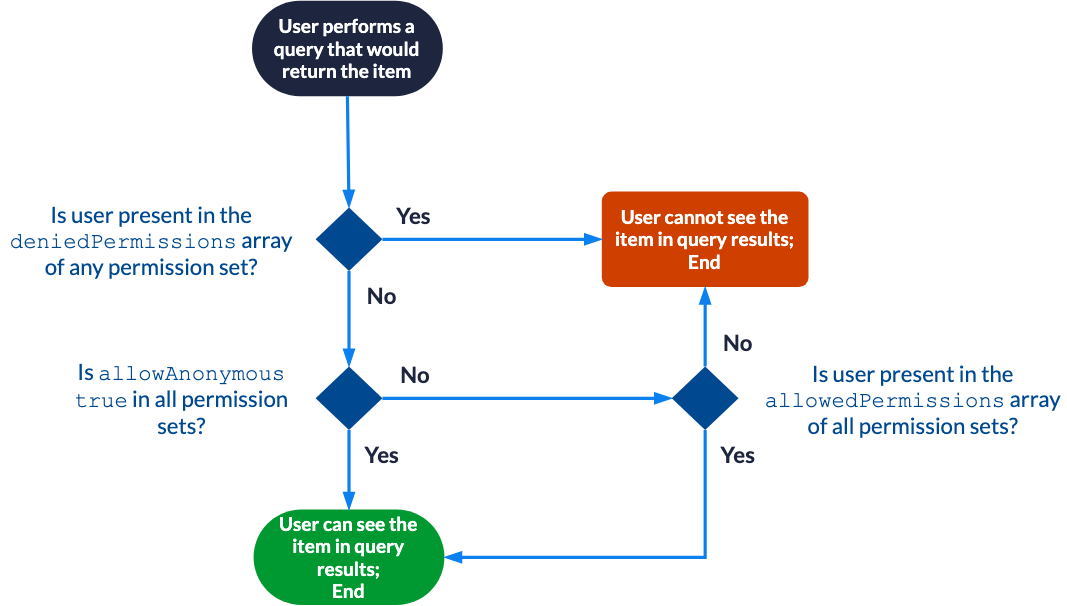
The permissions array objects support the following top-level properties:
allowAnonymous (Boolean)
permissions > allowAnonymous
Whether the current permission set allows anonymous users to see the item in their query results.
The default value is false.
allowedPermissions (array)
permissions > allowedPermissions
The array of security identities that should be allowed access to the item.
The allowedPermissions array objects support the following properties:
-
identity(required) -
identityType(required)
deniedPermissions (array)
permissions > deniedPermissions
The array of security identities that should be denied access to the item.
|
|
Note
If a security identity is both allowed and denied, the denial prevails. |
The deniedPermissions array objects support the following properties:
-
identity(required) -
identityType(required)
identity (string, required)
permissions > allowedPermissions|deniedPermissions > identity
The name of the security identity.
This name needs to be unique across the entire system. For simple use cases, this should be an email address.
Example: "asmith@example.com"
identityType (string, required)
permissions > allowedPermissions|deniedPermissions > identityType
The type of the security identity. Possible values are:
-
"User": An individual user with a specific identity, such as an email address. -
"Group": A collection of users grouped together, allowing you to manage permissions for multiple users collectively. Individual members of this group can be of any valididentityType.The JSON representation of a
Groupis the following:{ "identity": { "name": string, "type": "Group" }, "members": [ { "name": string, "type": "User"|"Group"|"VirtualGroup"|"Unknown" } ] } -
"VirtualGroup": A virtual group that doesn’t exist in the indexed enterprise system, used for defining granted identities. Functionally, aVirtualGroupis identical to aGroup. -
"Unknown": An entity that doesn’t fit into the predefinedidentityTypevalues.
See Security identity definition examples for more information on the different types of security identities.
securityProvider (string)
permissions > allowedPermissions|deniedPermissions > securityProvider
The unique identifier of the security identity provider in which the security identity is defined. You can get this value from the Security Identities (platform-ca | platform-eu | platform-au) page.
When no security identity provider is specified, the first security identity provider associated with the target Push source is used.
Examples
The following are examples of permissions objects when using the simplified permission model:
Allowing all users
{
  ...
  "permissions": [
    {
      "allowAnonymous": true
    }
  ]
}
Allowing and denying security identities
{
  ...
  "permissions": [
    {
      "allowAnonymous": false,
      "allowedPermissions": [
        {
          "identity": "SampleGroup",
          "identityType": "Group"
        }
      ],
      "deniedPermissions": [
        {
          "identity": "asmith@example.com",
          "identityType": "User",
          "securityProvider": "My Security Identity Provider"
        }
      ]
    }
  ]
}
Complete permission model
In the complete permission model, the permissions property is an array of permission levels.
This model supports complex secured enterprise systems that require defining a hierarchy of permission levels, where level x permissions take precedence over those from level x+1.
{
  ...
  "permissions": [
    {                                            -> Permission level 1
      "name": string,
      "permissionSets": [
        {
          "allowAnonymous": Boolean,
          "allowedPermissions": [
            {
              "identity": string,
              "identityType": string,
              "securityProvider": string
            }
          ],
          "deniedPermissions": [
            {
              "identity": string,
              "identityType": string,
              "securityProvider": string
            }
          ]
        }
      ]
    },
    {                                            -> Permission level 2
      ...
    }
  ]
} |
See Documentbody model. |
Effective permission evaluation with the complete permission model

The permissions array objects support the following top-level properties:
-
permissionSets(required)
permissionSets (array, required)
permissions > permissionSets
The array of permission sets in the permission level.
Each object in the array supports the following top-level properties:
allowAnonymous (Boolean)
permissions > permissionSets > allowAnonymous
Whether the current permission set allows anonymous users to see the item in their query results.
The default value is false.
allowedPermissions (array)
permissions > permissionSets > allowedPermissions
The array of security identities that should be allowed access to the item.
Each object in the array supports the following properties:
-
identity(required) -
identityType(required)
deniedPermissions (array)
permissions > permissionSets > deniedPermissions
The array of security identities that should be denied access to the item.
|
|
Note
If a security identity is both allowed and denied, the denial prevails. |
Each object in the array supports the following properties:
-
identity(required) -
identityType(required)
identity (string)
permissions > permissionSets > allowedPermissions|deniedPermissions > identity
The name of the security identity.
This name needs to be unique across the entire system. For simple use cases, this should be an email address.
Example: "asmith@example.com"
identityType (string)
permissions > permissionSets > allowedPermissions|deniedPermissions > identityType
The type of the security identity. Possible values are:
-
"User": An individual user with a specific identity, such as an email address. -
"Group": A collection of users grouped together, allowing you to manage permissions for multiple users collectively. Individual members of this group can be of any valididentityType.The JSON representation of a
Groupis the following:{ "identity": { "name": string, "type": "Group" }, "members": [ { "name": string, "type": "User"|"Group"|"VirtualGroup"|"Unknown" } ] } -
"VirtualGroup": A virtual group that doesn’t exist in the indexed enterprise system, used for defining granted identities. Functionally, aVirtualGroupis identical to aGroup. -
"Unknown": An entity that doesn’t fit into the predefinedidentityTypevalues.
See Security identity definition examples for more information on the different types of security identities.
securityProvider (string)
permissions > permissionSets > allowedPermissions|deniedPermissions > securityProvider
The unique identifier of the security identity provider in which the security identity is defined. You can get this value from the Security Identities (platform-ca | platform-eu | platform-au) page.
When no security identity provider is specified, the first security identity provider associated with the target Push source is used.
Examples
The following are examples of permissions objects when using the complete permission model:
With one permission level
{
  ...
  "permissions": [
    {
      "name": "MyPermissionLevel",
      "permissionSets": [
        {
          "allowAnonymous": false,
          "allowedPermissions": [
            {
              "identity": "SampleGroup",
              "identityType": "Group"
            }
          ],
          "deniedPermissions": [
            {
              "identity": "asmith@example.com",
              "identityType": "User",
              "securityProvider": "My Security Identity Provider"
            }
          ]
        }
      ]
    }
  ]
}
Effective permissions:
-
SampleGroup: This group isn’t specifically denied in any of the permission level 1 permission sets, and is specifically allowed in all of those permission sets. Users in this group can see the item in query results. -
asmith@example.com: This user is specifically denied in at least one of the permission level 1 permission sets. The user can’t see the item in query results.
With two permission levels
{
  ...
  "permissions": [
    {
      "name": "Permission Level 1",
      "permissionSets": [
        {
          "allowAnonymous": true
        },
        {
          "allowAnonymous": false,
          "allowedPermissions": [
            {
              "identity": "SampleTeam1",
              "identityType": "Group"
            }
          ],
          "deniedPermissions": [
            {
              "identity": "SampleTeam2",
              "identityType": "Group"
            }
          ]
        },
        {
          "allowAnonymous": false,
          "allowedPermissions": [
            {
              "identity": "asmith@example.com",
              "identityType": "User"
            },
            {
              "identity": "cbrown@example.com",
              "identityType": "User"
            }
          ],
          "deniedPermissions": [
            {
              "identity": "bjones@example.com",
              "identityType": "User"
            }
          ]
        }
      ]
    },
    {
      "name": "Permission Level 2",
      "permissionSets": [
        {
          "allowAnonymous": false,
          "allowedPermissions": [
            {
              "identity": "bjones@example.com",
              "identityType": "User"
            },
            {
              "identity": "emitchell@example.com",
              "identityType": "User"
            }
          ],
          "deniedPermissions": [
            {
              "identity": "asmith@example.com",
              "identityType": "User"
            }
          ]
        },
        {
          "allowAnonymous": false,
          "allowedPermissions": [
            {
              "identity": "MysteryUserX",
              "identityType": "User"
            }
          ]
        }
      ]
    }
  ]
}
Effective permissions:
-
asmith@example.com: This user isn’t specifically denied in any of the permission level 1 permission sets, and is specifically allowed in all of those permission sets. The user can see the item in query results. -
bjones@example.com: This user is specifically denied in at least one of the permission level 1 permission sets. The user can’t see the item in query results. -
cbrown@example.com: This user is specifically denied in at least one of the permission level 1 permission sets. The user can’t see the item in query results. -
emitchell@example.com: This user is unknown in permission level 1. Consequently, permission level 2 is evaluated. The user isn’t denied in any of the permission level 2 permission sets, and is specifically allowed in all of those permission sets. The user can see the item in query results. -
An unauthenticated user: Unauthenticated users are denied in at least one of the permission level 1 permission sets. These users can’t see the item in query results.
Security identity models
The security identity models are JSON objects to be used for the API request body when adding, updating, or disabling security identities, or when establishing alias and granted identity relationships between security identities.
There are three security identity models:
-
The
IdentityBodymodel for single security identity add or update requests. -
The
BatchIdentityBodymodel for batch security identity update requests. -
The
MappedIdentityBodymodel to establish relationships between identities.
IdentityBody model
The IdentityBody model is the JSON object to be used for the request body of the Add or update a security identity request.
This model defines the unique name of the security identity, its type, and, if applicable, its members and granted identities.
{
  "identity": {
    "name": "string",
    "type": "USER",
    "additionalInfo": {
      "additionalProp1": "string",
      "additionalProp2": "string",
      ...
    }
  },
  "members": [
    {
      "name": "string",
      "type": "USER"
      "additionalInfo": {}
    }
  ],
  "wellKnowns": [
    {
      "name": "string",
      "type": "USER"
      "additionalInfo": {}
    }
  ]
} |
The key-value pairs you add in the optional additionalInfo object appear when you expand an identity on the Browse security identities subpage. |
The IdentityBody model supports the following top-level properties:
-
identity(required)
identity (object, required)
IdentityBody model > identity
The characteristics of the security identity.
The identity object supports the following properties:
name (string, required)
IdentityBody model > identity > name
The name of the security identity.
This name needs to be unique across the entire system. For simple use cases, this should be an email address.
Example: "asmith@example.com"
type (string, required)
IdentityBody model > identity > type
The type of the security identity. Possible values are:
-
"User": An individual user with a specific identity, such as an email address. -
"Group": A collection of users grouped together, allowing you to manage permissions for multiple users collectively. Individual members of this group can be of any valididentityType.The JSON representation of a
Groupis the following:{ "identity": { "name": string, "type": "Group" }, "members": [ { "name": string, "type": "User"|"Group"|"VirtualGroup"|"Unknown" } ] } -
"VirtualGroup": A virtual group that doesn’t exist in the indexed enterprise system, used for defining granted identities. Functionally, aVirtualGroupis identical to aGroup. -
"Unknown": An entity that doesn’t fit into the predefinedidentityTypevalues.
See Security identity definition examples for more information on the different types of security identities.
members (array)
IdentityBody model > members
The array of identities in a Group or VirtualGroup security identity.
Each member in the array is an object that supports the following properties:
name (string, required)
IdentityBody model > members > name
The name of the security identity.
This name needs to be unique across the entire system. For simple use cases, this should be an email address.
Example: "asmith@example.com"
type (string, required)
IdentityBody model > members > type
The type of the security identity. Possible values are:
-
"User": An individual user with a specific identity, such as an email address. -
"Group": A collection of users grouped together, allowing you to manage permissions for multiple users collectively. Individual members of this group can be of any valididentityType.The JSON representation of a
Groupis the following:{ "identity": { "name": string, "type": "Group" }, "members": [ { "name": string, "type": "User"|"Group"|"VirtualGroup"|"Unknown" } ] } -
"VirtualGroup": A virtual group that doesn’t exist in the indexed enterprise system, used for defining granted identities. Functionally, aVirtualGroupis identical to aGroup. -
"Unknown": An entity that doesn’t fit into the predefinedidentityTypevalues.
See Security identity definition examples for more information on the different types of security identities.
wellKnowns (array)
IdentityBody model > wellKnowns
The array of granted identities that the target security identity becomes a member of.
You can consider wellKnowns as groups.
Membership to an existing wellKnowns granted identity is defined through the member (typically a User security identity), not through the group.
See Defining a granted identity and Defining a user with granted identities for more information.
Each object in the array supports the following properties:
name (string, required)
IdentityBody model > wellKnowns > name
The name of the security identity.
This name needs to be unique across the entire system. For simple use cases, this should be an email address.
Example: "asmith@example.com"
type (string, required)
IdentityBody model > wellKnowns > type
The type of the security identity. Possible values are:
-
"User": An individual user with a specific identity, such as an email address. -
"Group": A collection of users grouped together, allowing you to manage permissions for multiple users collectively. Individual members of this group can be of any valididentityType.The JSON representation of a
Groupis the following:{ "identity": { "name": string, "type": "Group" }, "members": [ { "name": string, "type": "User"|"Group"|"VirtualGroup"|"Unknown" } ] } -
"VirtualGroup": A virtual group that doesn’t exist in the indexed enterprise system, used for defining granted identities. Functionally, aVirtualGroupis identical to aGroup. -
"Unknown": An entity that doesn’t fit into the predefinedidentityTypevalues.
See Security identity definition examples for more information on the different types of security identities.
Examples
The following are examples of IdentityBody objects:
A user identity with a "Department" metadata value.
{
  "identity": {
    "name": "msinger@abc.com",
    "type": "USER",
    "additionalInfo": {
      "Department": "R&D"
    }
  }
}
A group identity with one assigned member and one granted identity
{
  "identity": {
    "name": "SampleGroup",
    "type": "GROUP",
    "additionalInfo": {}
  },
  "members": [
    {
      "name": "asmith@example.com",
      "type": "USER",
      "additionalInfo": {}
    }
  ],
  "wellKnowns": [
    {
      "name": "SampleGrantedIdentity",
      "type": "GROUP",
      "additionalInfo": {}
    }
  ]
}
A group identity with two assigned members and one granted identity
{
  "identity": {
    "name": "SampleGroup",
    "type": "GROUP"
  },
  "members": [
    {
      "name": "asmith@example.com",
      "type": "USER"
    },
    {
      "name": "SampleVirtualGroup",
      "type": "VIRTUAL_GROUP"
    }
  ],
  "wellKnowns": [
    {
      "name": "Domain Users",
      "type": "GROUP"
    }
  ]
}
BatchIdentityBody model
The BatchIdentityBody model is the JSON representation to be used for the request body when uploading a batch of security identity updates into a file container.
This request is the second step in a three-step process to add, update, or disable a batch of security identities.
The BatchIdentityBody model defines the security identities to add or update, the alias and granted identity relationships that you want to establish for specified security identities, and the security identities to disable.
{
  "members": [],                   -> The identities to add or update
  "mappings": [                    -> The alias and granted identity relationships to establish
    {                                 -> Mapping 1
      "identity": {                      -> The mapping 1 target security identity
        "name": string,
        "type": string,
        "additionalInfo": {}
      },
      "mappings": [
        {                                -> The first alias for the mapping 1 target security identity
          "name": string,
          "type": string,
          "provider": string,
          "additionalInfo": {}
        },
        {                                -> The second alias for the mapping 1 target security identity
          ...
        },
        ...
      ],
      "wellKnowns": [
        {                                -> The first granted identity for the mapping 1 target security identity
          "name": string,
          "type": string,
          "additionalInfo": {}
        }
        ...
      ]
    },
    {                                 -> Mapping 2
      ...
    }
    ...
  ],
  "deleted": [                     ->The identities to disable
    {
      "identity": {
        "name": string,
        "type": string
      }
    },
    ...
  ]
} |
The key-value pairs you add in the optional additionalInfo object appear when you expand an identity on the Browse security identities subpage. |
The BatchIdentityBody model supports the following top-level properties:
members (array)
BatchIdentityBody model > members
The array of identities to add or update.
Each object in the members array implements the IdentityBody model.
mappings (array)
BatchIdentityBody model > mappings
The array of alias and granted identity relationships to establish.
Each object in this mappings array supports the following properties:
-
identity(required)
identity (object, required)
BatchIdentityBody model > mappings > identity
The target security identity to which you want to establish alias and/or granted identity relationships.
The identity object supports the following properties:
name (string, required)
BatchIdentityBody model > mappings > identity > name
The name of the security identity.
This name needs to be unique across the entire system. For simple use cases, this should be an email address.
Example: "asmith@example.com"
type (string, required)
BatchIdentityBody model > mappings > identity > type
The type of the security identity. Possible values are:
-
"User": An individual user with a specific identity, such as an email address. -
"Group": A collection of users grouped together, allowing you to manage permissions for multiple users collectively. Individual members of this group can be of any valididentityType.The JSON representation of a
Groupis the following:{ "identity": { "name": string, "type": "Group" }, "members": [ { "name": string, "type": "User"|"Group"|"VirtualGroup"|"Unknown" } ] } -
"VirtualGroup": A virtual group that doesn’t exist in the indexed enterprise system, used for defining granted identities. Functionally, aVirtualGroupis identical to aGroup. -
"Unknown": An entity that doesn’t fit into the predefinedidentityTypevalues.
See Security identity definition examples for more information on the different types of security identities.
mappings (array)
BatchIdentityBody model > mappings > mappings
The array of alias relationships for the target security identity.
The mappings array objects support the following properties:
name (string, required)
BatchIdentityBody model > mappings > mappings > name
The name of the security identity.
This name needs to be unique across the entire system. For simple use cases, this should be an email address.
Example: "asmith@example.com"
type (string, required)
BatchIdentityBody model > mappings > mappings > type
The type of the security identity. Possible values are:
-
"User": An individual user with a specific identity, such as an email address. -
"Group": A collection of users grouped together, allowing you to manage permissions for multiple users collectively. Individual members of this group can be of any valididentityType.The JSON representation of a
Groupis the following:{ "identity": { "name": string, "type": "Group" }, "members": [ { "name": string, "type": "User"|"Group"|"VirtualGroup"|"Unknown" } ] } -
"VirtualGroup": A virtual group that doesn’t exist in the indexed enterprise system, used for defining granted identities. Functionally, aVirtualGroupis identical to aGroup. -
"Unknown": An entity that doesn’t fit into the predefinedidentityTypevalues.
See Security identity definition examples for more information on the different types of security identities.
provider (string)
BatchIdentityBody model > mappings > mappings > provider
The unique identifier of the security identity provider in which the security identity is defined. You can get this value from the Security Identities (platform-ca | platform-eu | platform-au) page.
When no security identity provider is specified, the first security identity provider associated with the target Push source is used.
wellKnowns (array)
BatchIdentityBody model > mappings > wellKnowns
The array of granted identities that the target security identity becomes a member of.
You can consider wellKnowns as groups.
Membership to an existing wellKnowns granted identity is defined through the member (typically a User security identity), not through the group.
See Defining a granted identity and Defining a user with granted identities for more information.
Each object in this wellKnowns array supports the following properties:
name (string, required)
BatchIdentityBody model > mappings > wellKnowns > name
The name of the security identity.
This name needs to be unique across the entire system. For simple use cases, this should be an email address.
Example: "asmith@example.com"
type (string, required)
BatchIdentityBody model > mappings > wellKnowns > type
The type of the security identity. Possible values are:
-
"User": An individual user with a specific identity, such as an email address. -
"Group": A collection of users grouped together, allowing you to manage permissions for multiple users collectively. Individual members of this group can be of any valididentityType.The JSON representation of a
Groupis the following:{ "identity": { "name": string, "type": "Group" }, "members": [ { "name": string, "type": "User"|"Group"|"VirtualGroup"|"Unknown" } ] } -
"VirtualGroup": A virtual group that doesn’t exist in the indexed enterprise system, used for defining granted identities. Functionally, aVirtualGroupis identical to aGroup. -
"Unknown": An entity that doesn’t fit into the predefinedidentityTypevalues.
See Security identity definition examples for more information on the different types of security identities.
deleted (array)
BatchIdentityBody model > deleted
The array of security identities to disable.
Each object in the deleted array supports the identity required property.
identity (object, required)
BatchIdentityBody model > deleted > identity
The security identity to disable.
The identity object supports the following properties:
name (string, required)
BatchIdentityBody model > deleted > identity > name
The name of the security identity.
This name needs to be unique across the entire system. For simple use cases, this should be an email address.
Example: "asmith@example.com"
type (string, required)
BatchIdentityBody model > deleted > identity > type
The type of the security identity. Possible values are:
-
"User": An individual user with a specific identity, such as an email address. -
"Group": A collection of users grouped together, allowing you to manage permissions for multiple users collectively. Individual members of this group can be of any valididentityType.The JSON representation of a
Groupis the following:{ "identity": { "name": string, "type": "Group" }, "members": [ { "name": string, "type": "User"|"Group"|"VirtualGroup"|"Unknown" } ] } -
"VirtualGroup": A virtual group that doesn’t exist in the indexed enterprise system, used for defining granted identities. Functionally, aVirtualGroupis identical to aGroup. -
"Unknown": An entity that doesn’t fit into the predefinedidentityTypevalues.
See Security identity definition examples for more information on the different types of security identities.
Example
The following is an example of a BatchIdentityBody object:
Adding or updating a group security identity, establishing alias and granted identity relationships, and deleting a security identity
{
  "members": [
    {
      "identity": {
        "name": "SampleGroup",
        "type": "GROUP",
        "additionalInfo": {}
      },
      "members": [
        {
          "name": "asmith@example.com",
          "type": "USER",
          "additionalInfo": {}
        }
      ],
      "wellKnowns": [
        {
          "name": "SampleGrantedIdentity",
          "type": "GROUP",
          "additionalInfo": {}
        }
      ]
    }
  ],
  "mappings": [
    {
      "identity": {
        "name": "asmith@example.com",
        "type": "USER",
        "additionalInfo": {}
      },
      "mappings": [
        {
          "name": "alice_smith@example.com",
          "type": "USER",
          "provider": "Email Security Provider",
          "additionalInfo": {}
        }
      ],
      "wellKnowns": [
        {
          "name": "SampleGrantedIdentity2",
          "type": "VIRTUAL_GROUP",
          "additionalInfo": {}
        }
      ]
    }
  ],
  "deleted": [
    {
      "identity": {
        "name": "bjones@example.com",
        "type": "USER",
        "additionalInfo": {}
      }
    }
  ]
}
MappedIdentityBody model
The MappedIdentityBody model is the JSON representation to be used for the request body of the Add or update an alias request.
The MappedIdentityBody model defines the alias and granted identity relationships that you want to establish for a specified security identity.
{
  "identity": {
    "name": string,
    "type": string,
    "additionalInfo": {}
  },
  "mappings": [
    {
      "name": string,
      "type": string,
      "provider": string,
      "additionalInfo": {}
    }
  ],
  "wellKnowns": [
    {
      "name": string,
      "type": string,
      "additionalInfo": {}
    }
  ]
} |
The key-value pairs you add in the optional additionalInfo object appear when you expand an identity on the Browse security identities subpage. |
The BatchIdentityBody model supports the following top-level properties:
-
identity(required)
identity (object, required)
MappedIdentityBody model > identity
The target security identity to which you want to establish alias and/or granted identity relationships.
The identity object supports the following properties:
name (string, required)
MappedIdentityBody model > identity > name
The name of the security identity.
This name needs to be unique across the entire system. For simple use cases, this should be an email address.
Example: "asmith@example.com"
type (string, required)
MappedIdentityBody model > identity > type
The type of the security identity. Possible values are:
-
"User": An individual user with a specific identity, such as an email address. -
"Group": A collection of users grouped together, allowing you to manage permissions for multiple users collectively. Individual members of this group can be of any valididentityType.The JSON representation of a
Groupis the following:{ "identity": { "name": string, "type": "Group" }, "members": [ { "name": string, "type": "User"|"Group"|"VirtualGroup"|"Unknown" } ] } -
"VirtualGroup": A virtual group that doesn’t exist in the indexed enterprise system, used for defining granted identities. Functionally, aVirtualGroupis identical to aGroup. -
"Unknown": An entity that doesn’t fit into the predefinedidentityTypevalues.
See Security identity definition examples for more information on the different types of security identities.
mappings (array)
MappedIdentityBody model > mappings
The array of alias relationships for the target security identity.
This mappings array objects support the following properties:
name (string, required)
MappedIdentityBody model > mappings > name
The name of the security identity.
This name needs to be unique across the entire system. For simple use cases, this should be an email address.
Example: "asmith@example.com"
type (string, required)
MappedIdentityBody model > mappings > type
The type of the security identity. Possible values are:
-
"User": An individual user with a specific identity, such as an email address. -
"Group": A collection of users grouped together, allowing you to manage permissions for multiple users collectively. Individual members of this group can be of any valididentityType.The JSON representation of a
Groupis the following:{ "identity": { "name": string, "type": "Group" }, "members": [ { "name": string, "type": "User"|"Group"|"VirtualGroup"|"Unknown" } ] } -
"VirtualGroup": A virtual group that doesn’t exist in the indexed enterprise system, used for defining granted identities. Functionally, aVirtualGroupis identical to aGroup. -
"Unknown": An entity that doesn’t fit into the predefinedidentityTypevalues.
See Security identity definition examples for more information on the different types of security identities.
provider (string)
MappedIdentityBody model > mappings > provider
The unique identifier of the security identity provider in which the security identity is defined. You can get this value from the Security Identities (platform-ca | platform-eu | platform-au) page.
When no security identity provider is specified, the first security identity provider associated with the target Push source is used.
wellKnowns (array)
MappedIdentityBody model > wellKnowns
The array of granted identities that the target security identity becomes a member of.
You can consider wellKnowns as groups.
Membership to an existing wellKnowns granted identity is defined through the member (typically a User security identity), not through the group.
See Defining a granted identity and Defining a user with granted identities for more information.
Each object in this wellKnowns array supports the following properties:
name (string, required)
MappedIdentityBody model > wellKnowns > name
The name of the security identity.
This name needs to be unique across the entire system. For simple use cases, this should be an email address.
Example: "asmith@example.com"
type (string, required)
MappedIdentityBody model > wellKnowns > type
The type of the security identity. Possible values are:
-
"User": An individual user with a specific identity, such as an email address. -
"Group": A collection of users grouped together, allowing you to manage permissions for multiple users collectively. Individual members of this group can be of any valididentityType.The JSON representation of a
Groupis the following:{ "identity": { "name": string, "type": "Group" }, "members": [ { "name": string, "type": "User"|"Group"|"VirtualGroup"|"Unknown" } ] } -
"VirtualGroup": A virtual group that doesn’t exist in the indexed enterprise system, used for defining granted identities. Functionally, aVirtualGroupis identical to aGroup. -
"Unknown": An entity that doesn’t fit into the predefinedidentityTypevalues.
See Security identity definition examples for more information on the different types of security identities.
Example
The following is an example of a MappedIdentityBody object:
Establishing one alias and one granted identity relationship for a user
{
  "identity": {
    "name": "asmith@example.com",
    "type": "USER",
    "additionalInfo": {}
  },
  "mappings": [
    {
      "name": "alice_smith@example.com",
      "type": "USER",
      "provider": "Email Security Provider",
      "additionalInfo": {}
    }
  ],
  "wellKnowns": [
    {
      "name": "SampleGrantedIdentity2",
      "type": "VIRTUAL_GROUP",
      "additionalInfo": {}
    }
  ]
}