--- title: Push API reference slug: '78' canonical_url: https://docs.coveo.com/en/78/ collection: index-content source_format: adoc --- # Push API reference This article provides reference material describing the Push API requests, along with the item and security identity models required for the request bodies. ## API resources The Push API exposes the following resources: * [Source status](#source-status) * [Item](#item) * [Security identity](#security-identity) * [File container](#file-container) ### Source status The **Source status** resource exposes a request to modify the status of a Push source. #### "Set the status of a push source" This request updates the source **Status** value on the [**Sources**](https://platform.cloud.coveo.com/admin/#/orgid/content/sources/) ([platform-ca](https://platform-ca.cloud.coveo.com/admin/#/orgid/content/sources/) | [platform-eu](https://platform-eu.cloud.coveo.com/admin/#/orgid/content/sources/) | [platform-au](https://platform-au.cloud.coveo.com/admin/#/orgid/content/sources/)) page of the [Coveo Administration Console](https://docs.coveo.com/en/183/), and it creates [activity](https://docs.coveo.com/en/173/) logs. **US East region** [%collapsible%open] #### [source,http,subs=attributes] ``` POST https://api.cloud.coveo.com/push/v1/organizations/{organizationId}/files HTTP/1.1 ​ Accept: application/json Authorization: Bearer {accessToken} ``` #### .Canada region
Details [source,http,subs=attributes] ``` POST https://api-ca.cloud.coveo.com/push/v1/organizations/{organizationId}/files HTTP/1.1 ​ Accept: application/json Authorization: Bearer {accessToken} ```
**Ireland region**
Details [source,http,subs=attributes] ``` POST https://api-eu.cloud.coveo.com/push/v1/organizations/{organizationId}/files HTTP/1.1 ​ Accept: application/json Authorization: Bearer {accessToken} ```
**Australia region**
Details [source,http,subs=attributes] ``` POST https://api-au.cloud.coveo.com/push/v1/organizations/{organizationId}/files HTTP/1.1 ​ Accept: application/json Authorization: Bearer {accessToken} ```
The request parameters are: .`organizationId` (path, string, required)
Details The unique identifier of the target [Coveo organization](https://docs.coveo.com/en/185/) which appears after `#/` in the URL of your [Coveo Administration Console](https://docs.coveo.com/en/183/) pages and can also be found using [other methods](https://docs.coveo.com/en/n1ce5273/). ![Administration Console URL](https://docs.coveo.com/en/assets/images/manage-an-organization/url.png) **Example**: `mycoveoorganizationg8tp8wu3`
.`sourceId` (path, string, required)
Details The unique identifier of the target Push [source](https://docs.coveo.com/en/246/). You can get this ID on the [**Sources**](https://platform.cloud.coveo.com/admin/#/orgid/content/sources/) ([platform-ca](https://platform-ca.cloud.coveo.com/admin/#/orgid/content/sources/) | [platform-eu](https://platform-eu.cloud.coveo.com/admin/#/orgid/content/sources/) | [platform-au](https://platform-au.cloud.coveo.com/admin/#/orgid/content/sources/)) page. ![Getting the source ID | Coveo](https://docs.coveo.com/en/assets/images/index-content/copy-source-id.png) **Example**: `mycoveoorganizationg8tp8wu3-xavb2urm6i6zagfhut2bgmsoee`
.`statusType` (query, string, required)
Details The status you want to set the [source](https://docs.coveo.com/en/246/) to. Possible values are: `IDLE`, `INCREMENTAL`, `REBUILD`, `REFRESH`. Setting the source status to `REBUILD`, `REFRESH`, or `INCREMENTAL` creates an activity. Setting the status to `IDLE` terminates the activity and marks it as completed. **Example**: `IDLE`
.`accessToken` (Authorization header, string, required)
Details A valid access token with the required privileges to perform the operation. We recommend replacing `{accessToken}` with an API key [generated from the relevant Push source](https://docs.coveo.com/en/1546#api-key) because it will automatically have the required [privileges](https://docs.coveo.com/en/228/). **Example**: `xsf7a197f1-981b-4mb5-59c9-d347267597p8`
Request body: None Coveo provides a [Swagger UI](https://swagger.io/tools/swagger-ui/) that generates real Push API requests on your [Coveo organization](https://docs.coveo.com/en/185/) data, allowing you to validate your requests before integrating them into your code. You can try this request in the Swagger UI corresponding to your Coveo organization region ( [US](https://platform.cloud.coveo.com/docs?urls.primaryName=PushAPI#/File%20Container) | [CA](https://platform-ca.cloud.coveo.com/docs?urls.primaryName=PushAPI#/File%20Container) | [EU](https://platform-eu.cloud.coveo.com/docs?urls.primaryName=PushAPI#/File%20Container) | [AU](https://platform-au.cloud.coveo.com/docs?urls.primaryName=PushAPI#/File%20Container) ). See [Create a file container](https://docs.coveo.com/en/43/) for more details and usage examples. ### Item The **[item](https://docs.coveo.com/en/210/)** resource exposes requests to add, update, and delete items or batches of items. #### "Add or update an item" This request adds or updates a source item. **US East region** [%collapsible%open] #### [source,http,subs=attributes] ``` POST https://api.cloud.coveo.com/push/v1/organizations/{organizationId}/files HTTP/1.1 ​ Content-Type: application/json Accept: application/json Authorization: Bearer {accessToken} ``` #### .Canada region
Details [source,http,subs=attributes] ``` POST https://api-ca.cloud.coveo.com/push/v1/organizations/{organizationId}/files HTTP/1.1 ​ Content-Type: application/json Accept: application/json Authorization: Bearer {accessToken} ```
**Ireland region**
Details [source,http,subs=attributes] ``` POST https://api-eu.cloud.coveo.com/push/v1/organizations/{organizationId}/files HTTP/1.1 ​ Content-Type: application/json Accept: application/json Authorization: Bearer {accessToken} ```
**Australia region**
Details [source,http,subs=attributes] ``` POST https://api-au.cloud.coveo.com/push/v1/organizations/{organizationId}/files HTTP/1.1 ​ Content-Type: application/json Accept: application/json Authorization: Bearer {accessToken} ```
The request parameters are: .`organizationId` (path, string, required)
Details The unique identifier of the target [Coveo organization](https://docs.coveo.com/en/185/) which appears after `#/` in the URL of your [Coveo Administration Console](https://docs.coveo.com/en/183/) pages and can also be found using [other methods](https://docs.coveo.com/en/n1ce5273/). ![Administration Console URL](https://docs.coveo.com/en/assets/images/manage-an-organization/url.png) **Example**: `mycoveoorganizationg8tp8wu3`
.`sourceId` (path, string, required)
Details The unique identifier of the target Push [source](https://docs.coveo.com/en/246/). You can get this ID on the [**Sources**](https://platform.cloud.coveo.com/admin/#/orgid/content/sources/) ([platform-ca](https://platform-ca.cloud.coveo.com/admin/#/orgid/content/sources/) | [platform-eu](https://platform-eu.cloud.coveo.com/admin/#/orgid/content/sources/) | [platform-au](https://platform-au.cloud.coveo.com/admin/#/orgid/content/sources/)) page. ![Getting the source ID | Coveo](https://docs.coveo.com/en/assets/images/index-content/copy-source-id.png) **Example**: `mycoveoorganizationg8tp8wu3-xavb2urm6i6zagfhut2bgmsoee`
.`documentId` (query, string, required)
Details The unique identifier of the item. Must be the item URI. **Example**: `+file://folder/my-file.html+`
.`orderingId` (query, integer)
Details A value indicating the order of arrival of the Push operation. The default value is the current 13-digit timestamp ([number of milliseconds since Unix Epoch](https://currentmillis.com/)). [WARNING]
Specifying an `orderingId` value in this operation is typically not recommended and [potentially dangerous](https://docs.coveo.com/en/147/). #### **Example**: `1506700606240` ##### .`compressionType` (query, string)
Details The algorithm that was used to compress the item data. Specifying a value for this parameter is only necessary when using the `compressedBinaryData` or the `compressedBinaryDataFileId` property to [push item data](https://docs.coveo.com/en/73/). The possible values are: `Uncompressed`, `ZLib`, `GZip`, `LZMA`, and `Deflate`. These values are case-sensitive and the default value is `ZLib`. **Example**: `"Uncompressed"`
.`accessToken` (Authorization header, string, required)
Details A valid access token with the required privileges to perform the operation. We recommend replacing `{accessToken}` with an API key [generated from the relevant Push source](https://docs.coveo.com/en/1546#api-key) because it will automatically have the required [privileges](https://docs.coveo.com/en/228/). **Example**: `xsf7a197f1-981b-4mb5-59c9-d347267597p8`
Request body: See [`DocumentBody` model](#documentbody-model). Coveo provides a [Swagger UI](https://swagger.io/tools/swagger-ui/) that generates real Push API requests on your [Coveo organization](https://docs.coveo.com/en/185/) data, allowing you to validate your requests before integrating them into your code. You can try this request in the Swagger UI that's associated with your Coveo organization region ( [US](https://platform.cloud.coveo.com/docs?urls.primaryName=PushAPI#/File%20Container) | [CA](https://platform-ca.cloud.coveo.com/docs?urls.primaryName=PushAPI#/File%20Container) | [EU](https://platform-eu.cloud.coveo.com/docs?urls.primaryName=PushAPI#/File%20Container) | [AU](https://platform-au.cloud.coveo.com/docs?urls.primaryName=PushAPI#/File%20Container) ). See [Create a file container](https://docs.coveo.com/en/43/) for more details and usage examples. For help troubleshooting this and other Push API requests, refer to the [Common Push API errors](https://docs.coveo.com/en/95#common-push-api-errors) and [Indexing process and other issues](https://docs.coveo.com/en/95#indexing-process-and-other-issues) sections. #### "Delete an item and optionally its children" This request deletes a specific item. Optionally, you can also delete the item's children: items whose `documentId` values start with the `documentId` of the item being deleted. **US East region** [%collapsible%open] #### [source,http,subs=attributes] ``` POST https://api.cloud.coveo.com/push/v1/organizations/{organizationId}/files HTTP/1.1 ​ Accept: application/json Authorization: Bearer {accessToken} ``` #### .Canada region
Details [source,http,subs=attributes] ``` POST https://api-ca.cloud.coveo.com/push/v1/organizations/{organizationId}/files HTTP/1.1 ​ Accept: application/json Authorization: Bearer {accessToken} ```
**Ireland region**
Details [source,http,subs=attributes] ``` POST https://api-eu.cloud.coveo.com/push/v1/organizations/{organizationId}/files HTTP/1.1 ​ Accept: application/json Authorization: Bearer {accessToken} ```
**Australia region**
Details [source,http,subs=attributes] ``` POST https://api-au.cloud.coveo.com/push/v1/organizations/{organizationId}/files HTTP/1.1 ​ Accept: application/json Authorization: Bearer {accessToken} ```
The request parameters are: .`organizationId` (path, string, required)
Details The unique identifier of the target [Coveo organization](https://docs.coveo.com/en/185/) which appears after `#/` in the URL of your [Coveo Administration Console](https://docs.coveo.com/en/183/) pages and can also be found using [other methods](https://docs.coveo.com/en/n1ce5273/). ![Administration Console URL](https://docs.coveo.com/en/assets/images/manage-an-organization/url.png) **Example**: `mycoveoorganizationg8tp8wu3`
.`sourceId` (path, string, required)
Details The unique identifier of the target Push [source](https://docs.coveo.com/en/246/). You can get this ID on the [**Sources**](https://platform.cloud.coveo.com/admin/#/orgid/content/sources/) ([platform-ca](https://platform-ca.cloud.coveo.com/admin/#/orgid/content/sources/) | [platform-eu](https://platform-eu.cloud.coveo.com/admin/#/orgid/content/sources/) | [platform-au](https://platform-au.cloud.coveo.com/admin/#/orgid/content/sources/)) page. ![Getting the source ID | Coveo](https://docs.coveo.com/en/assets/images/index-content/copy-source-id.png) **Example**: `mycoveoorganizationg8tp8wu3-xavb2urm6i6zagfhut2bgmsoee`
.`documentId` (query, string, required)
Details The unique identifier of the item. Must be the item URI. **Example**: `+file://folder/my-file.html+`
.`deleteChildren` (query, boolean)
Details Whether to delete the children of the item, that is, items whose `documentId` values start with the `documentId` of the item being deleted. The default value is `false`. **Example**: `true`
.`orderingId` (query, integer)
Details A value indicating the order of arrival of the Push operation. The default value is the current 13-digit timestamp ([number of milliseconds since Unix Epoch](https://currentmillis.com/)). [WARNING]
Specifying an `orderingId` value in this operation is typically not recommended and [potentially dangerous](https://docs.coveo.com/en/147/). #### **Example**: `1506700606240` ##### .`accessToken` (Authorization header, string, required)
Details A valid access token with the required privileges to perform the operation. We recommend replacing `{accessToken}` with an API key [generated from the relevant Push source](https://docs.coveo.com/en/1546#api-key) because it will automatically have the required [privileges](https://docs.coveo.com/en/228/). **Example**: `xsf7a197f1-981b-4mb5-59c9-d347267597p8`
Request body: None Coveo provides a [Swagger UI](https://swagger.io/tools/swagger-ui/) that generates real Push API requests on your [Coveo organization](https://docs.coveo.com/en/185/) data, allowing you to validate your requests before integrating them into your code. You can try this request in the Swagger UI that's associated with your Coveo organization region ( [US](https://platform.cloud.coveo.com/docs?urls.primaryName=PushAPI#/File%20Container) | [CA](https://platform-ca.cloud.coveo.com/docs?urls.primaryName=PushAPI#/File%20Container) | [EU](https://platform-eu.cloud.coveo.com/docs?urls.primaryName=PushAPI#/File%20Container) | [AU](https://platform-au.cloud.coveo.com/docs?urls.primaryName=PushAPI#/File%20Container) ). See [Create a file container](https://docs.coveo.com/en/43/) for more details and usage examples. For help troubleshooting this and other Push API requests, refer to the [Common Push API errors](https://docs.coveo.com/en/95#common-push-api-errors) and [Indexing process and other issues](https://docs.coveo.com/en/95#indexing-process-and-other-issues) sections. #### "Add, update, and/or delete a batch of items" This request pushes the content of a file container to the [Coveo indexing pipeline](https://docs.coveo.com/en/184/). **US East region** [%collapsible%open] #### [source,http,subs=attributes] ``` POST https://api.cloud.coveo.com/push/v1/organizations/{organizationId}/files HTTP/1.1 ​ Accept: application/json Authorization: Bearer {accessToken} ``` #### .Canada region
Details [source,http,subs=attributes] ``` POST https://api-ca.cloud.coveo.com/push/v1/organizations/{organizationId}/files HTTP/1.1 ​ Accept: application/json Authorization: Bearer {accessToken} ```
**Ireland region**
Details [source,http,subs=attributes] ``` POST https://api-eu.cloud.coveo.com/push/v1/organizations/{organizationId}/files HTTP/1.1 ​ Accept: application/json Authorization: Bearer {accessToken} ```
**Australia region**
Details [source,http,subs=attributes] ``` POST https://api-au.cloud.coveo.com/push/v1/organizations/{organizationId}/files HTTP/1.1 ​ Accept: application/json Authorization: Bearer {accessToken} ```
The request parameters are: .`organizationId` (path, string, required)
Details The unique identifier of the target [Coveo organization](https://docs.coveo.com/en/185/) which appears after `#/` in the URL of your [Coveo Administration Console](https://docs.coveo.com/en/183/) pages and can also be found using [other methods](https://docs.coveo.com/en/n1ce5273/). ![Administration Console URL](https://docs.coveo.com/en/assets/images/manage-an-organization/url.png) **Example**: `mycoveoorganizationg8tp8wu3`
.`sourceId` (path, string, required)
Details The unique identifier of the target Push [source](https://docs.coveo.com/en/246/). You can get this ID on the [**Sources**](https://platform.cloud.coveo.com/admin/#/orgid/content/sources/) ([platform-ca](https://platform-ca.cloud.coveo.com/admin/#/orgid/content/sources/) | [platform-eu](https://platform-eu.cloud.coveo.com/admin/#/orgid/content/sources/) | [platform-au](https://platform-au.cloud.coveo.com/admin/#/orgid/content/sources/)) page. ![Getting the source ID | Coveo](https://docs.coveo.com/en/assets/images/index-content/copy-source-id.png) **Example**: `mycoveoorganizationg8tp8wu3-xavb2urm6i6zagfhut2bgmsoee`
.`fileId` (query, string, required)
Details The unique identifier of the file container into which the JSON definition of the content update was previously uploaded. This `fileId` is returned in the response of the [`Create a file container`](#create-a-file-container) request. **Example**: `d22778ca-7f42-4e13-9d9a-47d01bce866c`
.`orderingId` (query, integer)
Details A value indicating the order of arrival of the Push operation. The default value is the current 13-digit timestamp ([number of milliseconds since Unix Epoch](https://currentmillis.com/)). [WARNING]
Specifying an `orderingId` value in this operation is typically not recommended and [potentially dangerous](https://docs.coveo.com/en/147/). #### **Example**: `1506700606240` ##### .`accessToken` (Authorization header, string, required)
Details A valid access token with the required privileges to perform the operation. We recommend replacing `{accessToken}` with an API key [generated from the relevant Push source](https://docs.coveo.com/en/1546#api-key) because it will automatically have the required [privileges](https://docs.coveo.com/en/228/). **Example**: `xsf7a197f1-981b-4mb5-59c9-d347267597p8`
Request body: None Coveo provides a [Swagger UI](https://swagger.io/tools/swagger-ui/) that generates real Push API requests on your [Coveo organization](https://docs.coveo.com/en/185/) data, allowing you to validate your requests before integrating them into your code. You can try this request in the Swagger UI that's associated with your Coveo organization region ( [US](https://platform.cloud.coveo.com/docs?urls.primaryName=PushAPI#/File%20Container) | [CA](https://platform-ca.cloud.coveo.com/docs?urls.primaryName=PushAPI#/File%20Container) | [EU](https://platform-eu.cloud.coveo.com/docs?urls.primaryName=PushAPI#/File%20Container) | [AU](https://platform-au.cloud.coveo.com/docs?urls.primaryName=PushAPI#/File%20Container) ). See [Create a file container](https://docs.coveo.com/en/43/) for more details and usage examples. For help troubleshooting this and other Push API requests, refer to the [Common Push API errors](https://docs.coveo.com/en/95#common-push-api-errors) and [Indexing process and other issues](https://docs.coveo.com/en/95#indexing-process-and-other-issues) sections. #### "Delete old items" This request deletes all items whose last update `orderingId` value is lower than the `orderingId` value specified in the request query string. **US East region** [%collapsible%open] #### [source,http,subs=attributes] ``` POST https://api.cloud.coveo.com/push/v1/organizations/{organizationId}/files HTTP/1.1 ​ Accept: application/json Authorization: Bearer {accessToken} ``` #### .Canada region
Details [source,http,subs=attributes] ``` POST https://api-ca.cloud.coveo.com/push/v1/organizations/{organizationId}/files HTTP/1.1 ​ Accept: application/json Authorization: Bearer {accessToken} ```
**Ireland region**
Details [source,http,subs=attributes] ``` POST https://api-eu.cloud.coveo.com/push/v1/organizations/{organizationId}/files HTTP/1.1 ​ Accept: application/json Authorization: Bearer {accessToken} ```
**Australia region**
Details [source,http,subs=attributes] ``` POST https://api-au.cloud.coveo.com/push/v1/organizations/{organizationId}/files HTTP/1.1 ​ Accept: application/json Authorization: Bearer {accessToken} ```
The request parameters are: .`organizationId` (path, string, required)
Details The unique identifier of the target [Coveo organization](https://docs.coveo.com/en/185/) which appears after `#/` in the URL of your [Coveo Administration Console](https://docs.coveo.com/en/183/) pages and can also be found using [other methods](https://docs.coveo.com/en/n1ce5273/). ![Administration Console URL](https://docs.coveo.com/en/assets/images/manage-an-organization/url.png) **Example**: `mycoveoorganizationg8tp8wu3`
.`sourceId` (path, string, required)
Details The unique identifier of the target Push [source](https://docs.coveo.com/en/246/). You can get this ID on the [**Sources**](https://platform.cloud.coveo.com/admin/#/orgid/content/sources/) ([platform-ca](https://platform-ca.cloud.coveo.com/admin/#/orgid/content/sources/) | [platform-eu](https://platform-eu.cloud.coveo.com/admin/#/orgid/content/sources/) | [platform-au](https://platform-au.cloud.coveo.com/admin/#/orgid/content/sources/)) page. ![Getting the source ID | Coveo](https://docs.coveo.com/en/assets/images/index-content/copy-source-id.png) **Example**: `mycoveoorganizationg8tp8wu3-xavb2urm6i6zagfhut2bgmsoee`
.`orderingId` (query, integer, required)
Details The 13-digit Push API Unix Epoch operation timestamp value that determines the items that will be deleted. All items whose last update occurred before the specified `orderingId` will be deleted. For reference, the last update time of an item is recorded in its `orderingId` field and may be seen in the [Content Browser properties panel](https://docs.coveo.com/en/1712/). ![Ordering ID value in the Content Browser | Coveo](https://docs.coveo.com/en/assets/images/index-content/ordering-id-field-value.png) **Example**: `1506700606240`
.`queueDelay` (query, integer)
Details A grace period (in minutes) whose purpose is to give the [Coveo Platform](https://docs.coveo.com/en/186/) enough time to finish processing any previously enqueued operation that would affect the target Push source. The default value is 15 minutes. **Example**: `5`
.`accessToken` (Authorization header, string, required)
Details A valid access token with the required privileges to perform the operation. We recommend replacing `{accessToken}` with an API key [generated from the relevant Push source](https://docs.coveo.com/en/1546#api-key) because it will automatically have the required [privileges](https://docs.coveo.com/en/228/). **Example**: `xsf7a197f1-981b-4mb5-59c9-d347267597p8`
Request body: None Coveo provides a [Swagger UI](https://swagger.io/tools/swagger-ui/) that generates real Push API requests on your [Coveo organization](https://docs.coveo.com/en/185/) data, allowing you to validate your requests before integrating them into your code. You can try this request in the Swagger UI that's associated with your Coveo organization region ( [US](https://platform.cloud.coveo.com/docs?urls.primaryName=PushAPI#/File%20Container) | [CA](https://platform-ca.cloud.coveo.com/docs?urls.primaryName=PushAPI#/File%20Container) | [EU](https://platform-eu.cloud.coveo.com/docs?urls.primaryName=PushAPI#/File%20Container) | [AU](https://platform-au.cloud.coveo.com/docs?urls.primaryName=PushAPI#/File%20Container) ). See [Create a file container](https://docs.coveo.com/en/43/) for more details and usage examples. For help troubleshooting this and other Push API requests, refer to the [Common Push API errors](https://docs.coveo.com/en/95#common-push-api-errors) and [Indexing process and other issues](https://docs.coveo.com/en/95#indexing-process-and-other-issues) sections. ### Security identity The **[security identity](https://docs.coveo.com/en/240/)** resource exposes requests to manage security identities in a security identity provider. #### "Add or update a security identity" This request adds or updates a security identity in the specified security identity provider. **US East region** [%collapsible%open] #### [source,http,subs=attributes] ``` POST https://api.cloud.coveo.com/push/v1/organizations/{organizationId}/files HTTP/1.1 ​ Content-Type: application/json Accept: application/json Authorization: Bearer {accessToken} ``` #### .Canada region
Details [source,http,subs=attributes] ``` POST https://api-ca.cloud.coveo.com/push/v1/organizations/{organizationId}/files HTTP/1.1 ​ Content-Type: application/json Accept: application/json Authorization: Bearer {accessToken} ```
**Ireland region**
Details [source,http,subs=attributes] ``` POST https://api-eu.cloud.coveo.com/push/v1/organizations/{organizationId}/files HTTP/1.1 ​ Content-Type: application/json Accept: application/json Authorization: Bearer {accessToken} ```
**Australia region**
Details [source,http,subs=attributes] ``` POST https://api-au.cloud.coveo.com/push/v1/organizations/{organizationId}/files HTTP/1.1 ​ Content-Type: application/json Accept: application/json Authorization: Bearer {accessToken} ```
The request parameters are: .`organizationId` (path, string, required)
Details The unique identifier of the target [Coveo organization](https://docs.coveo.com/en/185/) which appears after `#/` in the URL of your [Coveo Administration Console](https://docs.coveo.com/en/183/) pages and can also be found using [other methods](https://docs.coveo.com/en/n1ce5273/). ![Administration Console URL](https://docs.coveo.com/en/assets/images/manage-an-organization/url.png) **Example**: `mycoveoorganizationg8tp8wu3`
.`providerId` (path, string, required)
Details The unique identifier of the target [security identity provider](https://docs.coveo.com/en/242/). You can get this ID on the [**Security Identities**](https://platform.cloud.coveo.com/admin/#/orgid/content/permissions/providers/) ([platform-ca](https://platform-ca.cloud.coveo.com/admin/#/orgid/content/permissions/providers/) | [platform-eu](https://platform-eu.cloud.coveo.com/admin/#/orgid/content/permissions/providers/) | [platform-au](https://platform-au.cloud.coveo.com/admin/#/orgid/content/permissions/providers/)) page. ![Getting the Security Provider ID from the Administration Console | Coveo](https://docs.coveo.com/en/assets/images/index-content/copy-security-provider-id.png) See [Create or update a security identity provider for a secured Push source](https://docs.coveo.com/en/85/) for more information.
.`orderingId` (query, integer)
Details A value indicating the order of arrival of the Push operation. The default value is the current 13-digit timestamp ([number of milliseconds since Unix Epoch](https://currentmillis.com/)). [WARNING]
Specifying an `orderingId` value in this operation is typically not recommended and [potentially dangerous](https://docs.coveo.com/en/147/). #### **Example**: `1506700606240` ##### .`accessToken` (Authorization header, string, required)
Details A valid access token with the required privileges to perform the operation. We recommend replacing `{accessToken}` with an API key [generated from the relevant Push source](https://docs.coveo.com/en/1546#api-key) because it will automatically have the required [privileges](https://docs.coveo.com/en/228/). **Example**: `xsf7a197f1-981b-4mb5-59c9-d347267597p8`
Request body: See [`IdentityBody` model](#identitybody-model). Coveo provides a [Swagger UI](https://swagger.io/tools/swagger-ui/) that generates real Push API requests on your [Coveo organization](https://docs.coveo.com/en/185/) data, allowing you to validate your requests before integrating them into your code. You can try this request in the Swagger UI that's associated with your Coveo organization region ( [US](https://platform.cloud.coveo.com/docs?urls.primaryName=PushAPI#/File%20Container) | [CA](https://platform-ca.cloud.coveo.com/docs?urls.primaryName=PushAPI#/File%20Container) | [EU](https://platform-eu.cloud.coveo.com/docs?urls.primaryName=PushAPI#/File%20Container) | [AU](https://platform-au.cloud.coveo.com/docs?urls.primaryName=PushAPI#/File%20Container) ). See [Create a file container](https://docs.coveo.com/en/43/) for more details and usage examples. For help troubleshooting this and other Push API requests, refer to the [Common Push API errors](https://docs.coveo.com/en/95#common-push-api-errors) and [Indexing process and other issues](https://docs.coveo.com/en/95#indexing-process-and-other-issues) sections. #### "Add or update an alias" This request adds or updates [alias](https://docs.coveo.com/en/176/) and [granted identity](https://docs.coveo.com/en/201/) relationships for the specified security identity. **US East region** [%collapsible%open] #### [source,http,subs=attributes] ``` POST https://api.cloud.coveo.com/push/v1/organizations/{organizationId}/files HTTP/1.1 ​ Content-Type: application/json Accept: application/json Authorization: Bearer {accessToken} ``` #### .Canada region
Details [source,http,subs=attributes] ``` POST https://api-ca.cloud.coveo.com/push/v1/organizations/{organizationId}/files HTTP/1.1 ​ Content-Type: application/json Accept: application/json Authorization: Bearer {accessToken} ```
**Ireland region**
Details [source,http,subs=attributes] ``` POST https://api-eu.cloud.coveo.com/push/v1/organizations/{organizationId}/files HTTP/1.1 ​ Content-Type: application/json Accept: application/json Authorization: Bearer {accessToken} ```
**Australia region**
Details [source,http,subs=attributes] ``` POST https://api-au.cloud.coveo.com/push/v1/organizations/{organizationId}/files HTTP/1.1 ​ Content-Type: application/json Accept: application/json Authorization: Bearer {accessToken} ```
The request parameters are: .`organizationId` (path, string, required)
Details The unique identifier of the target [Coveo organization](https://docs.coveo.com/en/185/) which appears after `#/` in the URL of your [Coveo Administration Console](https://docs.coveo.com/en/183/) pages and can also be found using [other methods](https://docs.coveo.com/en/n1ce5273/). ![Administration Console URL](https://docs.coveo.com/en/assets/images/manage-an-organization/url.png) **Example**: `mycoveoorganizationg8tp8wu3`
.`providerId` (path, string, required)
Details The unique identifier of the target [security identity provider](https://docs.coveo.com/en/242/). You can get this ID on the [**Security Identities**](https://platform.cloud.coveo.com/admin/#/orgid/content/permissions/providers/) ([platform-ca](https://platform-ca.cloud.coveo.com/admin/#/orgid/content/permissions/providers/) | [platform-eu](https://platform-eu.cloud.coveo.com/admin/#/orgid/content/permissions/providers/) | [platform-au](https://platform-au.cloud.coveo.com/admin/#/orgid/content/permissions/providers/)) page. ![Getting the Security Provider ID from the Administration Console | Coveo](https://docs.coveo.com/en/assets/images/index-content/copy-security-provider-id.png) See [Create or update a security identity provider for a secured Push source](https://docs.coveo.com/en/85/) for more information.
.`orderingId` (query, integer)
Details A value indicating the order of arrival of the Push operation. The default value is the current 13-digit timestamp ([number of milliseconds since Unix Epoch](https://currentmillis.com/)). [WARNING]
Specifying an `orderingId` value in this operation is typically not recommended and [potentially dangerous](https://docs.coveo.com/en/147/). #### **Example**: `1506700606240` ##### .`accessToken` (Authorization header, string, required)
Details A valid access token with the required privileges to perform the operation. We recommend replacing `{accessToken}` with an API key [generated from the relevant Push source](https://docs.coveo.com/en/1546#api-key) because it will automatically have the required [privileges](https://docs.coveo.com/en/228/). **Example**: `xsf7a197f1-981b-4mb5-59c9-d347267597p8`
Request body: See [`MappedIdentityBody` model](#mappedidentitybody-model). Coveo provides a [Swagger UI](https://swagger.io/tools/swagger-ui/) that generates real Push API requests on your [Coveo organization](https://docs.coveo.com/en/185/) data, allowing you to validate your requests before integrating them into your code. You can try this request in the Swagger UI that's associated with your Coveo organization region ( [US](https://platform.cloud.coveo.com/docs?urls.primaryName=PushAPI#/File%20Container) | [CA](https://platform-ca.cloud.coveo.com/docs?urls.primaryName=PushAPI#/File%20Container) | [EU](https://platform-eu.cloud.coveo.com/docs?urls.primaryName=PushAPI#/File%20Container) | [AU](https://platform-au.cloud.coveo.com/docs?urls.primaryName=PushAPI#/File%20Container) ). See [Create a file container](https://docs.coveo.com/en/43/) for more details and usage examples. For help troubleshooting this and other Push API requests, refer to the [Common Push API errors](https://docs.coveo.com/en/95#common-push-api-errors) and [Indexing process and other issues](https://docs.coveo.com/en/95#indexing-process-and-other-issues) sections. #### "Delete a security identity" This request disables a specific security identity in the specified security identity provider. **US East region** [%collapsible%open] #### [source,http,subs=attributes] ``` POST https://api.cloud.coveo.com/push/v1/organizations/{organizationId}/files HTTP/1.1 ​ Content-Type: application/json Accept: application/json Authorization: Bearer {accessToken} ``` #### .Canada region
Details [source,http,subs=attributes] ``` POST https://api-ca.cloud.coveo.com/push/v1/organizations/{organizationId}/files HTTP/1.1 ​ Content-Type: application/json Accept: application/json Authorization: Bearer {accessToken} ```
**Ireland region**
Details [source,http,subs=attributes] ``` POST https://api-eu.cloud.coveo.com/push/v1/organizations/{organizationId}/files HTTP/1.1 ​ Content-Type: application/json Accept: application/json Authorization: Bearer {accessToken} ```
**Australia region**
Details [source,http,subs=attributes] ``` POST https://api-au.cloud.coveo.com/push/v1/organizations/{organizationId}/files HTTP/1.1 ​ Content-Type: application/json Accept: application/json Authorization: Bearer {accessToken} ```
The request parameters are: .`organizationId` (path, string, required)
Details The unique identifier of the target [Coveo organization](https://docs.coveo.com/en/185/) which appears after `#/` in the URL of your [Coveo Administration Console](https://docs.coveo.com/en/183/) pages and can also be found using [other methods](https://docs.coveo.com/en/n1ce5273/). ![Administration Console URL](https://docs.coveo.com/en/assets/images/manage-an-organization/url.png) **Example**: `mycoveoorganizationg8tp8wu3`
.`providerId` (path, string, required)
Details The unique identifier of the target [security identity provider](https://docs.coveo.com/en/242/). You can get this ID on the [**Security Identities**](https://platform.cloud.coveo.com/admin/#/orgid/content/permissions/providers/) ([platform-ca](https://platform-ca.cloud.coveo.com/admin/#/orgid/content/permissions/providers/) | [platform-eu](https://platform-eu.cloud.coveo.com/admin/#/orgid/content/permissions/providers/) | [platform-au](https://platform-au.cloud.coveo.com/admin/#/orgid/content/permissions/providers/)) page. ![Getting the Security Provider ID from the Administration Console | Coveo](https://docs.coveo.com/en/assets/images/index-content/copy-security-provider-id.png) See [Create or update a security identity provider for a secured Push source](https://docs.coveo.com/en/85/) for more information.
.`orderingId` (query, integer)
Details A value indicating the order of arrival of the Push operation. The default value is the current 13-digit timestamp ([number of milliseconds since Unix Epoch](https://currentmillis.com/)). [WARNING]
Specifying an `orderingId` value in this operation is typically not recommended and [potentially dangerous](https://docs.coveo.com/en/147/). #### **Example**: `1506700606240` ##### .`accessToken` (Authorization header, string, required)
Details A valid access token with the required privileges to perform the operation. We recommend replacing `{accessToken}` with an API key [generated from the relevant Push source](https://docs.coveo.com/en/1546#api-key) because it will automatically have the required [privileges](https://docs.coveo.com/en/228/). **Example**: `xsf7a197f1-981b-4mb5-59c9-d347267597p8`
Request body: ```text { "identity": { "name": string, "type": string } } ``` The request body properties are: .`identity` (object, required)
Details The object that lists the key-value pairs that uniquely identify the security identity to delete.
.`name` (string, required)
Details The name of the security identity. This name needs to be unique across the entire system. For simple use cases, this should be an email address. **Example**: `+"asmith@example.com+"`
.`type` (string, required)
Details The type of the security identity. Possible values are: * `"User"`: An individual user with a specific identity, such as an email address. * `"Group"`: A collection of users grouped together, allowing you to manage permissions for multiple users collectively. Individual members of this group can be of any valid `identityType`. The JSON representation of a `Group` is the following: ```text { "identity": { "name": string, "type": "Group" }, "members": [ { "name": string, "type": "User"|"Group"|"VirtualGroup"|"Unknown" } ] } ``` * `"VirtualGroup"`: A virtual group that doesn't exist in the indexed enterprise system, used for defining granted identities. Functionally, a `VirtualGroup` is identical to a `Group`. * `"Unknown"`: An entity that doesn't fit into the predefined `identityType` values. See [Security identity definition examples](https://docs.coveo.com/en/42/) for more information on the different types of security identities.
Coveo provides a [Swagger UI](https://swagger.io/tools/swagger-ui/) that generates real Push API requests on your [Coveo organization](https://docs.coveo.com/en/185/) data, allowing you to validate your requests before integrating them into your code. You can try this request in the Swagger UI that's associated with your Coveo organization region ( [US](https://platform.cloud.coveo.com/docs?urls.primaryName=PushAPI#/File%20Container) | [CA](https://platform-ca.cloud.coveo.com/docs?urls.primaryName=PushAPI#/File%20Container) | [EU](https://platform-eu.cloud.coveo.com/docs?urls.primaryName=PushAPI#/File%20Container) | [AU](https://platform-au.cloud.coveo.com/docs?urls.primaryName=PushAPI#/File%20Container) ). See [Create a file container](https://docs.coveo.com/en/43/) for more details and usage examples. For help troubleshooting this and other Push API requests, refer to the [Common Push API errors](https://docs.coveo.com/en/95#common-push-api-errors) and [Indexing process and other issues](https://docs.coveo.com/en/95#indexing-process-and-other-issues) sections. #### "Add, update, and/or delete a batch of security identities" This request pushes the security identity update content of a file container to the security identity provider. **US East region** [%collapsible%open] #### [source,http,subs=attributes] ``` POST https://api.cloud.coveo.com/push/v1/organizations/{organizationId}/files HTTP/1.1 ​ Accept: application/json Authorization: Bearer {accessToken} ``` #### .Canada region
Details [source,http,subs=attributes] ``` POST https://api-ca.cloud.coveo.com/push/v1/organizations/{organizationId}/files HTTP/1.1 ​ Accept: application/json Authorization: Bearer {accessToken} ```
**Ireland region**
Details [source,http,subs=attributes] ``` POST https://api-eu.cloud.coveo.com/push/v1/organizations/{organizationId}/files HTTP/1.1 ​ Accept: application/json Authorization: Bearer {accessToken} ```
**Australia region**
Details [source,http,subs=attributes] ``` POST https://api-au.cloud.coveo.com/push/v1/organizations/{organizationId}/files HTTP/1.1 ​ Accept: application/json Authorization: Bearer {accessToken} ```
The request parameters are: .`organizationId` (path, string, required)
Details The unique identifier of the target [Coveo organization](https://docs.coveo.com/en/185/) which appears after `#/` in the URL of your [Coveo Administration Console](https://docs.coveo.com/en/183/) pages and can also be found using [other methods](https://docs.coveo.com/en/n1ce5273/). ![Administration Console URL](https://docs.coveo.com/en/assets/images/manage-an-organization/url.png) **Example**: `mycoveoorganizationg8tp8wu3`
.`providerId` (path, string, required)
Details The unique identifier of the target [security identity provider](https://docs.coveo.com/en/242/). You can get this ID on the [**Security Identities**](https://platform.cloud.coveo.com/admin/#/orgid/content/permissions/providers/) ([platform-ca](https://platform-ca.cloud.coveo.com/admin/#/orgid/content/permissions/providers/) | [platform-eu](https://platform-eu.cloud.coveo.com/admin/#/orgid/content/permissions/providers/) | [platform-au](https://platform-au.cloud.coveo.com/admin/#/orgid/content/permissions/providers/)) page. ![Getting the Security Provider ID from the Administration Console | Coveo](https://docs.coveo.com/en/assets/images/index-content/copy-security-provider-id.png) See [Create or update a security identity provider for a secured Push source](https://docs.coveo.com/en/85/) for more information.
.`fileId` (query, string, required)
Details The unique identifier of the file container into which the JSON definition of the content update was previously uploaded. This `fileId` is returned in the response of the [`Create a file container`](#create-a-file-container) request. **Example**: `d22778ca-7f42-4e13-9d9a-47d01bce866c`
.`orderingId` (query, integer)
Details A value indicating the order of arrival of the Push operation. The default value is the current 13-digit timestamp ([number of milliseconds since Unix Epoch](https://currentmillis.com/)). [WARNING]
Specifying an `orderingId` value in this operation is typically not recommended and [potentially dangerous](https://docs.coveo.com/en/147/). #### **Example**: `1506700606240` ##### .`accessToken` (Authorization header, string, required)
Details A valid access token with the required privileges to perform the operation. We recommend replacing `{accessToken}` with an API key [generated from the relevant Push source](https://docs.coveo.com/en/1546#api-key) because it will automatically have the required [privileges](https://docs.coveo.com/en/228/). **Example**: `xsf7a197f1-981b-4mb5-59c9-d347267597p8`
Request body: None Coveo provides a [Swagger UI](https://swagger.io/tools/swagger-ui/) that generates real Push API requests on your [Coveo organization](https://docs.coveo.com/en/185/) data, allowing you to validate your requests before integrating them into your code. You can try this request in the Swagger UI that's associated with your Coveo organization region ( [US](https://platform.cloud.coveo.com/docs?urls.primaryName=PushAPI#/File%20Container) | [CA](https://platform-ca.cloud.coveo.com/docs?urls.primaryName=PushAPI#/File%20Container) | [EU](https://platform-eu.cloud.coveo.com/docs?urls.primaryName=PushAPI#/File%20Container) | [AU](https://platform-au.cloud.coveo.com/docs?urls.primaryName=PushAPI#/File%20Container) ). See [Create a file container](https://docs.coveo.com/en/43/) for more details and usage examples. For help troubleshooting this and other Push API requests, refer to the [Common Push API errors](https://docs.coveo.com/en/95#common-push-api-errors) and [Indexing process and other issues](https://docs.coveo.com/en/95#indexing-process-and-other-issues) sections. #### "Delete old security identities" This request disables all security identities whose last update `orderingId` value is lower than the `orderingId` value specified in the request query string. **US East region** [%collapsible%open] #### [source,http,subs=attributes] ``` POST https://api.cloud.coveo.com/push/v1/organizations/{organizationId}/files HTTP/1.1 ​ Accept: application/json Authorization: Bearer {accessToken} ``` #### .Canada region
Details [source,http,subs=attributes] ``` POST https://api-ca.cloud.coveo.com/push/v1/organizations/{organizationId}/files HTTP/1.1 ​ Accept: application/json Authorization: Bearer {accessToken} ```
**Ireland region**
Details [source,http,subs=attributes] ``` POST https://api-eu.cloud.coveo.com/push/v1/organizations/{organizationId}/files HTTP/1.1 ​ Accept: application/json Authorization: Bearer {accessToken} ```
**Australia region**
Details [source,http,subs=attributes] ``` POST https://api-au.cloud.coveo.com/push/v1/organizations/{organizationId}/files HTTP/1.1 ​ Accept: application/json Authorization: Bearer {accessToken} ```
The request parameters are: .`organizationId` (path, string, required)
Details The unique identifier of the target [Coveo organization](https://docs.coveo.com/en/185/) which appears after `#/` in the URL of your [Coveo Administration Console](https://docs.coveo.com/en/183/) pages and can also be found using [other methods](https://docs.coveo.com/en/n1ce5273/). ![Administration Console URL](https://docs.coveo.com/en/assets/images/manage-an-organization/url.png) **Example**: `mycoveoorganizationg8tp8wu3`
.`providerId` (path, string, required)
Details The unique identifier of the target [security identity provider](https://docs.coveo.com/en/242/). You can get this ID on the [**Security Identities**](https://platform.cloud.coveo.com/admin/#/orgid/content/permissions/providers/) ([platform-ca](https://platform-ca.cloud.coveo.com/admin/#/orgid/content/permissions/providers/) | [platform-eu](https://platform-eu.cloud.coveo.com/admin/#/orgid/content/permissions/providers/) | [platform-au](https://platform-au.cloud.coveo.com/admin/#/orgid/content/permissions/providers/)) page. ![Getting the Security Provider ID from the Administration Console | Coveo](https://docs.coveo.com/en/assets/images/index-content/copy-security-provider-id.png) See [Create or update a security identity provider for a secured Push source](https://docs.coveo.com/en/85/) for more information.
.`orderingId` (query, integer, required)
Details The 13-digit Push API Unix Epoch operation timestamp value that determines the items that will be deleted. All items whose last update occurred before the specified `orderingId` will be deleted. For reference, the last update time of an item is recorded in its `orderingId` field and may be seen in the [Content Browser properties panel](https://docs.coveo.com/en/1712/). ![Ordering ID value in the Content Browser | Coveo](https://docs.coveo.com/en/assets/images/index-content/ordering-id-field-value.png) **Example**: `1506700606240`
.`queueDelay` (query, integer)
Details A grace period (in minutes) whose purpose is to give the [Coveo Platform](https://docs.coveo.com/en/186/) enough time to finish processing any previously enqueued operation that would affect the target Push source. The default value is 15 minutes. **Example**: `5`
.`accessToken` (Authorization header, string, required)
Details A valid access token with the required privileges to perform the operation. We recommend replacing `{accessToken}` with an API key [generated from the relevant Push source](https://docs.coveo.com/en/1546#api-key) because it will automatically have the required [privileges](https://docs.coveo.com/en/228/). **Example**: `xsf7a197f1-981b-4mb5-59c9-d347267597p8`
Request body: None Coveo provides a [Swagger UI](https://swagger.io/tools/swagger-ui/) that generates real Push API requests on your [Coveo organization](https://docs.coveo.com/en/185/) data, allowing you to validate your requests before integrating them into your code. You can try this request in the Swagger UI that's associated with your Coveo organization region ( [US](https://platform.cloud.coveo.com/docs?urls.primaryName=PushAPI#/File%20Container) | [CA](https://platform-ca.cloud.coveo.com/docs?urls.primaryName=PushAPI#/File%20Container) | [EU](https://platform-eu.cloud.coveo.com/docs?urls.primaryName=PushAPI#/File%20Container) | [AU](https://platform-au.cloud.coveo.com/docs?urls.primaryName=PushAPI#/File%20Container) ). See [Create a file container](https://docs.coveo.com/en/43/) for more details and usage examples. For help troubleshooting this and other Push API requests, refer to the [Common Push API errors](https://docs.coveo.com/en/95#common-push-api-errors) and [Indexing process and other issues](https://docs.coveo.com/en/95#indexing-process-and-other-issues) sections. ### File container The **File container** resource exposes an request to create a file container. #### "Create a file container" This request creates a temporary, private, and encrypted Amazon S3 file container. This request is the first step in the three-step process of pushing [large items](https://docs.coveo.com/en/69/), [batches of items](https://docs.coveo.com/en/90/), or [batches of security identities](https://docs.coveo.com/en/55/). **US East region** [%collapsible%open] #### [source,http,subs=attributes] ``` POST https://api.cloud.coveo.com/push/v1/organizations/{organizationId}/files HTTP/1.1 ​ Accept: application/json Authorization: Bearer {accessToken} ``` #### .Canada region
Details [source,http,subs=attributes] ``` POST https://api-ca.cloud.coveo.com/push/v1/organizations/{organizationId}/files HTTP/1.1 ​ Accept: application/json Authorization: Bearer {accessToken} ```
**Ireland region**
Details [source,http,subs=attributes] ``` POST https://api-eu.cloud.coveo.com/push/v1/organizations/{organizationId}/files HTTP/1.1 ​ Accept: application/json Authorization: Bearer {accessToken} ```
**Australia region**
Details [source,http,subs=attributes] ``` POST https://api-au.cloud.coveo.com/push/v1/organizations/{organizationId}/files HTTP/1.1 ​ Accept: application/json Authorization: Bearer {accessToken} ```
The request parameters are: .`organizationId` (path, string, required)
Details The unique identifier of the target [Coveo organization](https://docs.coveo.com/en/185/) which appears after `#/` in the URL of your [Coveo Administration Console](https://docs.coveo.com/en/183/) pages and can also be found using [other methods](https://docs.coveo.com/en/n1ce5273/). ![Administration Console URL](https://docs.coveo.com/en/assets/images/manage-an-organization/url.png) **Example**: `mycoveoorganizationg8tp8wu3`
.`useVirtualHostedStyleUrl` (query, boolean)
Details Whether to generate the presigned URL using the [virtual hosted-style URL](https://docs.aws.amazon.com/AmazonS3/latest/userguide/VirtualHosting.html#virtual-hosted-style-access). The default and recommended value is `true`. **Example**: `true`
.`accessToken` (Authorization header, string, required)
Details A valid access token with the required privileges to perform the operation. We recommend replacing `{accessToken}` with an API key [generated from the relevant Push source](https://docs.coveo.com/en/1546#api-key) because it will automatically have the required [privileges](https://docs.coveo.com/en/228/). **Example**: `xsf7a197f1-981b-4mb5-59c9-d347267597p8`
Request body: None Successful response body: ```text { "uploadUri": string, "fileId": string, "requiredHeaders": { "x-amz-server-side-encryption": "AES256", "Content-Type": "application/octet-stream" } } ``` The `uploadUri` and `requiredHeaders` values are required in the second step of the three-step process to push [large items](https://docs.coveo.com/en/69#step-2-upload-the-item-binary-data-into-the-file-container), [batches of items](https://docs.coveo.com/en/90#step-2-upload-the-content-update-into-the-file-container), or [batches of security identities](https://docs.coveo.com/en/55#step-2-upload-the-security-identity-update-into-the-file-container) to the file container. The `fileId` value is required in the third step of the process to push the [large item](https://docs.coveo.com/en/69#step-3-use-the-fileid-as-the-compressedbinarydatafileid-value), [batch of item](https://docs.coveo.com/en/90#step-3-push-the-file-container-into-a-push-source), or [batch of security identity](https://docs.coveo.com/en/55#step-3-push-the-file-container-into-a-security-identity-provider) file container content to the [Coveo Platform](https://docs.coveo.com/en/186/). Coveo provides a [Swagger UI](https://swagger.io/tools/swagger-ui/) that generates real Push API requests on your [Coveo organization](https://docs.coveo.com/en/185/) data, allowing you to validate your requests before integrating them into your code. You can try this request in the Swagger UI that's associated with your Coveo organization region ( [US](https://platform.cloud.coveo.com/docs?urls.primaryName=PushAPI#/File%20Container) | [CA](https://platform-ca.cloud.coveo.com/docs?urls.primaryName=PushAPI#/File%20Container) | [EU](https://platform-eu.cloud.coveo.com/docs?urls.primaryName=PushAPI#/File%20Container) | [AU](https://platform-au.cloud.coveo.com/docs?urls.primaryName=PushAPI#/File%20Container) ). See [Create a file container](https://docs.coveo.com/en/43/) for more details and usage examples. For help troubleshooting this and other Push API requests, refer to the [Common Push API errors](https://docs.coveo.com/en/95#common-push-api-errors) and [Indexing process and other issues](https://docs.coveo.com/en/95#indexing-process-and-other-issues) sections. ## Item models The item models are JSON objects to be used for the API request body when adding, updating, or deleting items in a Push source. There are two item models: * The [`DocumentBody`](#documentbody-model) model, for single item add or update requests. * The [`BatchDocumentBody`](#batchdocumentbody-model) model, for batch item update requests. ### `DocumentBody` model The `DocumentBody` model is the JSON representation to be used for the request body of the [`Add or update an item`](#add-or-update-an-item) request. The model defines the [body](https://docs.coveo.com/en/3313/) of an item, its metadata, and permissions. ```txt { "data": string | "compressedBinaryData": string | "compressedBinaryDataFileId": string, <1> "fileExtension": string, "parentId": string, "": primitive type, "": primitive type, ... "permissions": [] <2> } ``` <1> Exactly one of these must be provided. <2> The `permissions` array is required when you select [**Same users and groups as in your content system**](https://docs.coveo.com/en/1779#same-users-and-groups-as-in-your-content-system) as the source content security option. In this scenario, a Push API request without the `permissions` property will still be successful, but the [**Log Browser**](https://platform.cloud.coveo.com/admin/#/orgid/logs/browser/) ([platform-ca](https://platform-ca.cloud.coveo.com/admin/#/orgid/logs/browser/) | [platform-eu](https://platform-eu.cloud.coveo.com/admin/#/orgid/logs/browser/) | [platform-au](https://platform-au.cloud.coveo.com/admin/#/orgid/logs/browser/)) will show an error when the operation reaches the `Consuming` stage of the [Coveo indexing pipeline](https://docs.coveo.com/en/184/). The `DocumentBody` model supports the following top-level properties: * [`data`](#data-string) | [`compressedBinaryData`](#compressedbinarydata-string) | [`compressedBinaryDataFileId`](#compressedbinarydatafileid-string) (provide exactly one of these properties) * [`fileExtension`](#fileextension-string) * [`parentId`](#parentid-string) * [Metadata key-value pairs](#metadata-key-value-pairs) * [`permissions`](#permissions-array) #### `data` (string) The textual, non-binary content of the original item. When pushing a compressed binary item, such as XML/HTML, PDF, or Word document, you should use the `compressedBinaryData` or `compressedBinaryDataFileId` attribute instead, depending on the content size. **Example**: `"
My raw textual item data
"` #### `compressedBinaryData` (string) The original binary item content, compressed using one of the supported compression types (`Deflate`, `GZip`, `LZMA`, `Uncompressed`, or `ZLib`), and then Base64 encoded. Use this parameter when you're pushing a compressed binary item, such as XML/HTML, PDF, or Word document of less than 5 MB. When pushing an item whose size is 5 MB or more, use the `compressedBinaryDataFileId` parameter instead. When pushing less than 5 MB of textual, non-binary content, use the `data` parameter instead. **Example**: `"H4sIAAAAAAAA/0utSMwtyEkFAJ+b7G4HAAAA"` #### `compressedBinaryDataFileId` (string) The `fileId` value returned in the response to the [`Create a file container`](#create-a-file-container) request containing the compressed binary data of the original item. File containers are created as part of a multi-step process when [pushing large items](https://docs.coveo.com/en/69#when-pushing-a-single-item) or [batches of items](https://docs.coveo.com/en/69#when-pushing-batches-of-items). Use this parameter when you're pushing compressed binary item data, such as XML/HTML, PDF, or Word documents of 5 MB or more. When pushing compressed binary data of less than 5 MB, use the `compressedBinaryData` parameter instead. When pushing less than 5 MB of textual, non-binary content, use the `data` parameter instead. **Example**: `"d22778ca-7f42-4e13-9d9a-47d01bce866c"` #### `fileExtension` (string) The file extension of the data you're pushing, including the leading dot (`.`) character. This is useful when pushing a compressed item because it informs the [document processing manager (DPM)](https://docs.coveo.com/en/191/) about how to correctly process the item. **Example**: `".html"` #### `parentId` (string) The `documentId` of the parent item. Specifying a `parentId` value creates a relationship between the current item and its parent. See [About the parentId property](https://docs.coveo.com/en/57/) for more details. **Example**: `"+file://folder/my-file.html+"` #### Metadata key-value pairs Metadata key-value pairs to populate fields in your [items](https://docs.coveo.com/en/210/). Metadata keys are case insensitive. Each piece of metadata you add must have a value that matches the data type of the [field it populates](https://docs.coveo.com/en/115/). See the [Push source key characteristics table](https://docs.coveo.com/en/1546#source-key-characteristics) for further details on indexing metadata with a Push source. See also [Manage fields](https://docs.coveo.com/en/1833/). #### `permissions` (array) See [Item permission models](#item-permission-models). #### Examples The following are examples of `DocumentBody` objects: **Using `data` in a public item**
Details ```json { "author": "Alice Smith", "date": "2017-11-08T12:18:41.666Z", "documenttype": "Text", "filename": "mytext.txt", "language": [ "English" ], "permanentid": "my93849text03985permanent93849id", "sourcetype": "Push", "title": "My Text", "data": "This is a sample text written by Alice Smith.", "fileExtension": ".txt" } ```
**Using `compressedBinaryData` in a child item with simplified permission model**
Details ```json { "documenttype": "Image", "filename": "myimage.png", "height": 200, "permanentid": "my838290image93940permanent9394id", "sourcetype": "Push", "width": 200, "CompressedBinaryData": "iVBORw0KGgoAAAANSUhEUgAAAMgAAADICAYAAACtWK6eAAAp80lEQVR4nOx9C5QU1bnu7tdMz3uG[...]", "fileExtension": ".png", "parentId": "http://www.example.com/mypost/", "permissions": [ { "allowAnonymous": true } ] } ```
**Using `compressedBinaryDataFileId` in an item with complete permission model**
Details ```json { "author": "Sample Group", "documenttype": "Video", "duration": 180.72, "filename": "myvideo.avi", "language": [ "English" ], "permanentid": "my93920video8472permanent94820id", "sourcetype": "Push", "title": "My Video", "compressedBinaryDataFileId": "b5e8767e-8f0d-4a89-9095-1127915c89c7", "fileExtension": ".avi", "permissions": [ { "name": "MyPermissionLevel1", "permissionSets": [ { "allowAnonymous": false, "allowedPermissions": [ { "identity": "SampleGroup", "identityType": "Group" } ], "deniedPermissions": [ { "identity": "asmith@example.com", "identityType": "User", "securityProvider": "My Security Identity Provider" } ] } ] }, { "name": "MyPermissionLevel2", "permissionSets": [ { "allowAnonymous": false, "allowedPermissions": [ { "identity": "SampleGroup2", "identityType": "Group" } ], "deniedPermissions": [ { "identity": "bjones@example.com", "identityType": "User" } ] } ] } ] } ```
### `BatchDocumentBody` model The `BatchDocumentBody` model is the JSON representation to be used for the request body when [uploading a batch of item updates into a file container](https://docs.coveo.com/en/90#step-2-upload-the-content-update-into-the-file-container). This request is the second step in a three-step process to [add, update, or delete a batch of items](https://docs.coveo.com/en/90/). The `BatchDocumentBody` model defines the [body](https://docs.coveo.com/en/3313/), metadata, and permissions of items to add or update. It also specifies the items to delete. ```txt { "addOrUpdate": [ { "documentId": string "data": string | "compressedBinaryData": string | "compressedBinaryDataFileId": string, <1> "fileExtension": string, "parentId": string, "": primitive type, "": primitive type, ... "permissions": [] <2> }, { ... }, ... ], "delete": [ { "documentId": string "deleteChildren": Boolean }, { ... }, ... ] } ``` <1> Exactly one of these must be provided. <2> The `permissions` array is required when you select the [**Same users and groups as in your content system**](https://docs.coveo.com/en/1779#same-users-and-groups-as-in-your-content-system) source content security option. In this scenario, a Push API request without the `permissions` property will be successful, but the [**Log Browser**](https://platform.cloud.coveo.com/admin/#/orgid/logs/browser/) ([platform-ca](https://platform-ca.cloud.coveo.com/admin/#/orgid/logs/browser/) | [platform-eu](https://platform-eu.cloud.coveo.com/admin/#/orgid/logs/browser/) | [platform-au](https://platform-au.cloud.coveo.com/admin/#/orgid/logs/browser/)) will show an `Error` when the operation reaches the `Consuming` stage of the [Coveo indexing pipeline](https://docs.coveo.com/en/184/). The `BatchDocumentBody` model supports the following top-level properties: * [`addOrUpdate`](#addorupdate-array) * [`delete`](#delete-array) #### `addOrUpdate` (array) [`BatchDocumentBody` model](#batchdocumentbody-model) > `addOrUpdate` The array of items to add or update. Each object in the `addOrUpdate` array supports the following properties: * [`documentId`](#documentid-string-required) (required) * [`data`](#data-string-2) | [`compressedBinaryData`](#compressedbinarydata-string-2) | [`compressedBinaryDataFileId`](#compressedbinarydatafileid-string-2) (provide exactly one of these properties) * [`fileExtension`](#fileextension-string-2) * [`parentId`](#parentid-string-2) * [Metadata key-value pairs](#metadata-key-value-pairs-2) * [`permissions`](#permissions-array-2) ##### `documentId` (string, required) [`BatchDocumentBody` model](#batchdocumentbody-model) > [`addOrUpdate`](#addorupdate-array) > `documentId` The unique identifier of the item, its `URI`. ![Item Uri in Content Browser | Coveo](https://docs.coveo.com/en/assets/images/index-content/item-uri.png) **Example**: `+file://folder/my-file.html+` ##### `data` (string) [`BatchDocumentBody` model](#batchdocumentbody-model) > [`addOrUpdate`](#addorupdate-array) > `data` The textual, non-binary content of the original item. When pushing a compressed binary item, such as XML/HTML, PDF, or Word document, you should use the `compressedBinaryData` or `compressedBinaryDataFileId` attribute instead, depending on the content size. **Example**: `"
My raw textual item data
"` ##### `compressedBinaryData` (string) [`BatchDocumentBody` model](#batchdocumentbody-model) > [`addOrUpdate`](#addorupdate-array) > `compressedBinaryData` The original binary item content, compressed using one of the supported compression types (`Deflate`, `GZip`, `LZMA`, `Uncompressed`, or `ZLib`), and then Base64 encoded. Use this parameter when you're pushing a compressed binary item, such as XML/HTML, PDF, or Word document of less than 5 MB. When pushing an item whose size is 5 MB or more, use the `compressedBinaryDataFileId` parameter instead. When pushing less than 5 MB of textual, non-binary content, use the `data` parameter instead. **Example**: `"H4sIAAAAAAAA/0utSMwtyEkFAJ+b7G4HAAAA"` ##### `compressedBinaryDataFileId` (string) [`BatchDocumentBody` model](#batchdocumentbody-model) > [`addOrUpdate`](#addorupdate-array) > `compressedBinaryDataFileId` The `fileId` value returned in the response to the [`Create a file container`](#create-a-file-container) request containing the compressed binary data of the original item. File containers are created as part of a multi-step process when [pushing large items](https://docs.coveo.com/en/69#when-pushing-a-single-item) or [batches of items](https://docs.coveo.com/en/69#when-pushing-batches-of-items). Use this parameter when you're pushing compressed binary item data, such as XML/HTML, PDF, or Word documents of 5 MB or more. When pushing compressed binary data of less than 5 MB, use the `compressedBinaryData` parameter instead. When pushing less than 5 MB of textual, non-binary content, use the `data` parameter instead. **Example**: `"d22778ca-7f42-4e13-9d9a-47d01bce866c"` ##### `fileExtension` (string) [`BatchDocumentBody` model](#batchdocumentbody-model) > [`addOrUpdate`](#addorupdate-array) > `fileExtension` The file extension of the data you're pushing, including the leading dot (`.`) character. This is useful when pushing a compressed item because it informs the [document processing manager (DPM)](https://docs.coveo.com/en/191/) about how to correctly process the item. **Example**: `".html"` ##### `parentId` (string) [`BatchDocumentBody` model](#batchdocumentbody-model) > [`addOrUpdate`](#addorupdate-array) > `parentId` The `documentId` of the parent item. Specifying a `parentId` value creates a relationship between the current item and its parent. See [About the parentId property](https://docs.coveo.com/en/57/) for more details. **Example**: `"+file://folder/my-file.html+"` ##### Metadata key-value pairs [`BatchDocumentBody` model](#batchdocumentbody-model) > [`addOrUpdate`](#addorupdate-array) > Metadata key-value pairs Metadata key-value pairs to populate fields in your [items](https://docs.coveo.com/en/210/). Metadata keys are case insensitive. Each piece of metadata you add must have a value that matches the data type of the [field it populates](https://docs.coveo.com/en/115/). See the [Push source key characteristics table](https://docs.coveo.com/en/1546#source-key-characteristics) for further details on indexing metadata with a Push source. See also [Manage fields](https://docs.coveo.com/en/1833/). ##### `permissions` (array) [`BatchDocumentBody` model](#batchdocumentbody-model) > [`addOrUpdate`](#addorupdate-array) > `permissions` See [Item permission models](#item-permission-models). #### `delete` (array) [`BatchDocumentBody` model](#batchdocumentbody-model) > `delete` The array of items to delete. Each object in the `delete` array supports the following properties: * [`documentId`](#documentid-string-required-2) (required) * [`deleteChildren`](#deletechildren-boolean) ##### `documentId` (string, required) [`BatchDocumentBody` model](#batchdocumentbody-model) > [`delete`](#delete-array) > `documentId` The unique identifier of the item, its `URI`. ![Item Uri in Content Browser | Coveo](https://docs.coveo.com/en/assets/images/index-content/item-uri.png) **Example**: `+file://folder/my-file.html+` ##### `deleteChildren` (Boolean) [`BatchDocumentBody` model](#batchdocumentbody-model) > [`delete`](#delete-array) > `deleteChildren` Whether to delete the children of the target item. Children have `documentId` values that start with the `documentId` of the parent item. The default value is `false`. **Example**: `true` #### Example The following is an example of a `BatchDocumentBody` object: **Using `data` and the complete permission model**
Details ```json { "addOrUpdate": [ { "author": "Alice Smith", "date": "2017-11-08T12:18:41.666Z", "documenttype": "Text", "filename": "mytext.txt", "language": [ "English" ], "permanentid": "sample2156permanent165464id", "sourcetype": "Push", "title": "My Text", "data": "This is a sample text written by Alice Smith.", "documentId": "http://www.example.com/mytext.txt", "fileExtension": ".txt", "permissions": [ { "allowAnonymous": true } ] }, { "documenttype": "Image", "filename": "myimage.png", "height": 200, "permanentid": "my56182image65132permanent5456id", "sourcetype": "Push", "width": 200, "compressedBinaryData": "iVBORw0KGgoAAAANSUhEUgAAAMgAAADICAYAAACtWK6eAAAp80lEQVR4nOx9C5QU1bnu7tdMz3uG[...]", "compressionType": "UNCOMPRESSED", "documentId": "http://www.example.com/mypost/myimage.png", "fileExtension": ".png", "parentId": "http://www.example.com/mypost/", "permissions": [ { "allowAnonymous": true } ] }, { "author": "Sample Group", "documenttype": "Video", "duration": 180.72, "filename": "myvideo.avi", "language": [ "English" ], "permanentid": "my94293video03938permanent93892id", "sourcetype": "Push", "title": "My Video", "compressedBinaryDataFileId": "b5e8767e-8f0d-4a89-9095-1127915c89c7", "compressionType": "LZMA", "documentId": "http://www.example.com/myvideo.avi", "fileExtension": ".avi", "permissions": [ { "name": "MyPermissionLevel1", "permissionSets": [ { "allowAnonymous": false, "allowedPermissions": [ { "identity": "SampleGroup", "identityType": "Group" } ], "deniedPermissions": [ { "identity": "asmith@example.com", "identityType": "User", "securityProvider": "My Security Identity Provider" } ] } ] }, { "name": "MyPermissionLevel2", "permissionSets": [ { "allowAnonymous": false, "allowedPermissions": [ { "identity": "SampleGroup2", "identityType": "Group" } ], "deniedPermissions": [ { "identity": "bjones@example.com", "identityType": "User" } ] } ] } ] } ], "delete": [ { "documentId": "http://www.example.com/mydeleteditem/", "deleteChildren": true } ] } ```
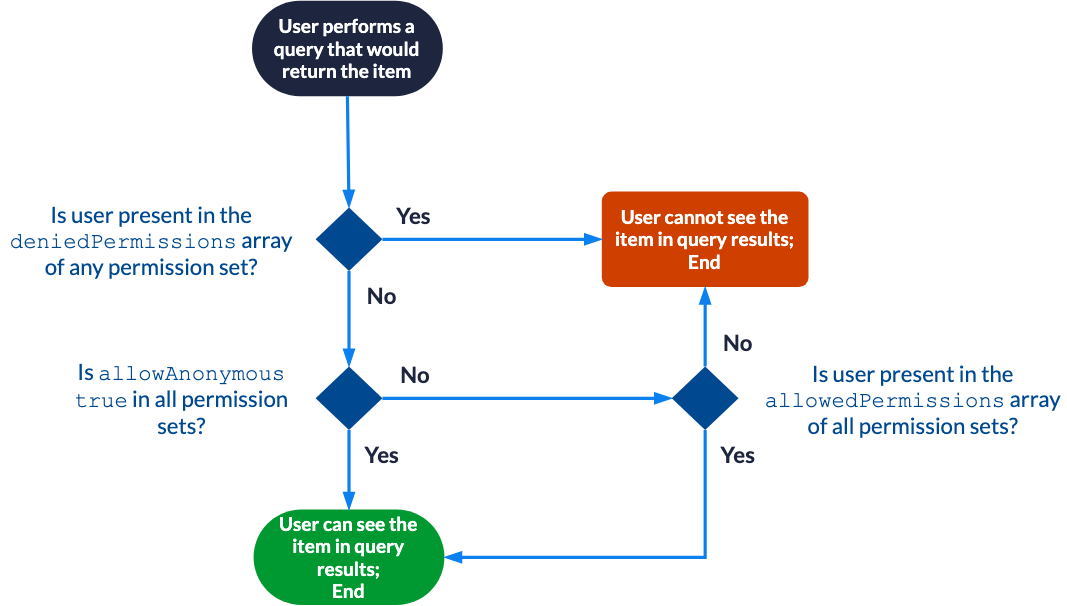
## Item permission models The Push API supports two item permission models: * The [simplified permission model](#simplified-permission-model), where `permissions` is an array of permission sets. * The [complete permission model](#complete-permission-model), where `permissions` is an array of permission levels. ### Simplified permission model In the [simplified permission model](https://docs.coveo.com/en/2007/), the `permissions` property is an array of permission sets. ```txt { ... <1> "permissions": [ { -> Permission set 1 "allowAnonymous": Boolean, "allowedPermissions": [ { "identity": string, "identityType": string, "securityProvider": string } ], "deniedPermissions": [ { "identity": string, "identityType": string, "securityProvider": string } ] }, { -> Permission set 2 ... } ] } ``` <1> See [`Documentbody` model](#documentbody-model). **Effective permission evaluation with the simplified permission model**
Details ![Permission evaluation flowchart showing how user access to items is determined in Coveo](https://docs.coveo.com/en/assets/images/index-content/permissions-evaluation-flowchart.png)
The `permissions` array objects support the following top-level properties: * [`allowAnonymous`](#allowanonymous-boolean) * [`allowedPermissions`](#allowedpermissions-array) * [`deniedPermissions`](#deniedpermissions-array) #### `allowAnonymous` (Boolean) [`permissions`](#simplified-permission-model) > `allowAnonymous` Whether the current permission set allows anonymous users to see the item in their query results. The default value is `false`. #### `allowedPermissions` (array) [`permissions`](#simplified-permission-model) > `allowedPermissions` The array of [security identities](https://docs.coveo.com/en/240/) that should be allowed access to the [item](https://docs.coveo.com/en/210/). The `allowedPermissions` array objects support the following properties: * [`identity`](#identity-string-required) (required) * [`identityType`](#identitytype-string-required) (required) * [`securityProvider`](#securityprovider-string) #### `deniedPermissions` (array) [`permissions`](#simplified-permission-model) > `deniedPermissions` The array of [security identities](https://docs.coveo.com/en/240/) that should be denied access to the [item](https://docs.coveo.com/en/210/). > **Note** > > If a [security identity](https://docs.coveo.com/en/240/) is both allowed and denied, the [denial prevails](https://docs.coveo.com/en/1618#denial-prevalence). The `deniedPermissions` array objects support the following properties: * [`identity`](#identity-string-required) (required) * [`identityType`](#identitytype-string-required) (required) * [`securityProvider`](#securityprovider-string) ##### `identity` (string, required) [`permissions`](#simplified-permission-model) > [`allowedPermissions`](#allowedpermissions-array)|[`deniedPermissions`](#deniedpermissions-array) > `identity` The name of the security identity. This name needs to be unique across the entire system. For simple use cases, this should be an email address. **Example**: `+"asmith@example.com+"` ##### `identityType` (string, required) [`permissions`](#simplified-permission-model) > [`allowedPermissions`](#allowedpermissions-array)|[`deniedPermissions`](#deniedpermissions-array) > `identityType` The type of the security identity. Possible values are: * `"User"`: An individual user with a specific identity, such as an email address. * `"Group"`: A collection of users grouped together, allowing you to manage permissions for multiple users collectively. Individual members of this group can be of any valid `identityType`. The JSON representation of a `Group` is the following: ```text { "identity": { "name": string, "type": "Group" }, "members": [ { "name": string, "type": "User"|"Group"|"VirtualGroup"|"Unknown" } ] } ``` * `"VirtualGroup"`: A virtual group that doesn't exist in the indexed enterprise system, used for defining granted identities. Functionally, a `VirtualGroup` is identical to a `Group`. * `"Unknown"`: An entity that doesn't fit into the predefined `identityType` values. See [Security identity definition examples](https://docs.coveo.com/en/42/) for more information on the different types of security identities. ##### `securityProvider` (string) [`permissions`](#simplified-permission-model) > [`allowedPermissions`](#allowedpermissions-array)|[`deniedPermissions`](#deniedpermissions-array) > `securityProvider` The unique identifier of the security identity provider in which the security identity is defined. You can get this value from the [**Security Identities**](https://platform.cloud.coveo.com/admin/#/orgid/content/permissions/providers/) ([platform-ca](https://platform-ca.cloud.coveo.com/admin/#/orgid/content/permissions/providers/) | [platform-eu](https://platform-eu.cloud.coveo.com/admin/#/orgid/content/permissions/providers/) | [platform-au](https://platform-au.cloud.coveo.com/admin/#/orgid/content/permissions/providers/)) page. ![Getting the Security Provider ID from the Administration Console | Coveo](https://docs.coveo.com/en/assets/images/index-content/copy-security-provider-id.png) When no security identity provider is specified, the first security identity provider associated with the target Push source is used. #### Examples The following are examples of `permissions` objects when using the simplified permission model: **Allowing all users**
Details ```json { ... "permissions": [ { "allowAnonymous": true } ] } ```
**Allowing and denying security identities**
Details ```json { ... "permissions": [ { "allowAnonymous": false, "allowedPermissions": [ { "identity": "SampleGroup", "identityType": "Group" } ], "deniedPermissions": [ { "identity": "asmith@example.com", "identityType": "User", "securityProvider": "My Security Identity Provider" } ] } ] } ```
### Complete permission model In the [complete permission model](https://docs.coveo.com/en/1526/), the `permissions` property is an array of permission levels. This model supports complex secured enterprise systems that require defining a hierarchy of permission levels, where level `x` permissions take precedence over those from level `x+1`. ```txt { ... <1> "permissions": [ { -> Permission level 1 "name": string, "permissionSets": [ { "allowAnonymous": Boolean, "allowedPermissions": [ { "identity": string, "identityType": string, "securityProvider": string } ], "deniedPermissions": [ { "identity": string, "identityType": string, "securityProvider": string } ] } ] }, { -> Permission level 2 ... } ] } ``` <1> See [`Documentbody` model](#documentbody-model). **Effective permission evaluation with the complete permission model**
Details ![Permission evaluation flow diagram](https://docs.coveo.com/en/assets/images/index-content/permission-level-flowchart.png)
The `permissions` array objects support the following top-level properties: * [`name`](#name-string) * [`permissionSets`](#permissionsets-array-required) (required) #### `name` (string) [`permissions`](#complete-permission-model) > `name` The permission level name. #### `permissionSets` (array, required) [`permissions`](#complete-permission-model) > `permissionSets` The array of permission sets in the permission level. Each object in the array supports the following top-level properties: * [`allowAnonymous`](#allowanonymous-boolean-2) * [`allowedPermissions`](#allowedpermissions-array-2) * [`deniedPermissions`](#deniedpermissions-array-2) ##### `allowAnonymous` (Boolean) [`permissions`](#complete-permission-model) > [`permissionSets`](#permissionsets-array-required) > `allowAnonymous` Whether the current permission set allows anonymous users to see the item in their query results. The default value is `false`. ##### `allowedPermissions` (array) [`permissions`](#complete-permission-model) > [`permissionSets`](#permissionsets-array-required) > `allowedPermissions` The array of [security identities](https://docs.coveo.com/en/240/) that should be allowed access to the [item](https://docs.coveo.com/en/210/). Each object in the array supports the following properties: * [`identity`](#identity-string) (required) * [`identityType`](#identitytype-string) (required) * [`securityProvider`](#securityprovider-string-2) ##### `deniedPermissions` (array) [`permissions`](#complete-permission-model) > [`permissionSets`](#permissionsets-array-required) > `deniedPermissions` The array of [security identities](https://docs.coveo.com/en/240/) that should be denied access to the [item](https://docs.coveo.com/en/210/). > **Note** > > If a [security identity](https://docs.coveo.com/en/240/) is both allowed and denied, the [denial prevails](https://docs.coveo.com/en/1618#denial-prevalence). Each object in the array supports the following properties: * [`identity`](#identity-string) (required) * [`identityType`](#identitytype-string) (required) * [`securityProvider`](#securityprovider-string-2) ###### `identity` (string) [`permissions`](#complete-permission-model) > [`permissionSets`](#permissionsets-array-required) > [`allowedPermissions`](#allowedpermissions-array-2)|[`deniedPermissions`](#deniedpermissions-array-2) > `identity` The name of the security identity. This name needs to be unique across the entire system. For simple use cases, this should be an email address. **Example**: `+"asmith@example.com+"` ###### `identityType` (string) [`permissions`](#complete-permission-model) > [`permissionSets`](#permissionsets-array-required) > [`allowedPermissions`](#allowedpermissions-array-2)|[`deniedPermissions`](#deniedpermissions-array-2) > `identityType` The type of the security identity. Possible values are: * `"User"`: An individual user with a specific identity, such as an email address. * `"Group"`: A collection of users grouped together, allowing you to manage permissions for multiple users collectively. Individual members of this group can be of any valid `identityType`. The JSON representation of a `Group` is the following: ```text { "identity": { "name": string, "type": "Group" }, "members": [ { "name": string, "type": "User"|"Group"|"VirtualGroup"|"Unknown" } ] } ``` * `"VirtualGroup"`: A virtual group that doesn't exist in the indexed enterprise system, used for defining granted identities. Functionally, a `VirtualGroup` is identical to a `Group`. * `"Unknown"`: An entity that doesn't fit into the predefined `identityType` values. See [Security identity definition examples](https://docs.coveo.com/en/42/) for more information on the different types of security identities. ###### `securityProvider` (string) [`permissions`](#complete-permission-model) > [`permissionSets`](#permissionsets-array-required) > [`allowedPermissions`](#allowedpermissions-array-2)|[`deniedPermissions`](#deniedpermissions-array-2) > `securityProvider` The unique identifier of the security identity provider in which the security identity is defined. You can get this value from the [**Security Identities**](https://platform.cloud.coveo.com/admin/#/orgid/content/permissions/providers/) ([platform-ca](https://platform-ca.cloud.coveo.com/admin/#/orgid/content/permissions/providers/) | [platform-eu](https://platform-eu.cloud.coveo.com/admin/#/orgid/content/permissions/providers/) | [platform-au](https://platform-au.cloud.coveo.com/admin/#/orgid/content/permissions/providers/)) page. ![Getting the Security Provider ID from the Administration Console | Coveo](https://docs.coveo.com/en/assets/images/index-content/copy-security-provider-id.png) When no security identity provider is specified, the first security identity provider associated with the target Push source is used. #### Examples The following are examples of `permissions` objects when using the complete permission model: **With one permission level**
Details ```json { ... "permissions": [ { "name": "MyPermissionLevel", "permissionSets": [ { "allowAnonymous": false, "allowedPermissions": [ { "identity": "SampleGroup", "identityType": "Group" } ], "deniedPermissions": [ { "identity": "asmith@example.com", "identityType": "User", "securityProvider": "My Security Identity Provider" } ] } ] } ] } ``` **Effective permissions**: * `SampleGroup`: This group isn't specifically denied in any of the permission level 1 permission sets, and is specifically allowed in all of those permission sets. Users in this group can see the item in query results. * `+asmith@example.com+`: This user is specifically denied in at least one of the permission level 1 permission sets. The user can't see the item in query results.
**With two permission levels**
Details ```json { ... "permissions": [ { "name": "Permission Level 1", "permissionSets": [ { "allowAnonymous": true }, { "allowAnonymous": false, "allowedPermissions": [ { "identity": "SampleTeam1", "identityType": "Group" } ], "deniedPermissions": [ { "identity": "SampleTeam2", "identityType": "Group" } ] }, { "allowAnonymous": false, "allowedPermissions": [ { "identity": "asmith@example.com", "identityType": "User" }, { "identity": "cbrown@example.com", "identityType": "User" } ], "deniedPermissions": [ { "identity": "bjones@example.com", "identityType": "User" } ] } ] }, { "name": "Permission Level 2", "permissionSets": [ { "allowAnonymous": false, "allowedPermissions": [ { "identity": "bjones@example.com", "identityType": "User" }, { "identity": "emitchell@example.com", "identityType": "User" } ], "deniedPermissions": [ { "identity": "asmith@example.com", "identityType": "User" } ] }, { "allowAnonymous": false, "allowedPermissions": [ { "identity": "MysteryUserX", "identityType": "User" } ] } ] } ] } ``` **Effective permissions**: * `+asmith@example.com+`: This user isn't specifically denied in any of the permission level 1 permission sets, and is specifically allowed in all of those permission sets. The user can see the item in query results. * `+bjones@example.com+`: This user is specifically denied in at least one of the permission level 1 permission sets. The user can't see the item in query results. * `+cbrown@example.com+`: This user is specifically denied in at least one of the permission level 1 permission sets. The user can't see the item in query results. * `+emitchell@example.com+`: This user is unknown in permission level 1. Consequently, permission level 2 is evaluated. The user isn't denied in any of the permission level 2 permission sets, and is specifically allowed in all of those permission sets. The user can see the item in query results. * An unauthenticated user: Unauthenticated users are denied in at least one of the permission level 1 permission sets. These users can't see the item in query results.
## Security identity models The security identity models are JSON objects to be used for the API request body when adding, updating, or disabling security identities, or when establishing [alias](https://docs.coveo.com/en/176/) and [granted identity](https://docs.coveo.com/en/201/) relationships between security identities. There are three security identity models: * The [`IdentityBody` model](#identitybody-model) for single security identity add or update requests. * The [`BatchIdentityBody` model](#batchidentitybody-model) for batch security identity update requests. * The [`MappedIdentityBody` model](#mappedidentitybody-model) to establish relationships between identities. ### `IdentityBody` model The `IdentityBody` model is the JSON object to be used for the request body of the [`Add or update a security identity`](#add-or-update-a-security-identity) request. This model defines the unique name of the security identity, its type, and, if applicable, its [members](https://docs.coveo.com/en/2873/) and [granted identities](https://docs.coveo.com/en/201/). ```txt { "identity": { "name": "string", "type": "USER", "additionalInfo": { <1> "additionalProp1": "string", "additionalProp2": "string", ... } }, "members": [ { "name": "string", "type": "USER" "additionalInfo": {} <1> } ], "wellKnowns": [ { "name": "string", "type": "USER" "additionalInfo": {} <1> } ] } ``` <1> The key-value pairs you add in the optional `additionalInfo` object appear when you expand an identity on the [**Browse security identities**](https://docs.coveo.com/en/1728/) subpage. The `IdentityBody` model supports the following top-level properties: * [`identity`](#identity-object-required) (required) * [`members`](#members-array) * [`wellKnowns`](#wellknowns-array) #### `identity` (object, required) [`IdentityBody` model](#identitybody-model) > `identity` The characteristics of the security identity. The `identity` object supports the following properties: * [name](#name-string-required) (required) * [type](#type-string-required) (required) ##### `name` (string, required) [`IdentityBody` model](#identitybody-model) > [`identity`](#identity-object-required) > `name` The name of the security identity. This name needs to be unique across the entire system. For simple use cases, this should be an email address. **Example**: `+"asmith@example.com+"` ##### `type` (string, required) [`IdentityBody` model](#identitybody-model) > [`identity`](#identity-object-required) > `type` The type of the security identity. Possible values are: * `"User"`: An individual user with a specific identity, such as an email address. * `"Group"`: A collection of users grouped together, allowing you to manage permissions for multiple users collectively. Individual members of this group can be of any valid `identityType`. The JSON representation of a `Group` is the following: ```text { "identity": { "name": string, "type": "Group" }, "members": [ { "name": string, "type": "User"|"Group"|"VirtualGroup"|"Unknown" } ] } ``` * `"VirtualGroup"`: A virtual group that doesn't exist in the indexed enterprise system, used for defining granted identities. Functionally, a `VirtualGroup` is identical to a `Group`. * `"Unknown"`: An entity that doesn't fit into the predefined `identityType` values. See [Security identity definition examples](https://docs.coveo.com/en/42/) for more information on the different types of security identities. #### `members` (array) [`IdentityBody` model](#identitybody-model) > `members` The array of [identities](#identity-object-required) in a `Group` or `VirtualGroup` security identity. Each member in the array is an object that supports the following properties: * [`name`](#name-string-required-2) (required) * [`type`](#type-string-required-2) (required) ##### `name` (string, required) [`IdentityBody` model](#identitybody-model) > [`members`](#members-array) > `name` The name of the security identity. This name needs to be unique across the entire system. For simple use cases, this should be an email address. **Example**: `+"asmith@example.com+"` ##### `type` (string, required) [`IdentityBody` model](#identitybody-model) > [`members`](#members-array) > `type` The type of the security identity. Possible values are: * `"User"`: An individual user with a specific identity, such as an email address. * `"Group"`: A collection of users grouped together, allowing you to manage permissions for multiple users collectively. Individual members of this group can be of any valid `identityType`. The JSON representation of a `Group` is the following: ```text { "identity": { "name": string, "type": "Group" }, "members": [ { "name": string, "type": "User"|"Group"|"VirtualGroup"|"Unknown" } ] } ``` * `"VirtualGroup"`: A virtual group that doesn't exist in the indexed enterprise system, used for defining granted identities. Functionally, a `VirtualGroup` is identical to a `Group`. * `"Unknown"`: An entity that doesn't fit into the predefined `identityType` values. See [Security identity definition examples](https://docs.coveo.com/en/42/) for more information on the different types of security identities. #### `wellKnowns` (array) [`IdentityBody` model](#identitybody-model) > `wellKnowns` The array of [granted identities](https://docs.coveo.com/en/201/) that the target security identity becomes a member of. You can consider `wellKnowns` as groups. Membership to an existing `wellKnowns` granted identity is defined through the member (typically a `User` security identity), not through the group. See [Defining a granted identity](https://docs.coveo.com/en/42#defining-a-granted-identity) and [Defining a user with granted identities](https://docs.coveo.com/en/42#defining-a-user-with-granted-identities) for more information. Each object in the array supports the following properties: * [`name`](#name-string-required-3) (required) * [`type`](#type-string-required-3) (required) ##### `name` (string, required) [`IdentityBody` model](#identitybody-model) > [`wellKnowns`](#wellknowns-array) > `name` The name of the security identity. This name needs to be unique across the entire system. For simple use cases, this should be an email address. **Example**: `+"asmith@example.com+"` ##### `type` (string, required) [`IdentityBody` model](#identitybody-model) > [`wellKnowns`](#wellknowns-array) > `type` The type of the security identity. Possible values are: * `"User"`: An individual user with a specific identity, such as an email address. * `"Group"`: A collection of users grouped together, allowing you to manage permissions for multiple users collectively. Individual members of this group can be of any valid `identityType`. The JSON representation of a `Group` is the following: ```text { "identity": { "name": string, "type": "Group" }, "members": [ { "name": string, "type": "User"|"Group"|"VirtualGroup"|"Unknown" } ] } ``` * `"VirtualGroup"`: A virtual group that doesn't exist in the indexed enterprise system, used for defining granted identities. Functionally, a `VirtualGroup` is identical to a `Group`. * `"Unknown"`: An entity that doesn't fit into the predefined `identityType` values. See [Security identity definition examples](https://docs.coveo.com/en/42/) for more information on the different types of security identities. #### Examples The following are examples of `IdentityBody` objects: **A user identity with a "Department" metadata value.**
Details ```json { "identity": { "name": "msinger@abc.com", "type": "USER", "additionalInfo": { "Department": "R&D" } } } ```
**A group identity with one assigned member and one granted identity**
Details ```json { "identity": { "name": "SampleGroup", "type": "GROUP", "additionalInfo": {} }, "members": [ { "name": "asmith@example.com", "type": "USER", "additionalInfo": {} } ], "wellKnowns": [ { "name": "SampleGrantedIdentity", "type": "GROUP", "additionalInfo": {} } ] } ```
**A group identity with two assigned members and one granted identity**
Details ```json { "identity": { "name": "SampleGroup", "type": "GROUP" }, "members": [ { "name": "asmith@example.com", "type": "USER" }, { "name": "SampleVirtualGroup", "type": "VIRTUAL_GROUP" } ], "wellKnowns": [ { "name": "Domain Users", "type": "GROUP" } ] } ```
### `BatchIdentityBody` model The `BatchIdentityBody` model is the JSON representation to be used for the request body when [uploading a batch of security identity updates into a file container](https://docs.coveo.com/en/55#step-2-upload-the-security-identity-update-into-the-file-container). This request is the second step in a three-step process to [add, update, or disable a batch of security identities](https://docs.coveo.com/en/55/). The `BatchIdentityBody` model defines the security identities to add or update, the [alias](https://docs.coveo.com/en/176/) and [granted identity](https://docs.coveo.com/en/201/) relationships that you want to establish for specified security identities, and the security identities to disable. ```txt { "members": [], -> The identities to add or update "mappings": [ -> The alias and granted identity relationships to establish { -> Mapping 1 "identity": { -> The mapping 1 target security identity "name": string, "type": string, "additionalInfo": {} <1> }, "mappings": [ { -> The first alias for the mapping 1 target security identity "name": string, "type": string, "provider": string, "additionalInfo": {} <1> }, { -> The second alias for the mapping 1 target security identity ... }, ... ], "wellKnowns": [ { -> The first granted identity for the mapping 1 target security identity "name": string, "type": string, "additionalInfo": {} <1> } ... ] }, { -> Mapping 2 ... } ... ], "deleted": [ ->The identities to disable { "identity": { "name": string, "type": string } }, ... ] } ``` <1> The key-value pairs you add in the optional `additionalInfo` object appear when you expand an identity on the [**Browse security identities**](https://docs.coveo.com/en/1728/) subpage. The `BatchIdentityBody` model supports the following top-level properties: * [`members`](#members-array-2) * [`mappings`](#mappings-array) * [`deleted`](#deleted-array) #### `members` (array) [`BatchIdentityBody` model](#batchidentitybody-model) > `members` The array of identities to add or update. Each object in the `members` array implements the [`IdentityBody` model](#identitybody-model). #### `mappings` (array) [`BatchIdentityBody` model](#batchidentitybody-model) > `mappings` The array of [alias](https://docs.coveo.com/en/176/) and [granted identity](https://docs.coveo.com/en/201/) relationships to establish. Each object in this `mappings` array supports the following properties: * [`identity`](#identity-object-required-2) (required) * [`mappings`](#mappings-array-2) * [`wellKnowns`](#wellknowns-array-2) ##### `identity` (object, required) [`BatchIdentityBody` model](#batchidentitybody-model) > [`mappings`](#mappings-array) > `identity` The target security identity to which you want to establish alias and/or granted identity relationships. The `identity` object supports the following properties: * [`name`](#name-string-required-4) (required) * [`type`](#type-string-required-4) (required) ###### `name` (string, required) [`BatchIdentityBody` model](#batchidentitybody-model) > [`mappings`](#mappings-array) > [`identity`](#identity-object-required-2) > `name` The name of the security identity. This name needs to be unique across the entire system. For simple use cases, this should be an email address. **Example**: `+"asmith@example.com+"` ###### `type` (string, required) [`BatchIdentityBody` model](#batchidentitybody-model) > [`mappings`](#mappings-array) > [`identity`](#identity-object-required-2) > `type` The type of the security identity. Possible values are: * `"User"`: An individual user with a specific identity, such as an email address. * `"Group"`: A collection of users grouped together, allowing you to manage permissions for multiple users collectively. Individual members of this group can be of any valid `identityType`. The JSON representation of a `Group` is the following: ```text { "identity": { "name": string, "type": "Group" }, "members": [ { "name": string, "type": "User"|"Group"|"VirtualGroup"|"Unknown" } ] } ``` * `"VirtualGroup"`: A virtual group that doesn't exist in the indexed enterprise system, used for defining granted identities. Functionally, a `VirtualGroup` is identical to a `Group`. * `"Unknown"`: An entity that doesn't fit into the predefined `identityType` values. See [Security identity definition examples](https://docs.coveo.com/en/42/) for more information on the different types of security identities. ##### `mappings` (array) [`BatchIdentityBody` model](#batchidentitybody-model) > [`mappings`](#mappings-array) > `mappings` The array of alias relationships for the [target security identity](#identity-object-required-2). The `mappings` array objects support the following properties: * [`name`](#name-string-required-5) (required) * [`type`](#type-string-required-5) (required) ###### `name` (string, required) [`BatchIdentityBody` model](#batchidentitybody-model) > [`mappings`](#mappings-array) > [`mappings`](#mappings-array-2) > `name` The name of the security identity. This name needs to be unique across the entire system. For simple use cases, this should be an email address. **Example**: `+"asmith@example.com+"` ###### `type` (string, required) [`BatchIdentityBody` model](#batchidentitybody-model) > [`mappings`](#mappings-array) > [`mappings`](#mappings-array-2) > `type` The type of the security identity. Possible values are: * `"User"`: An individual user with a specific identity, such as an email address. * `"Group"`: A collection of users grouped together, allowing you to manage permissions for multiple users collectively. Individual members of this group can be of any valid `identityType`. The JSON representation of a `Group` is the following: ```text { "identity": { "name": string, "type": "Group" }, "members": [ { "name": string, "type": "User"|"Group"|"VirtualGroup"|"Unknown" } ] } ``` * `"VirtualGroup"`: A virtual group that doesn't exist in the indexed enterprise system, used for defining granted identities. Functionally, a `VirtualGroup` is identical to a `Group`. * `"Unknown"`: An entity that doesn't fit into the predefined `identityType` values. See [Security identity definition examples](https://docs.coveo.com/en/42/) for more information on the different types of security identities. ###### `provider` (string) [`BatchIdentityBody` model](#batchidentitybody-model) > [`mappings`](#mappings-array) > [`mappings`](#mappings-array-2) > `provider` The unique identifier of the security identity provider in which the security identity is defined. You can get this value from the [**Security Identities**](https://platform.cloud.coveo.com/admin/#/orgid/content/permissions/providers/) ([platform-ca](https://platform-ca.cloud.coveo.com/admin/#/orgid/content/permissions/providers/) | [platform-eu](https://platform-eu.cloud.coveo.com/admin/#/orgid/content/permissions/providers/) | [platform-au](https://platform-au.cloud.coveo.com/admin/#/orgid/content/permissions/providers/)) page. ![Getting the Security Provider ID from the Administration Console | Coveo](https://docs.coveo.com/en/assets/images/index-content/copy-security-provider-id.png) When no security identity provider is specified, the first security identity provider associated with the target Push source is used. ##### `wellKnowns` (array) [`BatchIdentityBody` model](#batchidentitybody-model) > [`mappings`](#mappings-array) > `wellKnowns` The array of [granted identities](https://docs.coveo.com/en/201/) that the target security identity becomes a member of. You can consider `wellKnowns` as groups. Membership to an existing `wellKnowns` granted identity is defined through the member (typically a `User` security identity), not through the group. See [Defining a granted identity](https://docs.coveo.com/en/42#defining-a-granted-identity) and [Defining a user with granted identities](https://docs.coveo.com/en/42#defining-a-user-with-granted-identities) for more information. Each object in this `wellKnowns` array supports the following properties: * [`name`](#name-string-required-6) (required) * [`type`](#type-string-required-6) (required) ###### `name` (string, required) [`BatchIdentityBody` model](#batchidentitybody-model) > [`mappings`](#mappings-array) > [`wellKnowns`](#wellknowns-array-2) > `name` The name of the security identity. This name needs to be unique across the entire system. For simple use cases, this should be an email address. **Example**: `+"asmith@example.com+"` ###### `type` (string, required) [`BatchIdentityBody` model](#batchidentitybody-model) > [`mappings`](#mappings-array) > [`wellKnowns`](#wellknowns-array-2) > `type` The type of the security identity. Possible values are: * `"User"`: An individual user with a specific identity, such as an email address. * `"Group"`: A collection of users grouped together, allowing you to manage permissions for multiple users collectively. Individual members of this group can be of any valid `identityType`. The JSON representation of a `Group` is the following: ```text { "identity": { "name": string, "type": "Group" }, "members": [ { "name": string, "type": "User"|"Group"|"VirtualGroup"|"Unknown" } ] } ``` * `"VirtualGroup"`: A virtual group that doesn't exist in the indexed enterprise system, used for defining granted identities. Functionally, a `VirtualGroup` is identical to a `Group`. * `"Unknown"`: An entity that doesn't fit into the predefined `identityType` values. See [Security identity definition examples](https://docs.coveo.com/en/42/) for more information on the different types of security identities. #### `deleted` (array) [`BatchIdentityBody` model](#batchidentitybody-model) > `deleted` The array of security identities to disable. Each object in the `deleted` array supports the [`identity`](#identity-object-required-3) required property. ##### `identity` (object, required) [`BatchIdentityBody` model](#batchidentitybody-model) > [`deleted`](#deleted-array) > `identity` The security identity to disable. The `identity` object supports the following properties: * [`name`](#name-string-required-7) (required) * [`type`](#type-string-required-7) (required) ###### `name` (string, required) [`BatchIdentityBody` model](#batchidentitybody-model) > [`deleted`](#deleted-array) > [`identity`](#identity-object-required-3) > `name` The name of the security identity. This name needs to be unique across the entire system. For simple use cases, this should be an email address. **Example**: `+"asmith@example.com+"` ###### `type` (string, required) [`BatchIdentityBody` model](#batchidentitybody-model) > [`deleted`](#deleted-array) > [`identity`](#identity-object-required-3) > `type` The type of the security identity. Possible values are: * `"User"`: An individual user with a specific identity, such as an email address. * `"Group"`: A collection of users grouped together, allowing you to manage permissions for multiple users collectively. Individual members of this group can be of any valid `identityType`. The JSON representation of a `Group` is the following: ```text { "identity": { "name": string, "type": "Group" }, "members": [ { "name": string, "type": "User"|"Group"|"VirtualGroup"|"Unknown" } ] } ``` * `"VirtualGroup"`: A virtual group that doesn't exist in the indexed enterprise system, used for defining granted identities. Functionally, a `VirtualGroup` is identical to a `Group`. * `"Unknown"`: An entity that doesn't fit into the predefined `identityType` values. See [Security identity definition examples](https://docs.coveo.com/en/42/) for more information on the different types of security identities. #### Example The following is an example of a `BatchIdentityBody` object: **Adding or updating a group security identity, establishing alias and granted identity relationships, and deleting a security identity**
Details ```json { "members": [ { "identity": { "name": "SampleGroup", "type": "GROUP", "additionalInfo": {} }, "members": [ { "name": "asmith@example.com", "type": "USER", "additionalInfo": {} } ], "wellKnowns": [ { "name": "SampleGrantedIdentity", "type": "GROUP", "additionalInfo": {} } ] } ], "mappings": [ { "identity": { "name": "asmith@example.com", "type": "USER", "additionalInfo": {} }, "mappings": [ { "name": "alice_smith@example.com", "type": "USER", "provider": "Email Security Provider", "additionalInfo": {} } ], "wellKnowns": [ { "name": "SampleGrantedIdentity2", "type": "VIRTUAL_GROUP", "additionalInfo": {} } ] } ], "deleted": [ { "identity": { "name": "bjones@example.com", "type": "USER", "additionalInfo": {} } } ] } ```
### `MappedIdentityBody` model The `MappedIdentityBody` model is the JSON representation to be used for the request body of the [`Add or update an alias`](#add-or-update-an-alias) request. The `MappedIdentityBody` model defines the [alias](https://docs.coveo.com/en/176/) and [granted identity](https://docs.coveo.com/en/201/) relationships that you want to establish for a specified security identity. ```txt { "identity": { "name": string, "type": string, "additionalInfo": {} <1> }, "mappings": [ { "name": string, "type": string, "provider": string, "additionalInfo": {} <1> } ], "wellKnowns": [ { "name": string, "type": string, "additionalInfo": {} <1> } ] } ``` <1> The key-value pairs you add in the optional `additionalInfo` object appear when you expand an identity on the [**Browse security identities**](https://docs.coveo.com/en/1728/) subpage. The `BatchIdentityBody` model supports the following top-level properties: * [`identity`](#identity-object-required-4) (required) * [`mappings`](#mappings-array-3) * [`wellKnowns`](#wellknowns-array-3) #### `identity` (object, required) [`MappedIdentityBody` model](#mappedidentitybody-model) > `identity` The target security identity to which you want to establish alias and/or granted identity relationships. The `identity` object supports the following properties: * [`name`](#name-string-required-8) (required) * [`type`](#type-string-required-8) (required) ##### `name` (string, required) [`MappedIdentityBody` model](#mappedidentitybody-model) > [`identity`](#identity-object-required-4) > `name` The name of the security identity. This name needs to be unique across the entire system. For simple use cases, this should be an email address. **Example**: `+"asmith@example.com+"` ##### `type` (string, required) [`MappedIdentityBody` model](#mappedidentitybody-model) > [`identity`](#identity-object-required-4) > `type` The type of the security identity. Possible values are: * `"User"`: An individual user with a specific identity, such as an email address. * `"Group"`: A collection of users grouped together, allowing you to manage permissions for multiple users collectively. Individual members of this group can be of any valid `identityType`. The JSON representation of a `Group` is the following: ```text { "identity": { "name": string, "type": "Group" }, "members": [ { "name": string, "type": "User"|"Group"|"VirtualGroup"|"Unknown" } ] } ``` * `"VirtualGroup"`: A virtual group that doesn't exist in the indexed enterprise system, used for defining granted identities. Functionally, a `VirtualGroup` is identical to a `Group`. * `"Unknown"`: An entity that doesn't fit into the predefined `identityType` values. See [Security identity definition examples](https://docs.coveo.com/en/42/) for more information on the different types of security identities. #### `mappings` (array) [`MappedIdentityBody` model](#mappedidentitybody-model) > `mappings` The array of alias relationships for the [target security identity](#identity-object-required-2). This `mappings` array objects support the following properties: * [`name`](#name-string-required-9) (required) * [`type`](#type-string-required-9) (required) * [`provider`](#provider-string-2) ##### `name` (string, required) [`MappedIdentityBody` model](#mappedidentitybody-model) > [`mappings`](#mappings-array-3) > `name` The name of the security identity. This name needs to be unique across the entire system. For simple use cases, this should be an email address. **Example**: `+"asmith@example.com+"` ##### `type` (string, required) [`MappedIdentityBody` model](#mappedidentitybody-model) > [`mappings`](#mappings-array-3) > `type` The type of the security identity. Possible values are: * `"User"`: An individual user with a specific identity, such as an email address. * `"Group"`: A collection of users grouped together, allowing you to manage permissions for multiple users collectively. Individual members of this group can be of any valid `identityType`. The JSON representation of a `Group` is the following: ```text { "identity": { "name": string, "type": "Group" }, "members": [ { "name": string, "type": "User"|"Group"|"VirtualGroup"|"Unknown" } ] } ``` * `"VirtualGroup"`: A virtual group that doesn't exist in the indexed enterprise system, used for defining granted identities. Functionally, a `VirtualGroup` is identical to a `Group`. * `"Unknown"`: An entity that doesn't fit into the predefined `identityType` values. See [Security identity definition examples](https://docs.coveo.com/en/42/) for more information on the different types of security identities. ##### `provider` (string) [`MappedIdentityBody` model](#mappedidentitybody-model) > [`mappings`](#mappings-array-3) > `provider` The unique identifier of the security identity provider in which the security identity is defined. You can get this value from the [**Security Identities**](https://platform.cloud.coveo.com/admin/#/orgid/content/permissions/providers/) ([platform-ca](https://platform-ca.cloud.coveo.com/admin/#/orgid/content/permissions/providers/) | [platform-eu](https://platform-eu.cloud.coveo.com/admin/#/orgid/content/permissions/providers/) | [platform-au](https://platform-au.cloud.coveo.com/admin/#/orgid/content/permissions/providers/)) page. ![Getting the Security Provider ID from the Administration Console | Coveo](https://docs.coveo.com/en/assets/images/index-content/copy-security-provider-id.png) When no security identity provider is specified, the first security identity provider associated with the target Push source is used. #### `wellKnowns` (array) [`MappedIdentityBody` model](#mappedidentitybody-model) > `wellKnowns` The array of [granted identities](https://docs.coveo.com/en/201/) that the target security identity becomes a member of. You can consider `wellKnowns` as groups. Membership to an existing `wellKnowns` granted identity is defined through the member (typically a `User` security identity), not through the group. See [Defining a granted identity](https://docs.coveo.com/en/42#defining-a-granted-identity) and [Defining a user with granted identities](https://docs.coveo.com/en/42#defining-a-user-with-granted-identities) for more information. Each object in this `wellKnowns` array supports the following properties: * [`name`](#name-string-required-10) (required) * [`type`](#type-string-required-10) (required) ##### `name` (string, required) [`MappedIdentityBody` model](#mappedidentitybody-model) > [`wellKnowns`](#wellknowns-array-3) > `name` The name of the security identity. This name needs to be unique across the entire system. For simple use cases, this should be an email address. **Example**: `+"asmith@example.com+"` ##### `type` (string, required) [`MappedIdentityBody` model](#mappedidentitybody-model) > [`wellKnowns`](#wellknowns-array-3) > `type` The type of the security identity. Possible values are: * `"User"`: An individual user with a specific identity, such as an email address. * `"Group"`: A collection of users grouped together, allowing you to manage permissions for multiple users collectively. Individual members of this group can be of any valid `identityType`. The JSON representation of a `Group` is the following: ```text { "identity": { "name": string, "type": "Group" }, "members": [ { "name": string, "type": "User"|"Group"|"VirtualGroup"|"Unknown" } ] } ``` * `"VirtualGroup"`: A virtual group that doesn't exist in the indexed enterprise system, used for defining granted identities. Functionally, a `VirtualGroup` is identical to a `Group`. * `"Unknown"`: An entity that doesn't fit into the predefined `identityType` values. See [Security identity definition examples](https://docs.coveo.com/en/42/) for more information on the different types of security identities. #### Example The following is an example of a `MappedIdentityBody` object: **Establishing one alias and one granted identity relationship for a user**
Details ```json { "identity": { "name": "asmith@example.com", "type": "USER", "additionalInfo": {} }, "mappings": [ { "name": "alice_smith@example.com", "type": "USER", "provider": "Email Security Provider", "additionalInfo": {} } ], "wellKnowns": [ { "name": "SampleGrantedIdentity2", "type": "VIRTUAL_GROUP", "additionalInfo": {} } ] } ```