Simplified permission model
Simplified permission model

Each secured item must have a permission model which you can define or modify using the permissions property when you add or update an item in a secured Push source.
The index uses the permission model of an item, along with the currently available information in the security identity cache, to evaluate the effective permissions of that item (that is, who can or can’t see the item in query results).
This article describes the simplified permission model, flexible and powerful enough to replicate access rights of most secured enterprise systems.

|
You can’t define security identities in item permission models. The permission model of an item must rather refer to existing security identities retrieved through a security identity provider. For more information, see Security identity definition examples and User alias definition examples. By default, each object in the |
Effective permission evaluation
Once a security identity update has been performed and all security identities can be resolved to individual user entities, effective permissions are evaluated as follows for each item with a simplified permission model:
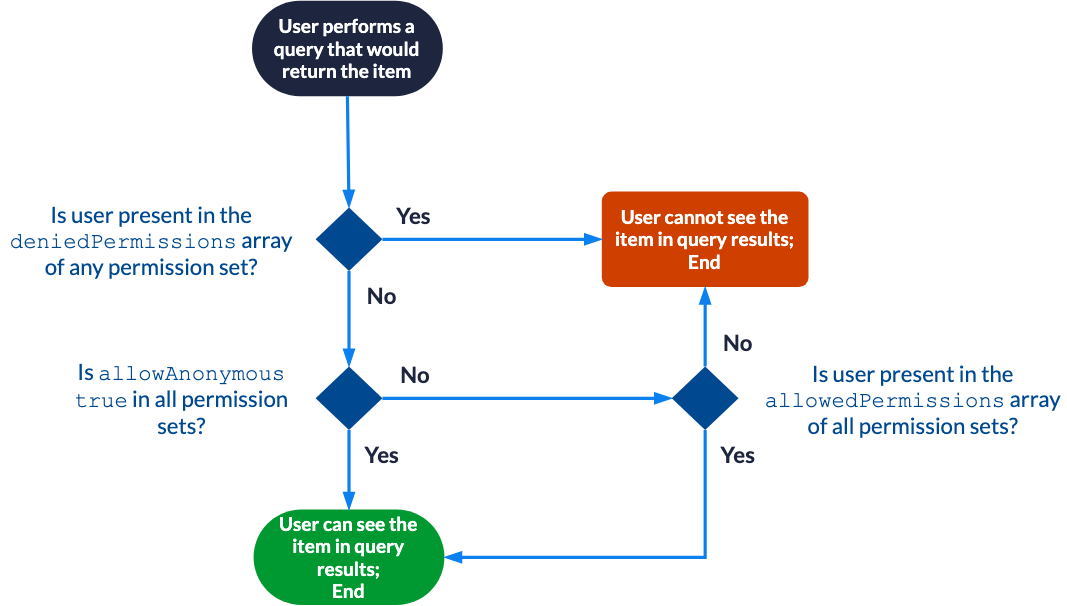

|
Note
This process becomes more complex when you use the complete permission model to define many permission levels. For more information, see Effective permission evaluation with the complete permission model. |
Allowing Anyone
This is one of the most basic permission models you can provide for an item in a secured Push source.
{
  "permissions": [
    {
      "allowAnonymous": true
    }
  ]
}
In this example, the permission model contains a single permission set that makes the item essentially public. Any user, authenticated or not, can see this item in query results.
|
|
Note
When the |
Allowing only specific users
Suppose that the SampleTeam2 security identity group only contains the following members:
-
User
cbrown@example.com -
User
dmoore@example.com
{
  "permissions": [
    {
      "allowAnonymous": false,
      "allowedPermissions": [
        {
          "identity": "asmith@example.com",
          "identityType": "User"
        },
        {
          "identity": "SampleTeam2",
          "identityType": "Group"
        }
      ]
    }
  ]
}
In this example, the permission model contains a single permission set that only allows authenticated users asmith@example.com, cbrown@example.com, and dmoore@example.com to see the item in query results.
Allowing only specific users, except specific users
Suppose that:
-
The
SampleGroupvirtual group only contains theSampleTeam1andSampleTeam2groups as members. -
The
SampleTeam1group only contains usersasmith@example.comandbjones@example.comas members. -
The
SampleTeam2group only contains userscbrown@example.comanddmoore@example.comas members.
{
  "permissions": [
    {
      "allowAnonymous": false,
      "allowedPermissions": [
        {
          "identity": "SampleGroup",
          "identityType": "VirtualGroup"
        }
      ],
      "deniedPermissions": [
        {
          "identity": "SampleTeam2",
          "identityType": "Group"
        },
        {
          "identity": "asmith@example.com",
          "identityType": "User"
        }
      ]
    }
  ]
}
In this example, the permission model contains a single permission set that only allows authenticated user bjones@example.com to see the item in query results.
Allowing anyone except specific users
This is a rather exceptional, corner case permission model.
Suppose that the SampleTeam1 group only contains the following members:
-
User
asmith@example.com -
User
bjones@example.com
{
  "permissions": [
    {
      "allowAnonymous": true,
      "deniedPermissions": [
        {
          "identity": "SampleTeam1",
          "identityType": "Group"
        },
        {
          "identity": "cbrown@example.com",
          "identityType": "User"
        }
      ]
    }
  ]
}
In this example, the permission model contains a single permission set that allows any user except authenticated users asmith@example.com, bjones@example.com, and cbrown@example.com to see the item in query results.
Of course, the three excluded users could easily manage to see the item by performing unauthenticated queries.
Combining many permission sets
Suppose that:
-
The
SampleGroupvirtual group only contains theSampleTeam1andSampleTeam2groups as members. -
The
SampleTeam1group only contains usersasmith@example.comandbjones@example.comas members. -
The
SampleTeam2group only containscbrown@example.comanddmoore@example.comas members. -
The
MysteryUserXalias resolves to useremitchell@example.com. For more information, see User alias definition examples.
{
  "permissions": [
    {
      "allowAnonymous": true,
      "deniedPermissions": [
        {
          "identity": "asmith@example.com",
          "identityType": "User"
        }
      ]
    },
    {
      "allowAnonymous": false,
      "allowedPermissions": [
        {
          "identity": "SampleTeam1",
          "identityType": "Group"
        },
        {
          "identity": "emitchell@example.com",
          "identityType": "User"
        }
      ]
    },
    {
      "allowAnonymous": false,
      "allowedPermissions" : [
        {
          "identity": "MysteryUserX",
          "identityType": "User"
        }
      ],
      "deniedPermissions": [
        {
          "identity": "SampleGroup",
          "identityType": "VirtualGroup"
        }
      ]
    }
  ]
}
In this example, the permission model contains three permission sets:
-
The first permission set allows anyone except authenticated user
asmith@example.com. -
The second permission set only allows authenticated users
asmith@example.com,bjones@example.com, andemitchell@example.com. -
The third permission set allows authenticated user
emitchell@example.com, and denies authenticated usersasmith@example.com,bjones@example.com,cbrown@example.com, anddmoore@example.com.
Consequently, when all three permission sets are combined, only authenticated user emitchell@example.com can see the item in query results.