Knowledge Hub
Knowledge Hub


|
The Coveo Knowledge Hub is currently available as a beta to early-access customers only. Contact your Account Manager for early access to this feature. |
The Coveo Knowledge Hub is a centralized knowledge management platform that provides insights into how your content is used in your Coveo implementations, such as when using generative answering, across your various knowledge distribution channels.
The Knowledge Hub tools help organizations develop informed knowledge management strategies. Tools that allow knowledge managers to assess and optimize their content flows and to drive measurable value from Coveo implementations.
Access the Knowledge Hub
Users with the required privileges can access the Knowledge Hub from the Coveo Administration Console.
In the Coveo Administration Console header, use the application picker to select Knowledge Hub.

Knowledge Hub tools and features
The primary focus of the Knowledge Hub is to help organizations create impactful generative answering experiences using RGA.
The Knowledge Hub offers a suite of tools with features that enable knowledge managers and subject matter experts in an organization to review and optimize their RGA-generated answers, and monitor the performance of their RGA implementations over time.
The following table lists the tools and features available in the Knowledge Hub, along with links to their respective documentation.

|
For information on how best to use the Knowledge Hub features, see the two main workflows for evaluating and improving your RGA implementations. |
| Tool | Feature | Documentation |
|---|---|---|
Answer Manager |
View feedback for your RGA-generated answers. |
|
Create rules to manage your generated answers. |
||
Chunk Inspector |
Analyze the segments of text (chunks) that were used to generate a specific answer using RGA. |
|
See how an item in your index is segmented into chunks by the RGA model. |
||
GenAI Performance |
Use the dashboards to analyze your RGA implementation metrics, such as answer rate and most cited items, to see the trends over time and to identify areas for improvement. |
Why and when to use the Knowledge Hub features
While understanding what a feature does is useful, knowing why and when to use it makes it easier to integrate that functionality into your organization’s workflow.
The Knowledge Hub features are designed around two common workflows for evaluating and improving your RGA implementation.
The two workflows are:
-
Using the GenAI Performance dashboards to analyze the performance metrics of your RGA implementation
Improve your RGA implementation through answer evaluation
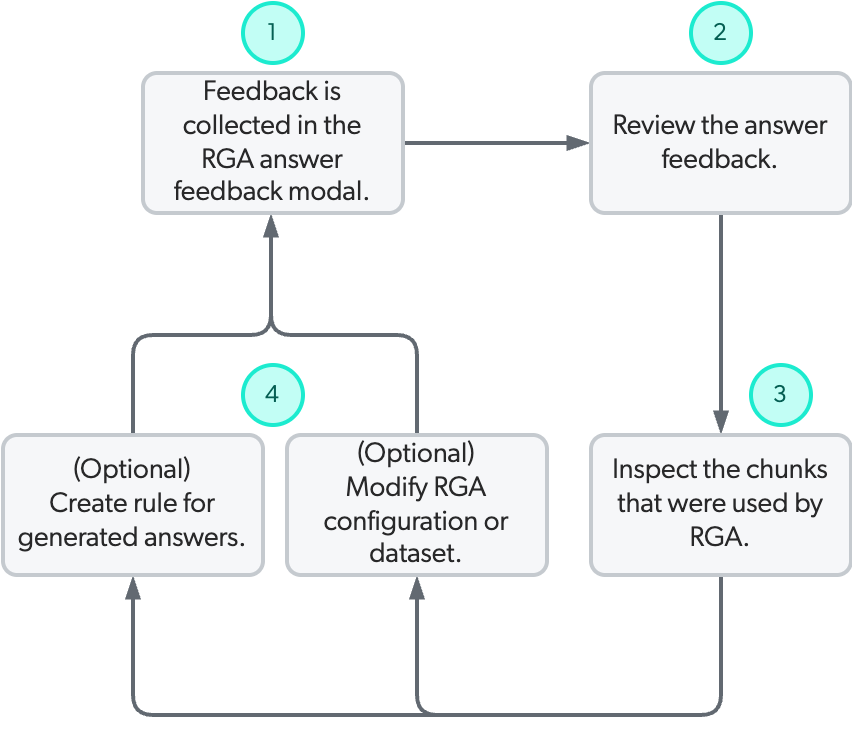
The recommended workflow for improving your RGA implementation is cyclical: evaluate the generated answers, analyze the chunks used to produce them, adjust your RGA implementation, and then re-evaluate the generated answers.
The following diagram illustrates this cyclical process and describes how the Knowledge Hub features are used in that process:
1 |
When RGA generates an answer for a user query in a search interface, the user can click the thumbs-up or thumbs-down icon in the RGA component to provide feedback on the generated answer. |
2 |
Use the Knowledge Hub Answer Manager to review the answer feedback. You’ll be able to see the query, the generated answer, and the feedback information that was provided. |
3 |
Use the Knowledge Hub Chunk Inspector to inspect the segments of text (chunks) that RGA used to generate the answer. Inspecting the chunks used by RGA provides insight as to why certain segments of text were used over others. This is especially useful when evaluating answers with negative feedback or answers that have been flagged as needing improvement. |
4 |
Based on the information gathered from reviewing the answer feedback and inspecting the chunks used by RGA, you can manage generated answers and improve your RGA implementation by creating rules in the Knowledge Hub Answer Manager, modifying the content used by RGA, and modifying your RGA implementation configuration. |
Analyze the performance of your RGA implementation
You can use the Coveo Knowledge Hub GenAI Performance dashboards to analyze the performance of all your RGA implementations from a single location.
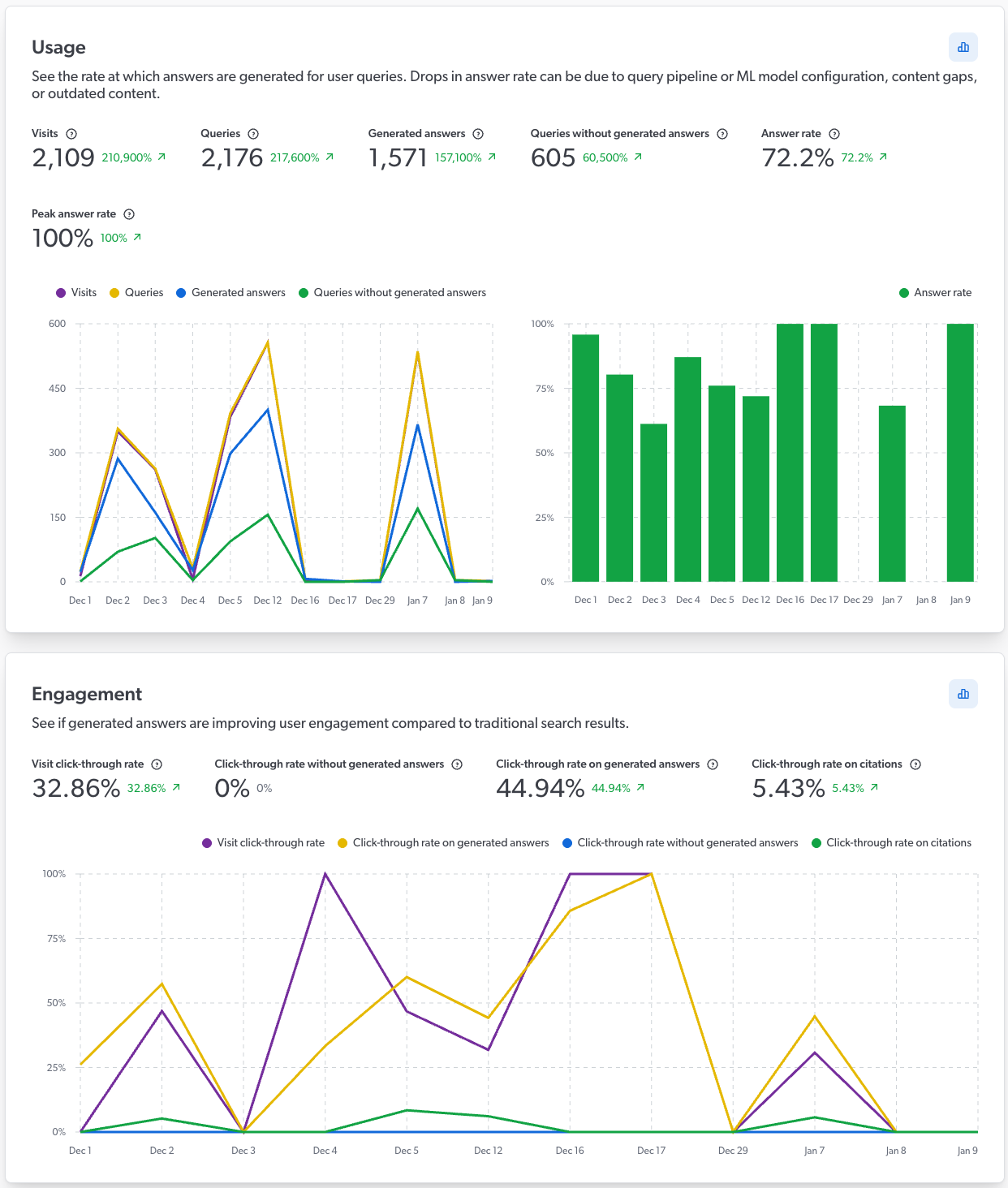
The dashboards include important metrics and information for analyzing RGA coverage and effectiveness, such as answer rate and a list of queries that didn’t generate an answer. The dashboards also include information related to your content, such as a list of the most cited items in generated answers, and behavioral information, such as user engagement with your RGA-generated answers.
By combining both quantitative and qualitative information, the GenAI Performance dashboards allow for a comprehensive analysis of your RGA implementations. All metrics also include trend indicators that show whether values are trending up or down, and adjustable period filters make it possible to view and compare information across different time frames. The dashboards provide visibility into potential issues or gaps in your RGA implementation, enabling you to make informed decisions to optimize performance.
Following a product release, while looking at the GenAI Performance dashboards, you notice a drop in the overall answer rate. You also notice that answers weren’t generated for a high number of queries related to that new product.
By monitoring the data and identifying a potential issue, you can investigate and address issues in your RGA implementation before they significantly impact user experience. For example, you may need to create new content for the product, adjust the RGA model configuration to include relevant content, or modify the associated query pipeline settings to better capture queries related to the new product.
Required privileges
The following table indicates the privileges required to access the Coveo Knowledge Hub (see Manage privileges and Privilege reference).
| Action | Service | Domain | Required access level |
|---|---|---|---|
Access the Coveo Knowledge Hub |
Knowledge |
Knowledge hub |
Allowed |
Organization |
Organization |
View |