Get started with the Hosted Model Context Protocol (MCP) Server
Get started with the Hosted Model Context Protocol (MCP) Server

The Coveo Hosted Model Context Protocol (MCP) Server enables Large Language Model (LLM) applications and AI agent frameworks to seamlessly access Coveo’s enterprise search and retrieval capabilities. It empowers these apps and frameworks to dynamically invoke Coveo tools, such as Search, Fetch, Answer, and Passage Retrieval without the need for custom integrations, making it easier for end users to obtain secure, relevant, and context-aware responses grounded in enterprise data.

|
For simplicity, the term LLM app is used throughout this article to refer to both an LLM application (such as ChatGPT) and an AI agent framework (such as AWS Bedrock). |
Solution overview
The Hosted MCP Server acts as an intermediary between LLM apps and Coveo’s APIs, streamlining the process of tool invocation and data retrieval. The following diagram provides a high-level overview of the Hosted MCP Server solution:
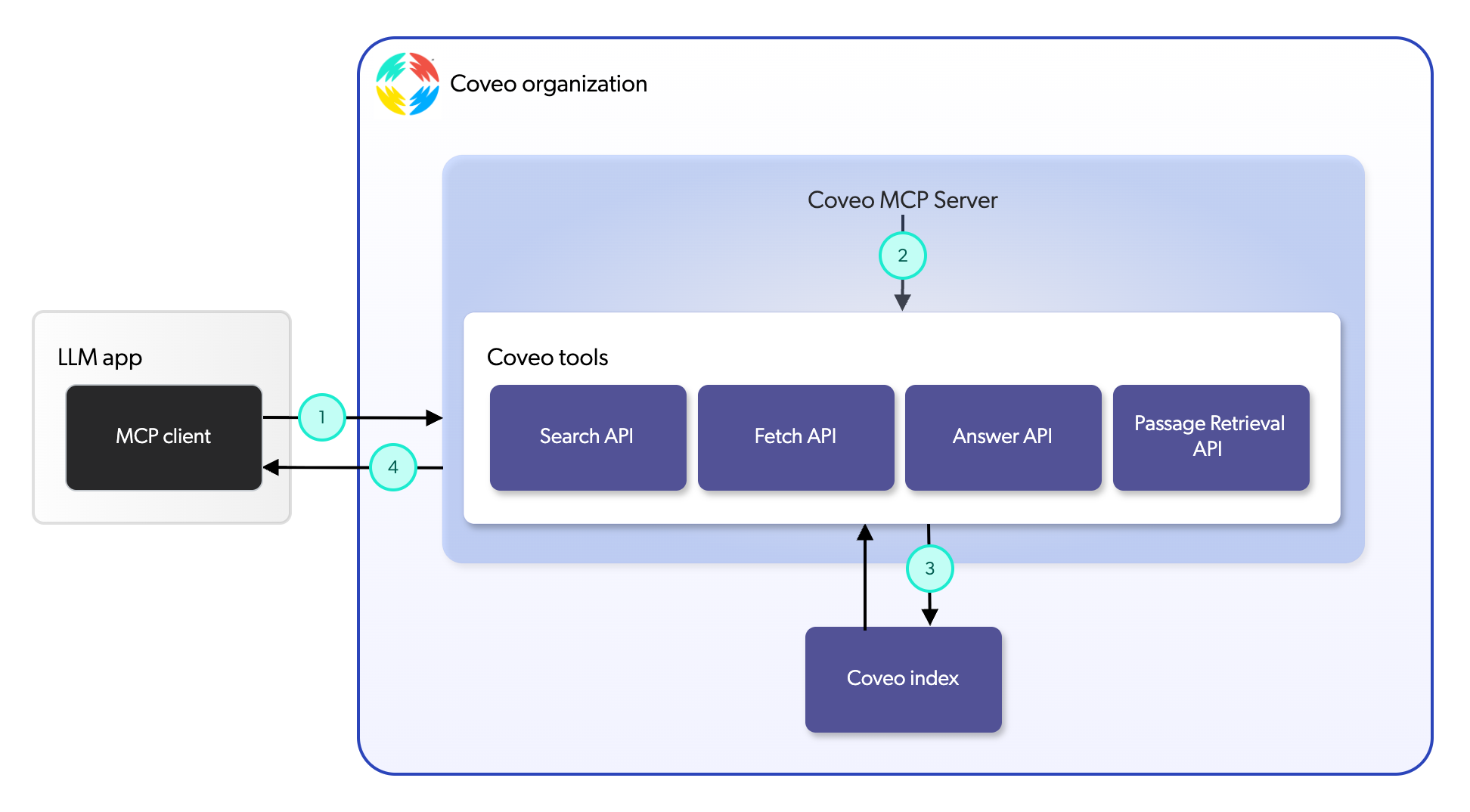
1 |
The MCP client, which is integrated into the LLM app, communicates with the Hosted MCP Server to request access to specific tools based on end user prompts or tasks. |
2 |
The Hosted MCP Server processes these requests and routes them to the appropriate Coveo APIs based on the tool being invoked. |
3 |
The Coveo APIs execute the requested operations, retrieving relevant data or generating answers from your indexed content. |
4 |
The Hosted MCP Server then returns the results to the MCP client, enabling it to return or generate contextually relevant responses for end users. |
Key benefits
The Hosted MCP Server offers several benefits for organizations looking to enhance the capabilities of their LLM apps:
-
Seamless integration: The Hosted MCP Server standardizes tool access, making Coveo’s Search, Fetch, Answer, and Passage Retrieval APIs accessible by leading third-party LLM apps at runtime.
-
Enhanced relevance and context: By leveraging Coveo’s powerful search and retrieval capabilities, the Hosted MCP Server ensures that responses generated by LLM apps are grounded in contextually relevant information from your indexed content.
-
Plug-and-play compatibility: The Hosted MCP Server is compatible with leading third-party LLM apps, allowing organizations to choose the best client apps for their specific use cases.
-
Scalability: The Hosted MCP Server is designed to handle large request volumes, making it suitable for enterprise workloads.
-
Enterprise-grade security: The Hosted MCP Server adheres to Coveo’s robust security standards, ensuring that data access is secure and compliant with organizational policies.
Which tool is right for your implementation?
The Hosted MCP Server offers the Search, Fetch, Answer, and Passage Retrieval tools that LLM apps can use to access and retrieve information from your indexed content. The tools you choose to use depend on the specific requirements of your application and the nature of end user prompts and queries. These tools can be used independently or in combination to provide a comprehensive solution for various use cases. The following sections provide an overview of each tool, highlighting their key features and typical use cases.
Search tool
The Search tool leverages the Coveo Search API to perform full-text searches across your indexed content. It’s useful for surfacing ranked items that match a query, which helps end users find relevant information quickly.
Fetch tool
The Fetch tool leverages a function of the Coveo Search API to retrieve a specific item based on a unique identifier. It’s particularly useful when direct access to a known item, in the form of its full content, is required.
You want to build an internal knowledge bot that can retrieve a specific policy document or technical manual when an employee requests a document ID or title.
Answer tool
The Answer tool leverages the Coveo Answer API to generate answers using Relevance Generative Answering (RGA). It’s ideal for providing generated answers that are grounded in your indexed content.
You want to build an autonomous support agent that answers or deflects tickets by providing end users with grounded generated answers using your official knowledge base and product documentation.
Passage Retrieval tool
The Passage Retrieval tool leverages the Coveo Passage Retrieval API to retrieve specific sections of text, known as passages, from your indexed content. It’s useful for retrieving the most relevant passages for a given query so third-party LLM apps can use them to generate answers.
You want to build a legal assistant that can generate answers to complex questions by retrieving pertinent passages from contracts and legal documents grounded in your enterprise data.
Current limitations
While the Hosted MCP Server significantly enhances the capabilities of LLM apps, there are some limitations to be aware of:
-
Effective tool selection by the LLM app depends on clear tool descriptions in your configuration, so plan to iterate and test descriptions to achieve reliable results.
-
Direct debugging capabilities aren’t yet available.
-
Filtering options such as facets aren’t yet available.
Solution demo
The following video[1] showcases the Hosted MCP Server solution, describing its key features and benefits for LLM apps.

What’s next?
See Manage Hosted MCP Server configurations for instructions on how to add, configure, and manage a Hosted MCP Server.