Monitor system performance
Monitor system performance

This is for:
System AdministratorAs you progress through your Coveo journey, monitoring system performance becomes crucial to ensure optimal search experiences for your users. To help you achieve this, Coveo provides a dedicated System Performance (platform-ca | platform-eu | platform-au) page within the Administration Console. This page offers a centralized view of key indexing and query performance metrics, enabling you to proactively manage and optimize your Coveo organization.
For your license details and an overview of your usage, check the License & Usage (platform-ca | platform-eu | platform-au) page and its dedicated article instead.
The System Performance page consists of two tabs: Content indexing and Queries. This article provides an overview of each tab and offers optimization tips to help you enhance your organization’s performance.
Content indexing tab
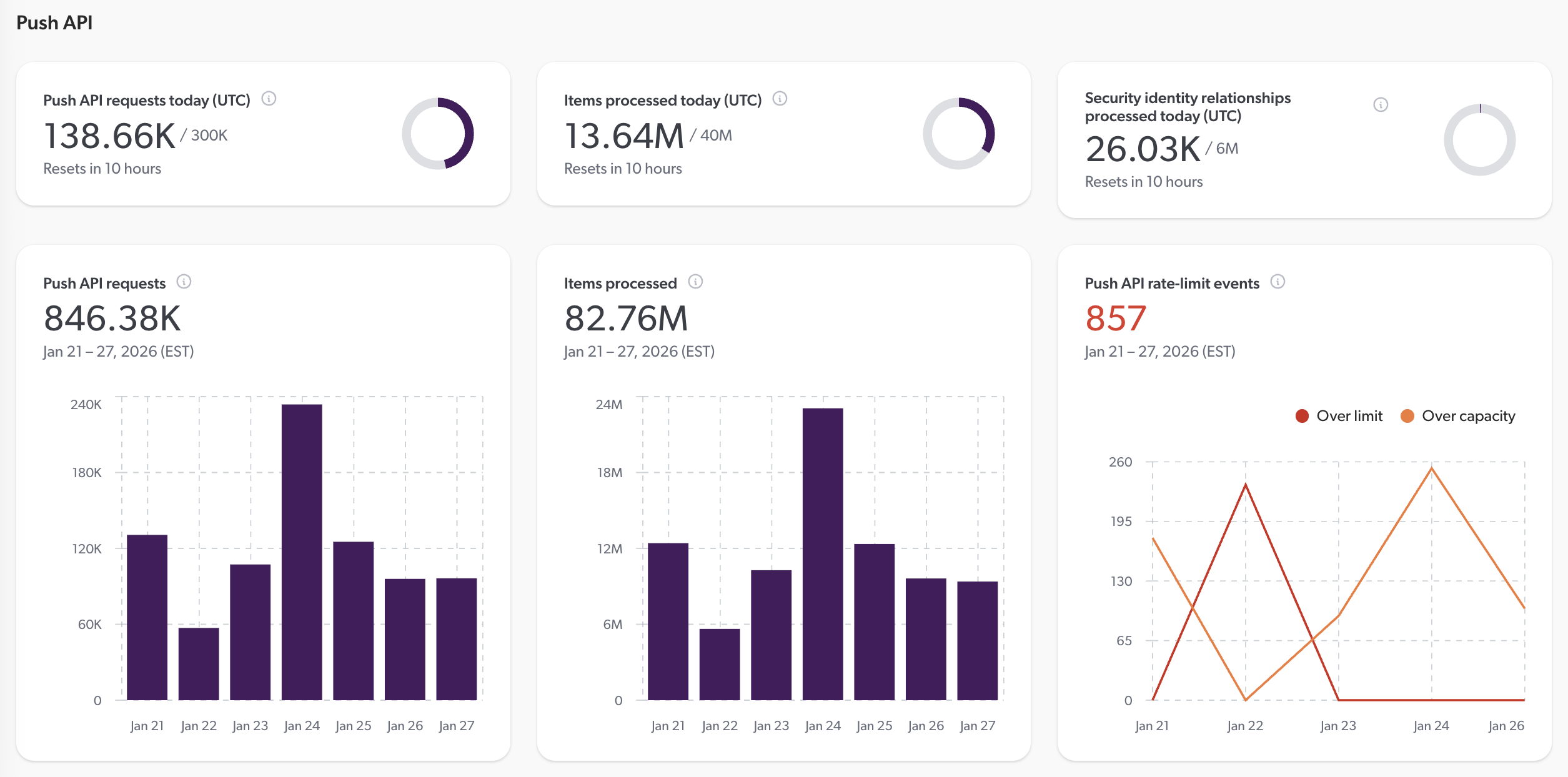
The Content indexing tab provides insights into the performance of your content indexing processes. It displays metrics such as the number of items indexed over time and any throttling events that may impact indexing speed. By monitoring these metrics, you can ensure that your content is being indexed efficiently and take corrective actions if necessary.
Additionally, the counts are displayed next to your organization quotas, enabling efficient monitoring of your usage. If you regularly approach or exceed your quotas, you can take proactive steps to manage your content indexing activities and avoid potential disruptions. You can also email the Coveo subscription team to discuss options for increasing your quotas to better accommodate your organization’s needs.
About rate-limit events
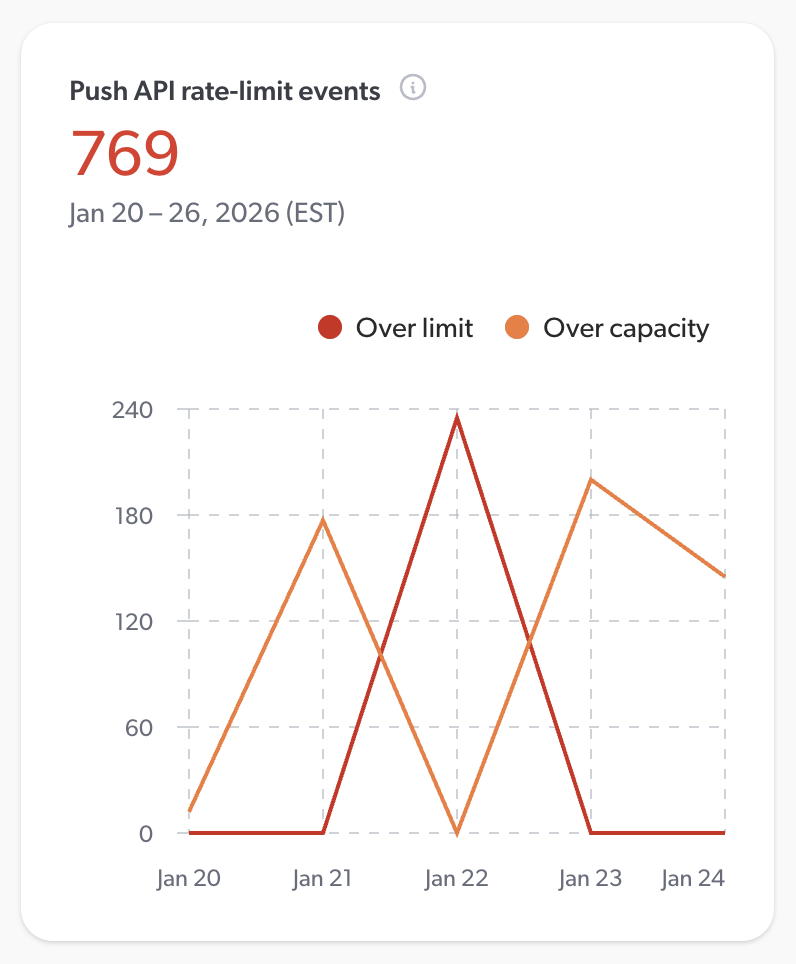
Rate-limit events occur when your organization exceeds the allowed number of requests to a Coveo API within a specified time frame. These events can impact the performance of your content indexing processes, leading to delays in indexing new or updated content.
The rate-limit events card displays two types of events:
-
Over-limit events: These events occur when your organization has exceeded the maximum number of allowed requests to a Coveo API for the day (UTC). Check the
Retry-Afterheader in the API response to determine when you can resume making requests. A high number of over-limit events indicates that your sources are frequently being throttled, which may lead to indexing delays and degrade content freshness. If you think your organization requires a higher rate limit, email the Coveo subscription team to discuss your options. -
Over-capacity events: These events occur when your organization has reached the maximum capacity for concurrent requests to a Coveo API. Your organization can still make requests, but they may be delayed or declined until capacity becomes available. See About Coveo’s indexing capacity management for details.
Optimize your content indexing
If you’re satisfied with your indexing performance, no action is needed. However, if you notice frequent rate-limit events or indexing pipeline errors, or if you often exceed your organization quotas, consider the following optimization tips.
When approaching your quotas, or when dealing with rate-limit events
-
Review and implement the leading practices for managing your sources.
-
Schedule source updates following the leading practices.
-
Read about crawling speed.
-
If your sources are throttled due to rate-limit events, check the
Retry-Afterheader in the API response to determine how long to wait before retrying your requests. -
Read about indexing capacity management, especially the section on implementing a retry mechanism.
-
With the Push API, consider batching your items or security identities.
-
When pushing SAP catalog data to Coveo, consider adjusting the concurrency and batch size parameters.
-
With the Stream API, increase batch size if your source is throttled due to a high number of requests. If your source is rather throttled due to a high number of items processed, decrease the frequency of updates.
When dealing with indexing pipeline errors
-
Select an issue and open it in the Log Browser to investigate the root cause. Expand the issue for details. The source or item URI may help you narrow down your investigation.
-
If the error comes from an indexing pipeline extension, check the usage statistics on the Extensions (platform-ca | platform-eu | platform-au) page to identify problematic extensions and review the indexing logs.
To optimize your index item count
The number of items in your index is a key entitlement of your Coveo license. Monitoring and optimizing your item count can help you stay within your entitlement. Moreover, a clean index yields faster, more relevant search, and prevents you from having to maintain complex rules to filter out useless data at query time.
To optimize your item count, consider the following best practices:
-
Delete unused sources. Do you have test or duplicate sources that are no longer needed? Consider using non-production organizations and resource snapshots for testing purposes.
-
Refine your original content directly in its repository. Are there any duplicates that could be removed? Are there any items that could be deleted? You can review what your sources have indexed in the Content Browser (platform-ca | platform-eu | platform-au). Refining your content before it’s even indexed also helps improve indexing time and efficiency.
-
Review each source’s scope. If you can filter out unwanted content before it’s indexed, the indexing process becomes lighter and easier to troubleshoot. Several sources provide inclusion, exclusion, and filtering options that help narrow the scope of indexed content. For example, a Google Drive source can be configured to index content from specific users or folders only. If the options in your source’s configuration panel are insufficient, consider adding JSON source filters to better control what is indexed.
-
With a Push source, only push items that are relevant to your search interface users.
-
With a Crawling Module source, consider using a pre-push extension to filter out unwanted items before they’re indexed.
-
Consider indexing pipeline extensions to discard items that have been indexed but that aren’t relevant to your search interface users. However, it’s best to narrow a source’s scope to prevent such items from being indexed in the first place if you can. This makes the indexing process more efficient and easier to troubleshoot.
-
Check your analytics Reports (platform-ca | platform-eu | platform-au) to identify items that receive no traffic. Adjust your sources' scope or filters to exclude them.
Queries tab
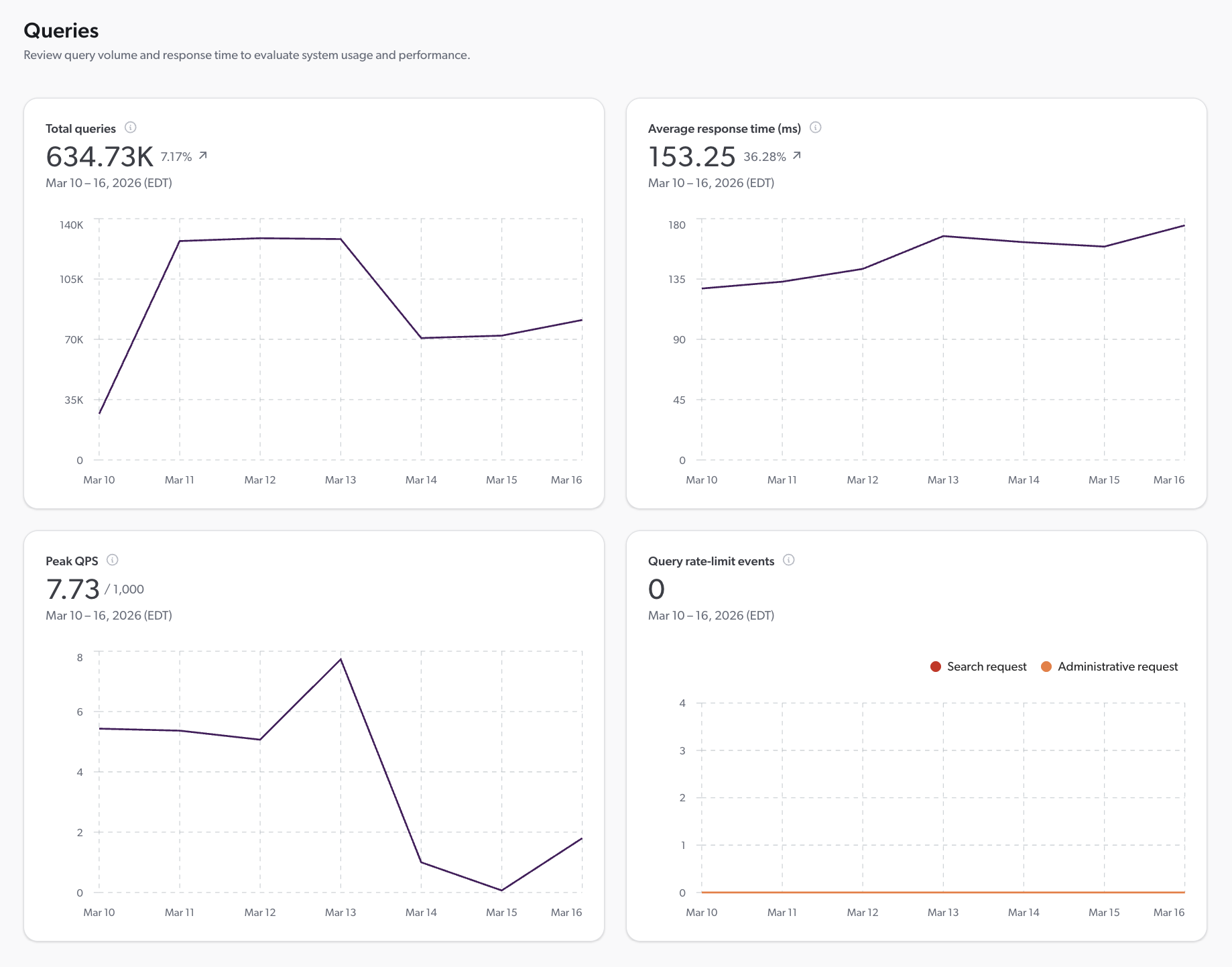
The Queries tab offers insights into the performance of your search interfaces. It displays your total number of queries, the average response time, peak queries per second (QPS), and any rate-limit events that may affect query performance. By monitoring these metrics, you can ensure that your search interfaces are delivering fast results to your users.
Optimize your search interface performance
To optimize your search interface performance
-
Consider a multi-region deployment to reduce latency for users located far from your organization’s primary region.
-
Check the per-pipeline average response times on the Query Pipelines (platform-ca | platform-eu | platform-au) page to identify any pipelines that may require optimization.
-
Keep your query pipelines as simple as possible. The more rules you configure in the query pipeline, the more time it takes to process.
-
Follow the thesaurus rules leading practices.
-
Follow the ranking expression rules leading practices.
-
Follow the stop word rules leading practices.
-
If your search interface allows sorting results by a custom field, make sure to enable the Sortable and Use cache for sort options for that field. Keeping the field in memory improves response time.
-
Disable the Facet, Multi-value facet, Sortable, and Free text search options for fields that don’t require them.
-
Keep the number of displayed values low in string facets to reduce facet loading time.
-
If most of the indexed items have a different value for a certain string field, disable the Facet option for this field. Loading many values is resource-demanding, and therefore increases response time. However, if you must have this facet in your search interface, enable the Use cache for nested queries option.
-
If your search interface has a range facet, make sure to enable the Use cache for numeric queries option for this facet’s field.
-
Keep the number of search results displayed per page low.
-
If folding results, keep the number of results folded inside each top result low.
As for query rate limit events, if you encounter frequent Administrative API errors or need a higher Search API rate limit, email the Coveo subscription team.
Required privileges
The following table indicates the privileges required to view the System Performance (platform-ca | platform-eu | platform-au) page. See Manage privileges for more information on granting privileges, and the Privilege reference for details on each privilege.
| Action | Service | Domain | Required access level |
|---|---|---|---|
View the System Performance page |
Organization |
Organization |
View |
Open indexing pipeline errors in the Log Browser |
Content |
Sources |
View |
Organization |
Organization |
View |