CMH Overview
CMH Overview

This is for:
MerchandiserThe Coveo Merchandising Hub (CMH) Overview page is the first page you see when you open the CMH, giving you an at-a-glance view of key performance metrics for the selected property. You can use it to review results over a chosen period or compare two periods side by side.
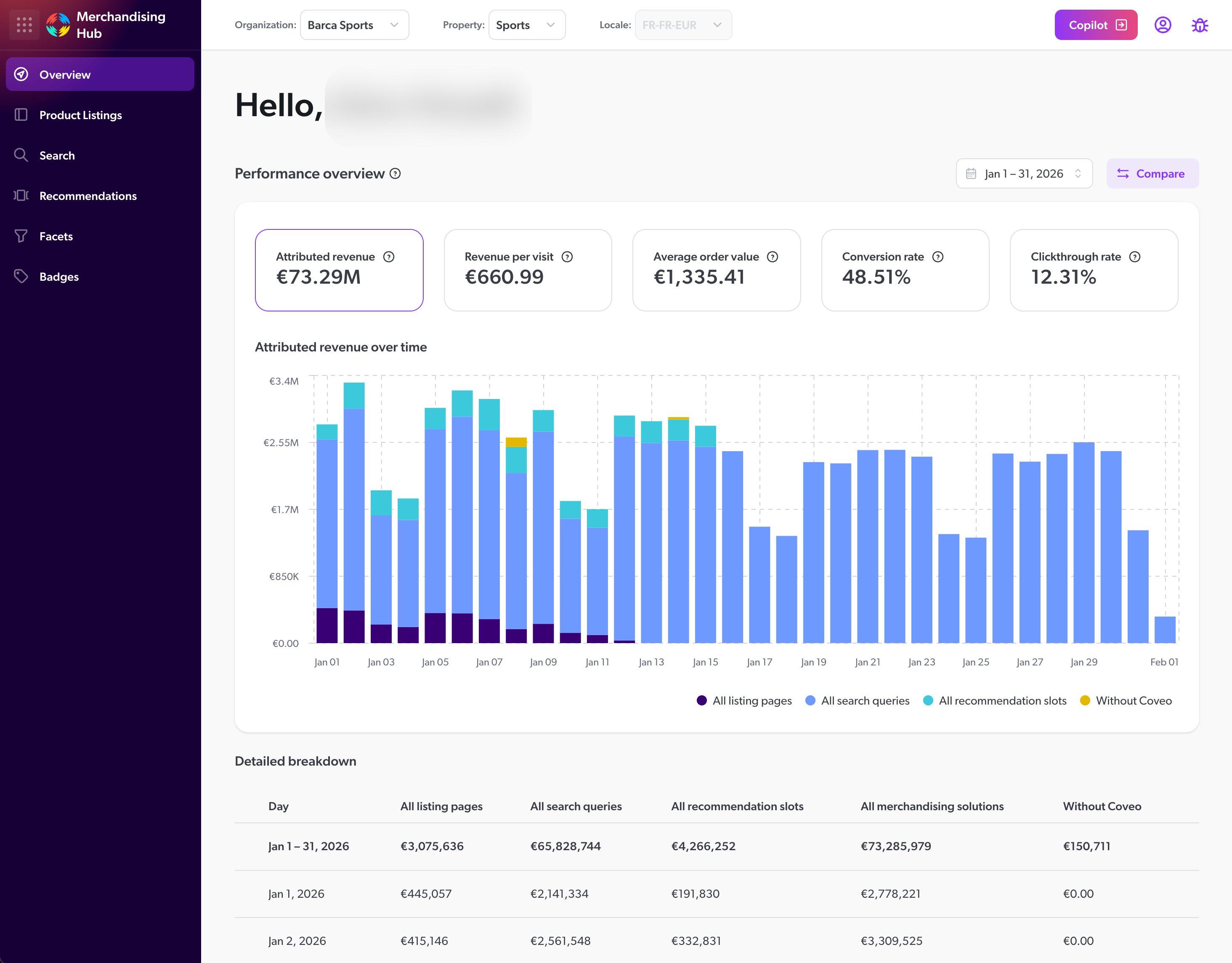
By default, the CMH Overview page is scoped to all merchandising solutions and shows data for the past 30 days. If your Coveo organization is new to CMH or doesn’t yet have any tracked activity, the performance metrics will appear once data becomes available.
Performance overview
At the top of the page, the Performance overview section shows five metric cards: Attributed revenue, Revenue per visit, Average order value, Conversion rate, and Clickthrough rate. These cards are interactive. Click a metric card to focus the performance view on that metric for the selected period.
Directly under the metric cards, the trend chart shows the selected metric over the chosen date range. For example, selecting the Attributed revenue card displays the Attributed revenue over time chart. The chart also includes Non-attributed revenue, which represents purchases that aren’t attributed to Search, Product Listings, or Recommendations, so you can compare both values over the same period. Selecting Average order value, Conversion rate, or Clickthrough rate updates the trend chart to show that metric over the same period. The chart title updates to match the selected metric.
Detailed breakdown
In the Detailed breakdown section, the first row shows the combined totals per solution, for the selected date range. Each subsequent row represents an individual day within that period, so you can review how the selected metric changes over time. The table breaks down the selected metric across different solutions. The columns update when you click a different metric card.
Discrepancies between reports
Figures shown for metrics in Coveo Merchandising Hub (CMH) Overview reports may differ from those for the same metrics in the Reports (platform-ca | platform-eu | platform-au) page of the Coveo Administration Console, Commerce Advanced Reports, and Coveo Merchandising Hub (CMH) manager reports, because each report type applies different filters and processing rules.
| Behavior | Administration Console reports | Commerce Advanced Reports | CMH Overview | CMH Search manager reports |
|---|---|---|---|---|
|
Included |
Included |
Included |
Excluded |
|
Included |
Included |
Included |
Excluded |
|
Included |
Excluded |
Excluded |
Excluded |
|
Included |
Excluded |
Excluded |
Excluded |
Query case normalization |
Case-sensitive |
Case-insensitive |
Case-insensitive |
Case-insensitive |
Timezone |
UTC |
Browser timezone |
Browser timezone |
Browser timezone |
The main drivers of discrepancies between report types are:
-
searchboxAsYouTypeevent handling: Report types differ in whether they count search events where the event cause issearchboxAsYouType:-
Administration Console reports include these events in all metrics.
-
Commerce Advanced Reports and Coveo Merchandising Hub (CMH) Overview reports include them in search counts and revenue, but exclude them from clickthrough rate and average click rank to avoid diluting click-based metrics with product suggestion events.
-
Coveo Merchandising Hub (CMH) Search manager reports exclude them from all metrics to remove noise from product suggestions.
This means Search manager reports show lower search counts and revenue than other report types. If your implementation includes product suggestions in the search box, revenue may also differ between Coveo Merchandising Hub (CMH) Overview and Search manager reports.
-
-
Query case normalization: Commerce Advanced Reports and Coveo Merchandising Hub (CMH) reports normalize queries to lowercase, so "shoes", "Shoes", and "SHOES" are counted as one query. Administration Console reports may count them separately.
-
Timezone: Administration Console reports use UTC. Commerce Advanced Reports and Coveo Merchandising Hub (CMH) reports use the browser’s local timezone, which can shift daily totals near day boundaries.