Manage the Multi-Modal Catalog Encoder
Manage the Multi-Modal Catalog Encoder

This is for:
System AdministratorThis article describes how to enable the Multi-Modal Catalog Encoder, validate its impact, and understand its entitlement and fallback behavior.

|
Note
A model can take anywhere from several minutes to several hours to build, depending on the size of the model dataset and the number of model build requests in the queue (system load). |
Enable the encoder
The Multi-Modal Catalog Encoder is offered under a separate entitlement from the Catalog Semantic Encoder (CSE). Once your license includes the entitlement, a Coveo representative enables the feature for your Coveo organization.
When the entitlement is active, multi-modal embeddings take precedence and replace the core embeddings used by the Catalog Semantic Encoder. No changes to your query pipelines or front-end integration are required.
Before the Multi-Modal Catalog Encoder is enabled for your Coveo organization, confirm that your catalog and images are ready, as described in the prerequisites. For how images are retrieved and validated, see Product images for the Multi-Modal Catalog Encoder.
Scope the encoder
You can enable or disable multi-modal embeddings per catalog or per environment. This lets you roll out the encoder progressively. For example, you can validate it in a non-production environment or on a single catalog before enabling it everywhere.
Validate its impact
You can measure the impact of the Multi-Modal Catalog Encoder against your existing setup using the following methods:
-
A/B testing: Test multi-modal embeddings against the Catalog Semantic Encoder on live traffic, and measure the impact on click-through rate and low-performing queries.
-
Attribution: Identify whether observed relevance changes are attributable to multi-modal embeddings rather than to other configuration or model changes.
-
Signal visibility: Get high-level visibility into whether image-based signals contributed to ranking decisions for a given query. Raw embeddings and the vector space aren’t exposed.
Manage the model
|
|
Note
Model creation is currently performed with the help of your Coveo representative. A self-serve model creation flow within the Coveo Administration Console is planned for a future release. |
When a model builds, it processes your catalog and images, generates embeddings, and packages everything needed for serving, including a precomputed query embedding cache. The encoder ships with production-safe default configurations that require no manual tuning. Serving parameters, such as semantic similarity thresholds and boosting behavior, are optimized automatically for your catalog during the model build, and the model is evaluated against relevance quality checks before it’s published.
Fallback behavior
The Multi-Modal Catalog Encoder is designed so that search availability is never at risk.
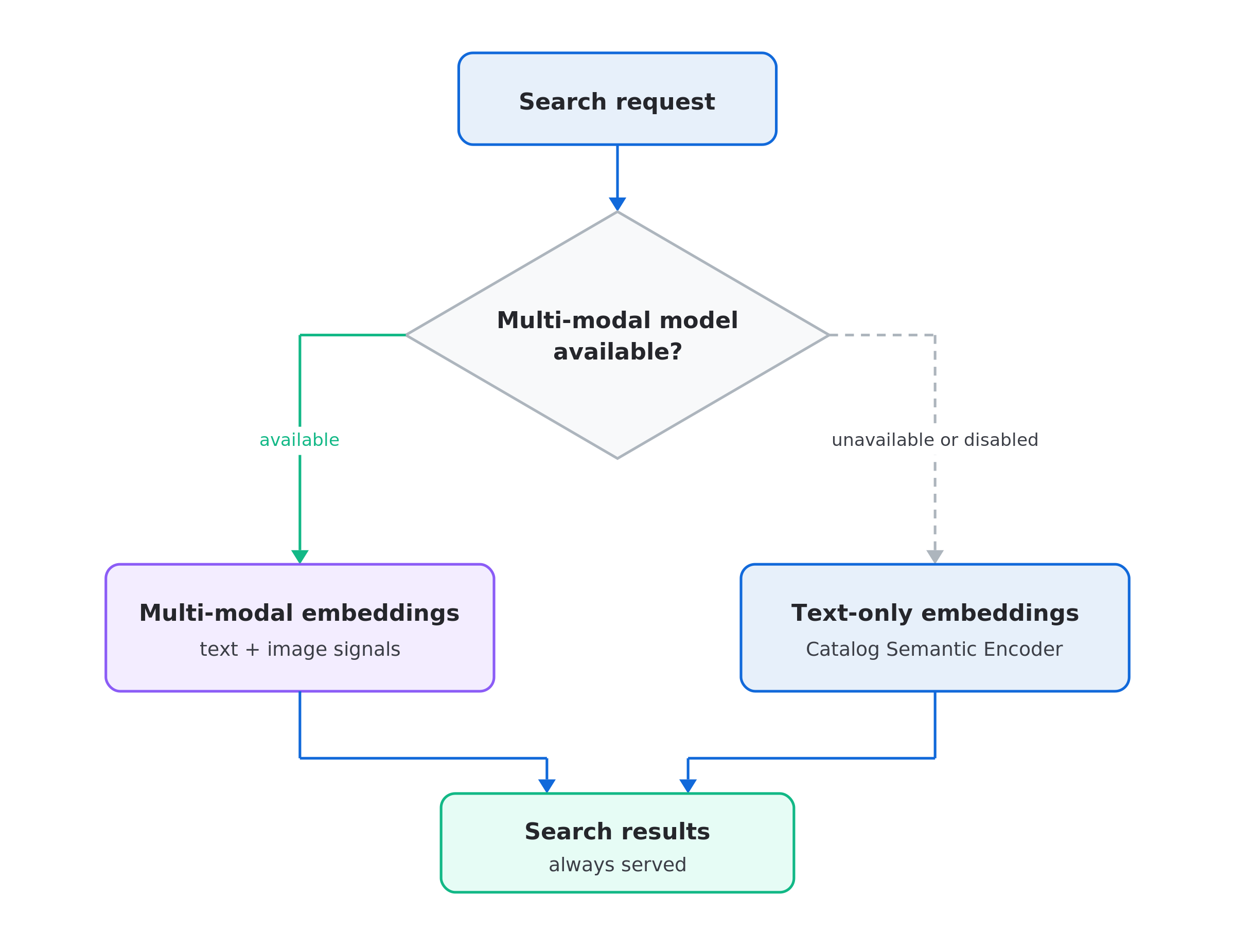
The following diagram shows how search uses multi-modal embeddings when the model is available and text-only Catalog Semantic Encoder embeddings when it’s unavailable or disabled, with both paths leading to search results.
-
If multi-modal embedding services are unavailable or degraded, search automatically falls back to text-only semantic embeddings.
-
Failures in multi-modal embedding infrastructure don’t affect search availability.
-
Products without usable images are always served using text-based embeddings.
Disable the encoder
If the Multi-Modal Catalog Encoder entitlement is removed from your license, multi-modal embedding behavior is fully disabled. Your Coveo organization returns to the standard Catalog Semantic Encoder without further configuration.