Disable the reverse proxy
Disable the reverse proxy


|
Legacy feature
The Coveo Hive Framework is now in maintenance mode and is no longer recommended for new implementations. To build new search experiences, use one of Coveo’s more modern, lightweight, and responsive libraries. To get started, see the Build search article. |
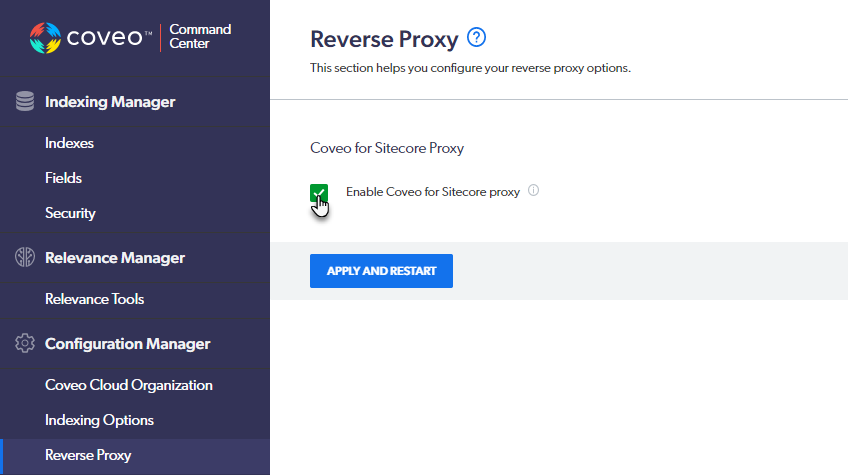
As of the October 30, 2020 release, you can disable the Coveo for Sitecore reverse proxy through the Command Center.
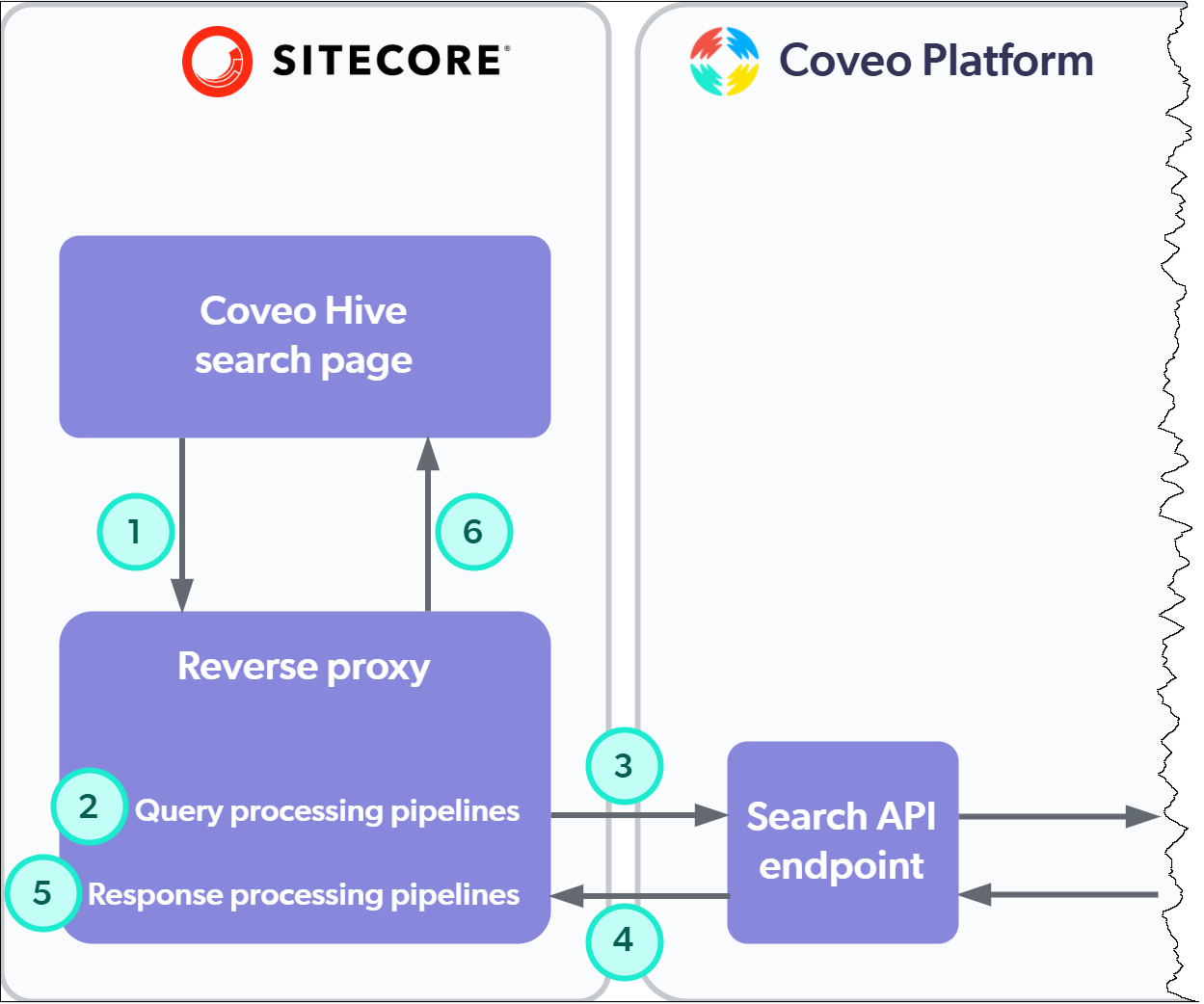
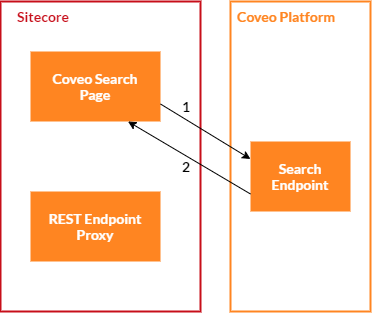
When you disable the reverse proxy, your Coveo Hive interface’s search and usage analytics requests are performed directly on Coveo Platform endpoints. The following diagrams illustrate the differences between the processing of search requests with the reverse proxy enabled (below left) and disabled (below right).
-
The Coveo Hive search page sends the search request to the reverse proxy endpoint.
-
Coveo for Sitecore query processing pipeline processors modify the request payload.
-
The reverse proxy relays the modified search request to the Search API endpoint.
-
The Coveo Platform sends the response back to the reverse proxy endpoint.
-
Coveo for Sitecore response processing pipeline processors modify the JSON response.
-
The reverse proxy relays the modified response to the Coveo Hive search page.
-
The Coveo Hive search page sends the search request directly to the Search API endpoint.
-
The Coveo Platform sends the response back to the Coveo Hive search page.

|
Coveo Hive search interfaces now perform front-end calls through the reverse proxy to generate search tokens, even when you disable the proxy. Caching reverse proxy endpoint responses may cause issues. |
Pros and cons of disabling the reverse proxy
Choosing between using or disabling the Coveo for Sitecore reverse proxy is a matter of context.
-
A Coveo for Commerce customer using Sitecore on Azure should bypass the reverse proxy to increase perceived search performance and reduce Azure usage costs. Moreover, Coveo for Commerce customers don’t benefit from Coveo for Sitecore search pipelines designed to handle responses with Sitecore source data (see Compatibility with Sitecore Commerce).
-
A customer with a scaled on-premises Sitecore XM or XP environment would benefit from enabling the reverse proxy, especially if they’re inclined to leverage Coveo for Sitecore search pipelines for custom code.
In more detail, consider the advantages and drawbacks in the table below when deciding whether to disable the Coveo for Sitecore reverse proxy.
| Criterion | Using the reverse proxy | Bypassing the reverse proxy | ||
|---|---|---|---|---|
Host resolving |
|
Out of the box, a Coveo for Sitecore response processing proxy pipeline runs the |
|
In a scaled Sitecore environment, you’ll need to account for the fact your clickable URIs are not automatically recomputed at query time. For example, you could use an indexing pipeline extension to ensure your items are indexed with content delivery (CD) site URIs. |
Search query durations |
|
Search query requests and responses are relayed by the reverse proxy. Server thread handling, proxy pipeline operations (for example, deserialization and reserialization of search request payloads), and processor execution increase overhead. |
|
Your search requests are sent directly from your search interface to the Coveo Platform Search API endpoint, resulting in shorter query durations. |
Custom processing of search queries/results |
|
Coveo for Sitecore provides pipelines to alter search queries before they’re sent to the Coveo Platform, and to handle and modify the responses. You can run your custom processors in these pipelines, leveraging Sitecore context (see About the REST endpoint pipelines). |
|
You’ll need to consider using query pipeline features to alter search requests in the Coveo Platform before they’re sent to the index. Though query pipeline features are powerful, only the trigger feature lets you alter the query response, but not the search results themselves. |
Load on server |
|
Using the reverse proxy produces two hits on your server for each search and usage analytics request, increasing the load on your server. |
|
Your server is hit only once for each search and usage analytics request. On hosted platforms (for example, Azure), where usage costs may depend on the number of hits to your backend, bypassing the reverse proxy can translate into cost reductions. |

