About Dynamic Navigation Experience (DNE)
About Dynamic Navigation Experience (DNE)


Coveo Machine Learning (Coveo ML) Dynamic Navigation Experience (DNE) models leverage Coveo Analytics events to pertinently order facets and facet values. More precisely, DNE models analyze queries and actions performed by previous users (for example, clicked results and facet selections) to make the most relevant facets appear at the top for a given query.
Coveo ML DNE models also reorder facet values within a given facet to make the most popular values appear at the top. To do so, the models use the actions performed by previous users who have selected certain facet values for a specific query.
Furthermore, Coveo ML DNE offers a facet value autoselection feature that improves the user experience by automatically selecting facet values.
A Coveo ML DNE model uses its facet value ranking to boost search results. The model uses the most popular facet values for a certain query and applies query ranking expressions (QREs) to boost the search results whose field values match the values of those facets.

|
Note
A model can take anywhere from several minutes to several hours to build, depending on the size of the model dataset and the number of model build requests in the queue (system load). |

|
A Coveo Machine Learning (Coveo ML) Dynamic Navigation Experience (DNE) model requires dynamic facets. If your search interface uses the Coveo JavaScript Search Framework, DNE doesn’t support regular facets. For more information, see Configure dynamic facets in your search interface. |
Members with the required privileges can create, manage, and deploy a DNE model.
You’re selling smartphones on your site.
Before enabling Coveo ML DNE, your search page, powered by the Coveo JavaScript Search Framework, displays facets in the following order when customers search for cellphone:
-
Screen size
-
Storage capacity
-
Price
-
Brand
You enable a Coveo ML DNE model. When your search interface sends a query to the Search API to request facets, the DNE model modifies that query in the query pipeline. It applies insights gained from the analysis of past customer behavior and determines that users are most likely to sort search results using the Brand and Price facets. Your search page now displays facets in the following order:
-
Brand
-
Price
-
Screen size
-
Storage capacity
Before enabling Coveo ML DNE, the Brand facet displayed its facet values in the following order when customers searched for cellphone:
-
LG
-
Samsung
-
Apple
You enable a Coveo ML DNE model. When your search interface sends a query to the Search API to request facets, the DNE model modifies that query in the query pipeline. It applies insights gained from the analysis of past customer behavior and determines that users are most likely to search for Apple and Samsung smartphones rather than for LG devices. The JavaScript Search Framework now displays the facet values within the Brand facet in the following order:
-
Apple
-
Samsung
-
LG
Since the Coveo ML DNE model determined that customers are more likely to shop for Apple phones, the model modifies the user query to boost Apple phone result list items.
About the autoselection feature
It’s possible to activate the DNE autoselection feature in your Coveo-powered interfaces. To use this feature, you only need to specify which facets to apply the feature on when you create your DNE model.
For a given query, the DNE autoselection feature can automatically select the most relevant facet value from the returned facets. To do so, the feature learns from your end-users' behaviors to understand which facet values are the most relevant.
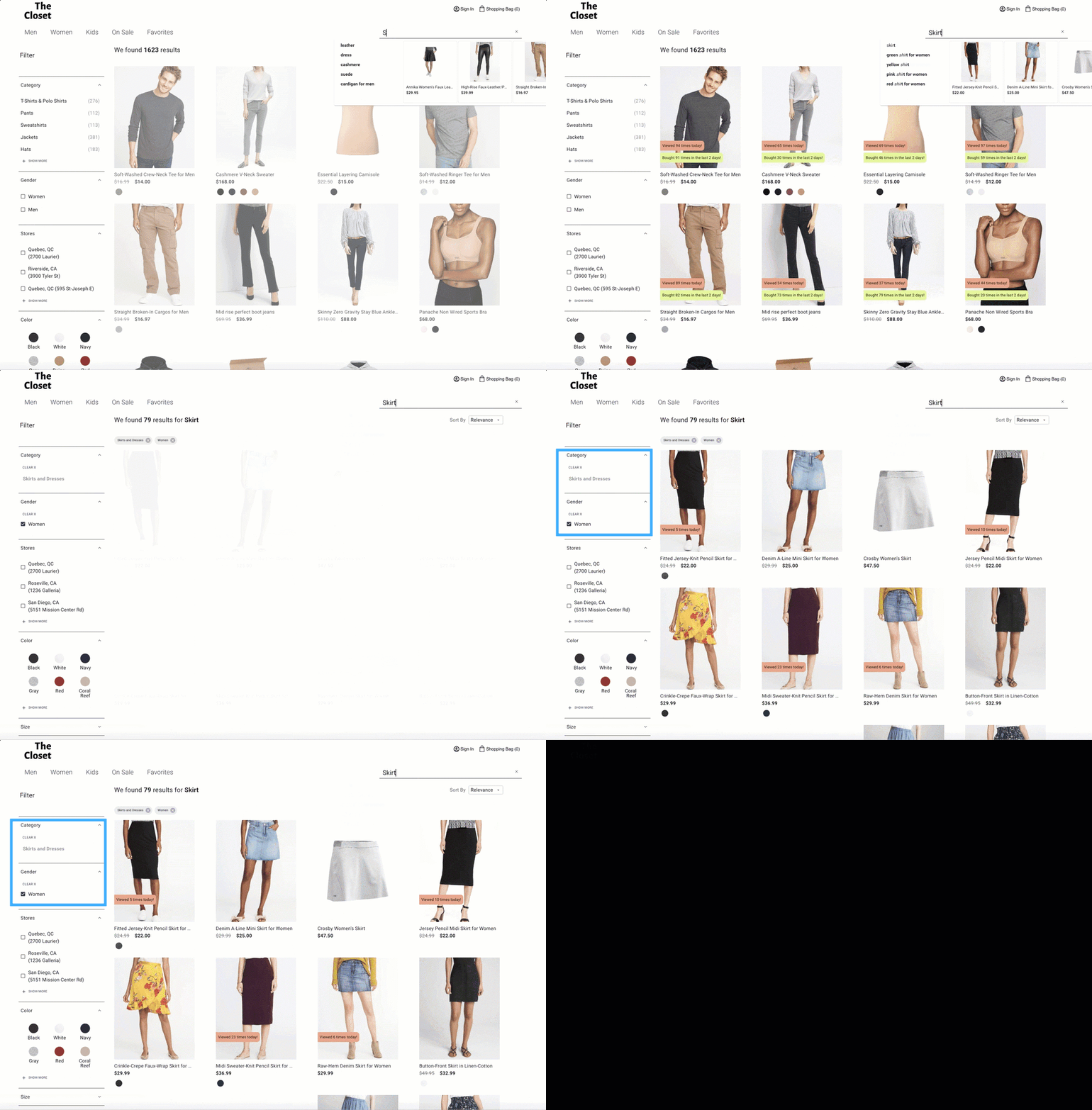
For a Coveo-powered clothing commerce interface, a Coveo administrator created a DNE model and chose to enable the autoselection feature for the category and gender facets when configuring the model.
When accessing the commerce interface, a customer searches for a skirt.
Based on the recorded Coveo Analytics data, the model determines that the Skirts and Dresses value of the Category facet and the Women value of the gender facet are relevant enough to be automatically selected and refine the user query.
About the Facet Generator feature
As a complement to your DNE model, the Facet Generator displays the best facets for your search interface. It works right away, without any training, and is ideal for commerce scenarios.
See About the Facet Generator for details.
Submodels
A submodel is a smaller, specialized model that operates as part of a larger model.
A DNE model automatically creates submodels to handle different combinations of language, search hub, and tabs because these attributes normally define different types of users and use cases.
A model learns separately from search visits made in interfaces offered in different languages, since the keywords used for similar searches often vary by language. Different search hubs or interfaces may also serve different purposes, meaning that users may expect different results for the same query depending on where they search. Submodels account for these differences by filtering out recommendations that don’t match the current search hub and interface combination, helping ensure that recommendations remain relevant to the context in which the search is performed.
For example:
-
If your search hub supports multiple languages, each language will have its own submodel to ensure that recommendations are relevant to users searching in that language.
-
If your model is used in multiple search hubs that all share the same language, each search hub will have its own submodel to ensure that recommendations are relevant to the context of that specific search hub.
-
If a search hub contains multiple tabs, each tab will have its own submodel to account for the different search contexts represented by those tabs.
-
If your model is used across multiple search hubs, languages, and tabs, each combination of search hub, language, and tab will have its own submodel. For example, if a search hub has English and French versions and contains Products and Documentation tabs, separate submodels are created for each combination: English-Products, English-Documentation, French-Products, and French-Documentation.
You can review the number of recommended items for each submodel in the model’s information tab.
|
|
Notes
|

|
If you want user behavior from one search interface (search hub) to influence recommendations in other search interfaces for a unified experience, you can configure the Suggestion filters advanced model setting accordingly. If the parameter value specifies only a particular search hub, the model uses behavior from that search hub to generate recommendations or suggestions, including when the model is used in a different search hub. Before modifying the Suggestion filters advanced option, we strongly recommend that you consult your Account Manager or Coveo Support for appropriate guidance. Moreover, you should test any changes in a sandbox environment before deploying in production. |