Choose the right approach
Choose the right approach

This is for:
DeveloperCoveo provides a number of frameworks and REST APIs to build a search interface. Which framework or REST API is the best for you depends on your business needs, desired performance, complexity, etc. Compare the available options below to choose the approach that’s right for you, then begin your implementation.

|
Notes
|
Which is the best one?
The following graphics and the detailed comparison matrix show that Atomic is typically the best choice if performance, development speed, and customization are equally important for you.
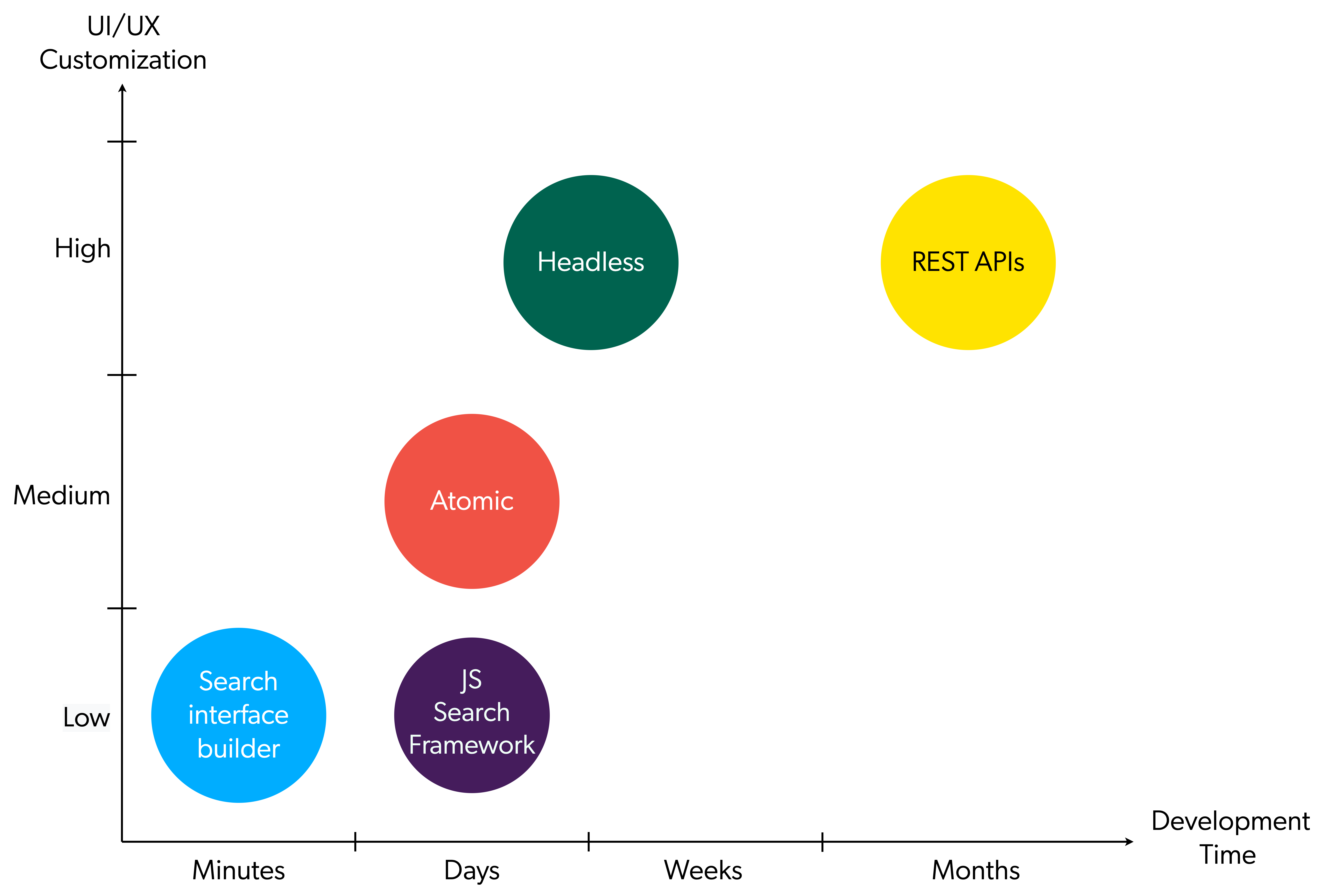
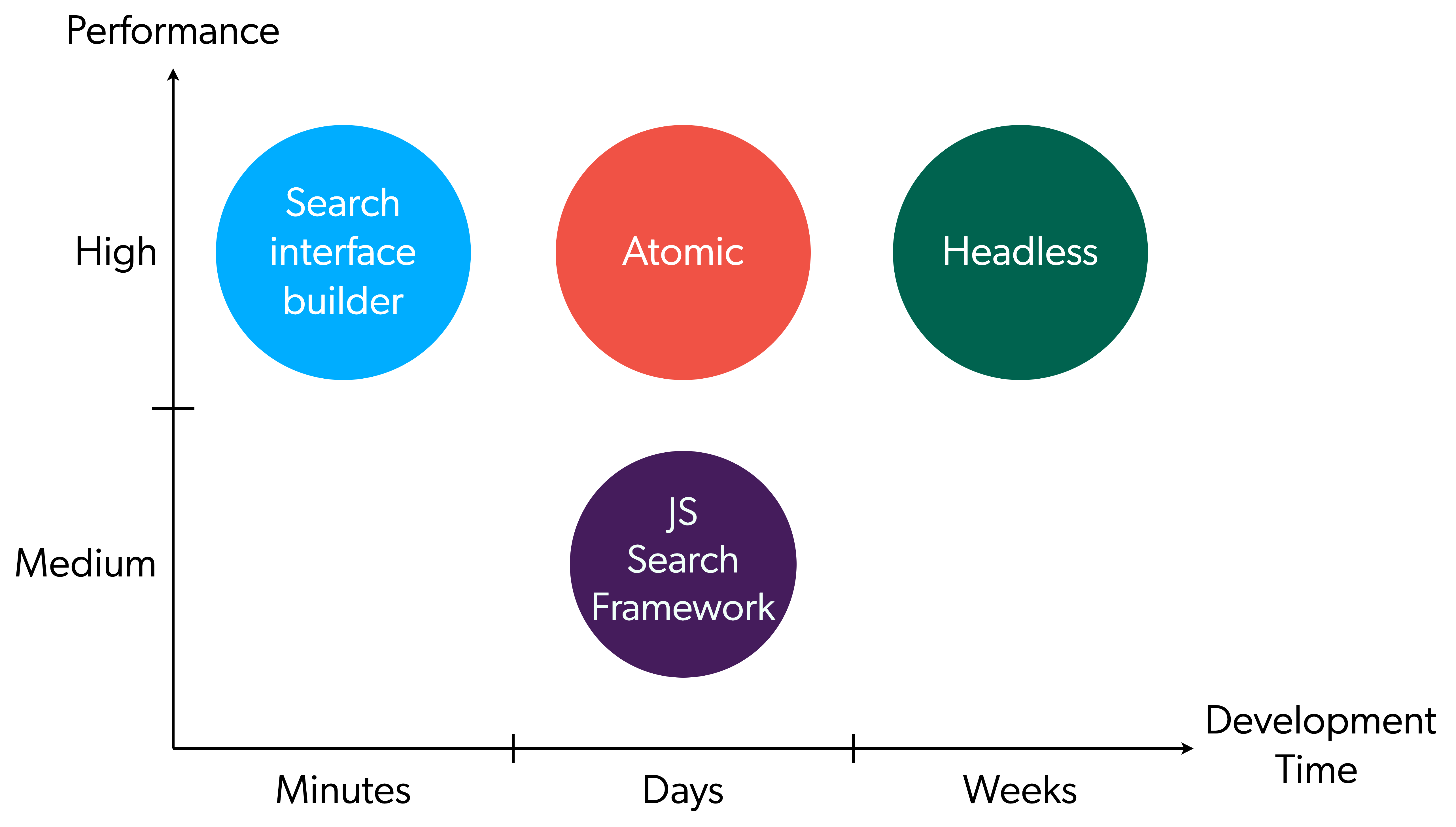
Self-hosted vs. Coveo-hosted
Depending on the needs of your organization, Coveo offers you the option to self-host your search page internally or to have Coveo host your search page for you.
This section will highlight the pros and cons of each approach to help you decide which option best meets your needs.
Self-hosted search page
Coveo provides a number of ways to build your own custom search pages, whether it be through the Atomic or Headless libraries or building a completely custom implementation with REST APIs. These options will allow you to create a solution tailored to your needs, from controlling the entire look and feel of the implementation to custom-built API solutions.
Using a self-hosted page gives you the most control over the user experience on your site.
| Pros | Cons |
|---|---|
|
|
Coveo-hosted search page
You can use the Search Pages (platform-ca | platform-eu | platform-au) panel to create search pages hosted by Coveo with the Search page builder. Coveo-hosted search pages are immediately fully operational, which means that you can use and share them as soon as they’re created. This no-code option allows you to create a simple search page in a matter of minutes without having to host any resources.
The customization options for this approach are limited, but it’s the fastest way to get started with Coveo search.
Using a Coveo-hosted page can also be a useful tool for adding Coveo search to your site quickly while you develop a self-hosted solution.
| Pros | Cons |
|---|---|
|
|
The comparison matrix
The following matrix presents an in-depth comparison of the tools Coveo provides.
The stars in this table are score points. The higher, the better. The bottom row shows the total score for each tool.
| Search interface builder | Atomic | Headless | JS Search Framework | REST API | |
|---|---|---|---|---|---|
Programming Skills Required |
None ⭐⭐⭐ |
Low ⭐⭐⭐ |
Medium ⭐⭐ |
Low ⭐⭐⭐ |
High ⭐ |
Performance |
High ⭐⭐ |
High ⭐⭐ |
High ⭐⭐ |
Medium ⭐ |
N/A — |
Bundle Size |
N/A — |
Light ⭐⭐ |
Light ⭐⭐ |
Heavy ⭐ |
N/A — |
Pre-built Components |
Yes ⭐ |
Yes ⭐ |
No — |
Yes ⭐ |
No — |
Server-side Rendering |
No — |
No — |
Yes ⭐ |
No — |
N/A — |
UI/UX Customization |
Low ⭐ |
Medium ⭐⭐ |
High ⭐⭐⭐ |
Low ⭐ |
High ⭐⭐⭐ |
Analytics |
Included ⭐ |
Included ⭐ |
Included ⭐ |
Included ⭐ |
Excluded / DIY — |
Under active development |
Yes ⭐ |
Yes ⭐ |
Yes ⭐ |
No — |
Yes ⭐ |
Time to Build a Search Interface |
Minutes ⭐⭐⭐ |
Days ⭐⭐⭐ |
Days to Weeks ⭐⭐ |
Days ⭐⭐⭐ |
Months ⭐ |
Score |
12 pts |
15 pts |
14 pts |
11 pts |
6 pts |
See the following sections for details on each approach.
Combine frameworks
Technically, you can use two frameworks simultaneously. For example, this can help you gradually migrate from JS Search Framework to Atomic.

|
JS Search Framework vs Atomic and Headless
Your interface can be built with:
Don’t use the JavaScript Search Framework with other frameworks unless absolutely required. By doing so, you’re likely to face issues with inconsistency in the long term. To migrate from the JavaScript Search Framework to either Atomic or Headless, you have to rewrite the existing portions of the code with the new framework. |
All frameworks either wrap the Coveo REST APIs directly or wrap a framework that does. It’s safe to use a given framework in conjunction with a tool from the same hierarchy, for example, Atomic and Headless or Atomic and REST APIs.
The following diagram shows how frameworks relate to each other:

Search interface builder
Coveo’s search interface builder is available via the Search Pages (platform-ca | platform-eu | platform-au) page of the Administration Console and works with the Atomic library. You can use the builder to create a basic search interface in a couple of minutes without writing any code.
Search pages created with the builder are hosted by Coveo. Once you’ve created your search page, you can deploy it to your site.
The hosted search pages are also useful tools for testing or demonstration purposes while building out your Coveo search solution. You can share links to these hosted search pages with anyone, even people who don’t have access to the Coveo Administration Console.
To create a custom search interface, however, you should opt for Atomic or another library or framework.
| Pros | Cons |
|---|---|
|
|
Atomic library
The Coveo Atomic library is a collection of pre-built UI components meant to quickly create product discovery interfaces. You can theme and customize the Atomic components to suit your needs. Under the hood, Atomic relies on the Coveo Headless library to interface with Coveo and handle the application state.
For more information, see Use the Atomic Library and Atomic for commerce.

|
Create an Atomic search interface project with The search interface builder, which uses Atomic, is also an ideal codeless alternative for creating simple interfaces for testing or demonstrations. |
| Pros | Cons |
|---|---|
|
|

|
Atomic for Commerce components are in open beta and remain under active development. Atomic for Commerce hasn’t yet gone through a formal accessibility review. If you have accessibility needs, contact your Account Manager and we’ll work with you to address them. |
Headless library
The Headless library is a Redux-based toolset for developing your own search UI component libraries. It provides the underlying functionality of the Atomic library or of the JavaScript Search Framework without tying that functionality to a specific UI implementation.
See Use the Headless library for details.
| Pros | Cons |
|---|---|
|
|
JavaScript Search Framework
|
|
Note
This framework is in maintenance mode. |
The JavaScript Search Framework is a UI component library that you can use to assemble feature-rich search interfaces. It’s both customizable and extendable to suit your individual use cases.
See Use the JavaScript Search Framework (Legacy) for details.
| Pros | Cons |
|---|---|
|
|
REST APIs
The Atomic and Headless libraries, as well as the JavaScript Search Framework, are built on top of the Coveo REST APIs. Those APIs are publicly documented, and you can develop directly against them to integrate Coveo search features in an environment that can’t run JavaScript.
See Use the REST APIs to build a search UI for details.
| Pros | Cons |
|---|---|
|
|
What’s next?
Continue with the implementation path that matches your selected approach:
-
Follow the implementation guide to build and deploy your Coveo-powered search interface.
-
Create a Coveo search interface project to scaffold an Atomic or Headless starter project.
-
Manage hosted search pages to create and manage Coveo-hosted search pages.
-
Use the REST APIs to build a search UI when your integration can’t use a JavaScript library.