Adobe Experience Manager
Adobe Experience Manager

Adobe Experience Manager integrates with Coveo so you can index website pages and assets, enrich them with metadata, and surface relevant results in Coveo-powered experiences.
About Adobe Experience Manager
Adobe Experience Manager is a content management system for managing digital experiences, websites, and assets.
Why use Coveo with Adobe Experience Manager?
Connect your repository to a unified index so users can find relevant Adobe Experience Manager content alongside content from other systems.
-
Index the items and metadata that are relevant to your users.
-
Once indexed, surface this content alongside content from your other sources. Present it in a single Coveo-powered search interface with filtering, ranking, and personalized results, or make it available to an LLM app or agent through a Coveo MCP Server connection.
Considerations
The recommended integration described below assumes that you have a sitemap file and don’t need to index item access permissions. Alternatively:
-
If you don’t have a sitemap file, use a Coveo Web source instead.
-
If you need to index item access permissions, use a Push source instead. Unlike the Sitemap and Web sources, the Push source supports the Same users and groups as in your content system content-security option.
The recommended integration uses a Coveo Atomic search interface to surface the indexed content. Before you build it, confirm that Atomic is the right approach for your experience. Another way to surface the indexed content is through an MCP client and Coveo MCP Server connection. See AI assistants and agents for more information.
Recommended integration architecture
A Coveo source that uses a generic connector, like the Sitemap source, retrieves content and metadata from Adobe Experience Manager and indexes it in Coveo. A Coveo-powered search interface can then surface the indexed content.
The following diagram shows the recommended Adobe Experience Manager integration.
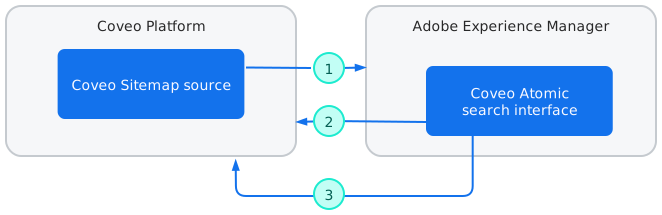
1 |
The Coveo Sitemap source retrieves content using the Adobe Experience Manager API. |
2 |
The Coveo Atomic search interface sends requests, including usage analytics data, to the Coveo Search API. The Search API returns results and AI-generated answers back to the interface. |
3 |
The Coveo Search API records the search interface’s usage analytics in Coveo Analytics. Search interface result click events and AI-generated answers are also logged through other means and aren’t shown on the diagram. |
Prerequisites
-
You have access to the Adobe Experience Manager content and assets that you want to make searchable.
-
You have a license that allows you to create the required source in your Coveo organization.
-
Your Coveo organization hasn’t reached its source quota. You can review your quotas on the License & Usage (platform-ca | platform-eu | platform-au) page, along with your usage.
-
You have the privileges to create and manage sources.
Integrate Adobe Experience Manager with Coveo
Follow these steps to select a source, index your Adobe Experience Manager content, and verify the results.
Step 1: Create and configure the source
Create a Coveo Sitemap source and configure the sitemap URLs, crawling scope, authentication when required, and metadata extraction.
Step 2: Index your Adobe Experience Manager content
Build the source, then use the Content Browser (platform-ca | platform-eu | platform-au) to verify the indexed pages, assets, URLs, and metadata.
Step 3: Create source mappings and fields
Create the required source mappings and fields to index the metadata you want to use in search experiences.
Step 4: Build the search interface
Follow the Getting started with Atomic documentation to start building the Coveo Atomic search interface.

|
Create your search interface project using the npm create @coveo/ui command line tool. |
What’s next?
-
See source update schedules to configure when your source checks for changed content.
-
See Achieve relevance to improve the relevance of the Adobe Experience Manager search experience.
-
See the integration directory for other Coveo integration opportunities.