Website content
Website content

This is for:
DeveloperCoveo integrates with websites, content management systems, digital experience platforms, and cloud content repositories to make pages, assets, files, and metadata searchable and relevant. Coveo works alongside these platforms so teams can continue authoring or storing content where they already manage it.
This article helps developers evaluate how Coveo fits into a website, content platform, or cloud repository implementation.
What Coveo powers in these platforms
Coveo retrieves content and metadata from these platforms through packaged integrations, native connectors, or configured generic connectors, depending on where the content lives. Coveo stores the content in a single index alongside content from your other systems, enabling a unified search experience. The source platform remains the system for authoring or storing content, while Coveo provides the search and relevance layer.
Use cases
-
Make website pages, assets, files, and objects discoverable alongside content from other enterprise systems.
-
Preserve metadata so users can filter and sort search results.
-
Index content from a cloud repository without changing how teams manage the files or objects in that repository.
-
Deliver relevant search experiences without replacing the source platform’s authoring or storage workflow.
Typical integration pattern
The typical content ingestion pattern depends on where the content lives. The example below shows the pattern for websites and content management systems where the Coveo Sitemap source is the recommended approach.
A Coveo Atomic search interface can surface indexed content in a website or application by sending search requests, including usage analytics data, to the Coveo Search API. The Search API records the analytics in the Coveo Platform, so users can search the content and Coveo can improve relevance over time.
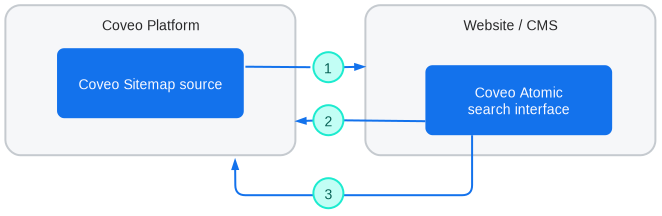
1 |
The Coveo Sitemap source crawls the items listed in the configured sitemap; use a Coveo Web source when no sitemap is available. |
2 |
The Coveo Atomic search interface sends requests, including usage analytics data, to the Coveo Search API. The Search API returns results and AI-generated answers to the interface. An alternative way to query the Coveo index is through an MCP client and Coveo MCP Server connection. See AI assistants and agents for more information. |
3 |
The Coveo Search API records the search interface’s usage analytics in Coveo Analytics, where the data can support machine learning models that improve relevance. Search interface result click events and AI-generated answers are also logged through other means and aren’t shown on the diagram. |
Refer to product-specific articles when available.
Product-specific articles
The following content management systems have dedicated Coveo integration articles: