V2 release notes
V2 release notes
- May 2018 maintenance release: v2.51.4
- March 2018 maintenance release: v2.51.3
- February 2018 maintenance release: v2.51
- December 2017 maintenance release: v2.50
- October 2017 maintenance release: v2.49
- October 2017 release: v2.48
- July 2017 release: v2.45
- May 2017 maintenance release: v2.44
- May 2017 release: v2.41
- March 2017 maintenance release: v2.40
- March 2017 release: v2.39
- February 2017 maintenance release: v2.38.2
- February 2017 release: v2.38
- November 2016 maintenance release: v2.35.1
- November 2016 maintenance release: v2.35
- November 2016 maintenance release: v2.34
- November 2016 release: v2.33
- September 2016 maintenance release: v2.32
- September 2016 maintenance release: v2.31
- September 2016 release: v2.29
- July 2016 maintenance release: v2.27
- July 2016 maintenance release: v2.26
- July 2016 release: v2.25
- May 2016 maintenance release: v2.24
- May 2016 maintenance release: v2.21.1
- May 2016 release: v2.21
- April 2016 release: v2.19
- February 2016 maintenance release: v2.18
- February 2016 maintenance release: v2.17
- February 2016 release: v2.15
- December 2015 maintenance release: v2.9
- December 2015 release: v2.8
- November 2015 release: v2.6
- September 2015 release: v2.5
- July 2015 maintenance release: v2.4.1
- July 2015 maintenance release: v2.4
- July 2015 release: v2.3
May 2018 maintenance release: v2.51.4

|
This release needs to be installed when Upgrading from v2 to v3. For more information, see Upgrading from v2 to v3. |

|
Note
This release includes the JavaScript Search Framework March 2018 maintenance release (1.2537.55) and the JavaScript Interface Editor September 2017 minor release (v1.1.18). |
This section summarizes the enhancements, bug fixes, and fixed support cases introduced in the May 2018 maintenance release of Coveo for Salesforce (2.51.4).
To download this release of Coveo for Salesforce:
| Issue number | Enhancement |
|---|---|
SFINT-1470 |
Ensure that the Coveo for Salesforce package can be updated to v3. |
March 2018 maintenance release: v2.51.3
|
|
Note
This release includes the JavaScript Search Framework March 2018 maintenance release (1.2537.55) and the JavaScript Interface Editor September 2017 minor release (v1.1.18). |
This section summarizes the enhancements, bug fixes, and fixed support cases introduced in the March 2018 maintenance release of Coveo for Salesforce (2.51.3).
To download this release of Coveo for Salesforce:
This release only includes a fix through the Coveo JavaScript Search Framework March 2018 maintenance release (1.2537.55).
February 2018 maintenance release: v2.51
|
|
A patch for this release was released to fix a specific issue with the Coveo JavaScript Search Framework (see March 2018 maintenance release: v2.51.3). |
|
|
Note
This release includes the JavaScript Search Framework February 2018 maintenance release (v1.2537.52) and the JavaScript Interface Editor September 2017 minor release (v1.1.18). |
This section summarizes the enhancements, bug fixes, and fixed support cases introduced in the February 2018 maintenance release of Coveo for Salesforce (2.51).
To download this release of Coveo for Salesforce:
| Issue number | Bug fix |
|---|---|
SFINT-864 |
[Standalone Searchbox] Ensured the search icon didn’t expand alongside the searchbox suggestions. |
SFNT-1177 |
Fixed issue preventing a search page from being modified or deleted from the Community Builder in a Spring '18 community. |
| Issue number | Case | Fixed support case |
|---|---|---|
SFINT-1171 |
00040339 |
[Standalone Searchbox] Ensured Lightning themes work alongside the search box (see Including the Standalone Searchbox in Your Community). |
SFINT-1229 |
00041373 |
[Standalone Searchbox] Fixed issue causing queries with parentheses to prevent subsequent queries. |
December 2017 maintenance release: v2.50
|
|
Note
This release includes the JavaScript Search Framework July 2017 maintenance release (v1.2537.33) and the JavaScript Interface Editor September 2017 minor release (v1.1.18). |
This section summarizes the enhancements and fixed support cases introduced in the December 2017 release of Coveo for Salesforce (2.50).
To download this release of Coveo for Salesforce:
| Issue number | Enhancement |
|---|---|
SFINT-1078 |
[Lightning components] Automatically renew the search token in Lightning. |
SFINT-1085 |
[Standalone Searchbox] Support Lightning themes with the Standalone Searchbox. |
SFINT-1102 |
[Insight Panel] Change partial match default configuration from match 5 to match 2 (see BoxQuerySome component - useSomeQRE). |
| Issue number | Case | Fixed support case |
|---|---|---|
SFINT-1052 |
00039381 |
Fixed issue causing new community users to see an error when accessing the community for the first time. |
October 2017 maintenance release: v2.49
|
|
Note
This release includes the JavaScript Search Framework July 2017 maintenance release (v1.2537.33) and the JavaScript Interface Editor September 2017 minor release (v1.1.18). |
This section summarizes the bug fixes and fixed support case introduced in the October 2017 maintenance release of Coveo for Salesforce (2.49).
To download this release of Coveo for Salesforce:
| Issue number | Bug fixes |
|---|---|
SFINT-1053 |
Fixed issue where an extra search token was sent alongside a custom search token. |
SFINT-1058 |
Fixed issue where |
| Issue number | Case | Fixed support case |
|---|---|---|
SFINT-1057 |
00038230 |
IE11 analytics events aren’t sent correctly. |
October 2017 release: v2.48
|
|
Note
This release includes the JavaScript Search Framework July 2017 maintenance release (v1.2537.33) and the JavaScript Interface Editor September 2017 minor release (v1.1.18). |
|
|
Due to a difference in the Salesforce Winter '18, when using the Coveo Standalone Searchbox, you must ensure that you have the appropriate value for the Search Url option (see Including the Standalone Searchbox in Your Community). |
| Version | Salesforce before Winter 18 | Salesforce Winter 18 and up (with up-to-date community) |
|---|---|---|
Coveo for Salesforce before v2.48 |
Leave the field blank |
|
Coveo for Salesforce v2.48+ |
|
Leave the field blank |
This section summarizes the new feature, bug fixes, and fixed support cases introduced in the October 2017 release of Coveo for Salesforce (2.48).
To download this release of Coveo for Salesforce:
| Issue number | New feature | Documentation |
|---|---|---|
SFINT-989 |
Add component property to custom scripts for Lightning components. |
Add JavaScript to the Coveo Lightning Aura components with custom code |
| Issue number | Bug fixes |
|---|---|
SFINT-209 |
Ensured query extensions generated by Coveo for Salesforce respect the leading practices. |
SFINT-911 |
Fixed jQuery issue when a Lightning component loads a version older than 3.0.0. |
SFINT-943 |
Fixed token refresh issue with Coveo. |
SFINT-949 |
Ensure that the Standalone Searchbox sets the correct parameters when used by an anonymous user. |
SFINT-965 |
Fixed issue with the recommendations component in Lightning. |
SFINT-973 |
Fixed Lightning advanced configuration issue. |
| Case | Issue number | Fixed support case |
|---|---|---|
00037035 |
SFINT-908 |
CaseArticle not always created when attaching to case. |
00038343 |
SFINT-977 |
Can’t use CustomSearchToken with CustomSearchbox component. |
00038540 |
SFINT-1018 |
Lightning search component |
July 2017 release: v2.45
|
|
Note
This release includes the JavaScript Search Framework July 2017 minor release (v1.2537.24) and the JavaScript Interface Editor May 2017 minor release (v1.1.11). |
This section summarizes the new features, bug fixes, and fixed support cases introduced in the July 2017 release of Coveo for Salesforce (2.45).
To download this release of Coveo for Salesforce:
| Issue number | New features | Documentation |
|---|---|---|
SFINT-436 |
Add administrator restrictions to Coveo configuration pages. |
|
SFINT-868 |
Submit Case ID to Usage Analytics when submitting a Case in the Case Creation component. |
|
SFINT-891 |
Improve tooltips in Lightning components. |
|
SFINT-893 |
Add descriptions to API keys generated by Coveo for Salesforce in Coveo. |
|
SFINT-897 |
Automatically create page configuration when administrators insert Coveo components in Lightning. |
|
SFINT-905 |
Allow login to Coveo through organization name in package configuration page. |
|
SFINT-906 |
Remove recommendation component option when creating a search page. |
|
SFINT-907 |
Support anonymous user access for Visualforce communities. |
|
UX-502 |
Update Getting Started page when installing the package. |
| Issue number | Bug fixes |
|---|---|
SFINT-338 |
Fix issue where guest users had access to search alerts. |
SFINT-529 |
Validate name when creating a Coveo-powered search page in Lightning. |
SFINT-612 |
Change default example for Advanced Server-Side Configuration to one valid with all editions of Coveo for Salesforce. |
SFINT-821 |
Change all external links from |
SFINT-922 |
Allow custom URL to be used in Coveo for Salesforce Free edition. |
| Issue number | Case | Fixed support case |
|---|---|---|
SFINT-872 |
00036971 |
Lightning component doesn’t work in IE11. |
SFINT-888 |
00037299 |
Can’t save query in the query editor of the Interface Editor. |
May 2017 maintenance release: v2.44
|
|
Note
This release includes the JavaScript Search Framework May 2017 minor release (v1.2537.19) and the JavaScript Interface Editor May 2017 minor release (v1.1.11). |
This section summarizes the new features, bug fixes, and fixed support cases introduced in the May 2017 maintenance release of Coveo for Salesforce (2.44).
To download this release of Coveo for Salesforce:
| Issue number | New feature |
|---|---|
SFINT-844 |
Allow users to switch Coveo versions using the Lightning Experience. |
| Issue number | Bug fixes |
|---|---|
SFINT-826 |
Better error handling when user denies Coveo access to Salesforce. |
SFINT-862 |
Added out-of-the-box template support for Standalone Searchbox with Coveo for Salesforce Free. |
SFINT-865 |
Fixed alignment issue with QuestionPost templates in Coveo for Salesforce Free. |
SFINT-874 |
Fixed JWT flow issue in Salesforce Demo Organizations. |
SFINT-875 |
Fixed issue causing two search components on the same page to share the same result templates. |
SFINT-876 |
Fixed issue preventing the Interface Editor from opening in Salesforce Demo Organizations. |
SFINT-877 |
Fixed issue with search page creation in Salesforce Demo Organizations. |
SFINT-882 |
Fixed error message when user doesn’t have access to a Coveo Lightning component. |
| Issue number | Case | Fixed support case |
|---|---|---|
SFINT-871 |
00037134 |
Underscore templating not rendering properly with Coveo for Salesforce 2.41. |
May 2017 release: v2.41
|
|
Note
This release includes the JavaScript Search Framework May 2017 minor release (v1.2537.19) and the JavaScript Interface Editor May 2017 minor release (v1.1.11). |
This section summarizes the new features, bug fixes, and fixed support cases introduced in the May 2017 release of Coveo for Salesforce (2.41).
To download this release of Coveo for Salesforce:
| Issue number | New features | Documentation |
|---|---|---|
SFINT-310 |
Display the Coveo Organization name and id on the package configuration page. |
|
SFINT-398 |
Disable the Edit/Delete button when a search page isn’t configured in Lightning. |
|
SFINT-414 |
Disable Interface Editor options when a user doesn’t have access to a Lightning component. |
|
SFINT-710 |
Support Lightning Locker (BETA) |
|
SFINT-720 |
Create a standalone search box for Lightning. |
|
SFINT-731 |
Display message to explain how to connect to Coveo. |
|
SFINT-805 |
Add origin context support for Usage Analytics. |
| Issue number | Bug fixes |
|---|---|
SFINT-64 |
Make Administration Console link dynamic in configuration page. |
SFINT-559 |
Fix swapped logic in Advanced configuration settings. |
SFINT-656 |
Fix Sarissa compatibility issue. |
SFINT-798 |
Fixed issue preventing Interface Editor from opening in Salesforce Demo Organization Lightning communities. |
| Issue number | Case | Fixed support case |
|---|---|---|
SFINT-837 |
00036900 |
Package 2.40 not installing without proper community. |
March 2017 maintenance release: v2.40
|
|
Note
This release includes the JavaScript Search Framework March 2017 maintenance release (v1.2359.14) and the Interface Editor March 2017 release (1.1.6). |
This section summarizes the bug fixes introduced in the March 2017 maintenance release of Coveo for Salesforce (2.40).
To download this release of Coveo for Salesforce:
| Issue number | Bug fixes |
|---|---|
SFINT-791 |
Fix issue with JWT flow in Salesforce Demo Organizations. |
SFINT-798 |
Fix issue while opening Interface Editor in Salesforce Demo Organizations. |
March 2017 release: v2.39
|
|
Note
This release includes the JavaScript Search Framework March 2017 maintenance release (v1.2359.14) and the Interface Editor March 2017 release (1.1.6). |
This section summarizes the new features, bug fixes, and fixed support cases introduced in the March 2017 release of Coveo for Salesforce (2.39).
To download this release of Coveo for Salesforce:
| Issue number | New features |
|---|---|
SFINT-685 |
Add a warning to access Preview mode in Lightning. |
SFINT-687 |
Add a warning to deactivate Lightning Locker. |
SFINT-699 |
Use segment.io to track Coveo for Salesforce installation progress. |
| Issue number | Bug fixes |
|---|---|
SFINT-729 |
Redirect Mobile Search to the Full Search page. |
SFINT-735 |
Add a warning when users have insufficient access to Lightning components. |
SFINT-742 |
Add a warning when the package isn’t provisioned. |
SFINT-754 |
Fix issue with the generation of a custom search token. |
SFINT-771 |
Fix Lightning event binding issue. |
| Issue number | Case | Fixed support case |
|---|---|---|
SFINT-701 |
00035745 |
KB Article Links aren’t working in Community. |
SFINT-783 |
0035680 |
New Article shows as attached, but aren’t on the Attached Results tab. |
February 2017 maintenance release: v2.38.2
|
|
Note
This release includes the JavaScript Search Framework February 2017 maintenance release (v1.2126.8). |
February 2017 release: v2.38
|
|
Note
This release includes the JavaScript Search Framework February 2017 release (v1.2126.4). |
|
|
This release changes the way Lightning components can be used as wrapper for Coveo components. When upgrading to this release, you need to adapt your preexisting wrappers (see Add JavaScript to the Coveo Lightning Aura components with custom code - Deprecated. |
This section summarizes the new features, bug fixes, and fixed support cases introduced in the February 2017 release of Coveo for Salesforce (2.38).
To download this release of Coveo for Salesforce:
| Issue number | New features | Documentation |
|---|---|---|
SFINT-136 |
Use new |
|
SFINT-228 |
Support creation of Free organizations. |
|
SFINT-350 |
Implement a result component showing thumbnails for Salesforce items. |
|
SFINT-413 |
Add name field for Search Alert subscriptions. |
|
SFINT-551 |
Support connection to Coveo v1 and v2. |
|
SFINT-578 |
Support Spring '17. |
You need to deactivate Lightning Locker to ensure compatibility with Spring '17 (see Deactivating Lightning Locker). |
SFINT-624 |
Load correct template based on whether the organization is Free or Enterprise. |
|
SFINT-636 |
Change default query in Lightning builder. |
|
SFINT-641 |
Improve links to documentation inside the package. |
|
SFINT-642 |
Improve package provisioning. |
|
SFINT-643 |
Add loading animation when creating a case. |
|
SFINT-644 |
Ensure Lightning components have global access. |
| Issue number | Bug fixes |
|---|---|
SFINT-312 |
Fixed edit link issue with Internet Explorer and Winter '17. |
SFINT-332 |
Fixed issue where |
SFINT-370 |
Fixed compatibility issue with jQuery 3.0.0. |
SFINT-382 |
Fixed logging issue with sandboxes with custom domains. |
| Issue number | Case | Fixed support case |
|---|---|---|
SFINT-324 |
00033608 |
jQuery in the Salesforce package integration. |
SFINT-333 |
00033712 |
Attach to Case not populating objects. |
SFINT-581 |
00035188 |
Insight Panel error after deleting QRE in the Interface Editor. |
November 2016 maintenance release: v2.35.1
|
|
Notes
|
November 2016 maintenance release: v2.35
This section summarizes the new bug fix introduced in the November 2017 maintenance release of Coveo for Salesforce (2.35).
| Issue number | Bug fix |
|---|---|
SFINT-334 |
Fixed issue with |
November 2016 maintenance release: v2.34
|
|
Notes
|
November 2016 release: v2.33
|
|
Note
This release includes the JavaScript Search Framework October 2016 release (v1.1550.5). |
This section summarizes the new features and bug fixes introduced in the November 2016 release of Coveo for Salesforce (2.33).
| Issue number | New features |
|---|---|
JSUI-1026 |
Add the Powered by Coveo logo to the OOTB search page. |
JSUI-1067 |
Integrate Lightning design system icons into project. |
SFINT-378 |
Make Recommendation component work in InterfaceEditor. |
| Issue number | Bug fixes |
|---|---|
JSUI-753 |
Indexed date wraps on two lines. |
JSUI-1063 |
Interface Editor missing result template components. |
JSUI-1071 |
[CoveoInsight InterfaceEditor] Header title isn’t aligned in IE11. |
JSUI-1072 |
[Sort - Interface Editor Panel] Double Scrollbar in IE11. |
JSUI-1073 |
[Slider Facet] Tab icon is using not the right icon. |
JSUI-1074 |
[Facet Slider] Not all the fields can be used for Facet Slider Creator. |
JSUI-1075 |
Recommendation Component doesn’t have a placeholder. |
JSUI-1081 |
[Interface Editor] |
JSUI-1096 |
[IE11] Wrapping in layout table doesn’t work. |
JSUI-1109 |
Interface Editor missing strings v2. |
JSUI-1128 |
[Pipeline Context] There’s no confirmation message before deleting Pipeline Context. |
JSUI-1180 |
[Interface Editor] Edit / delete / clone button in "floating" caret selector aren’t aligned. |
JSUI-1203 |
Cancel button when adding language to localization returns Uncaught Error type. |
JSUI-1227 |
[Search] Missing 'x' on facet Custom-sort selected value. |
JSUI-1228 |
[Interface Editor] Clicking outside of the dropdown-menu box doesn’t close it automatically. |
JSUI-1234 |
[Interface Editor] Couldn’t open Preference Setting in Edit Mode. |
JSUI-1240 |
Couldn’t scroll the Create-Template Popup window. |
JSUI-1241 |
Couldn’t access full Icon dropdown table. |
SFINT-285 |
Edition panel too big for small screens. |
SFINT-287 |
[Interface Editor] Components are "dancing". |
SFINT-324 |
jQuery conflict in Salesforce integration package. |
SFINT-333 |
Attach to case not populating article object. |
SFINT-372 |
Loading Coveo-powered search page showing coveoua.min.js - 404 not found. |
SFINT-383 |
[Lightning] Not able to access advanced configurations in Lightning Builder. |
SFINT-384 |
Case Attach event not recorded in analytics. |
SFINT-385 |
AttachToCase attaching many times the same documents. |
SFINT-388 |
AttachToCase not handling articles from external orgIds properly. |
SFINT-394 |
[InsightPanel] Click 'Add a New Tab button' only shows 'pages..pages'. |
SFINT-401 |
[OS X El Capitan] Sourcemaps & Search aren’t loaded in Safari. |
SFINT-406 |
[IE11] Error when creating a Search Page in Lightning. |
SFINT-411 |
Lightning components search end-point undefined in case creation. |
September 2016 maintenance release: v2.32
|
|
Note
This release includes the JavaScript Search Framework September 2016 release (v1.1276.22). |
This section summarizes the bug fixes introduced in the September 2016 maintenance release of Coveo for Salesforce (2.32).
| Issue number | Enhancement |
|---|---|
SFINT-332 |
|
SFINT-334 |
|
September 2016 maintenance release: v2.31
|
|
Notes
|
This section summarizes the bug fixes introduced in the September 2016 maintenance release of Coveo for Salesforce (2.31).
| Issue number | Enhancement |
|---|---|
SFINT-324 |
jQuery conflict in Salesforce integration package. |
September 2016 release: v2.29
|
|
Note
This release includes the JavaScript Search Framework September 2016 release (v1.1276.18). |
This section summarizes the bug fixes introduced in the September 2016 release of Coveo for Salesforce (2.29).
| Issue number | Bug fix |
|---|---|
SFINT-217 |
[InsightPanel] Result template edition has some formatting issue. |
SFINT-233 |
3rd party d3.js was not properly added to library dependencies. |
SFINT-254 |
Configuring Coveo in a Community with a custom domain name creates 2 Coveo boxes. |
SFINT-265 |
[InsightPanel] Facet Sort Setting Panel was hidden. |
SFINT-266 |
[Insight Panel] Facet Setting icons aren’t aligned. |
SFINT-276 |
Layout editor of the Interface Editor had issues that prevented the proper modification of a result template. |
SFINT-277 |
[Insight Panel] - SortBy dropdown menu shouldn’t be empty. |
SFINT-282 |
CoveoBoxResultLink component is built in the OOTB results templates and shouldn’t be. |
SFINT-283 |
Interface Editor - Layout editor doesn’t vertical scroll anymore. |
SFINT-285 |
Interface Editor - Edition panel too big for small screens. |
SFINT-292 |
FacetSlider doesn’t create graph bars even when it has 100 steps |
SFINT-300 |
[Insight Panel] Relevance dropdown menu Width is too large. |
July 2016 maintenance release: v2.27
|
|
Notes
|
July 2016 maintenance release: v2.26
|
|
Note
This release includes the JavaScript Search Framework July 2016 maintenance release (v1.667.27). |
This section summarizes the bug fixes introduced in the July 2016 maintenance release of Coveo for Salesforce (2.26).
| Issue number | Bug fix |
|---|---|
SFINT-207 |
Case Creation lightning component doesn’t add the |
SFINT-215 |
|
SFINT-216 |
[InsightPanel] |
SFINT-219 |
InterfaceEditor - [AttachedResultsTab] Missing labels. |
SFINT-222 |
[InsightPanel] Old templates don’t work. |
SFINT-242 |
Build process bug fixes. |
July 2016 release: v2.25
|
|
Maintenance releases
|
|
|
Note
This release includes the JavaScript Search Framework July 2016 release (v1.667.24). |
|
|
If you don’t have a tab section in your Coveo-Powered Search Page, upgrading to this release or later causes a JavaScript issue. To fix this problem, see Coveo-powered search page fails to load after upgrade. |
This section summarizes the enhancements and bug fixes introduced in the July 2016 release of Coveo for Salesforce (2.25).
| Issue number | Enhancement |
|---|---|
SFINT-8 |
Create KB article from case. |
SFINT-87 |
New custom click event for UserActions. |
SFINT-93 |
Support Search Alerts for Box. |
SFINT-99 |
[Lightning] Support Custom Domains and Sandbox instances. |
SFINT-102 |
Improve analytics logging in the OOTB case deflection. |
| Issue number | Bug fix |
|---|---|
JSUI-817 |
Lightning configuration doesn’t appear in live mode. |
SFINT-20 |
Search Alerts aren’t disabled for Guest users. |
SFINT-34 |
Improper Rendering in Salesforce Lightning UI. |
SFINT-38 |
Authentication issue in SF, forcing the session to last longer than wanted. |
SFINT-50 |
Slight CSS issues with tabs in a BoxPopup. |
SFINT-85 |
Click events in UserActions have the wrong "Origin2" value (selected tabs versus UserActions). |
SFINT-131 |
Lightning component re-renders many times and breaks. |
SFINT-157 |
[CaseCreation] No query param sent after first query. |
SFINT-168 |
Sarissa (Salesforce XMLHttpRequest override) breaks the JavaScript Search Framework in IE11 (vsforce page). |
SFINT-171 |
BoxSearchAlerts manage alerts redirect to invalid page. |
SFINT-174 |
Create article: Dropdown css issue when article type name is too long. |
May 2016 maintenance release: v2.24
|
|
Note
This release includes the JavaScript Search Framework April 2016 release (v1.0.345.2). |
This section summarizes the enhancements and bug fixes introduced in the May 2016 maintenance release of Coveo for Salesforce (2.24).
| Issue number | Enhancement |
|---|---|
SFINT-99 |
[Lightning] Support custom domains and sandbox instances. |
| Issue number | Bug fix |
|---|---|
SFINT-117 |
Put the undocumented "global access" attributes on |
SFINT-131 |
Bug with Lightning component ( |
SFINT-141 |
Lightning integration has its access_token missing when sending data to UA. |
May 2016 maintenance release: v2.21.1
|
|
Notes
|
May 2016 release: v2.21
|
|
Maintenance releases
|
|
|
Note
This release includes the JavaScript Search Framework April 2016 release (v1.0.345). |
This section summarizes the bug fixes introduced in the May 2016 release of Coveo for Salesforce (2.21).
| Issue number | Bug fix |
|---|---|
SFINT-34 |
Improper rendering of Coveo Lightning components per the Salesforce documentation. |
SFINT-38 |
Authentication issue in Salesforce forcing the session to last longer than wanted. |
SFINT-51 |
Replaced |
SFINT-56 |
Lightning Search Page components use the production endpoint when configured for the staging environment platform. |
SFINT-59 |
Cross site scripting prevention for a Coveo item. |
SFINT-72 |
Coveo redirects to the Salesforce login with invalid parameters when creating a Coveo organization. |
SFINT-81 |
Remove references to deprecated Salesforce fields. |
SFINT-45 |
|
JSUI-732 |
Hierarchical facets shouldn’t be case sensitive. |
April 2016 release: v2.19
|
|
Note
This release includes the JavaScript Search Framework April 2016 release (v1.0.345). |
This section summarizes the enhancements and bug fixes introduced in the April 2016 release of Coveo for Salesforce (2.19).
| Issue number | Enhancement |
|---|---|
JSUI-586 |
|
| Issue number | Bug fix |
|---|---|
SFINT-17 |
Error message when linking Salesforce to a hybrid Coveo organization. |
SFINT-24 |
Creating a Coveo organization with an unactivated user displayed an exception, but now displays an error message saying to contact Coveo Support. |
SFINT-10 |
Lightning components - Interface Editor link is displayed, but not accessible for non Salesforce admin, such as portal users. |
SFINT-62 |
A |
JSUI-546 |
Clicking |
JSUI-569 |
Can’t create a search page using a Lightning component with a custom domain. |
February 2016 maintenance release: v2.18
|
|
Notes
|
This section summarizes the fixes introduced in the February 2016 maintenance release of Coveo for Salesforce (2.18).
| Issue number | Bug fix |
|---|---|
SFINT-16 |
Salesforce Integration search page load breaks when used with restricted permission profile. |
February 2016 maintenance release: v2.17
|
|
Notes
|
February 2016 release: v2.15
|
|
Starting with this Coveo for Salesforce v2 release, the bundled JavaScript Search Framework February 2016 release (v1.0.318) uses by default system fields without the |
|
|
Note
This release includes the JavaScript Search Framework February 2016 release (v1.0.318). |
This section summarizes the enhancements and bug fixes introduced in the February 2016 release of Coveo for Salesforce (2.15).
| Issue number | Enhancement |
|---|---|
JSUI-556 |
Advanced configuration for the Lightning components. |
JSUI-579 |
Response time improvement using |
| Issue number | Bug fix |
|---|---|
JSUI-427 |
|
December 2015 maintenance release: v2.9
|
|
Note
This release includes the JavaScript Search Framework December 2015 release (v1.0.273). |
This section summarizes the bug fixes introduced in the December 2015 maintenance release of Coveo for Salesforce (2.9).
| Issue number | Bug fix |
|---|---|
JSUI-542 |
|
December 2015 release: v2.8
|
|
Note
This release includes the JavaScript Search Framework December 2015 release (v1.0.273). |
This section summarizes the enhancements and bug fixes introduced in the December 2015 release of Coveo for Salesforce (2.8).
| Issue number | Enhancement |
|---|---|
JSUI-190 |
JavaScript Search Framework new Lightning friendly theme. |
JSUI-302 |
Context value syntax now supports this format: |
| Issue number | Bug fix |
|---|---|
JSUI-364 |
|
JSUI-368 |
The link Expand to full search isn’t there anymore. |
JSUI-326 |
|
JSUI-460 |
[Side Panel] " |
JSUI-469 |
[Interface Editor] With the new look, default result template added is always configured for the old one. |
JSUI-464 |
[Interface Editor] Icon CSS class doesn’t work with tab or facet. |
JSUI-395 |
The refresh token that links the Salesforce Integration package to Coveo org has a typo in parsing the December month name. |
November 2015 release: v2.6
|
|
Note
This release includes the JavaScript Search Framework November 2015 release (v1.0.139). |
This section summarizes the enhancements and bug fixes introduced in the November 2015 release of Coveo for Salesforce (2.6).
| Issue number | Enhancement |
|---|---|
JSUI-22 |
Analysts can filter analytics activity by account. |
JSUI-185 |
Insight Box queries automatically when context isn’t present. |
JSUI-268 |
Further UserActions error handling improvements. |
| Issue number | Bug fix |
|---|---|
JSUI-2 |
Error message not saying when Cloud Org is expired. |
JSUI-23 |
SFv2 - Loading image after org creation keeps reloading with Coveo August 2015. |
JSUI-158 |
Using Salesforce placeholder (for example, |
JSUI-271 |
Pipeline Context/Query extension in box: Can’t save Visualforce Page property. |
JSUI-172 |
Detached articles registered as clicks in the analytics. |
JSUI-194 |
Attach to case button still displayed outside case result template. |
JSUI-198 |
Remove context button misaligned. |
JSUI-199 |
|
September 2015 release: v2.5
|
|
Note
This release uses the JavaScript Search Framework September 2015 release (v1.0.96) |
This section summarizes the bug fixes introduced in the September 2015 release of Coveo for Salesforce (2.5).
| Issue number | Bug fix |
|---|---|
JSUI-122 |
In edit mode, can’t drag-and-drop tab to inline section in SF. |
JSUI-113 |
|
JSUI-23 |
SFv2 - Loading image after org creating is always rolling. |
July 2015 maintenance release: v2.4.1
This section summarizes the bug fixes introduced in the July 2015 maintenance release of Coveo for Salesforce (2.4.1).
| Issue number | Bug fix |
|---|---|
#64282 |
Fix dual scroll bar in Quick view. |
#65338 |
JavaScript Search Framework isn’t loading query counts during |
July 2015 maintenance release: v2.4
This section summarizes the bug fixes introduced in the July 2015 maintenance release of Coveo for Salesforce (2.4).
| Issue number | Bug fix |
|---|---|
#64824 |
UA not logged on full search page if |
#65288 |
OOTB SFv2 side panel not editable: |
July 2015 release: v2.3
|
|
Note
This release uses the new version JavaScript Search Framework. |
This section summarizes the enhancements introduced in the July 2015 release of Coveo for Salesforce (2.3).
New side panel editable in the Interface Editor
The new side panel is now configurable with the Interface Editor.

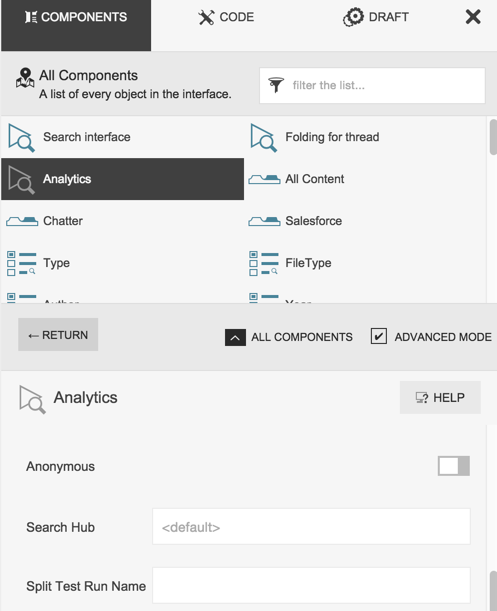
Add the search hub in the Analytics component within the Interface Editor
New provisioning process


