Facet Suggestions Using the Coveo for Sitecore Legacy Search UI Framework
Facet Suggestions Using the Coveo for Sitecore Legacy Search UI Framework
The Omnibox Component can propose facet values to the user.
Clicking a facet suggestion selects this facet value and refreshes the result page.
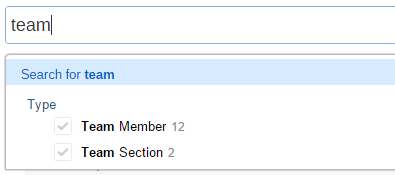
This component can be added to both the full search interface or the standalone search box.
Search Interface (Coveo Search/Coveo Search View)
Prerequisites
-
The Omnibox must be enabled on your page (see Search Component Properties).
-
You need to have at least one
FacetComponent on your page.
Facet suggestions are visible as soon as the prerequisites are met. If they’re not showing:
-
Open the Facet component properties using the Experience Editor or the Content Editor.
-
Check the Include facet values in the omnibox checkbox.
-
Save the item.
Standalone Search Box (Coveo Search Box/Coveo Search Box View)
Prerequisites
-
A copy of the default Coveo Search Box component (see Duplicating the Coveo Search Component).
-
You need to have at least one
FacetComponent on the page specified in the Search Page Item of your search box component properties. -
You need to use the
Coveo Search Resourcescomponent (Web Forms) or theCoveo Search View Resourcescomponent (MVC), not theCoveo Search Box Resourcescomponent (Web Forms) or theCoveo Search Box View Resourcescomponent (MVC).
Instructions
-
Locate the element with the
CoveoSearchboxclass in the ascx file (Web Forms) or the cshtml file (MVC) of your Coveo Search Box component copy. -
Add the following element anywhere between the opening
<div>tag and the closing</div>tag of that element:-
Web Forms
<div class="CoveoFacet" data-title="Type" id="<UNIQUE_ID>" data-id="<UNIQUE_ID>" data-field='<%= Model.ToCoveoFieldName("myField") %>' data-include-in-omnibox="true" data-preserve-position="false"></div> -
MVC
<div class="CoveoFacet" data-title="Type" id="<UNIQUE_ID>" data-id="<UNIQUE_ID>" data-field='@(Model.ToCoveoFieldName("myField"))' data-include-in-omnibox="true" data-preserve-position="false"></div>
-
-
Replace the
<UNIQUE_ID>placeholders with the value found in the properties of your facet (see Facet Component Properties). -
Save the file.