Understanding the coveoIndexingGetFields and coveoIndexingGetTemplates Pipelines
Understanding the coveoIndexingGetFields and coveoIndexingGetTemplates Pipelines

|
The The October 2018 release of Coveo for Sitecore 4.1 contains several changes related to the indexing of fields:
These modifications significantly alter and condense the processor invocation sequence (see Default Processing Sequence Diagram). As of the October 2018 release of Coveo for Sitecore 4.1, using the Command Center Indexing Manager is the recommended method to include or exclude fields. You can easily transition to using the Indexing Manager while maintaining your current field inclusion configuration (see Including Fields Using the Indexing Manager). |
This article explains how Coveo determines which fields should be indexed and how it leverages the coveoIndexingGetFields and coveoIndexingGetTemplates pipelines.
Default Processing Sequence Diagram
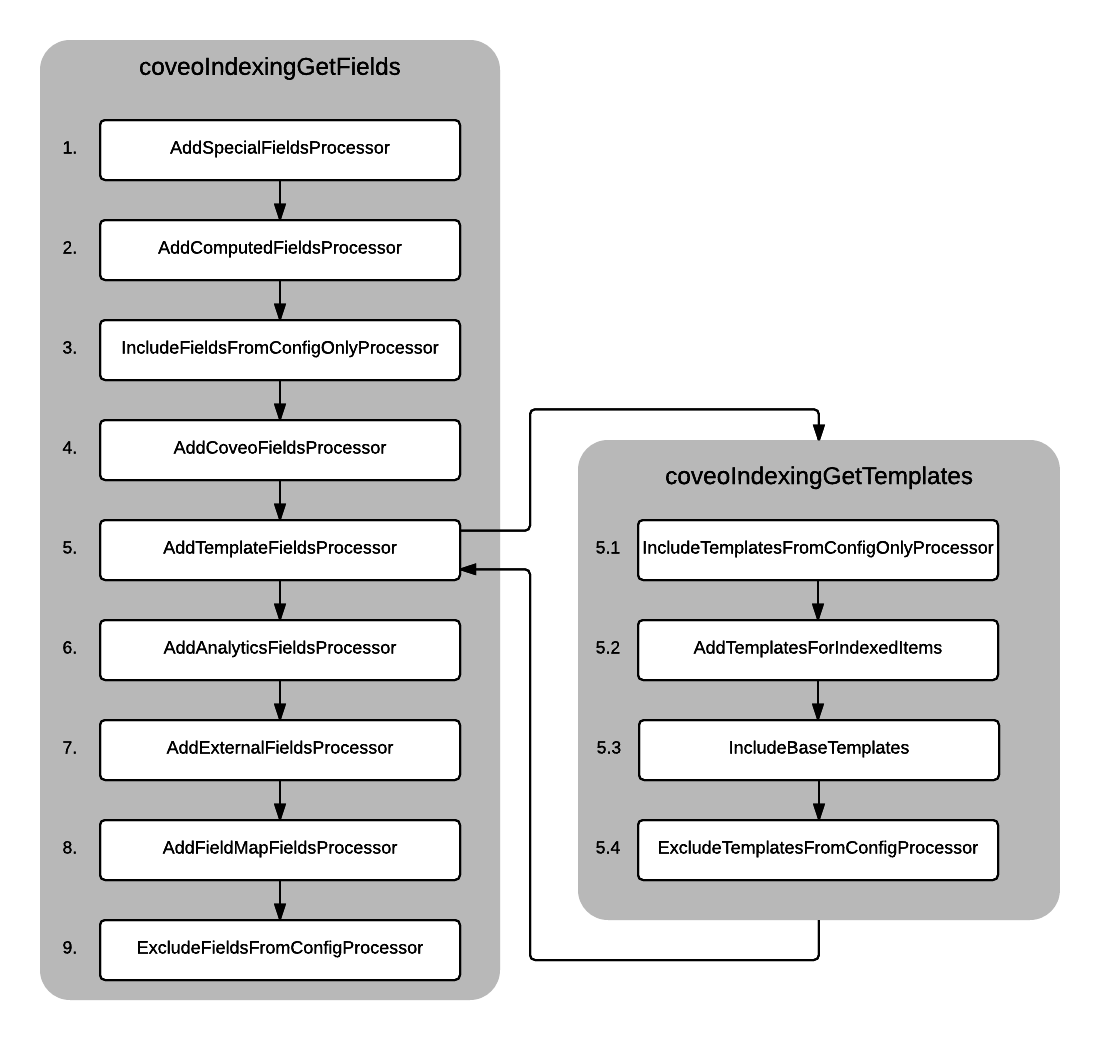
The diagram below shows the default sequence in which the processors are invoked.
|
|
All processors are interchangeable. For the assembly-qualified type name of each processor, see Processors Assembly-Qualified Type Names. |
-
The
AddSpecialFieldsProcessorprocessor retrieves some built-in Sitecore fields such as_id,_name,_templatename, and so on. Those fields are used by the Sitecore Content Search and the Coveo filtering rules. Note
NoteThis processor is mandatory, as Coveo for Sitecore relies on the fields it defines.
-
The
AddComputedFieldsProcessorprocessor retrieves the computed fields that are defined in the<fields hint="raw:AddComputedIndexField">element. By default, this list contains a series of computed fields used by the Coveo filtering rules. You can also create your own computed fields (see Creating Computed Fields).
NoteThis processor is mandatory, as Coveo for Sitecore relies on the fields it defines.
-
The
IncludeFieldsFromConfigOnlyProcessorprocessor retrieves the fields that are defined in the<include hint="list:IncludeField">element for Sitecore versions prior to 8.1, and<include hint="list:AddIncludedField">for Sitecore versions 8.1+. When one or several fields are marked as included, they’re added to the list of fields to index, and then the pipeline is aborted. In other words, no more processors are invoked. For more information on theIncludeFieldorAddIncludedFieldlist, see Including or Excluding Fields from the Indexing.
NoteUsing the Indexing Manager is now the recommended method to add or remove fields from the list of
<include>fields (see Understanding the Indexing Manager). -
The
AddCoveoFieldsProcessorprocessor adds fields that were used by Coveo. This processor is included to maintain backward compatibility with previous releases of Coveo for Sitecore. -
The
AddTemplateFieldsProcessorprocessor does two things; it first retrieves the templates to index, and then extracts the template fields to append them to thecoveoIndexingGetFieldspipeline arguments. To retrieve the templates, the processor invokes thecoveoIndexingGetTemplatespipeline.-
The
IncludeTemplatesFromConfigOnlyProcessorprocessor retrieves the templates that are defined in the<includeTemplate hint="list:IncludeTemplate">element for Sitecore versions prior to 8.1, and<AddIncludedTemplate hint="listAddIncludedTemplate">for Sitecore versions 8.1+. When at least one template is marked as included, the template is added to the list before the pipeline is aborted. No more processors are executed in thecoveoIndexingGetTemplatespipeline.However, the
AddTemplateFieldsProcessorand thecoveoIndexingGetFieldspipelines continue normally. For more information on the IncludeTemplate list, see Including or Excluding Templates from the Coveo Indexes.The
AddAllTemplatesProcessorprocessor retrieves all the available Sitecore templates and appends them to the pipeline arguments.Coveo for Sitecore (December 2016) The
AddTemplatesForIndexedItemsprocessor finds the templates that are referenced by crawling the items to index.
NoteSince crawling the items can be time-consuming, the list of referenced templates is cached. The cache is cleared every time the Sitecore instance restarts. It can also be cleared manually by synchronizing the index configuration (see Synchronize Coveo for Sitecore Configuration). Control Panel > Coveo Search > Actions > Synchronize Coveo Enterprise Search Configuration
Control Panel > Coveo Search > Actions > Synchronize with Coveo Cloud Configuration
NoteThe
AddTemplatesWithLayoutprocessor can now be added to thecoveoIndexingGetTemplatespipeline in the configuration files. When enabled, this new processor aims to replace default processorAddTemplatesForIndexedItems. The processor doesn’t scan the content tree and executes faster. On the other hand, depending on your templates, it might include different fields than theAddTemplatesForIndexedItemsprocessor. -
Coveo for Sitecore 4.1 (January 2018) The
AddTemplatesWithLayoutprocessor finds the templates having a layout. It also finds the templates for any branch item having a layout. This processor is significantly faster thanAddTemplatesForIndexedItemsbut might include different fields. -
Coveo for Sitecore (December 2016) The
IncludeBaseTemplatesprocessor simply takes the templates enlisted so far and enlists their base templates. -
The
ExcludeTemplatesFromConfigProcessorexcludes all the templates that are defined in the<excludeTemplate hint="list:ExcludeTemplate">element for Sitecore versions prior to 8.1, and<AddExcludedTemplate hint="list:AddExcludedTemplate">for Sitecore versions 8.1+. For more information on theExcludeTemplateandAddExcludedTemplatelist, see Including or Excluding Templates from the Coveo Indexes.-
The
AddAnalyticsFieldsProcessorappends Sitecore fields related to experience profiles and personalization.
NoteThis processor is mandatory if you’re using the Coveo personalization features.
-
-
-
The
AddExternalFieldsProcessorappends the fields marked as external. This processor is mostly used to provide autocompletion on fields coming from external sources. -
The
AddFieldMapFieldsProcessorappends the fields defined in the field map to the pipeline arguments. For more information on the Field Map section, see Understanding the Coveo Search Provider’s Configuration File. -
The
ExcludeFieldsFromConfigProcessorexcludes all the fields that are defined in the<exclude hint="list:ExcludeField">element for Sitecore versions prior to 8.1, and<exclude hint="list:AddExcludedField">for Sitecore versions 8.1+.
The processor can be reordered according to your specific needs. You can also add your own custom processors.
Processors Assembly-Qualified Type Names
Processor name |
Assembly-qualified type name |
AddAllTemplatesProcessor |
|
AddAnalyticsFieldsProcessor |
|
AddComputedFieldsProcessor |
|
AddCoveoFieldsProcessor |
|
AddExternalFieldsProcessor |
|
AddFieldMapFieldsProcessor |
|
AddSpecialFieldsProcessor |
|
AddTemplateFieldsProcessor |
|
AddTemplatesForIndexedItems |
|
AddTemplatesWithLayout |
|
ExcludeFieldsFromConfigProcessor |
|
ExcludeTemplatesFromConfigProcessor |
|
IncludeBaseTemplates |
|
IncludeFieldsFromConfigOnlyProcessor |
|
IncludeTemplatesFromConfigOnlyProcessor |
|
Creating a Custom Processor for the coveoIndexingGetFields Pipeline
To compile the class, you need to reference the following assemblies:
-
Coveo.AbstractLayer -
Coveo.Framework -
Sitecore.Kernel
This sample code adds the field myFieldName to the list of indexed fields.
The field then appears in the search index field set.
public class AddCustomField : Coveo.Framework.Processor.IProcessor<Coveo.AbstractLayer.Pipeline.CoveoIndexingGetFieldsArgs>
{
    public void Process(CoveoIndexingGetFieldsArgs p_Args)
    {
        // The fields are stored in the "Fields" property and can be added or removed.
        // A field can be added by passing its Sitecore name and type.
        Coveo.AbstractLayer.FieldManagement.FieldInformation newField
            = new Coveo.AbstractLayer.FieldManagement.FieldInformation("myFieldName", "Single-Line Text");
        p_Args.Fields.Add(newField);
    }
}
Creating a Custom Processor for the coveoIndexingGetTemplates Pipeline
To compile the class, you must reference the following assemblies:
-
Coveo.AbstractLayer -
Coveo.Framework -
Sitecore.Kernel
This sample code uses the database associated with the search index to retrieve a template and add it to the arguments. Once this pipeline is executed, Coveo gets the fields of each template to determine which fields need to be indexed.
public class AddCustomTemplate : Coveo.Framework.Processor.IProcessor<Coveo.AbstractLayer.Pipeline.CoveoIndexingGetTemplatesArgs>
{
    public void Process(CoveoIndexingGetTemplatesArgs p_Args)
    {
        Coveo.Framework.Templates.TemplateManagerWrapper templateManager = new Coveo.Framework.Templates.TemplateManagerWrapper();
        // Most of the time, a search index is associated with only one database.
        // However, it's possible for a search index to be associated with more than one database.
        // In such case, make sure to retrieve the template using the right database.
        Coveo.Framework.Databases.IDatabaseWrapper database = p_Args.IndexDatabases.First();
        ITemplate template = templateManager.GetTemplate("PUT THE TEMPLATE ID HERE", database);

        // The templates are stored in the Templates property and can be added or removed.
        p_Args.Templates.Add(template);
    }
}