Coveo indexing pipeline
Coveo indexing pipeline

The Coveo indexing pipeline is the process through which all content retrieved by a source goes before being indexed. The items enter the indexing pipeline either from Coveo source crawlers during a source refresh, rescan, or rebuild, or when the items are pushed by a custom process taking advantage of the Push API or Stream API.
For an administrator, a content manager, or a developer, knowing what the indexing pipeline does is useful in cases such as:
-
Troubleshooting item indexing issues while reviewing item logs from the Log Browser (platform-ca | platform-eu | platform-au) page.
See also About the indexing process.
The indexing pipeline consists of a series of sequential stages illustrated in the following diagram. As an administrator, content manager, or developer, you can control the behavior of the stages appearing in light blue. This includes Crawling, Push API, Stream API, both Applying extension stages, Optical character recognition, and Mapping.

Each indexing pipeline stage is described in the rest of the article.
Crawling
A source crawls its target repository to fetch and push the content and metadata of each repository item.
As a member of the Administrators or Content Managers built-in groups, you can add sources from the Coveo Administration Console. Some item metadata is already made available by the connector, including the URI, modification date, and more depending on the source.
Streaming
This stage is the first Push API or Stream API stage. It handles the reception of items to index from an external custom process.
As a developer, you control when and what items you send to the Push API or Stream API, one by one or in batch.
Streaming extension queue
The Streaming extension queue is unique to the Stream API.
It holds items ready to be processed by the Streaming extension stage.
Streaming extension
The Streaming extension is unique to the Stream API.
It should be viewed as a way to enable specific ML features, such as Coveo Personalization-as-you-go, and is the only way to benefit from partial item updates.
Push API queue
The Push API queue holds items ready to be processed by the Consuming stage.
Consuming
This is the last stage of the Push API or Stream API set.
It transfers items from the Push API queue to be processed by the document processing manager (DPM).
Items are sent to the DPM queue, one by one or in batch, depending on how they were pushed to the Streaming stage.
DPM queue
The DPM queue holds items ready to be processed by the document processing manager (DPM) set of stages.
Detecting
Detecting is the initial stage of the DPM set.
It checks the item content to determine its file type, such as PDF, HTML, XML, etc.
Applying extension (pre-conversion) (optional)
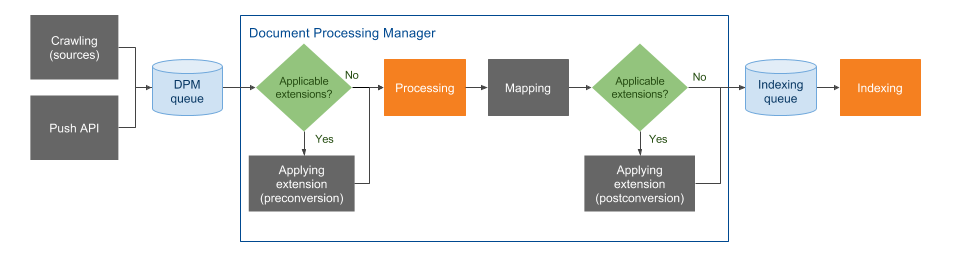
In this stage, extensions are applied before the item contents are converted into a different format in the Processing stage.
See more information on how to use pre-conversion extensions.
If you’re unsure which stage best fits your extension, you can compare pre-conversion and post-conversion.
A script may also be assigned to a source twice, once in each Applying extension stage, though it’s crucial to avoid making scripts too general.
Optical character recognition (OCR)
When optical character recognition is enabled for a source, at this stage, Coveo extracts text from images and PDF files. The extracted text is then searchable in a Coveo-powered search interface and appears in the item Quick view. For details on this technology, see Optical character recognition.
Processing
This stage essentially converts the content and properties of each item from its native format into a common format suitable for the Indexing stage using the appropriate Coveo converter for the supported file formats.
-
When the item is a PDF file, the PDF converter extracts the text and the properties from the PDF binary file.
-
When the item is an HTML file, the HTML converter extracts the text from the
bodyelement and metadata from themetaelements.
Mapping
This stage applies standard and custom source mappings to set Coveo field values with item metadata or literal text.
As an administrator:
-
When you create a source of a given type, a set of standard fields and mappings are automatically created. This source standard metadata is therefore automatically available in the index fields.
-
When you want to leverage custom metadata, create target Coveo index fields to host these metadata values and create mappings to set the Coveo index field values with the appropriate metadata or literal fix content. See Manage fields for details on this process.
Applying extension (post-conversion) (optional)
This stage is similar to Applying extension (pre-conversion).
However, extensions are applied to items after they’ve been converted and mapped in the Processing and Mapping stages.
Typically, more extensions are applied in post-conversion than pre-conversion.
See more information on how to use post-conversion extensions.
If you’re unsure which stage best fits your extension, you can compare pre-conversion and post-conversion.
A script may also be assigned to a source twice, once in each Applying extension stage, though it’s crucial to avoid making scripts too general.
Pre-indexing
This stage further processes item fields and metadata to optimize index efficiency.
Indexing queue
This stage holds items ready to be processed by the Indexing stage.
Indexing
This stage puts the item extracted content and properties into the Coveo unified index to make it available for user queries. Temporary files containing the extracted item content and properties are then deleted.

|
Note
Your Coveo index doesn’t store a copy of your original files. However, stored data include an excerpt of the item content to display in the search results. |

|
If your search page includes the Coveo Quickview component, users can use it to view the entire content of their search results. |