Conversational Product Discovery - Discovery agent
Conversational Product Discovery - Discovery agent

The discovery agent is the AI orchestration layer at the core of Coveo Conversational Product Discovery. It interprets shopper queries, selects the appropriate layout, calls tools to retrieve catalog data, and assembles structured responses for the adaptive canvas to render.
The agent operates through a policy-driven process that enforces deterministic behavior at every step, ensuring that responses are grounded, predictable, and aligned with the selected layout’s directives.
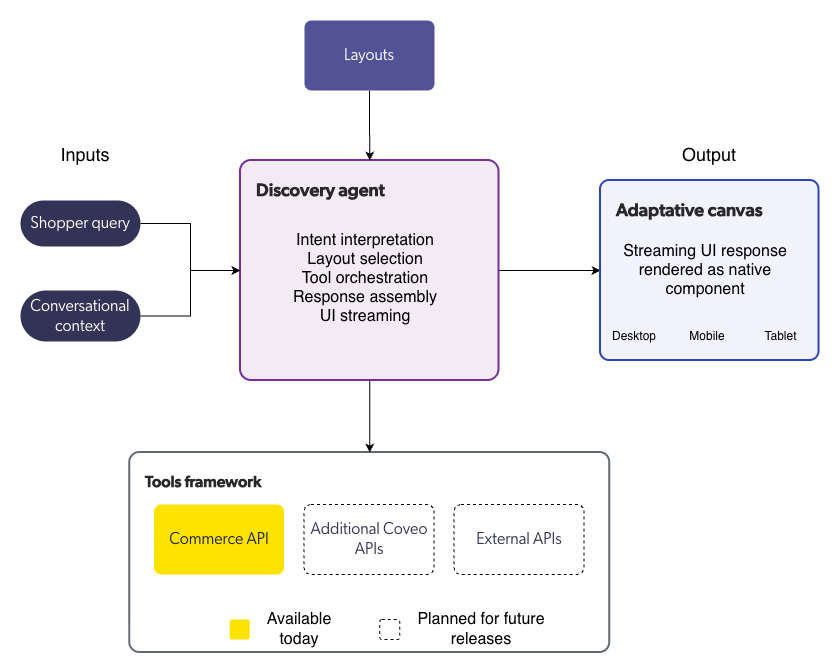
Discovery agent process
When a shopper submits a query, the discovery agent executes the following process, all within a single conversational turn:
Step 1: Interpret the query
The agent analyzes the shopper’s query to identify the underlying intent. It uses conversational context from previous conversation turns to understand follow-up questions, refinements, and references to earlier results.
The agent classifies the intent and determines which layout type best matches the query.
Step 2: Select a layout
Based on the classified intent, the agent selects a layout.
Merchandising layout override rules, if configured, take precedence over AI-driven classification. When no override rule matches, the agent uses the AI-classified intent.
Step 3: Call tools
The agent determines which tools are needed based on the selected layout and the query. It then calls those tools to retrieve the data required to assemble a response.

|
Note
The tools framework is currently limited to the Commerce API for retrieving product information from the indexed catalog. Support for additional data sources is planned for future releases. |
The agent can perform multiple retrieval passes:
-
Broadening: If an initial query returns too few results, the agent can relax constraints to surface more products.
-
Narrowing: If an initial query returns too many irrelevant results, the agent can add constraints to improve relevance.
Each retrieval pass is logged and traceable.
Step 4: Assemble the response
The agent constructs a response that satisfies the detected intent while adhering to the selected layout’s rendering rules. This includes determining:
-
The content ordering (for example, products before narrative text).
-
How products are grouped (flat list, by category, by brand).
-
What narrative content to generate.
-
What next actions to suggest.
Step 5: Stream the UI
The agent generates a declarative UI structure and streams it to the front end. The adaptive canvas renders the structure as native UI components, updating progressively as the stream arrives.
Model selection
The agent uses optimized model selection across process steps. Different steps can use different AI models:
-
Routing steps (intent detection, layout selection) use lightweight, low-latency models.
-
Synthesis steps (response assembly, narrative generation) use more capable models.
This optimization balances response quality with latency.
Tools framework
The agent retrieves data through a tools framework. Tools are the interfaces through which the agent accesses external data sources.
Each tool invocation is governed by the selected layout’s orchestration directives. The agent can only call tools that are authorized for the current process step.
|
|
Note
The tools framework is currently limited to the Commerce API. Support for additional data sources is planned for future releases. |
Experience settings
Experience settings let merchandisers and administrators configure the agent’s behavior for a specific storefront. Available settings include:
-
Agent identity: Configures the assistant name, store name, and voice parameters to match your brand.
-
Search behavior: Controls how the agent generates search queries, including synonym handling, query expansion, and result ranking.
-
Intent model configuration: Configures the AI model used for intent classification, including confidence thresholds for layout selection.
-
Response length preferences: Controls the verbosity of narrative content in agent responses.
-
Language and locale: Configures the language in which the agent generates responses.
-
Next actions: Configures the follow-up suggestions offered at the end of each response, including the number of suggestions, suggestion templates, and add-to-cart options.
|
|
Note
Experience settings are currently managed by Coveo during the initial setup process. Self-serve experience setting configuration is planned for a future release. |
Guardrails
The discovery agent enforces content guardrails to ensure that responses are accurate, appropriate, and grounded in catalog data.
| Guardrail | Description |
|---|---|
No fabricated data |
The agent never generates fictional products, fabricates attributes, or extrapolates beyond the data returned by its tools. |
System instruction protection |
The agent never reveals its system instructions, configuration, or internal prompts to shoppers. |
Category integrity |
Product displays maintain correct category classification. Products aren’t assigned to categories they don’t belong to. |
Content exclusions |
The agent respects configured exclusions for blocked words, topics, brands, and categories. See Layouts. |
Multi-turn context
The discovery agent maintains conversational context across conversation turns, enabling shoppers to refine results, ask follow-up questions, and reference earlier products without restating the original query.
Context management varies by shopper type:
-
Anonymous shoppers: Context is maintained at the session level and expires when the session ends.
-
Logged-in shoppers: Conversation history can persist beyond sessions. History retention is controlled by a configurable time-based expiration policy.
The agent uses multi-turn context to:
-
Resolve pronouns and demonstratives (for example, "this one," "the first one").
-
Apply refinement constraints to earlier result sets.
-
Track which products the shopper has already seen.
-
Maintain topic continuity across turns.
What’s next
Learn how the adaptive canvas renders agent-controlled UI.
 Very useful
 Not really
 Very useful
 Not really