Conversational Product Discovery layouts
Conversational Product Discovery layouts

In Coveo Conversational Product Discovery, a layout defines the type of experience the discovery agent delivers in response to a shopper query.
When a shopper submits a query, the agent identifies the shopper’s intent and maps it to a layout. The selected layout then governs what the agent retrieves, how it organizes the data, and how the adaptive canvas renders the response.
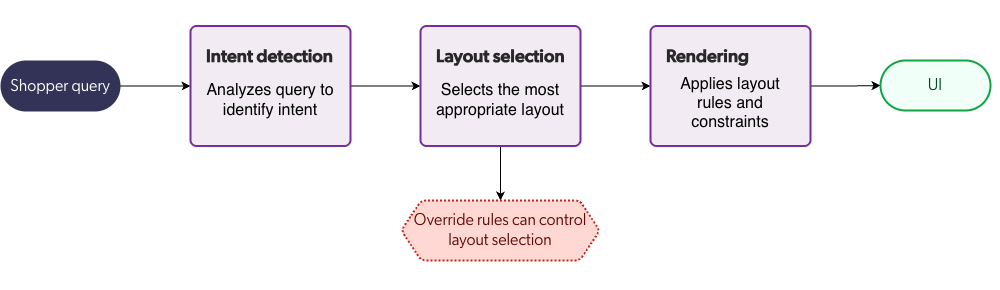
Layouts are the primary mechanism through which merchandisers and administrators shape the conversational experience. Each layout type has its own intent detection, rendering rules, and orchestration directives.

|
Note
Layout configurations are currently managed by Coveo during the initial setup process. Self-serve layout configuration is planned for a future release. |
Layout types
Each layout type corresponds to a specific class of shopper interaction. The following table describes the available layout types:
| Layout type | Description | Example |
|---|---|---|
Single-intent product search |
Shoppers describe what they want and receive a curated list of relevant products. |
"I want to see yellow paddleboard options under $1000." |
Multi-intent product search |
Shoppers request products across multiple categories in a single query, receiving distinct product lists per category. |
"Show me wetsuits, a bag, and surfboards." |
Conversational refinement |
Shoppers refine returned results through follow-up messages while Conversational Product Discovery maintains full context. |
"Under $1000." |
Product education |
Shoppers learn about products through catalog content and product attributes. |
"Is this bag waterproof?" |
Product comparison |
Shoppers compare products using a structured table that highlights relevant attributes. |
"What are the differences between these 4 surfboards?" |
Product bundle |
Shoppers receive a curated bundle of complementary products across categories to meet a stated goal. |
"What do I need to get started surfing? I have a $400 budget." |
Layouts and intent detection
When a shopper submits a query, the discovery agent analyzes the query and maps it to one of the available layout types. This mapping determines the experience the shopper receives.
The agent considers the following factors when selecting a layout:
-
The natural language intent in the query: The agent uses AI to classify the shopper’s query. For example, "compare X and Y" signals a comparison intent, while "show me running shoes" signals a single-intent search.
-
Conversational context: Follow-up queries that constrain or refine earlier results trigger the conversational refinement layout, even if the query would otherwise look like a new search.
-
Configured override rules: Override rules, if configured, can deterministically force a specific layout for queries that match defined conditions.
When a query could match multiple layout types, the agent resolves to the most specific match. For example, a query that contains both a search and a comparison resolves to the comparison layout.
Rendering rules
Each layout type defines rendering rules that govern the structure and content of the agent’s response. Rendering rules specify:
-
Content ordering: The sequence in which elements appear. For example, enforcing product results lists before summary text, or comparison tables before recommendation carousels.
-
Product grouping: How products are organized. For example, in flat lists, by category, or by brand.
-
Narrative generation: What explanatory copy, if any, accompanies the product results. For example, a product education layout may include a generated summary of key specifications.
-
Display constraints: Limits on the number of products to show, the number of categories in a multi-intent response, or the attributes to include in a comparison table.
Override rules
Override rules let merchandisers and administrators deterministically control layout selection for queries that match specific conditions. Unlike AI-driven intent detection, override rules are explicit: when a query matches a rule, the specified layout is always selected, regardless of the AI’s classification.
Override rules can match on:
-
Keywords or phrases in the query.
-
Product categories referenced in the query.
-
Brands mentioned in the query.
Override rules are evaluated before AI-driven intent detection. If a match is found, the matched rule’s layout takes precedence.
An administrator configures an override rule that forces the product comparison layout for any query containing the word "versus" or "vs."
A shopper types "Wave Chaser vs Wave Master surfboard." The override rule matches and the comparison layout is selected, even if the AI’s classification might have resolved differently.
|
|
Note
Override rules are currently managed by Coveo during the initial setup process. Self-serve override rule configuration is planned for a future release. |
Orchestration directives
Each layout type includes orchestration directives that instruct the discovery agent on how to execute the response. Orchestration directives specify:
-
Which tools the agent can call to retrieve data (for example, product search, faceted navigation).
-
How many retrieval passes the agent should attempt.
-
When to broaden or narrow queries. For example, broadening a search that returned too few results.
-
What guardrails to enforce. For example, ensuring a comparison table only includes products from the same category.
-
Contextual messaging: Directives can instruct the agent to append campaign or promotional messaging when results match specific conditions. For example, including "Free shipping on summer gear" when results contain products in a seasonal category.
-
Communication style adaptation: Directives can adjust the agent’s tone and terminology for specific shopper types or query contexts. For example, adapting language for professional buyers.
|
|
Note
Orchestration directives are currently managed by Coveo during the initial setup process. Self-serve orchestration directive configuration is planned for a future release. |
Content exclusions
Layouts support content exclusions that prevent the agent from including specific content in its responses. You can configure exclusions for:
-
Blocked words and topics: Queries containing blocked words are diverted from conversational responses.
-
Blocked brands: The agent excludes products from specified brands.
-
Blocked categories: The agent excludes products from specified categories.
-
Blocked product fields: The agent omits specified product fields from its responses.
-
Replacements: Disallowed terms are automatically substituted with approved alternatives. For example, replacing "cheap" with "budget-friendly".
Content exclusions apply across all layout types and are enforced at the discovery agent level during response assembly.
|
|
Note
Content exclusions are currently managed by Coveo during the initial setup process. Self-serve content exclusion configuration is planned for a future release. |
What’s next
-
Discovery agent: Understand how the agent executes the selected layout.
-
Adaptive canvas: Learn how the canvas renders layout-driven responses.
 Very useful
 Not really
 Very useful
 Not really