Conversational Product Discovery adaptive canvas
Conversational Product Discovery adaptive canvas

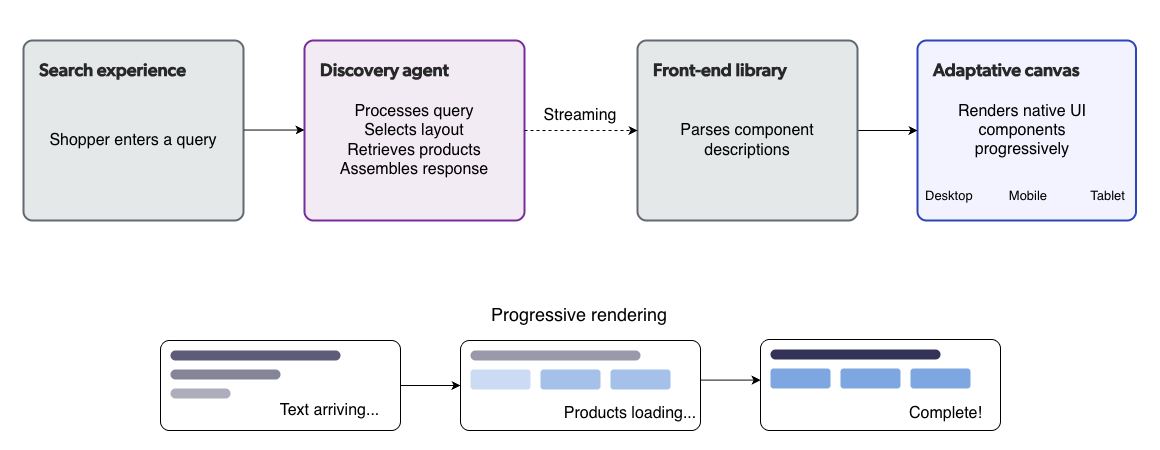
The Conversational Product Discovery adaptive canvas is the front-end rendering layer of Coveo Conversational Product Discovery. It receives a declarative UI structure streamed by the discovery agent and renders it as native UI components that adapt to the shopper’s device and screen size.
The canvas is agent-controlled. The discovery agent determines what to display, and the canvas determines how to display it.
Streaming architecture
The adaptive canvas uses a streaming architecture. As the discovery agent assembles a response, it streams the declarative UI structure to the front end in real time.
The canvas renders components progressively as the stream arrives:
-
Products and structured data appear immediately as their data becomes available.
-
Narrative content (summaries, explanations) renders token by token, providing a responsive typing experience.
-
The layout updates incrementally without waiting for the full response to complete.
This streaming approach provides a responsive experience even for complex, multi-section responses.
Component types
The adaptive canvas renders the following component types, based on the layout selected by the discovery agent.
Product displays
Product displays show curated sets of products in a visual format. The agent controls which products appear and in what order. The canvas renders them according to the device context.
Product displays support:
-
Carousels with product images, titles, and prices.
-
Category-grouped layouts for multi-intent queries.
-
Inline product cards within narrative content.
Comparison tables
Comparison tables place products side by side, highlighting key differences across a set of attributes. The discovery agent selects which attributes to compare based on the products and the shopper’s query.
Comparison tables display:
-
Product images and titles.
-
Attribute rows for the compared specifications.
-
Visual indicators for differences across products.
Summary tables
Summary tables present structured product attributes in a tabular format. They’re used when the shopper requests detailed information about a single product or a small set of products.
Decision-support content
Decision-support content includes AI-generated narrative text that helps shoppers understand products and make informed choices. Examples include:
-
Product summaries highlighting key features.
-
Contextual explanations based on the shopper’s stated needs.
-
Category overviews for multi-intent queries.
All decision-support content is grounded in the catalog data returned by the discovery agent’s tools.
Next actions
Next actions are suggested follow-up interactions that the agent offers at the end of a response. They guide the shopper toward logical next steps based on the current conversation context.
Examples of next actions include:
-
"Compare these two" (after a product search).
-
"Show me more under $500" (after an initial result set).
-
"What accessories do I need?" (after a product education response).
Multi-device adaptation
The adaptive canvas adapts its rendering to the shopper’s device and screen size:
-
Desktop: Wide layouts with side-by-side product carousels, full comparison tables, and multi-column content.
-
Tablet: Responsive layouts that adjust column counts and carousel widths.
-
Mobile: Vertically stacked layouts with touch-friendly carousels and collapsible comparison tables.
The canvas handles device adaptation automatically. The discovery agent’s declarative UI structure is device-agnostic. The canvas determines the appropriate rendering for the current viewport.
Integration approach
The adaptive canvas is delivered through a front-end library that consumes the discovery agent’s streaming API.

|
Note
Dedicated Headless controller and Atomic component integrations are planned for future releases. During the initial release, the canvas is integrated through the streaming API directly. |
Relationship to existing search
Conversational Product Discovery is designed to complement, not replace, existing search and listing page experiences. It operates as an additional experience layer that can coexist with traditional search interfaces.
When shoppers are in transactional buying mode (for example, searching for a specific SKU), the standard commerce search experience takes precedence. When exploratory or conversational intent is detected, the canvas renders the agent-driven experience.
 Very useful
 Not really
 Very useful
 Not really