Add ARIA landmarks
Add ARIA landmarks

Including ARIA landmarks in a web page can ease navigation for end users requiring assistive technology such as screen readers (see Using ARIA landmarks to identify regions of a page). This article provides generic guidelines for adding ARIA landmarks in a typical search page.

|
Notes
|
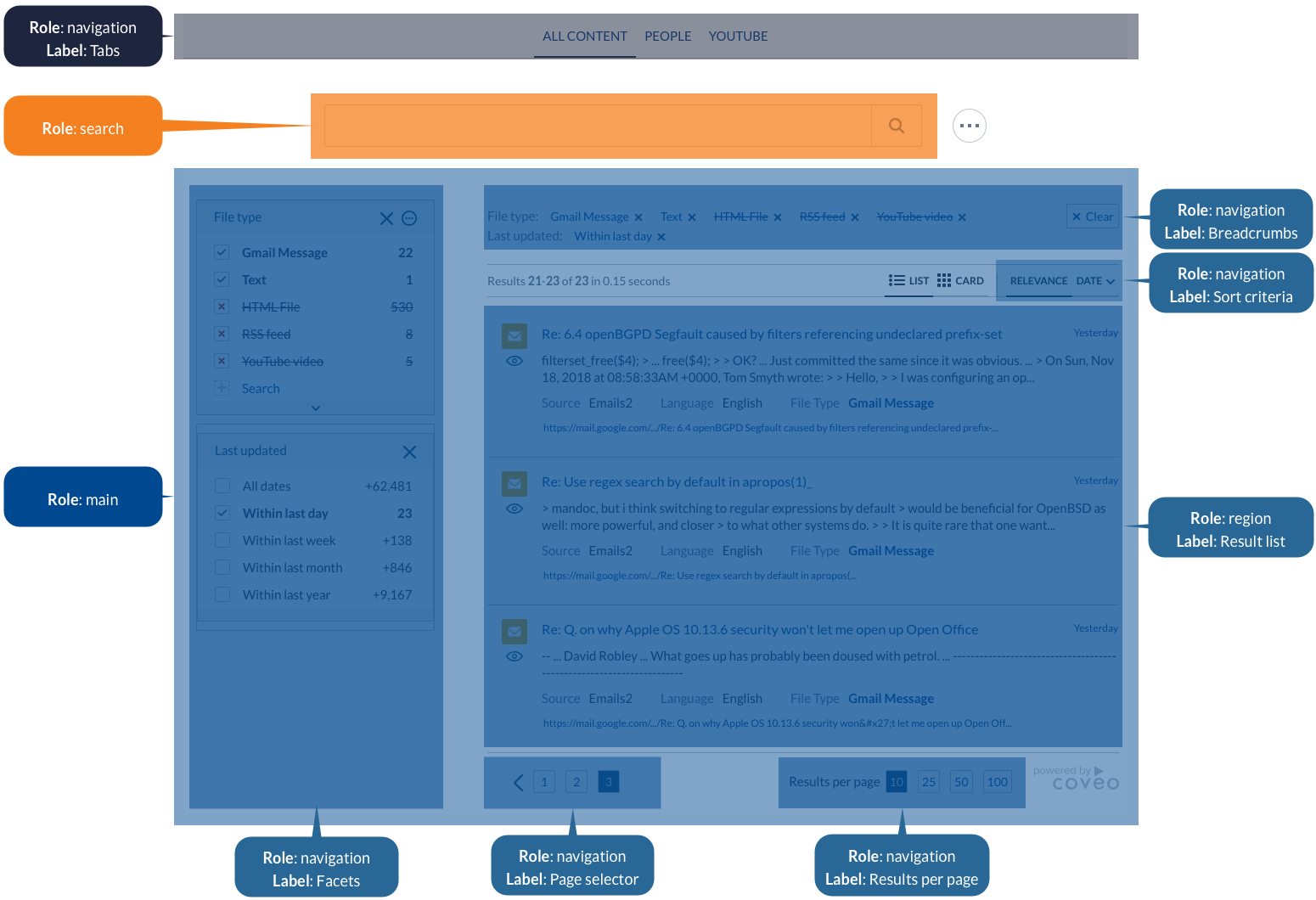
To add ARIA landmarks in a typical search page
-
In your search interface, define the top-level landmarks shown in the following table by adding the suggested
roleandaria-labelattributes to the appropriate HTML elements:rolearia-labelComponents
navigationTabsAll
TabsearchN/A
mainN/A
All components below
SearchBox<div class='coveo-tab-section' role='navigation' aria-label='Tabs'> <!-- CoveoTab components --> </div> <div class='coveo-search-section'> <!-- ... --> <div class='CoveoSearchbox' role='search'></div> <!-- ... --> </div> <div class='coveo-main-section' role='main'> <!-- ... --> </div> -
Under the
maintop-level landmark, define the following nested landmarks:rolearia-labelComponents
navigationFacetsAll
FacetnavigationBreadcrumbsnavigationSort criteriaAll
SortregionResult listAll
ResultListnavigationPage selectornavigationResults per page<!-- ... --> <div class='coveo-main-section' role='main'> <div class='coveo-facet-column' role='navigation' aria-label='Facets'> <!-- Facet components (for example, CoveoFacet, CoveoCategoryFacet, etc.) --> </div> <!-- ... --> <div class='CoveoBreadcrumbs' role='navigation' aria-label='Breadcrumbs'></div> <!-- ... --> <div class='coveo-results-header'> <!-- ... --> <div class='coveo-sort-section' role='navigation' aria-label='Sort criteria'> <!-- CoveoSort components --> </div> </div> <!-- ... --> <div role='region' aria-label='Result list'> <!-- CoveoResultList components --> </div> <div class='CoveoPager' role='navigation' aria-label='Page selector'></div> <div class='CoveoResultsPerPage' role='navigation' aria-label='Results per page'></div> <!-- ... --> </div> <!-- ... -->
 Very useful
 Not really
 Very useful
 Not really