---
title: Add ARIA landmarks
slug: '2666'
canonical_url: https://docs.coveo.com/en/2666/
collection: javascript-search-framework
source_format: adoc
---
# Add ARIA landmarks
Including [ARIA](https://en.wikipedia.org/wiki/WAI-ARIA) landmarks in a web page can ease navigation for end users requiring assistive technology such as screen readers (see [Using ARIA landmarks to identify regions of a page](https://www.w3.org/WAI/GL/wiki/Using_ARIA_landmarks_to_identify_regions_of_a_page)).
This article provides generic guidelines for adding ARIA landmarks in a typical search page.
> **Notes**
>
> * Feel free to adapt these guidelines according to the design of your search page (see [ARIA Landmarks Example](https://www.w3.org/WAI/GL/wiki/Using_ARIA_landmarks_to_identify_regions_of_a_page#Examples)).
> * Since the [August 2018 release (v2.4609)](https://docs.coveo.com/en/410#august-2018-release-v246096), all standard Coveo JavaScript Search Framework features and components are designed to meet [WCAG 2.0](https://www.w3.org/TR/WCAG20/) AA requirements.
> [WCAG 2.1](https://www.w3.org/TR/WCAG21/) A and AA requirements are met by since the [May 2020 release (v2.8959)](https://docs.coveo.com/en/m54e5269#2-8959).
> Adding ARIA landmarks in a search page is a complementary leading practice.
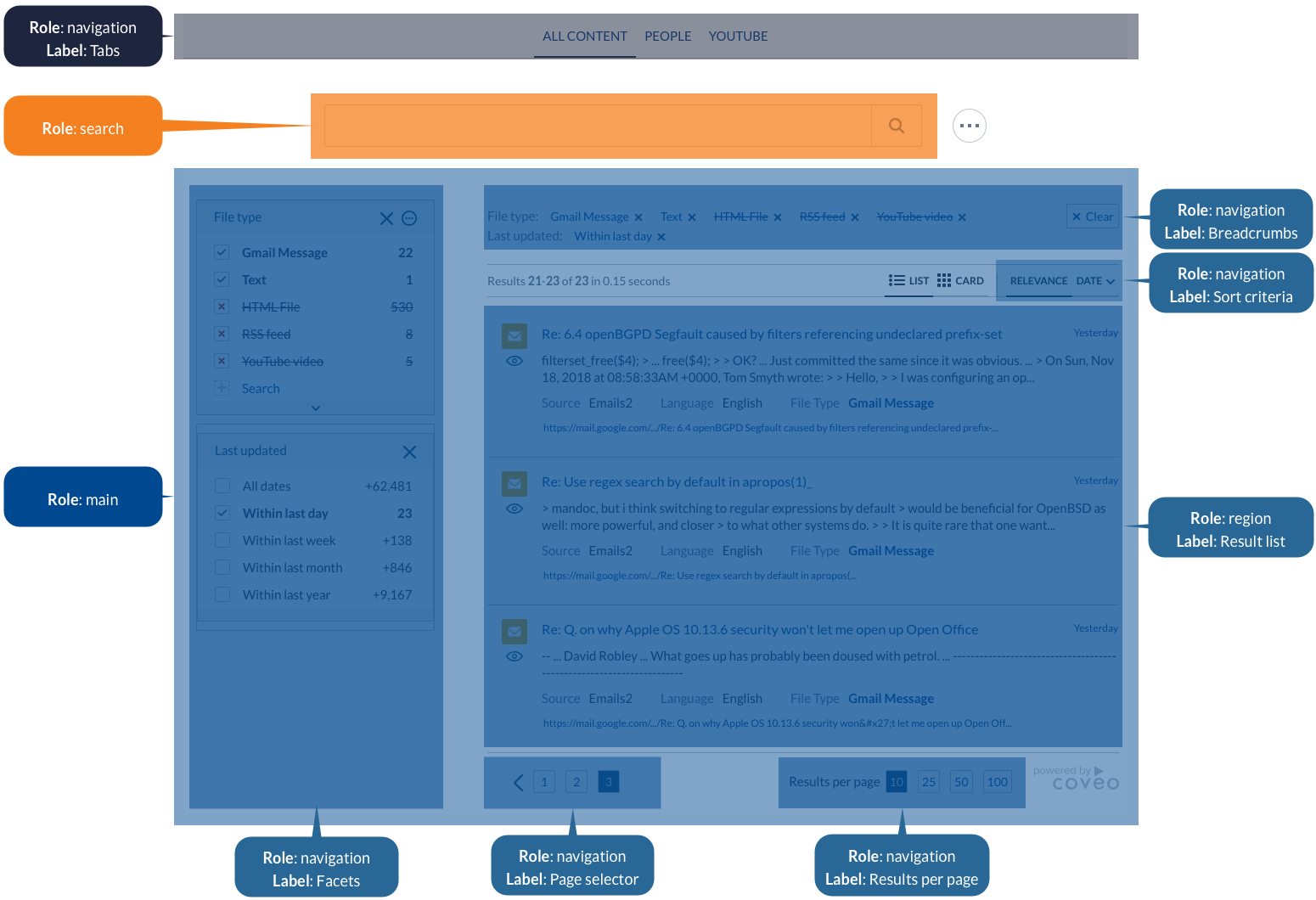
To add ARIA landmarks in a typical search page
. In your search interface, define the top-level landmarks shown in the following table by adding the suggested `role` and `aria-label` attributes to the appropriate HTML elements:
|===
| `role` | `aria-label` | Components
| `navigation`
| `Tabs`
| All [`Tab`](https://coveo.github.io/search-ui/components/tab.html)
| `search`
| N/A
| [`SearchBox`](https://coveo.github.io/search-ui/components/searchbox.html)
| `main`
| N/A
| All components below `SearchBox`
|===
```html
```
. Under the `main` top-level landmark, define the following nested landmarks:
|===
| `role` | `aria-label` | Components
| `navigation`
| `Facets`
| All [`Facet`](https://coveo.github.io/search-ui/components/facet.html)
| `navigation`
| `Breadcrumbs`
| [`Breadcrumb`](https://coveo.github.io/search-ui/components/breadcrumb.html)
| `navigation`
| `Sort criteria`
| All [`Sort`](https://coveo.github.io/search-ui/components/sort.html)
| `region`
| `Result list`
| All [`ResultList`](https://coveo.github.io/search-ui/components/resultlist.html)
| `navigation`
| `Page selector`
| [`Pager`](https://coveo.github.io/search-ui/components/pager.html)
| `navigation`
| `Results per page`
| [`ResultsPerPage`](https://coveo.github.io/search-ui/components/resultsperpage.html)
|===
```html
```