---
title: Multilingual content retrieval and answer generation
slug: p5ne0024
canonical_url: https://docs.coveo.com/en/p5ne0024/
collection: leverage-machine-learning
source_format: adoc
---
# Multilingual content retrieval and answer generation
> **Tip**
>
> Adding multilingual support to your [models](https://docs.coveo.com/en/1012/) is easier when your content strategy is designed for multiple languages from the start.
>
> See the recommendations regarding multiple languages when [indexing content](https://docs.coveo.com/en/2680#identify-content-to-include-or-exclude) and [configuring query pipelines](https://docs.coveo.com/en/2757#basic-query-pipeline-setup).
A [Coveo Machine Learning (Coveo ML)](https://docs.coveo.com/en/188/) [model](https://docs.coveo.com/en/1012/) that uses a text encoder to process language can be configured to support multiple languages.
Currently, this applies to the following [Coveo Machine Learning (Coveo ML)](https://docs.coveo.com/en/188/) [models](https://docs.coveo.com/en/1012/):
* [Passage Retrieval (CPR)](https://docs.coveo.com/en/oaie9196/)
* [Relevance Generative Answering (RGA)](https://docs.coveo.com/en/nbtb6010/)
* [Semantic Encoder (SE)](https://docs.coveo.com/en/nbtb0041/)
* [Smart Snippets](https://docs.coveo.com/en/laea5490/)
By default, these [models](https://docs.coveo.com/en/1012/) use an English-only text encoder, and therefore support processing and retrieving only English content.
However, Coveo offers beta support for all the other [index-supported languages](https://docs.coveo.com/en/1956#supported-languages-for-machine-learning-models).
> **Important**
>
> Coveo offers beta support for languages other than English.
> This means that languages other than English aren't fully tested or supported by Coveo and performance may vary.
This article describes how to configure these [models](https://docs.coveo.com/en/1012/) to process and retrieve content, and generate content in the case of [RGA](https://docs.coveo.com/en/nbtb6010/), in any of the index-supported languages.
## Multilingual configuration overview
If you have content in any of the [index-supported languages](https://docs.coveo.com/en/1956#supported-languages-for-machine-learning-models), multilingual configuration allows the [Passage Retrieval (CPR)](https://docs.coveo.com/en/oaie9196/), [Relevance Generative Answering (RGA)](https://docs.coveo.com/en/nbtb6010/), [Semantic Encoder (SE)](https://docs.coveo.com/en/nbtb0041/), and [Smart Snippet](https://docs.coveo.com/en/laea5490/) [models](https://docs.coveo.com/en/1012/) to create the [embeddings](https://docs.coveo.com/en/ncc87383/) that the [model](https://docs.coveo.com/en/1012/) then uses to retrieve content based on semantic similarity.
For the [RGA](https://docs.coveo.com/en/nbtb6010/) model, the configuration also includes setting the language for the generated answers.
Typically, you would set it to match the language of the content that the [RGA](https://docs.coveo.com/en/nbtb6010/) [model](https://docs.coveo.com/en/1012/) retrieves, but you can set it to a different language using the generative LLM's translation capabilities.
Specifically, multilingual configuration allows each of the [models](https://docs.coveo.com/en/1012/) to do the following in the chosen language:
* [Passage Retrieval (CPR)](https://docs.coveo.com/en/oaie9196/): Retrieve the most relevant passages.
* [Relevance Generative Answering (RGA)](https://docs.coveo.com/en/nbtb6010/): Generate answers.
* [Semantic Encoder (SE)](https://docs.coveo.com/en/nbtb0041/): Retrieve the most relevant content for [CPR](https://docs.coveo.com/en/oaie9196/) and [RGA](https://docs.coveo.com/en/nbtb6010/) during first-stage content retrieval.
> **Note**
>
> When using [CPR](https://docs.coveo.com/en/oaie9196/) or [RGA](https://docs.coveo.com/en/nbtb6010/), you must also configure the [SE](https://docs.coveo.com/en/nbtb0041/) [model](https://docs.coveo.com/en/1012/) to support multilingual content.
* [Smart Snippets](https://docs.coveo.com/en/laea5490/): Retrieve the most relevant item and display a snippet of that item in the search results.
To configure multilingual support
* For [CPR](https://docs.coveo.com/en/oaie9196/), [SE](https://docs.coveo.com/en/nbtb0041/), and [Smart Snippets](https://docs.coveo.com/en/laea5490/), [configure the model to use a multilingual text encoder](#configure-multilingual-content-retrieval) for content retrieval.
* For [RGA](https://docs.coveo.com/en/nbtb6010/), [configure the model to use a multilingual text encoder](#configure-multilingual-content-retrieval) for content retrieval, and [set the language that you want for the generated answers](#set-the-language-for-generated-answers).
> **Note**
>
> To generate answers in a language other than English, [use a custom search interface](https://docs.coveo.com/en/nb6a0037#custom-search-interface) that was created using the [Coveo Atomic library](https://docs.coveo.com/en/lcdf0264/), [Coveo Headless library](https://docs.coveo.com/en/lcdf0493/), or [Coveo Quantic library](https://docs.coveo.com/en/n9790069/).
>
> Generating answers in a language other than English isn't supported if you created your [RGA](https://docs.coveo.com/en/nbtb6010/)-enabled search interface using one of the [Coveo hosted search interface builders](https://docs.coveo.com/en/nb6a0037#coveo-hosted-search-interface)
> (Hosted search page builder, Hosted Insight Panel builder, or In-Product Experience builder).
## Configure multilingual content retrieval
This configuration applies to [CPR](https://docs.coveo.com/en/oaie9196/), [RGA](https://docs.coveo.com/en/nbtb6010/), [SE](https://docs.coveo.com/en/nbtb0041/), and [Smart Snippets](https://docs.coveo.com/en/laea5490/), and consists of setting the [model](https://docs.coveo.com/en/1012/) to use a multilingual text encoder, and specifying the dataset and dataset languages.
[CPR](https://docs.coveo.com/en/oaie9196/), [RGA](https://docs.coveo.com/en/nbtb6010/), [SE](https://docs.coveo.com/en/nbtb0041/), and [Smart Snippets](https://docs.coveo.com/en/laea5490/) use a pre-trained text encoder to create the [embeddings](https://docs.coveo.com/en/ncc87383/) that the [model](https://docs.coveo.com/en/1012/) then uses to retrieve content based on semantic similarity.
By default, these [models](https://docs.coveo.com/en/1012/) use an English-only text encoder.
Configuring a [model](https://docs.coveo.com/en/1012/) to use a multilingual text encoder allows the [model](https://docs.coveo.com/en/1012/) to effectively create the [embeddings](https://docs.coveo.com/en/ncc87383/) for content in different languages, and then retrieve content in the desired language based on those [embeddings](https://docs.coveo.com/en/ncc87383/).
> **Important**
>
> Associate your model with a search interface and query pipeline that are configured to handle multiple languages.
> If the associated query pipeline doesn't filter content based on the desired language, the model's multilingual encoder retrieves content from all available items in its training set based on semantic similarity, regardless of language.
To configure multilingual content retrieval
. If you haven't yet created the [model](https://docs.coveo.com/en/1012/), create the [model](https://docs.coveo.com/en/1012/) using the [Administration Console](https://docs.coveo.com/en/183/).
** [Create a CPR model](https://docs.coveo.com/en/oaie5476#create-a-cpr-model)
** [Create an RGA model](https://docs.coveo.com/en/nb6a0085#create-an-rga-model)
** [Create an SE model](https://docs.coveo.com/en/nb890247#create-an-se-model)
** [Create a Smart Snippet model](https://docs.coveo.com/en/l6he0424#create-a-smart-snippet-model)
. Access the **Machine Learning** section of the Swagger UI that's associated with your Coveo organization region ([US](https://platform.cloud.coveo.com/docs?urls.primaryName=Machine+Learning) | [CA](https://platform-ca.cloud.coveo.com/docs?urls.primaryName=Machine+Learning) | [EU](https://platform-eu.cloud.coveo.com/docs?urls.primaryName=Machine+Learning) | [AU](https://platform-au.cloud.coveo.com/docs?urls.primaryName=Machine+Learning)).
. Click **Authorize** and authenticate using your Coveo organization account credentials.
. In the Swagger UI, expand the **Machine Learning Models** section.
. Use the **List all models** GET request to access your model's JSON code:
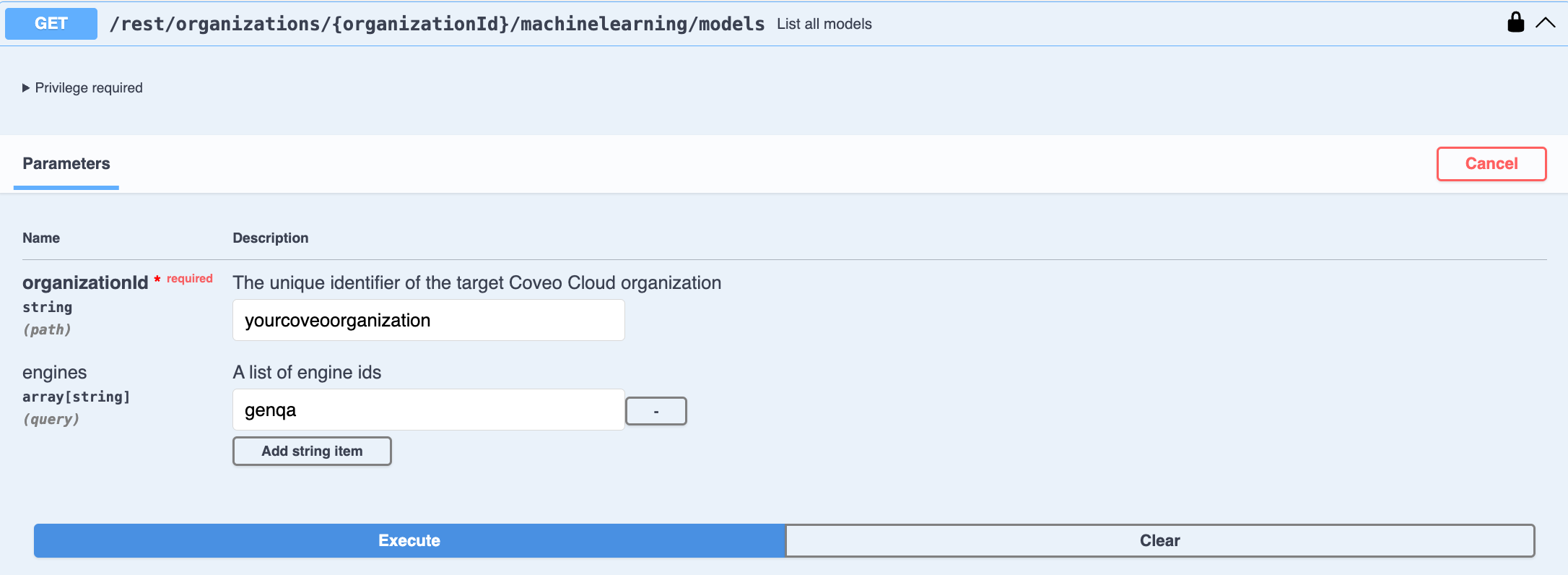
.. Enter your Coveo [**organization ID**](https://docs.coveo.com/en/n1ce5273/).
.. Filter the list by entering the **engine ID** of the [model](https://docs.coveo.com/en/1012/) type you want to configure.
Use `chunksretrieval` for [CPR](https://docs.coveo.com/en/oaie9196/), `genqa` for [RGA](https://docs.coveo.com/en/nbtb6010/), `embeddings` for [SE](https://docs.coveo.com/en/nbtb0041/), and `mlquestionanswering` for [Smart Snippets](https://docs.coveo.com/en/laea5490/).
.. Click **Execute**.
The JSON code for all the models of the chosen type in your organization appears in the **Response body**.
.. In the **Response body**, copy the JSON code of the [model](https://docs.coveo.com/en/1012/) that you want to configure.
You'll need it in the next step.
. Use the **Update the configuration of a model** PUT request to modify the [model](https://docs.coveo.com/en/1012/)'s JSON code:
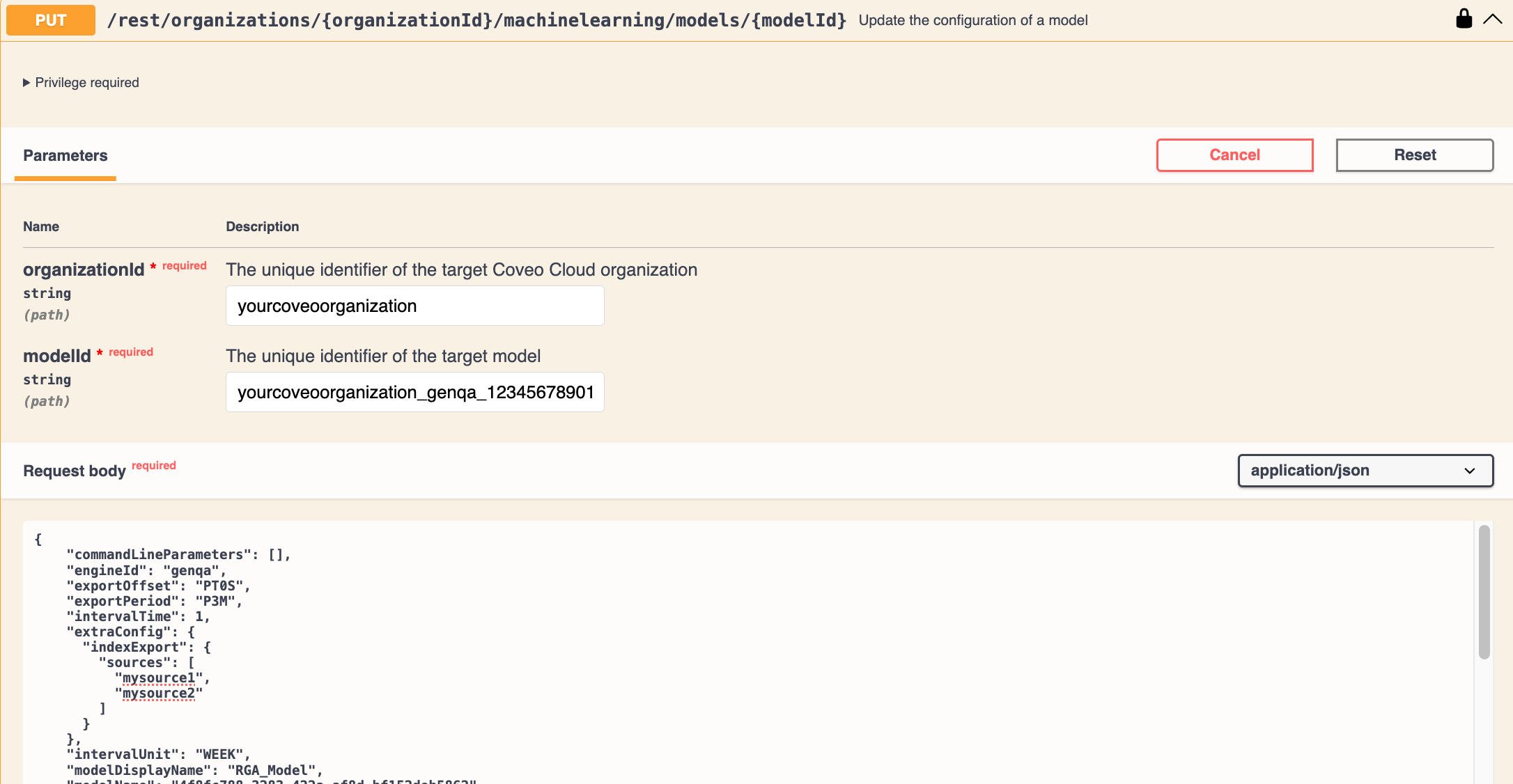
.. Paste the copied JSON code in the **Request body**.
.. Enter your Coveo **organization ID**.
.. Enter the ID of the [model](https://docs.coveo.com/en/1012/) you want to modify.
> **Tip**
>
> If you don't know the model ID, it appears in the [model](https://docs.coveo.com/en/1012/)'s JSON code in the `id` field.
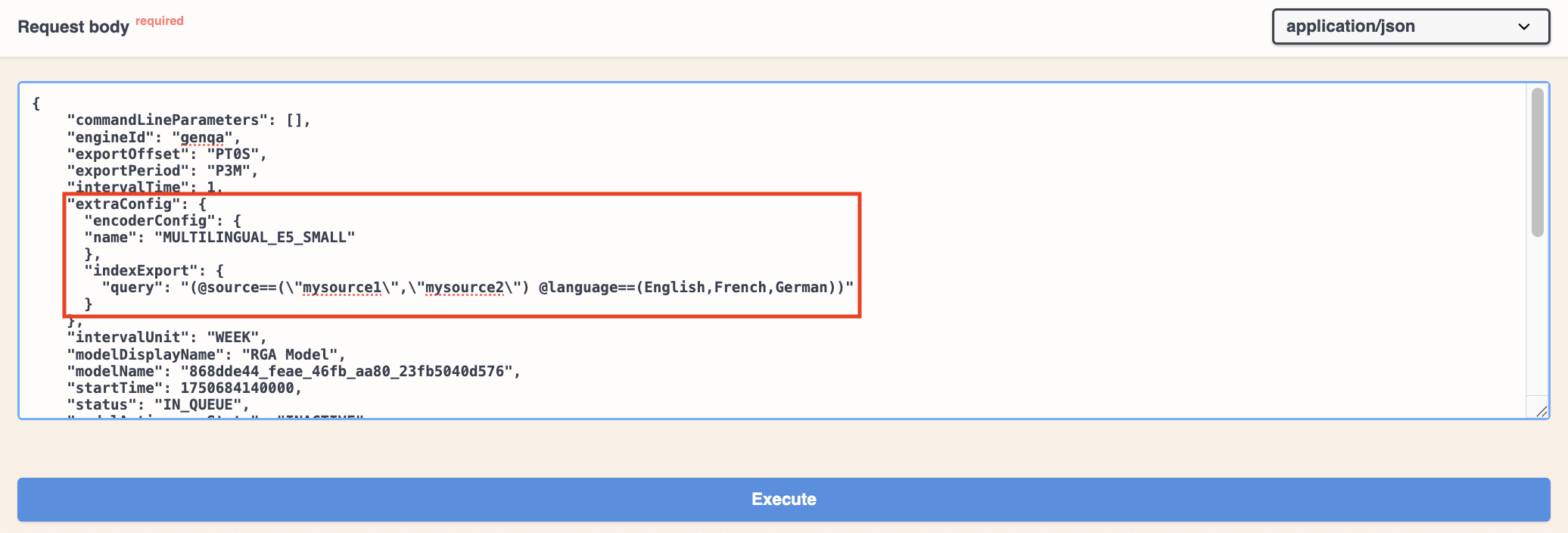
.. Modify the JSON code to set the [model](https://docs.coveo.com/en/1012/) to use a multilingual text encoder, and specify the dataset and dataset languages:
... In the `extraConfig` element of the JSON, add the `encoderConfig` parameter to set the multilingual text encoder to `MULTILINGUAL_E5_SMALL`.
```json
{
...
"extraConfig": {
"encoderConfig": {
"name": "MULTILINGUAL_E5_SMALL"
}
}
...
}
```
... In the `indexExport` element of the JSON, use the `query` parameter to specify the sources that contain the datasets that you want the [model](https://docs.coveo.com/en/1012/) to use, as well as the content languages.
> **Tip**
>
> You can set a [model](https://docs.coveo.com/en/1012/) to use dataset content in different languages, and then configure the query pipeline to filter the content the [model](https://docs.coveo.com/en/1012/) retrieves based on the required language.
**Example**
You want your [RGA](https://docs.coveo.com/en/nbtb6010/) [model](https://docs.coveo.com/en/1012/) to use the datasets from two sources: `mysource1` and `mysource2`.
The two sources contain content in English, French, and German, and the languages are specified using the `language` field in the source items.
The `query` parameter would be:
```json
{
...
"extraConfig": {
"indexExport": {
"query": "(@source==(\"mysource1\",\"mysource2\") @language==(English,French,German))"
}
}
...
}
```
If you remove `German` from the list of languages, the [RGA](https://docs.coveo.com/en/nbtb6010/) [model](https://docs.coveo.com/en/1012/) will use only the English and French content from those sources.
The German content won't be embedded, retrieved, or used for answer generation.
... In the `indexExport` element, delete the `sources` parameter from the JSON, if it exists.
The sources are now specified in the `query` parameter, so the `sources` parameter is no longer needed.
. In the Swagger UI, click **Execute** to apply the changes to the [model](https://docs.coveo.com/en/1012/).
You can [review the model information](https://docs.coveo.com/en/1894/) in the [Administration Console](https://docs.coveo.com/en/183/) to see if your changes were applied successfully.
## Set the language for generated answers
This configuration applies only for [RGA](https://docs.coveo.com/en/nbtb6010/).
If you've configured your [RGA](https://docs.coveo.com/en/nbtb6010/) [model](https://docs.coveo.com/en/1012/) to retrieve content in multiple languages, you can apply additional configuration to set the language of the generated answers.
Typically, you would set it to match the language of the content that the [RGA](https://docs.coveo.com/en/nbtb6010/) [model](https://docs.coveo.com/en/1012/) retrieves, but you can set it to a different language.
If set to a different language than the content, the generative LLM translates the generated answer.
To determine the language of the generated answer, the [RGA](https://docs.coveo.com/en/nbtb6010/) [model](https://docs.coveo.com/en/1012/) relies on a locale setting that specifies the language and region.
For example, `en-US` is the locale for English in the United States, and `fr-FR` is the locale for French in France.
Depending on how you choose to configure your [RGA](https://docs.coveo.com/en/nbtb6010/) implementation, the locale that's used for the generated answer can come from the search interface, the query pipeline, or the [RGA](https://docs.coveo.com/en/nbtb6010/) [model](https://docs.coveo.com/en/1012/) configuration itself.
Once a locale is established, the [RGA](https://docs.coveo.com/en/nbtb6010/) [model](https://docs.coveo.com/en/1012/) includes that locale in the prompt that's sent to the LLM for answer generation.
The generative LLM then generates the answer in that language.
No matter how you configure your [RGA](https://docs.coveo.com/en/nbtb6010/) implementation, [RGA](https://docs.coveo.com/en/nbtb6010/) ultimately relies on two parameters to establish the locale: `targetLocaleFromRequest` and `targetLocale`.
These parameters are typically set in the [RGA](https://docs.coveo.com/en/nbtb6010/) [model](https://docs.coveo.com/en/1012/) configuration, but they can also be set in the [RGA](https://docs.coveo.com/en/nbtb6010/) [model](https://docs.coveo.com/en/1012/) association in the query pipeline.
How and where you set these parameters is based on your chosen strategy for setting the locale.
To set the language used by [RGA](https://docs.coveo.com/en/nbtb6010/) for generated answers
. [Configure multilingual content retrieval](#configure-multilingual-content-retrieval) for the [RGA](https://docs.coveo.com/en/nbtb6010/) [model](https://docs.coveo.com/en/1012/).
> **Note**
>
> Because the [SE](https://docs.coveo.com/en/nbtb0041/) [model](https://docs.coveo.com/en/1012/) is used by [RGA](https://docs.coveo.com/en/nbtb6010/) to retrieve relevant content, the [SE](https://docs.coveo.com/en/nbtb0041/) [model](https://docs.coveo.com/en/1012/) must also be configured to retrieve multilingual content.
. [Determine your locale strategy](#determine-your-locale-strategy) to know where and how to set the locale that's used for generated answers.
This is based on your implementation needs and [RGA](https://docs.coveo.com/en/nbtb6010/)’s locale workflow, and may require you to do one or both of the following:
** [Set the locale in the search interface](#set-the-locale-in-the-search-interface) to send the locale along with the query request.
** [Create query parameter rules](#set-the-locale-using-a-query-parameter-rule) in the query pipeline to set the locale value.
. [Set the RGA locale parameters](#set-the-rga-locale-parameters) (`targetLocaleFromRequest` and `targetLocale`) that [RGA](https://docs.coveo.com/en/nbtb6010/) will use to determine the language for generated answers.
### Determine your locale strategy
Before we get into specifics on how to configure the locale for your [RGA](https://docs.coveo.com/en/nbtb6010/) implementation, let's first look at where the locale can be set in the [RGA](https://docs.coveo.com/en/nbtb6010/) workflow.
For maximum flexibility, the locale that's used for generated answers can come from the search interface, the query pipeline that's used by the [RGA](https://docs.coveo.com/en/nbtb6010/) [model](https://docs.coveo.com/en/1012/), or from the [RGA](https://docs.coveo.com/en/nbtb6010/) [model](https://docs.coveo.com/en/1012/) configuration itself.
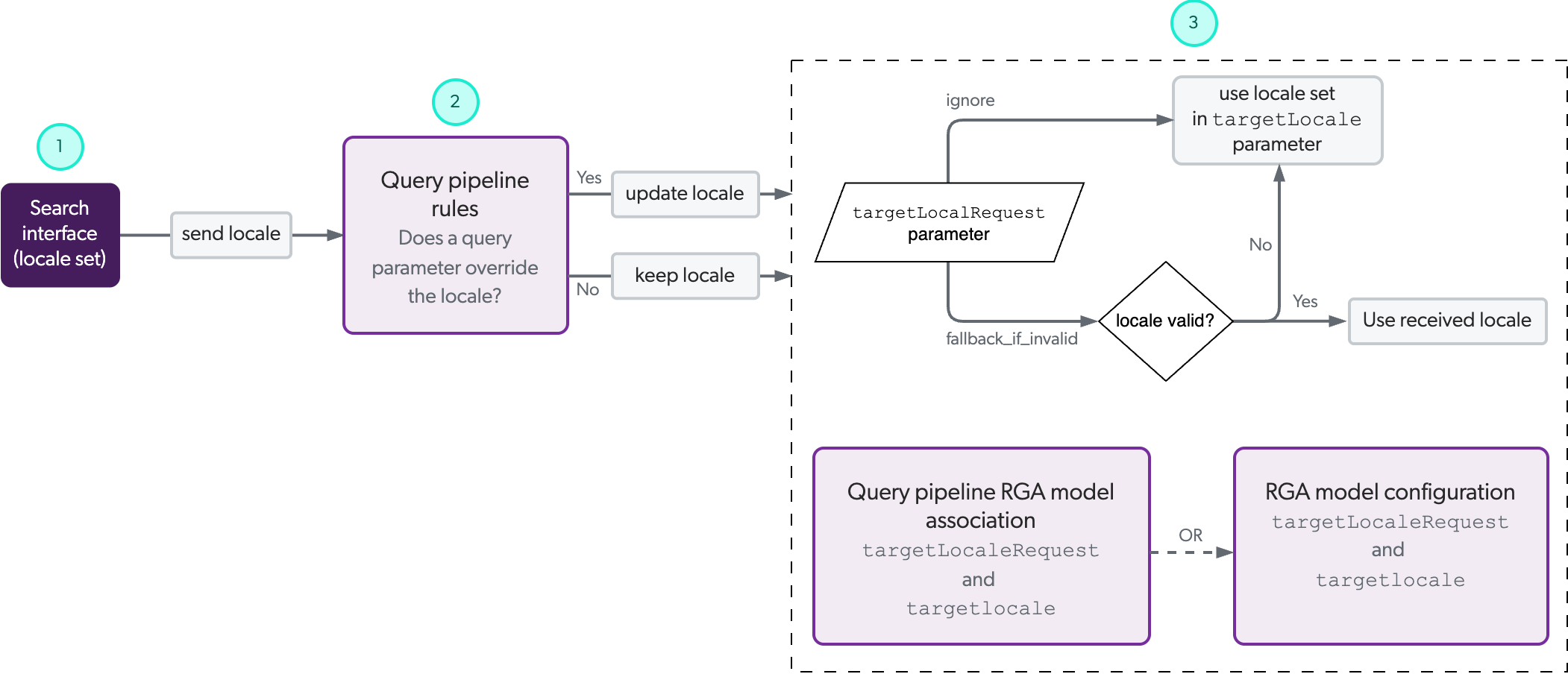
The following diagram illustrates the path a locale setting takes in an [RGA](https://docs.coveo.com/en/nbtb6010/) workflow, beginning with the recommended locale setting in the search interface.
This isn't to say that the locale setting must absolutely be set in the search interface.
It can be set at any of the indicated points along the path, with each subsequent step having the potential to override the locale set in a previous step.
You can use this diagram to help you determine the optimal implementation method for your specific needs.
> **Important**
>
> Associate your model with a search interface and query pipeline that are configured to handle multiple languages.
> If the associated query pipeline doesn't filter content based on the desired language, the model's multilingual encoder retrieves content from all available items in its training set based on semantic similarity, regardless of language.
[cols="2"]
|===
|1
a|(**Optional**) [If the locale is set in your RGA-enabled search interface](#set-the-locale-in-the-search-interface), the locale value is sent as part of the query request to the query pipeline that's used by the [RGA](https://docs.coveo.com/en/nbtb6010/) [model](https://docs.coveo.com/en/1012/).
> **Note**
>
> Coveo recommends that you use the search interface to set the locale to use for generated answers.
> It's the most reliable way to use your website's existing business logic, and provide a consistent customer experience without introducing unnecessary complexity in your [RGA](https://docs.coveo.com/en/nbtb6010/) implementation.
|2
|(**Optional**) You can [create a query parameter rule](#set-the-locale-using-a-query-parameter-rule) in the query pipeline to override the locale value from the search interface, or to set the locale value.
If you don't set a query parameter rule for the locale, the locale that's received from the search interface is kept.
|3
a|(**Required**) The `targetLocaleFromRequest` and `targetLocale` parameters are ultimately what determine the locale the [RGA](https://docs.coveo.com/en/nbtb6010/) [model](https://docs.coveo.com/en/1012/) uses for the generated answer.
Based on the parameter settings, the [RGA](https://docs.coveo.com/en/nbtb6010/) [model](https://docs.coveo.com/en/1012/) uses either the locale it receives from the search interface or query parameter rule, or the locale that's set in `targetLocale`.
For increased flexibility, the parameters can be set either in the [RGA](https://docs.coveo.com/en/nbtb6010/) [model](https://docs.coveo.com/en/1012/) association in the query pipeline, in the [RGA](https://docs.coveo.com/en/nbtb6010/) [model](https://docs.coveo.com/en/1012/) configuration itself, or in both.
If set in both, the parameter settings in the [RGA](https://docs.coveo.com/en/nbtb6010/) [model](https://docs.coveo.com/en/1012/) association take precedence.
For details, see [Set the RGA locale parameters](#set-the-rga-locale-parameters).
> **Note**
>
> Unlike 1 and 2 that are optional, you must set the `targetLocaleFromRequest` and `targetLocale` parameters.
> Otherwise, the [RGA](https://docs.coveo.com/en/nbtb6010/) [model](https://docs.coveo.com/en/1012/) will always default to English for generated answers, no matter what locale is set in a previous step.
|===
> **Tip**
>
> See [example configurations](#example-configurations) of how to configure your locale settings based on different scenarios.
### Set the locale in the search interface
While setting the locale in your [RGA](https://docs.coveo.com/en/nbtb6010/)-enabled search interface is optional, it's the recommended way to set the locale for generated answers.
> **Note**
>
> Even if you set the locale in the search interface, you must still [set the RGA locale parameters](https://docs.coveo.com/en/p5ne0024#set-the-rga-locale-parameters).
Enterprises typically build their websites and search interfaces to serve specific business logic and audiences.
It's for this reason that Coveo recommends that you set the locale in the search interface to take advantage of the same business logic when it comes to the language of generated answers.
Allowing the search interface to dictate the language for generated answers is the most reliable way to provide a consistent customer experience without introducing unnecessary complexity in your [RGA](https://docs.coveo.com/en/nbtb6010/) implementation.
> **Tip**
>
> Even if you configure a locale for all your search interfaces, you can still override the locale later in the [RGA](https://docs.coveo.com/en/nbtb6010/) workflow to accommodate for specific use cases and flows.
> In other words, you could use the search interface locale for the majority of use cases, but override it when needed.
Set the locale for your [RGA](https://docs.coveo.com/en/nbtb6010/)-enabled search interface based on the library or framework that you used to build your search interface:
* [Coveo Atomic library](https://docs.coveo.com/en/atomic/latest/usage/atomic-localization/)
* [Coveo Headless library](https://docs.coveo.com/en/headless/latest/reference/interfaces/SSR_Search.SearchConfigurationOptions.html)
* [Coveo Quantic library](https://docs.coveo.com/en/quantic/latest/reference/search-components/search-search-interface/)
* [Coveo JavaScript Search Framework](https://docs.coveo.com/en/421/)
> **Important**
>
> The locale used for [RGA](https://docs.coveo.com/en/nbtb6010/) must be a valid tag that includes a language code, or language and region codes, according to the [IETF BCP 47 standard](https://en.wikipedia.org/wiki/IETF_language_tag).
> For example, use `fr-FR` for French in France or `de` for international German.
> See [Supported locale tags](#supported-locale-tags) for details.
### Set the locale using a query parameter rule
There may be instances where you want to use a query parameter rule in the query pipeline to set or override the locale value that the [RGA](https://docs.coveo.com/en/nbtb6010/) [model](https://docs.coveo.com/en/1012/) receives.
This is especially useful if you're using the same query pipeline for multiple search interfaces, or setting the locale based on a specific condition.
> **Note**
>
> Even if you set the locale using a query parameter rule, you must still [set the RGA locale parameters](https://docs.coveo.com/en/p5ne0024#set-the-rga-locale-parameters).
To create a query parameter rule for the locale
[Add a query parameter rule](https://docs.coveo.com/en/3411#add-or-edit-query-parameter-rules) using the **Locale** parameter in the query pipeline that's used by your [RGA](https://docs.coveo.com/en/nbtb6010/)-enabled search interface.
> **Important**
>
> The locale used for [RGA](https://docs.coveo.com/en/nbtb6010/) must be a valid tag that includes a language code, or language and region codes, according to the [IETF BCP 47 standard](https://en.wikipedia.org/wiki/IETF_language_tag).
> For example, use `fr-FR` for French in France or `de` for international German.
> See [Supported locale tags](#supported-locale-tags) for details.
### Set the RGA locale parameters
The [RGA](https://docs.coveo.com/en/nbtb6010/) [model](https://docs.coveo.com/en/1012/) references the `targetLocaleFromRequest` and `targetLocale` parameter settings to determine what locale to use for the generated answer.
> **Important**
>
> These parameters are required to generate answers in a language other than English.
> If the parameters aren't set, the generated answers will always default to English.
* `targetLocaleFromRequest`: Sets whether to ignore or use the locale that the [RGA](https://docs.coveo.com/en/nbtb6010/) [model](https://docs.coveo.com/en/1012/) receives with the query request.
It can be set to one of the following values:
** `ignore`: Instructs the [RGA](https://docs.coveo.com/en/nbtb6010/) [model](https://docs.coveo.com/en/1012/) to ignore any locale that it receives, and instead use the locale that's specified in the `targetLocale` parameter.
** `fallback_if_invalid`: Instructs the [RGA](https://docs.coveo.com/en/nbtb6010/) [model](https://docs.coveo.com/en/1012/) to use the locale that it receives.
In the case of an invalid locale, the [RGA](https://docs.coveo.com/en/nbtb6010/) [model](https://docs.coveo.com/en/1012/) will use the locale that's specified in the `targetLocale` parameter.
* `targetLocale`: Sets the locale to use if `targetLocaleFromRequest` is set to `ignore`, or if it's set to `fallback_if_invalid` and the locale is invalid.
> **Important**
>
> The locale used for [RGA](https://docs.coveo.com/en/nbtb6010/) must be a valid tag that includes a language code, or language and region codes, according to the [IETF BCP 47 standard](https://en.wikipedia.org/wiki/IETF_language_tag).
> For example, use `fr-FR` for French in France or `de` for international German.
> See [Supported locale tags](#supported-locale-tags) for details.
> **Tip**
>
> See [example configurations](#example-configurations) of how to configure your locale settings based on different scenarios.
To set the [RGA](https://docs.coveo.com/en/nbtb6010/) locale parameters
You can set the `targetLocaleFromRequest` and `targetLocale` parameters in the [RGA](https://docs.coveo.com/en/nbtb6010/) [model](https://docs.coveo.com/en/1012/) association in the query pipeline, or in the [RGA](https://docs.coveo.com/en/nbtb6010/) [model](https://docs.coveo.com/en/1012/) configuration.
For more information, see [Model association versus model configuration](#model-association-versus-model-configuration).
**Set the RGA locale parameters in the model configuration**
Details
[discrete]
Details
[discrete]