---
title: Index HTML page metadata
slug: o2ta0401
canonical_url: https://docs.coveo.com/en/o2ta0401/
collection: index-content
source_format: adoc
---
# Index HTML page metadata
The Sitemap source supports many custom [metadata](https://docs.coveo.com/en/218/) [indexing](https://docs.coveo.com/en/204/) methods.
You can extract metadata [from the sitemap XML file](https://docs.coveo.com/en/2656/) and from the HTML content of the web pages listed in the sitemap.
There are three methods to index HTML page metadata: [web scraping configurations](https://docs.coveo.com/en/mahe0350/), the [JSON-LD metadata extraction](https://docs.coveo.com/en/1967#extract-json-ld-metadata) feature, and the `IndexHtmlMetadata` JSON parameter, which is the focus of this article.
## Usage scenarios
`IndexHtmlMetadata` is a [crawler](https://docs.coveo.com/en/2121/) parameter that's disabled by default, because it's costly resource-wise and may impact indexing performance.
When you [enable `IndexHtmlMetadata`](#enable-indexhtmlmetadata), the Sitemap crawler extracts the `content` attribute value of `` tags keyed with one of the following attributes: `name`, `property`, `itemprop`, or `http-equiv`.
**Example**
Given the `` tag, the Sitemap crawler extracts the following metadata:
Metadata name: `viewport`
Metadata value: `width=device-width, initial-scale=1.0`
After the crawling stage, the document is pushed to the [document processing manager (DPM)](https://docs.coveo.com/en/191/) where an [HTML _converter_](https://docs.coveo.com/en/1893#processing) also extracts metadata from page `` tags that have a `name` attribute.

The converter is more efficient at extracting metadata from `` HTML tags with a `name` attribute compared to `IndexHtmlMetadata`.
However, you might want to enable `IndexHtmlMetadata` in the following scenarios:
* When extracting metadata from `` tags that have a `property`, `itemprop`, or `http-equiv` attribute, which the converter doesn't support.
* When using a web scraping configuration that [excludes](https://docs.coveo.com/en/mahe0350#elements-to-exclude) `` tags, from which the converter would otherwise extract metadata.
## Enable `IndexHtmlMetadata`
If you're in one of the [usage scenarios](#usage-scenarios), enable `IndexHtmlMetadata` as follows:
. On the [**Sources**](https://platform.cloud.coveo.com/admin/#/orgid/content/sources/) ([platform-ca](https://platform-ca.cloud.coveo.com/admin/#/orgid/content/sources/) | [platform-eu](https://platform-eu.cloud.coveo.com/admin/#/orgid/content/sources/) | [platform-au](https://platform-au.cloud.coveo.com/admin/#/orgid/content/sources/)) page, click the desired source, and then click **More** > **Edit configuration with JSON** in the Action bar.
. Locate the `IndexHtmlMetadata` parameter in the JSON configuration.
```json
"IndexHtmlMetadata": {
"sensitive": false,
"value": "false"
}
```
. Set its `value` to `true`.
```json
"IndexHtmlMetadata": {
"sensitive": false,
"value": "true"
}
```
. Click **Save and rebuild source**.
## Use the crawler metadata values in your fields
By default, most [fields](https://docs.coveo.com/en/200/) are populated with the values extracted by the converter when the same metadata is extracted both by the converter and the crawler.
To force Coveo to index metadata values coming from the crawler, set the `origin` argument to `crawler` in your [mapping rule](https://docs.coveo.com/en/1839/).
**Example**
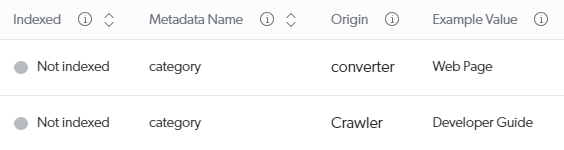
Suppose your source [**View and map metadata**](https://docs.coveo.com/en/m9ti0339#view-and-map-metadata-subpage) subpage shows values being extracted for the `category` metadata both by the crawler and the converter.
{empty}
To have your crawler values (for example, `Developer Guide`) [indexed in your field](https://docs.coveo.com/en/m9ti0339#index-metadata), you would use the following [mapping rule](https://docs.coveo.com/en/1839/):
`%[category:crawler]`.