The astonishing, the original, and always relevant Coveo style.
", "color": "Red", "ec_item_group_id": "001", "ec_product_id": "001-red", "ec_images": ["https://myimagegallery?productid"], "gender": "Men", "price": "30", "ec_category": "Soccer Shoes", "objecttype": "Product" } ``` In your organization, you created the following fields to store additional metadata about your products: * `product_color` * `product_gender` * `product_model` Therefore, you create mapping rules to map the `color`, `gender`, and `model` metadata to the `product_color`, `product_gender`, and `product_model` fields. #### Map to `permanentid` When using a [Catalog source](https://docs.coveo.com/en/l5if0244/) to [index](https://docs.coveo.com/en/204/) your [catalog data](https://docs.coveo.com/en/obcf0333/), the [Coveo Platform](https://docs.coveo.com/en/186/) automatically creates a standard commerce [field](https://docs.coveo.com/en/200/) named `ec_product_id` to hold unique product identifiers. If you use `ec_product_id` as the name of the [metadata](https://docs.coveo.com/en/218/) key that uniquely identifies your products in your [catalog data](https://docs.coveo.com/en/obcf0333/), it's automatically [mapped](https://docs.coveo.com/en/217/) to the `ec_product_id` and [`permanentid`](https://docs.coveo.com/en/1913#taking-advantage-of-the-permanentid-field) [fields](https://docs.coveo.com/en/200/) in your [Coveo organization](https://docs.coveo.com/en/185/). However, you may prefer to use a different name for the [metadata](https://docs.coveo.com/en/218/) key that uniquely identifies the [items](https://docs.coveo.com/en/pa8f6515/) in your [source](https://docs.coveo.com/en/246/), in which case the [mappings](https://docs.coveo.com/en/217/) aren't done automatically. This unique identifier can vary, depending on whether your [items](https://docs.coveo.com/en/pa8f6515/) are [products](https://docs.coveo.com/en/m53g7119/), [variants](https://docs.coveo.com/en/m53g0506/), or [availabilities](https://docs.coveo.com/en/m53g0124/). In this case, you must manually [map](https://docs.coveo.com/en/217/) the [metadata](https://docs.coveo.com/en/218/) key that uniquely identifies the [items](https://docs.coveo.com/en/pa8f6515/) in your [source](https://docs.coveo.com/en/246/) to the `permanentid` [field](https://docs.coveo.com/en/200/). > **Important** > > The unique identifier that you map to the `permanentid` [field](https://docs.coveo.com/en/200/) must be the same as the one you selected when defining the **Product** [catalog object](https://docs.coveo.com/en/ncig0154/) in the [catalog objects mapping](#step-1-catalog-objects-mapping-other-source-types) step. > > Not following this rule can cause Coveo for Commerce features that rely on consistent product identification to malfunction. To [map](https://docs.coveo.com/en/217/) a unique identifier to the `permanentid` [field](https://docs.coveo.com/en/200/) . Identify the [metadata](https://docs.coveo.com/en/218/) key that uniquely identifies a product, [variant](https://docs.coveo.com/en/mc7f0326/), or [availability](https://docs.coveo.com/en/mc7e9096/) in your [catalog data](https://docs.coveo.com/en/obcf0333/). . [Create a custom field](https://docs.coveo.com/en/n73f0502#create-additional-commerce-fields) in your [Coveo organization](https://docs.coveo.com/en/185/) that matches the name of the [metadata](https://docs.coveo.com/en/218/) key exactly. . [Map](https://docs.coveo.com/en/1640/) the [metadata](https://docs.coveo.com/en/218/) key to this custom [field](https://docs.coveo.com/en/200/). . [Map](https://docs.coveo.com/en/1640/) the [metadata](https://docs.coveo.com/en/218/) key to the `permanentid` [field](https://docs.coveo.com/en/200/). **Example** In your [catalog data](https://docs.coveo.com/en/obcf0333/), the [metadata](https://docs.coveo.com/en/218/) key that uniquely identifies a product is `product_code`. You create a custom [field](https://docs.coveo.com/en/200/) in your [Coveo organization](https://docs.coveo.com/en/185/) named `product_code` and [map](https://docs.coveo.com/en/217/) your `product_code` [metadata](https://docs.coveo.com/en/218/) key to this [field](https://docs.coveo.com/en/200/). You then [map](https://docs.coveo.com/en/217/) your `product_code` [metadata](https://docs.coveo.com/en/218/) key to the `permanentid` [field](https://docs.coveo.com/en/200/). #### Map to `language` The [Coveo Platform](https://docs.coveo.com/en/186/) automatically detects languages when it [indexes](https://docs.coveo.com/en/204/) [items](https://docs.coveo.com/en/pa8f6515/). Although commerce [sources](https://docs.coveo.com/en/246/) only contain [items](https://docs.coveo.com/en/pa8f6515/) in a single language, these [items](https://docs.coveo.com/en/pa8f6515/) are often too short for automatic language detection. If an [item](https://docs.coveo.com/en/pa8f6515/) doesn't have a language, certain [index](https://docs.coveo.com/en/204/) ranking features, such as [stemming](https://docs.coveo.com/en/1576/) and summarizing, aren't supported. To mitigate this, map the language [metadata](https://docs.coveo.com/en/218/) key in your [catalog data](https://docs.coveo.com/en/obcf0333/) to the default Coveo `language` [field](https://docs.coveo.com/en/200/). To map your language [metadata](https://docs.coveo.com/en/218/) key to the `language` [field](https://docs.coveo.com/en/200/) . Identify the [metadata](https://docs.coveo.com/en/218/) key associated with language in your [catalog data](https://docs.coveo.com/en/obcf0333/). . [Map](https://docs.coveo.com/en/1640/) this [metadata](https://docs.coveo.com/en/218/) key to the `language` [field](https://docs.coveo.com/en/200/). ## Map fields for other source types This section details the field mapping process when you use other eligible cloud [source](https://docs.coveo.com/en/246/) types to [index](https://docs.coveo.com/en/204/) your [catalog data](https://docs.coveo.com/en/obcf0333/), such as: * [Generic REST API](https://docs.coveo.com/en/1896/) * [GraphQL](https://docs.coveo.com/en/n6gh2329/) * [Database](https://docs.coveo.com/en/1885/) * [Web](https://docs.coveo.com/en/malf0160/) * [Sitemap](https://docs.coveo.com/en/1967/) It covers the two layers of mapping that you must complete: * [Catalog configuration mapping](#catalog-configuration-mapping-other-source-types) * [Source mapping](#source-mapping-other-source-types) ### Catalog configuration mapping When you [create a catalog entity](https://docs.coveo.com/en/3139/) in your [Coveo organization](https://docs.coveo.com/en/185/), you must define a [catalog configuration](https://docs.coveo.com/en/l5if0520/). In this configuration, you must define the [catalog configuration](https://docs.coveo.com/en/l5if0520/) [mappings](https://docs.coveo.com/en/217/) for the standard commerce [fields](https://docs.coveo.com/en/200/). You define [mappings](https://docs.coveo.com/en/217/) at two different points in the [catalog entity](https://docs.coveo.com/en/3143/) creation process: . When defining the [catalog objects](https://docs.coveo.com/en/ncig0154/) that compose your catalog entity (products, [variants](https://docs.coveo.com/en/mc7f0326/), and [availabilities](https://docs.coveo.com/en/mc7e9096/)). . On the **Standard fields** tab of the [catalog configuration](https://docs.coveo.com/en/l5if0520/). #### Step 1: Catalog objects mapping When defining the [catalog objects](https://docs.coveo.com/en/ncig0154/) that compose your catalog entity in the [catalog configuration](https://docs.coveo.com/en/l5if0520/), you must select the [metadata](https://docs.coveo.com/en/218/) keys in your [catalog data](https://docs.coveo.com/en/obcf0333/) that correspond to the unique identifiers of your products, [variants](https://docs.coveo.com/en/mc7f0326/), and [availabilities](https://docs.coveo.com/en/mc7e9096/). For example, if your [catalog data](https://docs.coveo.com/en/obcf0333/) uses the `product_id` metadata key to uniquely identify your products, you must select this key when defining the **Product** [catalog object](https://docs.coveo.com/en/ncig0154/). If your catalog data contains variants and availabilities, you must also select the metadata keys that uniquely identify these [catalog objects](https://docs.coveo.com/en/ncig0154/). For example, if your [catalog data](https://docs.coveo.com/en/obcf0333/) uses the `variant_id` and `availability_id` metadata keys to uniquely identify your [variants](https://docs.coveo.com/en/mc7f0326/) and [availabilities](https://docs.coveo.com/en/mc7e9096/), you must select these keys when defining the **Variant** and **Availability** [catalog objects](https://docs.coveo.com/en/ncig0154/). 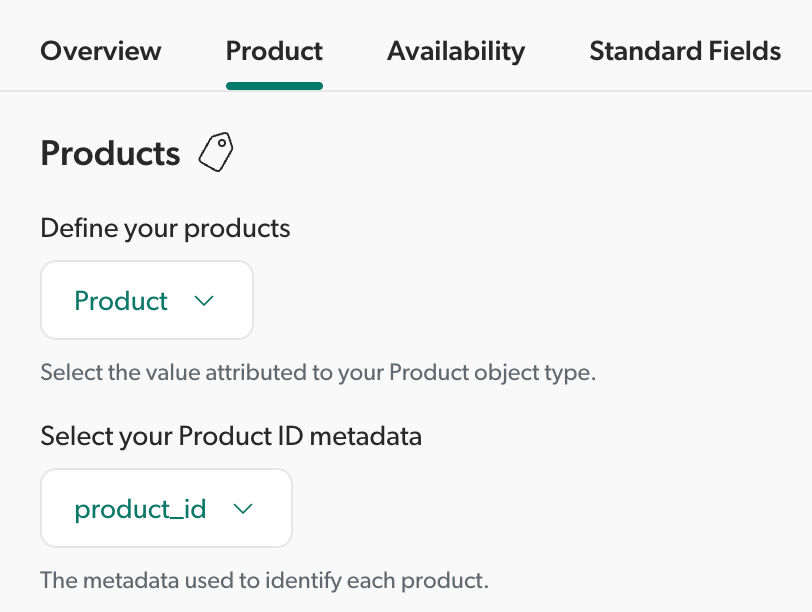 #### Step 2: Standard fields mapping Still within the [catalog configuration](https://docs.coveo.com/en/l5if0520/) process, you must use the [**Standard fields**](https://docs.coveo.com/en/3139#commerce-standard-fields) section to define [catalog configuration](https://docs.coveo.com/en/l5if0520/) [mappings](https://docs.coveo.com/en/217/) for the standard commerce [fields](https://docs.coveo.com/en/200/). This step is critical for: * Making sure that [Coveo Personalization-as-you-go](https://docs.coveo.com/en/m5kd0347/) (PAYG) can build a [product vector space](https://docs.coveo.com/en/l9gg3565/) that represents your content. * Tracking [Coveo Analytics events](https://docs.coveo.com/en/260/) using the [Event Protocol](https://docs.coveo.com/en/o1n91230/). This ensures that commerce [events](https://docs.coveo.com/en/260/) are enriched with the required [catalog data](https://docs.coveo.com/en/obcf0333/), such as `ec_item_group_id`, `ec_category`, and `ec_brand`. For each applicable standard commerce field listed in the **Standard fields** section, specify the corresponding metadata key in your [catalog data](https://docs.coveo.com/en/obcf0333/). For example, if your [catalog data](https://docs.coveo.com/en/obcf0333/) uses the `price` metadata key to store product prices, map `price` to the `ec_price` standard commerce field. 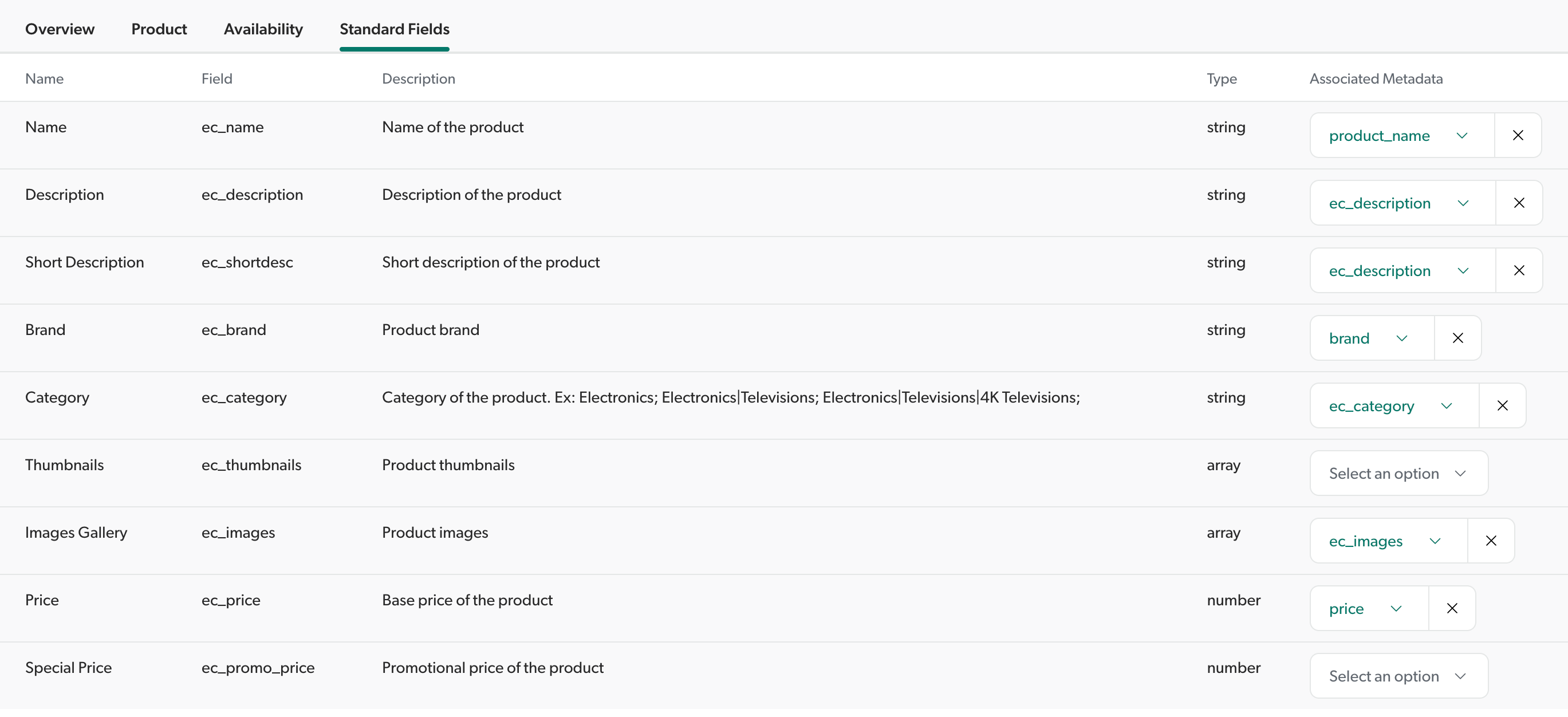 ### Source mapping You must create source mappings for the following fields: * [Catalog standard fields](#catalog-standard-fields-mapping-other-source-types) * [Catalog structure fields](#catalog-structure-fields-mapping-other-source-types) * [Custom fields](#custom-fields-mapping-other-source-types) * [`permanentid` field](#map-to-permanentid-other-source-types) * [`language` field](#map-to-language-other-source-types) #### Catalog standard fields mapping To ensure that the [standard commerce fields](https://docs.coveo.com/en/n73f0502#standard-commerce-fields) in your [Coveo organization](https://docs.coveo.com/en/185/) are properly filled with the corresponding metadata from your [catalog data](https://docs.coveo.com/en/obcf0333/), you must define [source mappings](https://docs.coveo.com/en/1640/) for each of the standard commerce fields that you use. For example, Coveo's standard field dedicated to a product's price is `ec_price`. If your metadata key for the price of a product is `price`, you must map the `ec_price` field to the `price` metadata key. This also applies if you use the same nomenclature as Coveo for the metadata keys in your [catalog data](https://docs.coveo.com/en/obcf0333/). For example, if your metadata key for a product's name is also named `ec_name`, you must still create a source mapping that maps the `ec_name` field to the `ec_name` metadata key. #### Catalog structure fields mapping To structure and configure your catalog entity, you must [use a set of structure fields](https://docs.coveo.com/en/n73f0502#structure-fields) to set up the relationships between your [items](https://docs.coveo.com/en/pa8f6515/), their [variants](https://docs.coveo.com/en/mc7f0326/), and their [availabilities](https://docs.coveo.com/en/mc7e9096/). Define [source mappings](https://docs.coveo.com/en/1640/) for each of the catalog structure fields that you use in your [catalog entity](https://docs.coveo.com/en/3143/). For example, if you created the `ec_variant_id` field to uniquely identify [variant](https://docs.coveo.com/en/mc7f0326/) items in your source, you must define a [source mapping](https://docs.coveo.com/en/1640/) that maps the `ec_variant_id` field to the corresponding metadata key in your [catalog data](https://docs.coveo.com/en/obcf0333/). > **Important** > > Make sure that the metadata keys you map to the catalog structure fields correspond to the unique identifiers you selected when defining the **Product**, **Variant**, and **Availability** [catalog objects](https://docs.coveo.com/en/ncig0154/) in the [catalog objects mapping](#step-1-catalog-objects-mapping-other-source-types) step. > > For example, if you selected the `variant_code` metadata key to uniquely identify your variants when defining the **Variant** [catalog object](https://docs.coveo.com/en/ncig0154/) in the catalog configuration, you must also map `variant_code` to the `ec_variant_id` catalog structure field. #### Custom fields mapping For any additional fields that you create in your [Coveo organization](https://docs.coveo.com/en/185/), you must [create mapping rules](https://docs.coveo.com/en/1640/) to map the metadata to these custom fields. **Example** You uploaded the following product data to your source: ```json { "documentId": "product://001-red", "FileExtension": ".html", "ec_name": "Coveo Soccer Shoes - Red", "model": "Authentic", "brand": "Coveo", "ec_description": "The astonishing, the original, and always relevant Coveo style.
", "color": "Red", "ec_item_group_id": "001", "ec_product_id": "001-red", "ec_images": ["https://myimagegallery?productid"], "gender": "Men", "price": "30", "ec_category": "Soccer Shoes", "objecttype": "Product" } ``` In your organization, you created the following fields to store additional metadata about your products: * `product_color` * `product_gender` * `product_model` Therefore, you create mapping rules to map the `color`, `gender`, and `model` metadata to the `product_color`, `product_gender`, and `product_model` fields. #### Map to `permanentid` You must manually [map](https://docs.coveo.com/en/217/) the [metadata](https://docs.coveo.com/en/218/) key that uniquely identifies the [items](https://docs.coveo.com/en/pa8f6515/) in your [source](https://docs.coveo.com/en/246/) to the [`permanentid`](https://docs.coveo.com/en/1913#taking-advantage-of-the-permanentid-field) [field](https://docs.coveo.com/en/200/). > **Important** > > The unique identifier that you map to the `permanentid` [field](https://docs.coveo.com/en/200/) must be the same as the one you selected when defining the **Product** [catalog object](https://docs.coveo.com/en/ncig0154/) in the [catalog objects mapping](#step-1-catalog-objects-mapping-other-source-types) step. > > Not following this rule can cause Coveo for Commerce features that rely on consistent product identification to malfunction. To [map](https://docs.coveo.com/en/217/) a unique identifier to the `permanentid` [field](https://docs.coveo.com/en/200/) . Identify the [metadata](https://docs.coveo.com/en/218/) key that uniquely identifies a product, [variant](https://docs.coveo.com/en/mc7f0326/), or [availability](https://docs.coveo.com/en/mc7e9096/) in your [catalog data](https://docs.coveo.com/en/obcf0333/). . [Create a custom field](https://docs.coveo.com/en/n73f0502#create-additional-commerce-fields) in your [Coveo organization](https://docs.coveo.com/en/185/) that matches the name of the [metadata](https://docs.coveo.com/en/218/) key exactly. . [Map](https://docs.coveo.com/en/1640/) the [metadata](https://docs.coveo.com/en/218/) key to this custom [field](https://docs.coveo.com/en/200/). . [Map](https://docs.coveo.com/en/1640/) the [metadata](https://docs.coveo.com/en/218/) key to the `permanentid` [field](https://docs.coveo.com/en/200/). **Example** In your [catalog data](https://docs.coveo.com/en/obcf0333/), the [metadata](https://docs.coveo.com/en/218/) key that uniquely identifies a product is `product_code`. You create a custom [field](https://docs.coveo.com/en/200/) in your [Coveo organization](https://docs.coveo.com/en/185/) named `product_code` and [map](https://docs.coveo.com/en/217/) your `product_code` [metadata](https://docs.coveo.com/en/218/) key to this [field](https://docs.coveo.com/en/200/). You then [map](https://docs.coveo.com/en/217/) your `product_code` [metadata](https://docs.coveo.com/en/218/) key to the `permanentid` [field](https://docs.coveo.com/en/200/). #### Map to `language` The [Coveo Platform](https://docs.coveo.com/en/186/) automatically detects languages when it [indexes](https://docs.coveo.com/en/204/) [items](https://docs.coveo.com/en/pa8f6515/). Although commerce [sources](https://docs.coveo.com/en/246/) only contain [items](https://docs.coveo.com/en/pa8f6515/) in a single language, these [items](https://docs.coveo.com/en/pa8f6515/) are often too short for automatic language detection. If an [item](https://docs.coveo.com/en/pa8f6515/) doesn't have a language, certain [index](https://docs.coveo.com/en/204/) ranking features, such as [stemming](https://docs.coveo.com/en/1576/) and summarizing, aren't supported. To mitigate this, map the language [metadata](https://docs.coveo.com/en/218/) key in your [catalog data](https://docs.coveo.com/en/obcf0333/) to the default Coveo `language` [field](https://docs.coveo.com/en/200/). To map your language [metadata](https://docs.coveo.com/en/218/) key to the `language` [field](https://docs.coveo.com/en/200/) . Identify the [metadata](https://docs.coveo.com/en/218/) key associated with language in your [catalog data](https://docs.coveo.com/en/obcf0333/). . [Map](https://docs.coveo.com/en/1640/) this [metadata](https://docs.coveo.com/en/218/) key to the `language` [field](https://docs.coveo.com/en/200/).