---
title: Search hub for Commerce (Legacy)
slug: n89e0266
canonical_url: https://docs.coveo.com/en/n89e0266/
collection: coveo-for-commerce
source_format: adoc
---
# Search hub for Commerce (Legacy)
The [search hub](https://docs.coveo.com/en/1342/) uniquely identifies a specific Coveo-powered experience, typically tied to a particular website or application.
It helps distinguish the context in which users interact with your content.
For example, if your company has a [storefront](https://docs.coveo.com/en/p33g0410/) for browsing and purchasing products and a support portal for accessing help articles, each would have its own distinct search hub value.
The search hub allows [Coveo organizations](https://docs.coveo.com/en/185/) to:
* Track search consumption
* Monitor usage through [Coveo Analytics reports](https://docs.coveo.com/en/266/)
* Enhance the effectiveness of [Coveo Machine Learning (Coveo ML)](https://docs.coveo.com/en/188/) [models](https://docs.coveo.com/en/1012/)
See [the generic search hub article](https://docs.coveo.com/en/o7qa1002/) for additional information on this topic.
> **Important**
>
> This section provides information on how to implement the [search hub](https://docs.coveo.com/en/1342/) that interacts with the Coveo Search API, which is no longer recommended for Coveo for Commerce implementations.
>
> New Coveo for Commerce implementations should use the Coveo for Commerce API, which provides a more efficient and flexible way to interact with the [Coveo Platform](https://docs.coveo.com/en/186/).
> See [Build commerce interfaces](https://docs.coveo.com/en/o4ue6279/) for documentation on how to build commerce interfaces using the Coveo for Commerce API.
## Defining the search hub at the interface level
When building your user interfaces, such as search, listing, and recommendation interfaces with [Coveo Platform](https://docs.coveo.com/en/186/)’s frameworks (that's, [Coveo Atomic library](https://docs.coveo.com/en/lcdf0264/) or [Coveo Headless library](https://docs.coveo.com/en/lcdf0493/)), you can specify a [search hub](https://docs.coveo.com/en/1342/) value at the interface level.
Note that the value chosen for the [search hub](https://docs.coveo.com/en/1342/) must be of the `string` data type.
> **Leading practice**
>
> We highly recommend setting a [search hub](https://docs.coveo.com/en/1342/) at both the interface level and in [the authentication](#defining-the-search-hub-in-the-authentication).
When doing so, the `searchHub` value of all requests to the Search API originating from the interface will contain the value configured at the interface level.
Also, setting a [search hub](https://docs.coveo.com/en/1342/) value at the interface level will be used to fill the value of the `originLevel1` parameter for both [click](https://docs.coveo.com/en/n6mf0358/) and [search](https://docs.coveo.com/en/n7o80165/) [events](https://docs.coveo.com/en/260/) originating from this interface, which is essential for accurate reporting and for computing [attribution](https://docs.coveo.com/en/m7l98577/) correctly.
**Example**
You create a [search interface](https://docs.coveo.com/en/2741/) for which you configure the [search hub](https://docs.coveo.com/en/1342/) to be `coveo-storefront-search`.
All [queries](https://docs.coveo.com/en/231/) originating from this [search interface](https://docs.coveo.com/en/2741/) will contain a `searchHub` parameter, for which the value will be `coveo-storefront-search`.
Similarly, all click and search events performed from this interface will contain an `originLevel1` parameter for which the value will be `coveo-storefront-search`.
### Defining the search hub in Atomic interfaces
Depending on whether you want to define the [search hub](https://docs.coveo.com/en/1342/) on a [search interface](https://docs.coveo.com/en/2741/) or recommendation component using the [Atomic](https://docs.coveo.com/en/atomic/latest/) framework, see the following documentation:
* On a [search interface](https://docs.coveo.com/en/2741/), you must set the [search hub](https://docs.coveo.com/en/1342/) value on the [`atomic-search-interface`](https://static.cloud.coveo.com/atomic/v3/storybook/index.html?path=/docs/atomic-search-interface\--docs) component.
* On a recommendation component, you must define the [search hub](https://docs.coveo.com/en/1342/) on the [`atomic-recs-interface`](https://static.cloud.coveo.com/atomic/v3/storybook/index.html?path=/docs/atomic-search-interface\--docs) component.
**Example**
The following code sample shows how you would set the [search hub](https://docs.coveo.com/en/1342/) on a `atomic-search-interface` component:
```html
```
### Defining the search hub in Headless interfaces
To define the [search hub](https://docs.coveo.com/en/1342/) on an interface built with the [Headless](https://docs.coveo.com/en/headless/latest/) framework, you must set the value when initializing the Headless engine.
Depending on the Headless engine you want to initialize:
[cols="2*", options="header"]
|===
|Engine | Instructions
| Search
| Set the [search hub](https://docs.coveo.com/en/1342/) value using the [`SearchConfigurationOptions`](https://docs.coveo.com/en/headless/latest/reference/interfaces/Search.SearchConfigurationOptions.html) object.
| Recommendation
| Set the [search hub](https://docs.coveo.com/en/1342/) value using the [`RecommendationEngineConfiguration`](https://docs.coveo.com/en/headless/latest/reference/interfaces/Recommendation.RecommendationEngineConfiguration.html) object.
|===
**Example**
The following code sample shows how you would set the [search hub](https://docs.coveo.com/en/1342/) using the `SearchConfigurationOptions` object.
```js
import { buildSearchEngine } from '@coveo/headless';
export const headlessEngine = buildSearchEngine({
configuration: {
[...]
search: {
searchHub: "",
},
},
});
```
## Defining the search hub in the authentication
Any interface that relies on the [Coveo Platform](https://docs.coveo.com/en/186/) regularly performs authenticated HTTP requests against the Search API and [Coveo Analytics](https://docs.coveo.com/en/182/), which means that you must implement a query authentication method to authenticate the requests originating from that interface.
When initializing your interface, you must mention an authorization token that grants the **Allowed** [access level](https://docs.coveo.com/en/2818/) on the **Execute Queries** [domain](https://docs.coveo.com/en/2819/) and the **Push** [access level](https://docs.coveo.com/en/2818/) on the **Analytics Data** [domain](https://docs.coveo.com/en/2819/) in the target organization.
This can be done by either using an API key or a [search token](https://docs.coveo.com/en/1346/).
Both methods let you specify a [search hub](https://docs.coveo.com/en/1342/) value, which we strongly recommend to protect the security of your content.
See [Ensure that authentication enforces search hub values](https://docs.coveo.com/en/las95231/) for more details on the importance of enforcing a search hub in your authentication method.
When defining a [search hub](https://docs.coveo.com/en/1342/) value within the authentication, this value takes precedence over the one defined at the interface level.
This means that if you configure a specific [search hub](https://docs.coveo.com/en/1342/) at the interface level, and another [search hub](https://docs.coveo.com/en/1342/) in the authentication method responsible for authenticating [queries](https://docs.coveo.com/en/231/) originating from that [search interface](https://docs.coveo.com/en/2741/), the value of the `searchHub` parameter of the query will be the one configured in the authentication method.
> **Leading practice**
>
> We highly recommend setting a [search hub](https://docs.coveo.com/en/1342/) at both the [interface level](#defining-the-search-hub-at-the-interface-level) and in the authentication.
Note that this behavior doesn't apply to requests to [Coveo Analytics](https://docs.coveo.com/en/182/).
If the [search hub](https://docs.coveo.com/en/1342/) defined at the interface level and the one defined in the authentication method differ, the one defined at the interface level will be used to fill the value of the `originLevel1` parameter.
**Example**
When configuring your interface, you defined `coveo-storefront-search` to be the [search hub](https://docs.coveo.com/en/1342/) value for this interface.
However, when configuring an authentication method to authenticate the requests originating from this interface, you added a [search hub](https://docs.coveo.com/en/1342/) parameter for which the value is `storefront`.
Therefore, the `searchHub` parameter of requests to the Search API will be `storefront`, and the `originLevel1` parameter of requests to [Coveo Analytics](https://docs.coveo.com/en/182/) will be `coveo-storefront-search`.
Therefore, to ensure consistency, we highly recommend that you configure the [search hub](https://docs.coveo.com/en/1342/) in the authentication and ensure that the value matches the one setup at the interface level.
For example, if you configured `coveo-storefront-search` to be the [search hub](https://docs.coveo.com/en/1342/) value at the interface level, the [search hub](https://docs.coveo.com/en/1342/) value enforced in the authentication method should also be `coveo-storefront-search`.
For information on how to configure your authentication method to authenticate requests to the Search API and [Coveo Analytics](https://docs.coveo.com/en/182/), see:
* To learn how manage API keys, see [Manage API keys](https://docs.coveo.com/en/1718/).
* To learn how to manage [search tokens](https://docs.coveo.com/en/1346/), see [Use search token authentication](https://docs.coveo.com/en/56/).
> **Note**
>
> Your authorization token requires the **Allowed** [access level](https://docs.coveo.com/en/2818/) on the **Execute Queries** [domain](https://docs.coveo.com/en/2819/), as well as the **Push** [access level](https://docs.coveo.com/en/2818/) on the **Analytics Data**.
## Search hub naming conventions
In Coveo for Commerce implementations, there's a specific naming convention that must be used to ensure that [attribution](https://docs.coveo.com/en/m1ae0440/) is computed accurately.
Depending on the type of interface from which the event originates, the value of the search hub must contain:
[%header,cols="2"]
|===
|Type of interface
|Contains the string
|A search page
|`search`
|A product listing page
|`listing`
|===
> **Note**
>
> For recommendation components, the [attribution](https://docs.coveo.com/en/m7l98577/) mechanism is automatically managed by tracking a unique ID throughout the actions leading to a product being added to a cart or purchased.
> Therefore, there's no specific naming convention to use when choosing a search hub value for your recommendation component, but note that it's a good practice to add `recs` in the component's search hub value (for example, `home_page_recs`).
>
> However, the identifier value of the recommendation component is used for reporting purposes.
> Specifically, the Coveo Analytics service utilizes the [`recommendation`](https://docs.coveo.com/en/13#operation/searchUsingPost-recommendation) parameter value from queries originating from a particular recommendation component to generate reports on the performance of that specific component.
>
> To ensure clarity and easy recognition, we strongly recommend assigning a meaningful and recognizable value as the identifier for your recommendation component.
>
> You can achieve this by setting the `id` property for your recommendation component. If you're using Headless, for instance, you can specify the component's ID by utilizing the [`id` property](https://docs.coveo.com/en/headless/latest/reference/interfaces/Recommendation.RecommendationListOptions.html#id) when initializing the [`RecommendationList` controller](https://docs.coveo.com/en/headless/latest/reference/interfaces/Recommendation.RecommendationList.html).
## Query routing
Every query submitted to the [Coveo Platform](https://docs.coveo.com/en/186/) must pass through a [query pipeline](https://docs.coveo.com/en/180/).
Specifically, [queries](https://docs.coveo.com/en/231/) originating from a particular interface need to be directed to a dedicated [query pipeline](https://docs.coveo.com/en/180/).
Query routing refers to the mechanism used to ensure [queries](https://docs.coveo.com/en/231/) originating from a given [search interface](https://docs.coveo.com/en/2741/) are routed to the proper [query pipeline](https://docs.coveo.com/en/180/) (see [Query pipeline routing mechanisms and rules](https://docs.coveo.com/en/1666/)).
The recommended and most flexible mechanism is the [condition-based routing](https://docs.coveo.com/en/1666#condition-based-routing-recommended) mechanism.
Condition-based routing, as indicated by its name, relies on the usage of a [query pipeline condition](https://docs.coveo.com/en/2793/).
By using the [search hub](https://docs.coveo.com/en/1342/) value configured at the interface level and in the authentication token, you can [configure a condition](https://docs.coveo.com/en/1959/) on the query pipeline to which queries originating from the interface must be routed to ensure that the proper query pipeline is used.
**Example**
When configuring your interface and authentication token, you defined `coveo-storefront-search` to be the [search hub](https://docs.coveo.com/en/1342/) value.
You want the `coveo-storefront` [query pipeline](https://docs.coveo.com/en/180/) to handle [queries](https://docs.coveo.com/en/231/) originating from the `coveo-storefront-search` interface.
Therefore, on the `coveo-storefront` [query pipeline](https://docs.coveo.com/en/180/), you define the following [condition](https://docs.coveo.com/en/2793/): `search hub is coveo-storefront-search`.
## Validate the search hub and query pipeline
To make sure that the correct [search hub](https://docs.coveo.com/en/1342/) value is used in requests to the Search API and [Coveo Analytics](https://docs.coveo.com/en/182/), and that [queries](https://docs.coveo.com/en/231/) are routed to the right [query pipeline](https://docs.coveo.com/en/180/), you can perform the following validations:
To validate the [search hub](https://docs.coveo.com/en/1342/) and [query pipeline](https://docs.coveo.com/en/180/) value in requests to the Search API
. Access the interface for which you want to validate the [search hub](https://docs.coveo.com/en/1342/) and [query pipeline](https://docs.coveo.com/en/180/) value.
. Open your web browser's developer tools.
> **Note**
>
> The examples in this article use the **Google Chrome** developer tools.
> For browser-specific information, see:
>
> * [Google Chrome](https://developers.google.com/web/tools/chrome-devtools/open)
>
> * [Mozilla Firefox](https://developer.mozilla.org/en-US/docs/Tools)
>
> * [Safari](https://support.apple.com/en-ca/guide/safari/sfri20948/mac)
. Select the **Network** tab.
. Depending on whether you're inspecting requests originating from a [search interface](https://docs.coveo.com/en/2741/), recommendation component, or listing page, perform the following:
* For a [search interface](https://docs.coveo.com/en/2741/), in the search box, perform a query.
* For a recommendation interface, open a page that incorporates a recommendation interface (for example, a [product detail page (PDP)](https://docs.coveo.com/en/n8ad7392/) or a home page).
* For a product listing page, open a product listing category.
. In the network monitoring tool, under the **Name** column, select the latest request to the Search API.
The request path should contain `/rest/search/v2`.
. Select the **Response** tab.
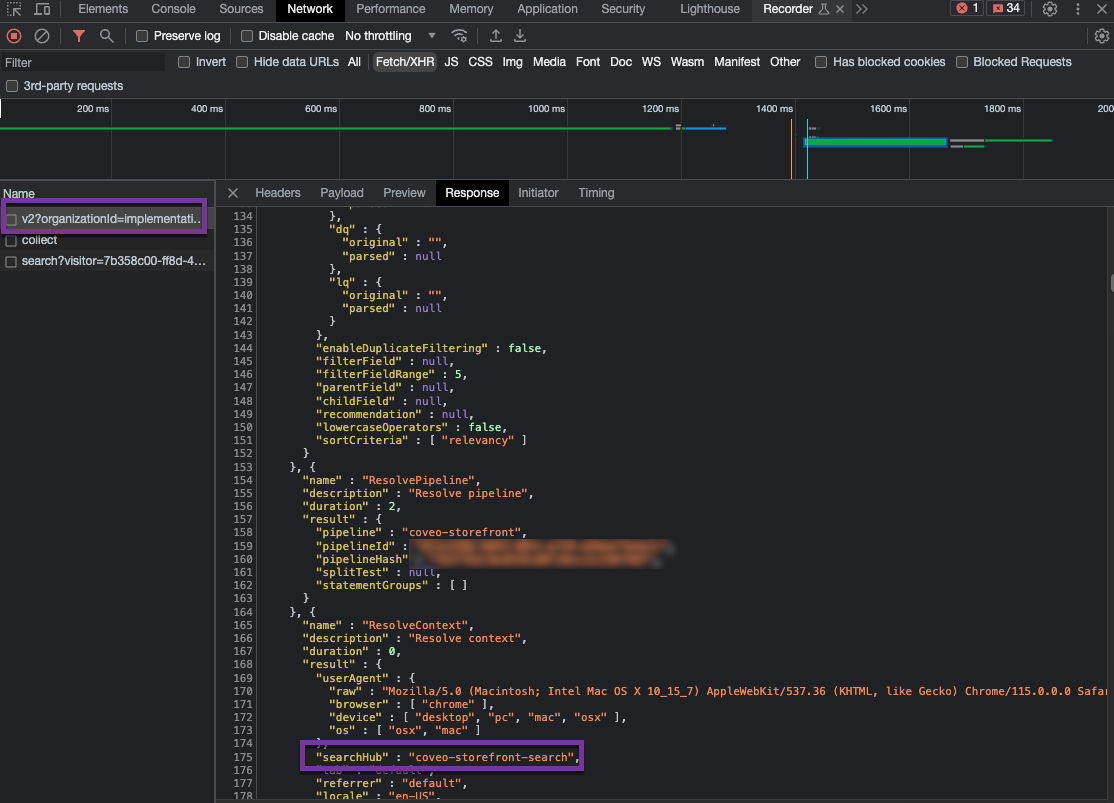
. Find the `searchHub` field, and ensure that the value is expected and follows the [naming conventions](#search-hub-naming-conventions).
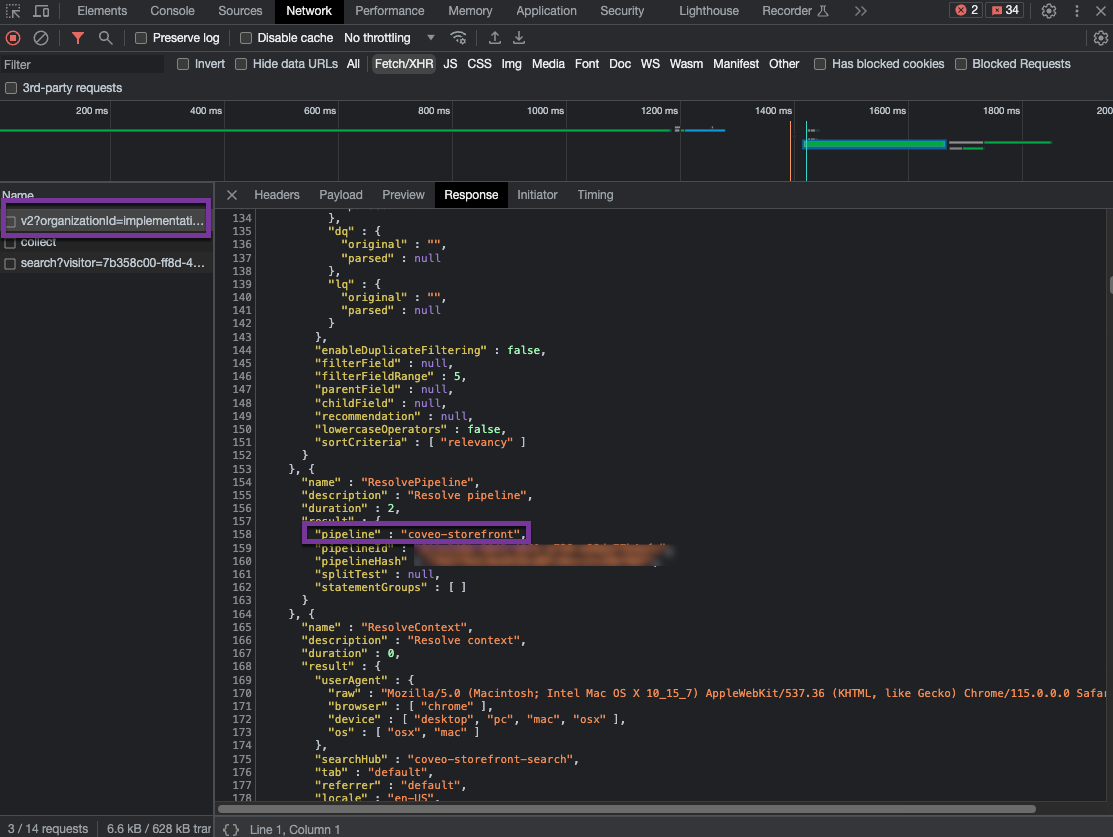
. Considering that you followed the recommended condition-based query routing mechanism, the query should be routed to the expected [query pipeline](https://docs.coveo.com/en/180/) since the pipeline has a [condition](https://docs.coveo.com/en/2793/) based on the value of the [search hub](https://docs.coveo.com/en/1342/).
Still on the **Response** tab, find the `pipeline` field, and validate that the query is routed to the right [query pipeline](https://docs.coveo.com/en/180/).
To validate the [search hub](https://docs.coveo.com/en/1342/) value in requests to [Coveo Analytics](https://docs.coveo.com/en/182/)
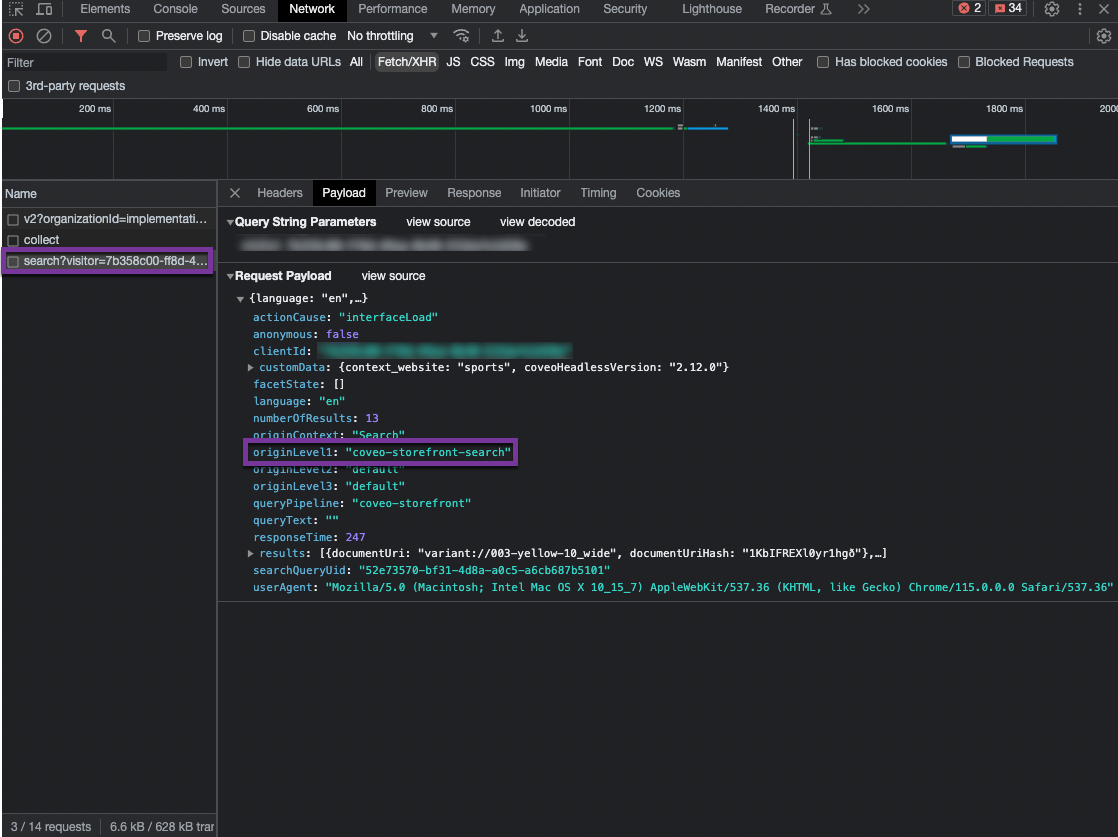
In requests to [Coveo Analytics](https://docs.coveo.com/en/182/), the value of the [search hub](https://docs.coveo.com/en/1342/) that was defined at the interface level and in the authentication method appears in the `originLevel1` field of the payload.
. Access the interface for which you want to validate the value of the `originLevel1` field.
. Open your web browser's developer tools.
> **Note**
>
> The examples in this article use the **Google Chrome** developer tools.
> For browser-specific information, see:
>
> * [Google Chrome](https://developers.google.com/web/tools/chrome-devtools/open)
>
> * [Mozilla Firefox](https://developer.mozilla.org/en-US/docs/Tools)
>
> * [Safari](https://support.apple.com/en-ca/guide/safari/sfri20948/mac)
. Select the **Network** tab.
. Depending on whether you're inspecting a search or click event, look for the following:
* For a search event, under the **Name** column, you should see a request whose path contains `/rest/ua/v15/analytics/search`.
* For a click event, under the **Name** column, you should see a request whose path contains `/rest/ua/v15/analytics/click`.
. Open the **Payload** tab.
. Check the value of the `originLevel1` field.
This value should match the `searchHub` value of the associated request to the Search API.