---
title: Customize data tracking
slug: n1ie8558
canonical_url: https://docs.coveo.com/en/n1ie8558/
collection: coveo-analytics
source_format: adoc
---
# Customize data tracking
Coveo's out-of-the-box (OOTB) tracking mechanisms allow for [persisting tracking identifiers](https://docs.coveo.com/en/n81d0319/) across subdomains.
It doesn't, however, allow tracking across multiple top-level domains.
For example, the client ID remains the same between `+support.barca.com+` and `+products.barca.com+`, since the information is shared across the `+barca.com+` top-level domain.
On the other hand, the client ID would change between `+support.barca.com+` and `+barcaengineering.com+`, since they are two distinct top-level domains and browser restrictions prevent them from accessing each other's client ID.
This article provides methods to use this identifier to track customers across multiple domains.
## User journey example
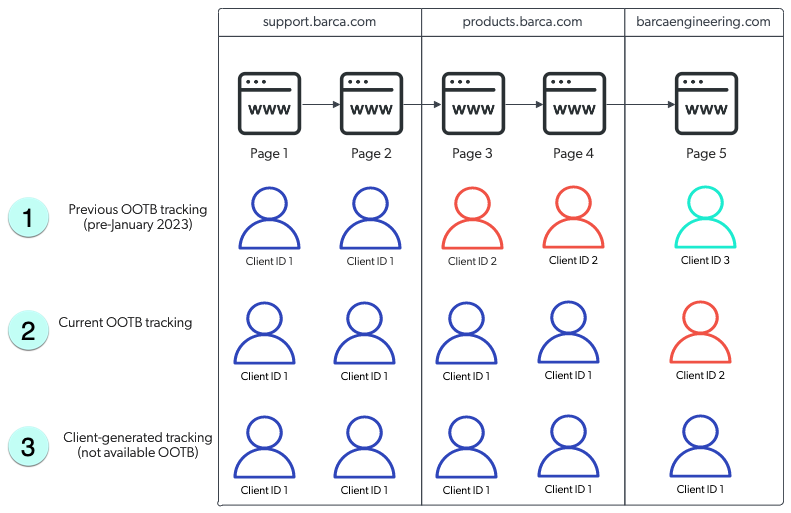
The example below demonstrates the differences within the user journey using different data tracking mechanisms.
A user navigates through pages across three sites, two of which share the same top-level domains (`+support.barca.com+` and `+products.barca.com+`).
> **Note**
>
> When the client ID changes, a new [visit](https://docs.coveo.com/en/271/) is generated.
1 With the previous OOTB tracking mechanism, a user is assigned a new client ID across each domain and subdomain.
2 With the current OOTB tracking mechanism, the client ID is persisted between `+support.barca.com+` and `+products.barca.com+`, but a user is assigned a new one when they reach `+barcaengineering.com+` which is under a different domain.
3 With client-generated tracking mechanisms, a user is assigned a single client ID which persists throughout the user journey.
## Set a tracking identifier based on an existing UUID
In certain cases, you may already have an existing identifier that you use for tracking users and/or you want to use this identifier to track customers across multiple domains.
You can use it to track customers across multiple domains if:
* You're using the [`coveo.analytics.js`](https://github.com/coveo/coveo.analytics.js) library to log events and the `coveoua` constant is available in the browser.
> **Note**
>
> This method doesn't apply if you're using [Coveo JavaScript Search Framework](https://docs.coveo.com/en/187/) (JSUI), and it may not be available if you're using app-specific frameworks.
* You have access to a stable string which identifies the browser client or user:
** You already have a UUID which identifies the browser (for example, through your own custom code).
** You're using a [third-party web analytics service on your site](#set-a-custom-clientid-from-a-google-clientid) and it's set up for cross-domain tracking (for example, a Google Analytics cross-domain setup).
** All your users are identified by a consistent `userId` on all events for the duration of their [journey](#user-journey-example).
In that case, a [combination of the `userId` and browser user agents](#set-a-custom-clientid-from-a-userid-and-useragent) can be used to generate a `clientId`.
You can then set a custom [client ID](https://docs.coveo.com/en/lbjf0131/) using a single JavaScript command, provided that it passes a valid UUID string which is unique to the browser across domains.
> **Warning**
>
> Creating your own client ID may be risky if not done correctly, therefore do it only if all other options are unavailable.
> If the ID isn't created properly, it can negatively affect tracking and consequently have an impact on all downstream Coveo systems.
### Set a custom `clientId`
This command must be called before any other Coveo API calls are executed, which in practice means immediately after the Coveo library has loaded.
```javascript
coveoua('onLoad', function (args) {
coveoanalytics.getCurrentClient().setClientId('e0982c9f-dea8-...-4fafea9b77fb');
});
```
### Set a custom `clientId` from a Google `clientId`
If you don't have your own client UUID string, but you do have a unique identifier from another source, you can use that string identifier to generate a consistent pseudonymous `clientId`, provided you also specify a unique namespace string constant.
> **Note**
>
> This namespace must be identical for all the domains that you want to track and is required to ensure good randomization.
A sample namespace can be your `organization_id`, Google `client_id`, or any other string which is constant for your organization.
**Example**
```javascript
coveoua('onLoad', function (args) {
gtag('get', GOOGLE_MEASUREMENT_ID, 'client_id', (google_client_id) => {
// This will generate a UUID for the provided Google client_id. The UUID will be stable for the given namespace.
coveoanalytics.getCurrentClient().setClientId(google_client_id, GOOGLE_MEASUREMENT_ID);
});
});
```
### Set a custom `clientId` from a `userId` and `userAgent`
If you don't have either your own `cliendId` nor a persistent ID from another source, but you do have a consistent user identifier, a `clientId` can be generated by combining the `userId` and the browser's distinct `userAgent` string.
This will ensure that the `clientId` is the same across domains, but is still distinct for different browsers and devices.
> **Note**
>
> In this case, changes to the browser's `userAgent` string (for example, browser version upgrade, `userAgent` override, or custom code) will affect the `clientId`.
```javascript
coveoua('onLoad', function (args) {
// this sets a stable v5 uuid based on the given userId and browser userAgent.
coveoanalytics.getCurrentClient().setClientId(USER_ID + Navigator.userAgent, ORGANIZATION_ID);
});
```
> **Important**
>
> The [client ID](https://docs.coveo.com/en/3348#client-id) and [user ID](https://docs.coveo.com/en/3348#user-id) shouldn't be confused with one another as they track different things.
> The client ID tracks a distinct combination of browser and device, while the user ID tracks a distinct user.
> While basing the client ID on only the `userId` is technically possible, it's not recommended since it would ultimately alter the semantic of [visits](https://docs.coveo.com/en/271/) and hamper tracking of different browser clients.
## Synchronize a client ID based on link decoration
> **Note**
>
> For clarity, the following domains will be used as examples in this section: `+support.barca.com+` and `+barcaengineering.com+`.
When there's no consistent user identifier available, it may still be possible to ensure the client IDs on two top-level domains are identical, by passing the client ID in a Coveo specific URL parameter.
### Prerequisites
> **Note**
>
> Use this method if you have experience with JavaScript.
* Your implementation relies on `coveo.analytics.js` v2.26.1 or higher (this includes recent versions of Headless, but excludes JSUI).
* You have content on multiple top-level domains.
For example, `+support.barca.com+` and `+barcaengineering.com+` are part of a single user journey and you want to track this journey as a single visit.
* The user is fully anonymous.
If you have a user ID or a third-party client ID, use the [method outlined above](#set-a-tracking-identifier-based-on-an-existing-uuid).
* There is a known set of links from `+support.barca.com+` to `+barcaengineering.com+`.
* You must be in control of both domains, and the `coveo.analytics.js` script has to be deployed on the outgoing and landing pages of both domains.
> **Important**
>
> Do not use this method if both of your domains are isolated.
> For example, you operate two distinct ecommerce domains, where all your users are anonymous, and there are no links from one domain to the other.
> In this case, Coveo can't assign a consistent `clientId` to both domains.
### Implementing link decoration
This method works by adding a `cvo_cid` parameter containing the `clientId` to the query parameters of the link used to navigate from a page on `+support.barca.com+` to a target page on `+barcaengineering.com+`.
This link parameter will be picked up by code on `+barcaengineering.com+` if all of the following conditions apply:
* The target page has a greater or equal version of `coveo.analytics.js` loaded.
* The current URL contains a `cvo_cid` query parameter.
* The `cvo_cid` query parameter contains a valid UUID.
* The `cvo_cid` query parameter contains a valid UNIX timestamp, and that timestamp is no more than 120 seconds in the past.
* The receiving page has specified an allowlist of valid referrers and the current referrer matches that list.
Then follow the following steps to implement link decoration:
. Ensure that `coveo.analytics.js` is loaded on the page on `+support.barca.com+` which links to `+barcaengineering.com+`.
. Modify the JavaScript on the source page on `+support.barca.com+` so that whenever a link to the target page is clicked, its `href` is replaced by the result of `coveoua('link:decorate', 'http://barcaengineering.com/index.html')`.
> **Note**
>
> This last step depends highly on the exact structure of the page.
> It's important that the decorated link is generated at the moment the link is clicked, as it will be valid only for a short time afterward.
> This means you can't just replace all links with decorated links in static page code.
> As an example, for a simple hyperlink, this sample code would dynamically replace the reference on click:
>
> ```javascript
Navigate to index
```
. Ensure that `+coveo.analytics.js+` is loaded on the target page (`+barcaengineering.com+`).
. Ensure that the target page allows reception of links from the source page by adding the line `coveoua('link:acceptFrom', ['support.barca.com']);` immediately after the `coveo.analytics.js` script loads.
The second parameter is an allowlist of incoming domains.
.. You want to list all of your domains that would send decorated links.
.. You can use wildcards to specify subdomains (for example, `**.barca.com`) or all domains (for example, `+**+`).
> **Note**
>
> If you don't specify a list, the link parameter will be ignored.