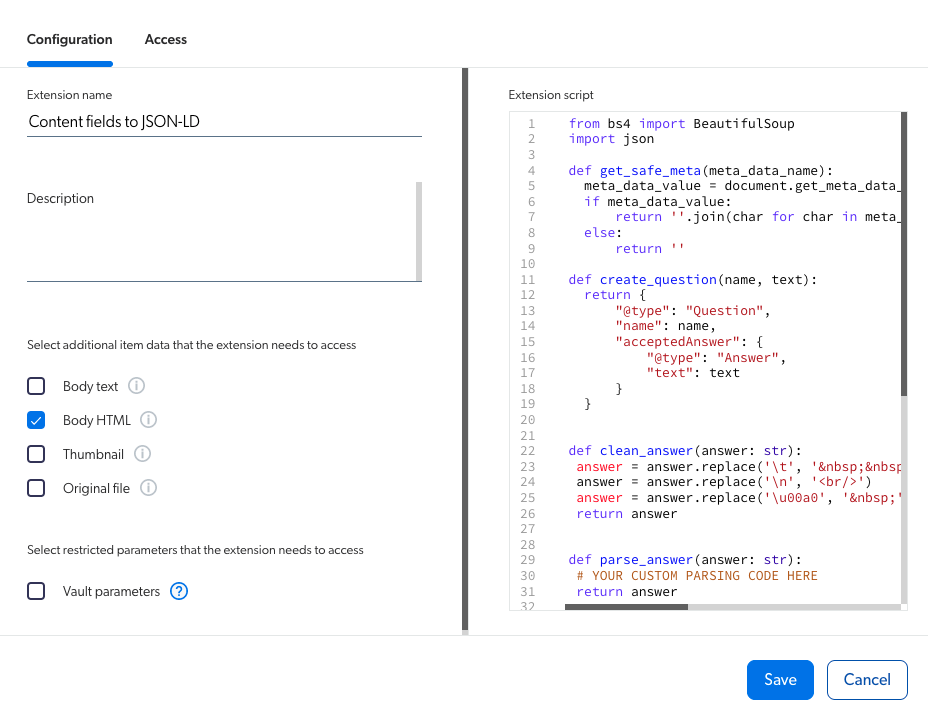
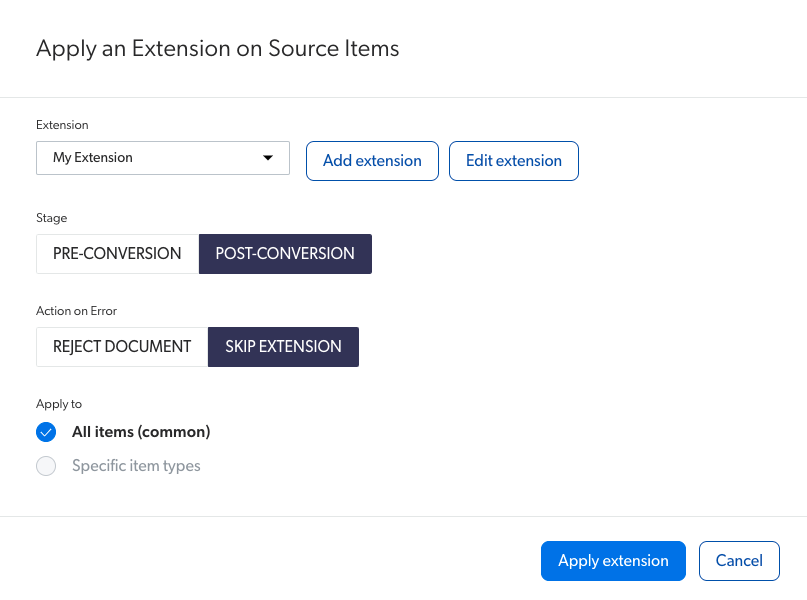
--- title: Add structured data (JSON-LD) to HTML items from index fields slug: m52a0468 canonical_url: https://docs.coveo.com/en/m52a0468/ collection: leverage-machine-learning source_format: adoc --- # Add structured data (JSON-LD) to HTML items from index fields When using a [Coveo Machine Learning (Coveo ML)](https://docs.coveo.com/en/188/) [Smart Snippet](https://docs.coveo.com/en/laea5490/) [model](https://docs.coveo.com/en/1012/) to extract questions and answers from a web page, we recommend that you use [Google structured data](https://developers.google.com/search/docs/data-types/faqpage) in JSON-LD format within the `` of the web page HTML for optimal results. In addition to, or in the absence of JSON-LD, the model searches headers (`` tags) in HTML items and uses the content that appears within these headers to extract snippets. See [Optimize the content](https://docs.coveo.com/en/l6he0424#optimize-the-content) for further information on how Coveo ML Smart Snippet models leverage HTML content to extract snippets. However, when using support-case content to build a Smart Snippet model (for example, content originating from a [Salesforce](https://docs.coveo.com/en/1052/) or [ServiceNow](https://docs.coveo.com/en/2107/) [source](https://docs.coveo.com/en/246/)), this content may not be properly configured to be optimally used by the model. This article provides instructions on how to create an [indexing pipeline extension (IPE)](https://docs.coveo.com/en/206/) that allows you to identify the [index](https://docs.coveo.com/en/204/) [fields](https://docs.coveo.com/en/200/) containing the questions and answers you want the model to use, and convert this content to JSON-LD format, which will be added in the `` of the HTML item. ![Content Browser showing answers and questions fields](https://docs.coveo.com/en/assets/images/index-content/question-answer-fields.png) ## Basic recipe The following code sample shows the post-conversion IPE script that can be used to specify the index field containing the questions and answers you want the model to use: ```python from bs4 import BeautifulSoup import json def get_safe_meta(meta_data_name): meta_data_value = document.get_meta_data_value(meta_data_name) if meta_data_value: return ''.join(char for char in meta_data_value[-1] if ord(char) < 128) else: return '' def create_question(name, text): return { "@type": "Question", "name": name, "acceptedAnswer": { "@type": "Answer", "text": text } } def clean_answer(answer: str): answer = answer.replace('\t', '  ') answer = answer.replace('\n', '
') answer = answer.replace('\u00a0', ' ') return answer def parse_answer(answer: str): # YOUR CUSTOM PARSING CODE HERE return answer QUESTION_FIELD = '' ANSWER_FIELD = '' body_html_stream = document.get_data_stream('body_html') question = get_safe_meta(QUESTION_FIELD) answer = clean_answer(get_safe_meta(ANSWER_FIELD)) questions = [] questions.append(create_question(question, parse_answer(answer))) faq_schema = json.dumps({"@context": "https://schema.org", "@type": "FAQPage", "mainEntity": questions}) faq_script = BeautifulSoup("""""", 'html.parser') body_html_soup = BeautifulSoup(body_html_stream.read(), 'html.parser') body_html_soup.head.append(faq_script) output_stream = document.DataStream('body_html') output_stream.write(str(body_html_soup)) document.add_data_stream(output_stream) document.add_meta_data({"HasHTMLVersion": True}) ``` Where you replace: * `` with the field that contain the questions you want the model to use. * `` with the field that contain the answers you want the model to use. * Below `YOUR CUSTOM PARSING CODE HERE`, you can optionally add custom code to adapt the IPE to your use case. **Example** The field that contain the answers you want the model to use may contain information that you don't want the [snippet](https://docs.coveo.com/en/laeb0292/) to display. When [configuring your Smart Snippet model](https://docs.coveo.com/en/l6he0424/), you selected `sfresolution` as a field to be used by the model to extract content. The content of the `sfresolution` field is configured as follows in the source you selected when configuring the model: ```html My Document Title

Objective

  • Request Access

Environment

  • V2

Procedure

  1. Submit a ticket
  2. Fill out the request
  3. After the ticket is submitted, check your inbox for a confirmation.

Additional Information

Additional information can be found on our support website.

``` To always provide relevant snippets, you modify the [above IPE](#basic-recipe) to include custom code that will only scope elements appearing within the `Procedure` section of the item's HTML, and use this information as the `answer` section of the JSON-LD generated by the IPE. ## Usage This section provides instructions on how to create the post-conversion IPE script and assign it to the desired sources. ## Step 1: Create the indexing pipeline extension (IPE) script ![Extension configuration](https://docs.coveo.com/en/assets/images/index-content/json-ld-extension2.png) . On the [**Extensions**](https://platform.cloud.coveo.com/admin/#/orgid/content/extensions/) ([platform-ca](https://platform-ca.cloud.coveo.com/admin/#/orgid/content/extensions/) | [platform-eu](https://platform-eu.cloud.coveo.com/admin/#/orgid/content/extensions/) | [platform-au](https://platform-au.cloud.coveo.com/admin/#/orgid/content/extensions/)) page of the Coveo Administration Console, click **Add extension**. . On the **Add an Extension** page, in the **Extension name** input, enter a meaningful name for your extension. . In the **Extension** input, you can optionally add a description for your extension. . In the **Select additional item data that the extension needs to access** section, select the **Body HTML** option. . In the **Select restricted parameters that the extension needs to access** section, make sure the **Vault parameters** option is cleared. . In the **Extension script** section, paste the [IPE script](#basic-recipe) and update the code to your needs. . [Assign the IPE script to your source](#step-2-assign-the-indexing-pipeline-extension-ipe-script-to-a-source). ## Step 2: Assign the indexing pipeline extension (IPE) script to a source ![Extension configuration](https://docs.coveo.com/en/assets/images/index-content/json-ld-extension-source2.png) . On the [**Sources**](https://platform.cloud.coveo.com/admin/#/orgid/content/sources/) ([platform-ca](https://platform-ca.cloud.coveo.com/admin/#/orgid/content/sources/) | [platform-eu](https://platform-eu.cloud.coveo.com/admin/#/orgid/content/sources/) | [platform-au](https://platform-au.cloud.coveo.com/admin/#/orgid/content/sources/)) page of the Coveo Administration Console, click the source to which you want to apply the IPE, and then click **More** > **Add extensions** in the Action bar. . On the page that opens, click **Add**, and then select **Extension**. . On the page that opens, in the **Extensions** section, select the [IPE you created](#step-1-create-the-indexing-pipeline-extension-ipe-script). . In the **Stage** section, select **Post-Conversion**. . In the **Action on Error** section, select **Skip Extension**. . In the **Apply to** section, depending on whether your Coveo ML Smart Snippet model applies to specific [item types](https://docs.coveo.com/en/l6he0424#document-type): ** If your Coveo ML Smart Snippet model doesn't scope specific item types, select **All items (common)**. ** If your Coveo ML Smart Snippet model scopes specific item types, select **Specific item types**, and then specify the item types to which the IPE should apply. . (Optional) In the **Condition(s) to apply** section, you can add a condition to the extension to scope the items on which the extension should apply (for example, `%[documenttype] == "Solution"`). . Click **Apply extension**. . Click **Save and rebuild source** to apply the IPE to your source. > **Important** > > To see the impact of the IPE in snippets extracted by a Coveo ML Smart Snippet model, update the model after the targeted sources have been rebuilt with the IPE. :leveloffset!: