---
title: Add structured data (JSON-LD) to HTML items from CSS selectors
slug: lc6d0080
canonical_url: https://docs.coveo.com/en/lc6d0080/
collection: leverage-machine-learning
source_format: adoc
---
# Add structured data (JSON-LD) to HTML items from CSS selectors
When using a [Coveo Machine Learning (Coveo ML)](https://docs.coveo.com/en/188/) [Smart Snippet](https://docs.coveo.com/en/laea5490/) [model](https://docs.coveo.com/en/1012/) to extract questions and answers from a web page, we recommend that you use [Google structured data](https://developers.google.com/search/docs/data-types/faqpage) in JSON-LD format within the `` of the web page HTML for optimal results.
In addition to, or in the absence of JSON-LD, the model searches headers (`` tags) in HTML items and uses the content that appears within these headers to extract snippets.
See [Optimize the content](https://docs.coveo.com/en/l6he0424#optimize-the-content) for further information on how Coveo ML Smart Snippet models leverage HTML content to extract snippets.
However, if your web page doesn't contain JSON-LD, and the questions contained in the web page aren't formatted using HTML headers (`` tags), you can use a pre-conversion [indexing pipeline extension (IPE)](https://docs.coveo.com/en/206/) script to specify CSS selectors to identify the questions and answers in an HTML item.
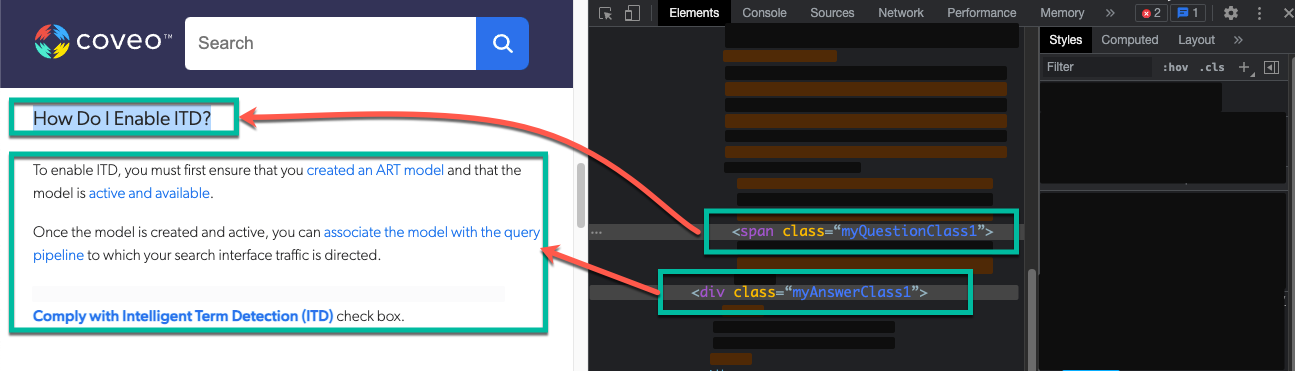
This article provides instructions on how to create this IPE script and assign it to your source.
When CSS selectors are specified to identify questions and answers, this IPE uses these selectors to create JSON-LD structured content and add the rendering to the `` of the HTML item.
## Basic recipe
The following code sample shows the pre-conversion IPE script that can be used to specify CSS selectors:
```python
import json
from bs4 import BeautifulSoup
from typing import List
# 1. Reading the document and parse HTML content
data_stream = document.get_data_stream('documentdata')
soup = BeautifulSoup(data_stream.read().decode(), 'html.parser')
# 2. Fetch questions and answers from HTML elements. For more information about CSS selector and BeautifulSoup, refer to : https://www.crummy.com/software/BeautifulSoup/bs4/doc/#css-selectors
questions: List[str] = [question.renderContents().decode() for question in soup.select('')]
answers: List[str] = [answer.renderContents().decode() for answer in soup.select('')]
# 3. Creating the FAQ Markup from the extracted questions and answers. For more information about the FAQ markup, refer to: https://developers.google.com/search/docs/advanced/structured-data/faqpage
main_entity = []
for question, answer in zip(questions, answers):
main_entity.append({"@type": "Question", "name": question,"acceptedAnswer": {"@type": "Answer", "text": answer}})
faq_markup = json.dumps({"@context": "https://schema.org", "@type": "FAQPage", "mainEntity": main_entity})
faq_markup_node = BeautifulSoup("", 'html.parser')
# 4. Appending the generated FAQ markup to the current document's head tag
output_stream = document.DataStream('documentdata')
soup.head.append(faq_markup_node)
output_stream.write(str(soup))
document.add_data_stream(output_stream)
```
Where you replace:
* `` with the CSS selectors that represent the headers you want to use for the questions in the source items.
See [Examples](https://docs.coveo.com/en/lc6d0080#examples) to learn how to use the CSS selectors in the above IPE.
* `` with the CSS selectors that represent the content you want to use for answers.
See [Examples](https://docs.coveo.com/en/lc6d0080#examples) to learn how to use the CSS selectors in the above IPE.
> **Notes**
>
> * This IPE also allows you to specify CSS selectors to exclude from the source items.
> See [Extension with exclusions](https://docs.coveo.com/en/lc6d0080#extension-with-exclusions) to learn how to exclude CSS selectors in the above IPE.
>
> * This IPE supports specifying multiple CSS selectors using either the `AND` or `OR` logic.
> See [Extension using the `OR` logic](https://docs.coveo.com/en/lc6d0080#extension-using-the-or-logic) for instructions.
## Usage
This section provides instructions on how to create the pre-conversion IPE script and assign it to the desired sources.
## Step 1: Create the indexing pipeline extension (IPE) script
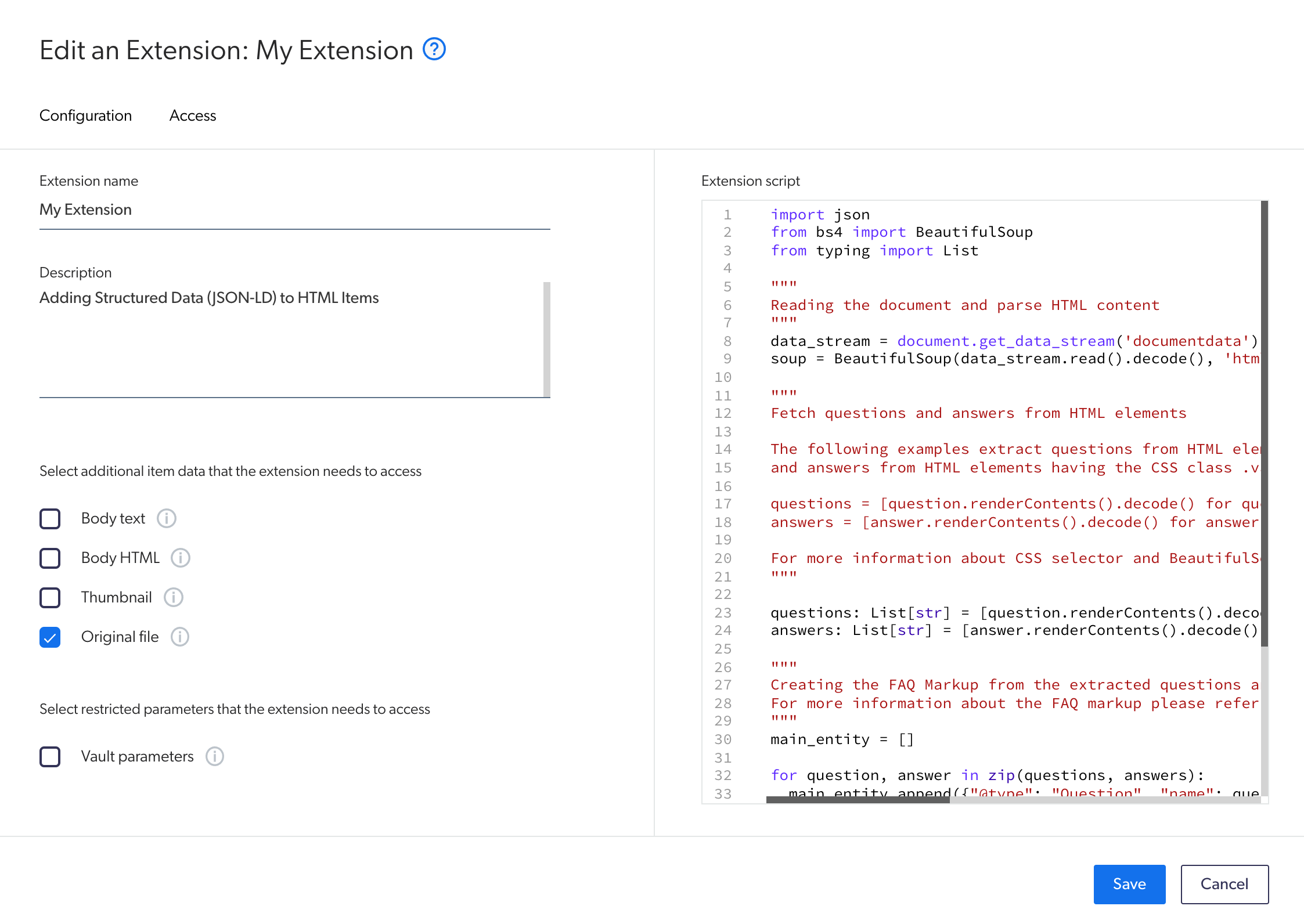
. On the [**Extensions**](https://platform.cloud.coveo.com/admin/#/orgid/content/extensions/) ([platform-ca](https://platform-ca.cloud.coveo.com/admin/#/orgid/content/extensions/) | [platform-eu](https://platform-eu.cloud.coveo.com/admin/#/orgid/content/extensions/) | [platform-au](https://platform-au.cloud.coveo.com/admin/#/orgid/content/extensions/)) page of the Coveo Administration Console, click **Add extension**.
. On the **Add an Extension** page, in the **Extension name** input, enter a meaningful name for your extension.
. In the **Extension** input, you can optionally add a description for your extension.
. In the **Select additional item data that the extension needs to access** section, select the **Original file** option.
. In the **Select restricted parameters that the extension needs to access** section, make sure the **Vault parameters** option is cleared.
. In the **Extension script** section, paste the [IPE script](#basic-recipe) and update the code to your needs.
. [Assign the IPE script to your source](#step-2-assign-the-indexing-pipeline-extension-ipe-script-to-a-source).
## Step 2: Assign the indexing pipeline extension (IPE) script to a source
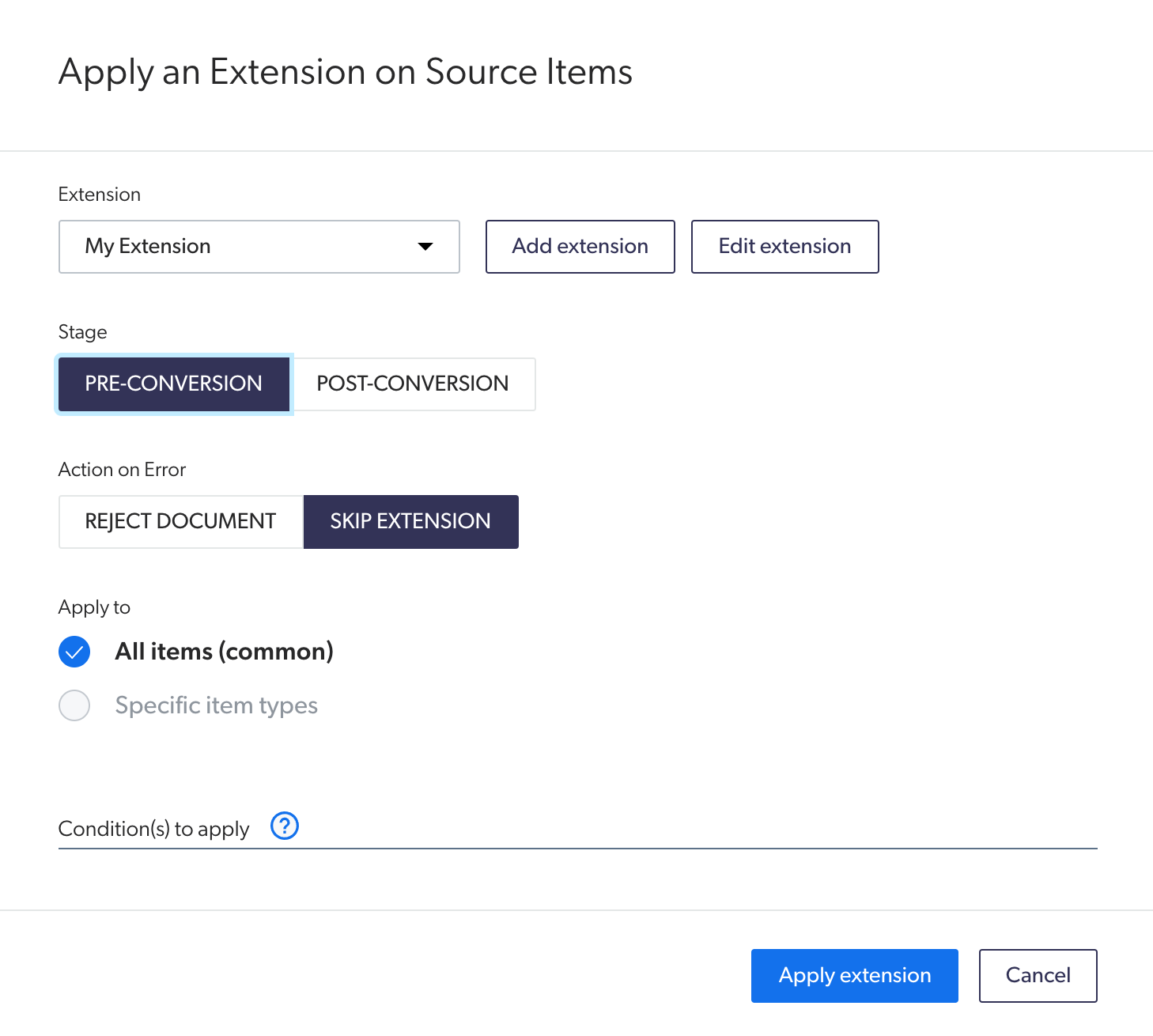
. On the [**Sources**](https://platform.cloud.coveo.com/admin/#/orgid/content/sources/) ([platform-ca](https://platform-ca.cloud.coveo.com/admin/#/orgid/content/sources/) | [platform-eu](https://platform-eu.cloud.coveo.com/admin/#/orgid/content/sources/) | [platform-au](https://platform-au.cloud.coveo.com/admin/#/orgid/content/sources/)) page of the Coveo Administration Console, click the source to which you want to apply the IPE, and then click **More** > **Add extensions** in the Action bar.
. On the page that opens, click **Add**, and then select **Extension**.
. On the page that opens, in the **Extensions** section, select the [IPE you created](#step-1-create-the-indexing-pipeline-extension-ipe-script).
. In the **Stage** section, select **Pre-Conversion**.
. In the **Action on Error** section, select **Skip Extension**.
. In the **Apply to** section, depending on whether your Coveo ML Smart Snippet model applies to specific [item types](https://docs.coveo.com/en/l6he0424#document-type):
** If your Coveo ML Smart Snippet model doesn't scope specific item types, select **All items (common)**.
** If your Coveo ML Smart Snippet model scopes specific item types, select **Specific item types**, and then specify the item types to which the IPE should apply.
. Leave the **Condition(s) to apply** input empty.
. Click **Apply extension**.
. Click **Save and rebuild source** to apply the IPE to your source.
> **Important**
>
> To see the impact of the IPE in snippets extracted by a Coveo ML Smart Snippet model, update the model after the targeted sources have been rebuilt with the IPE.
:leveloffset!:
## Examples
This section provides examples of different situations where you could use the above IPE.
### Extension with inclusions
You may want to specify certain CSS selectors so that a Coveo ML Smart Snippet model uses them to target questions and answers.
For example, by inspecting an FAQ page that you want to use for a Coveo ML Smart Snippet model, you realize that you use the following CSS selectors for the styling of your questions and answers:
* Questions: `.myQuestionClass1` and `.myQuestionClass2`
* Answers: `.myAnswerClass`
Therefore, you configure the IPE as follows:
```python
import json
from bs4 import BeautifulSoup
from typing import List
data_stream = document.get_data_stream('documentdata')
soup = BeautifulSoup(data_stream.read().decode(), 'html.parser')
questions: List[str] = [question.renderContents().decode() for question in soup.select('.myQuestionClass1.myQuestionClass2')]
answers: List[str] = [answer.renderContents().decode() for answer in soup.select('.myAnswerClass')]
main_entity = []
for question, answer in zip(questions, answers):
main_entity.append({"@type": "Question", "name": question,"acceptedAnswer": {"@type": "Answer", "text": answer}})
faq_markup = json.dumps({"@context": "https://schema.org", "@type": "FAQPage", "mainEntity": main_entity})
faq_markup_node = BeautifulSoup("", 'html.parser')
output_stream = document.DataStream('documentdata')
soup.head.append(faq_markup_node)
output_stream.write(str(soup))
document.add_data_stream(output_stream)
```
> **Important**
>
> The above IPE targets questions that contain both the `.myQuestionClass1` and `.myQuestionClass2` CSS selectors (using the `AND` logic).
>
> See [Extension Using the `OR` Logic](https://docs.coveo.com/en/lc6d0080#extension-using-the-or-logic) for an example of an IPE that targets at least one of the specified CSS selectors using the `OR` logic.
### Extension with exclusions
You may want to exclude specific CSS selectors to better target the questions and answers in an HTML item.
For example, considering an HTML item that has the following markup:
```html
My HTML page
Invalid question
Another invalid question
Yet, another invalid question
My Question
```
From the above HTML item, you want the model to extract the `My Question` question only.
To achieve this, include the `.title` and `.bold` CSS classes and exclude the `.red` class.
Therefore, you configure the IPE as follows:
```python
import json
from bs4 import BeautifulSoup
from typing import List
data_stream = document.get_data_stream('documentdata')
soup = BeautifulSoup(data_stream.read().decode(), 'html.parser')
questions: List[str] = [question.renderContents().decode() for question in soup.select('.title.bold:not(.red)')]
answers: List[str] = [answer.renderContents().decode() for answer in soup.select('')]
main_entity = []
for question, answer in zip(questions, answers):
main_entity.append({"@type": "Question", "name": question,"acceptedAnswer": {"@type": "Answer", "text": answer}})
faq_markup = json.dumps({"@context": "https://schema.org", "@type": "FAQPage", "mainEntity": main_entity})
faq_markup_node = BeautifulSoup("", 'html.parser')
output_stream = document.DataStream('documentdata')
soup.head.append(faq_markup_node)
output_stream.write(str(soup))
document.add_data_stream(output_stream)
```
> **Important**
>
> The above IPE targets questions that contain both the `.title` and `.bold` CSS selectors (using the `AND` logic).
>
> See [Extension Using the `OR` Logic](https://docs.coveo.com/en/lc6d0080#extension-using-the-or-logic) for an example of an IPE that targets at least one of the specified CSS selectors using the `OR` logic.
### Extension using the `OR` logic
In the previous examples, CSS selectors were specified using the `AND` logic, meaning that the targeted questions and answers are only considered if they include all the specified CSS selectors.
You can configure the IPE to target elements that have one or another of the specified CSS selectors (using the `OR` logic) by separating these selectors with a comma (`,`).
For example, by inspecting an FAQ page that you want to use for a Coveo ML Smart Snippet model, you realize that your questions use either the `.myQuestionClass1` or `.myQuestionClass2` for the styling.
Therefore, you configure the IPE as follows:
```python
import json
from bs4 import BeautifulSoup
from typing import List
data_stream = document.get_data_stream('documentdata')
soup = BeautifulSoup(data_stream.read().decode(), 'html.parser')
questions: List[str] = [question.renderContents().decode() for question in soup.select('.myQuestionClass1,.myQuestionClass2')]
answers: List[str] = [answer.renderContents().decode() for answer in soup.select('')]
main_entity = []
for question, answer in zip(questions, answers):
main_entity.append({"@type": "Question", "name": question,"acceptedAnswer": {"@type": "Answer", "text": answer}})
faq_markup = json.dumps({"@context": "https://schema.org", "@type": "FAQPage", "mainEntity": main_entity})
faq_markup_node = BeautifulSoup("", 'html.parser')
output_stream = document.DataStream('documentdata')
soup.head.append(faq_markup_node)
output_stream.write(str(soup))
document.add_data_stream(output_stream)
```