---
title: Provide search box suggestions
slug: '340'
canonical_url: https://docs.coveo.com/en/340/
collection: javascript-search-framework
source_format: adoc
---
# Provide search box suggestions
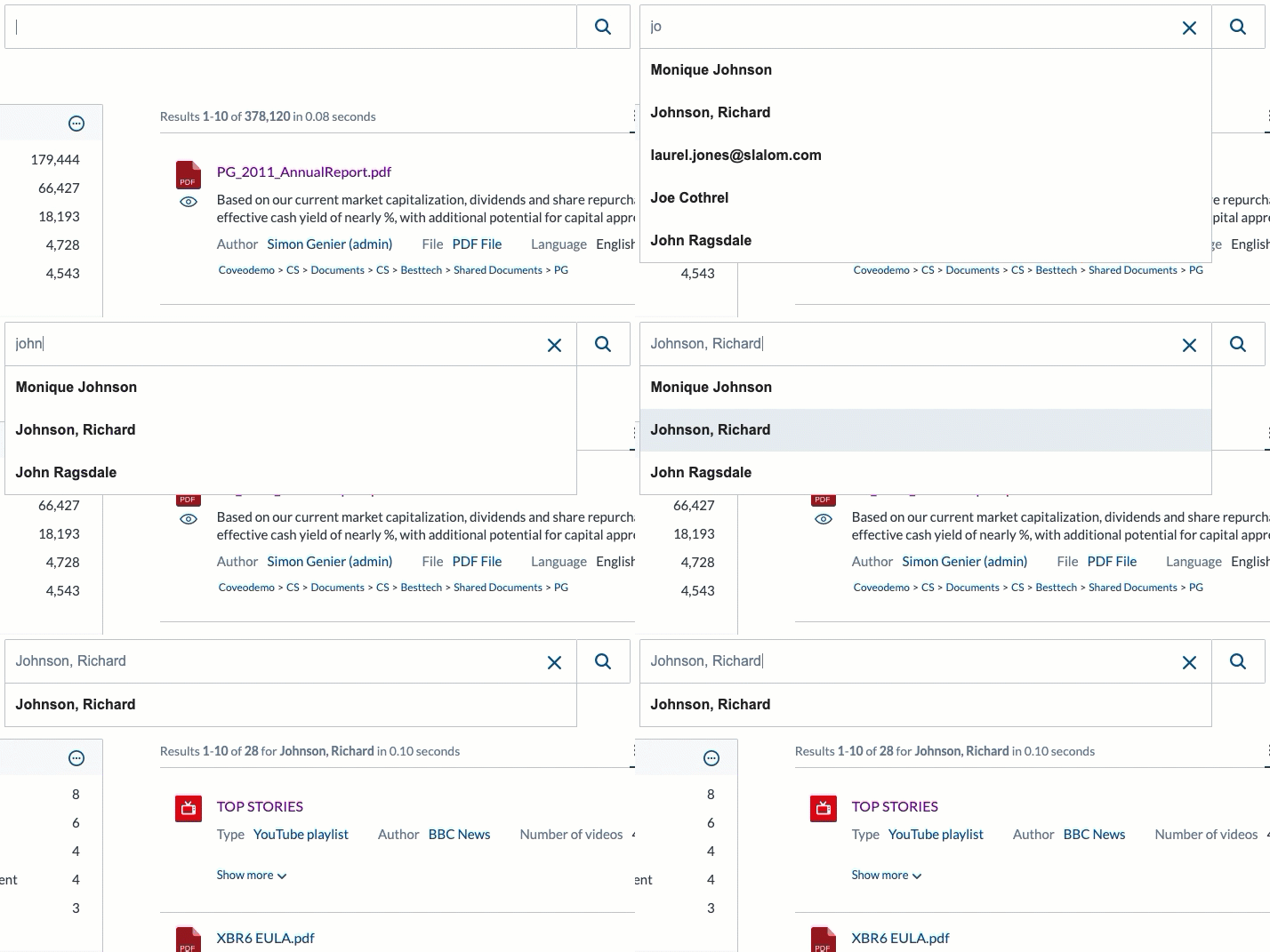
The JavaScript Search Framework supports different kinds of search box suggestions:
* [Coveo Machine Learning Query Suggestions](#providing-coveo-machine-learning-query-suggestions-recommended) (recommended)
* [Facet value suggestions](#providing-facet-value-suggestions)
* [Field suggestions](#providing-field-suggestions)
## Providing Coveo Machine Learning Query Suggestions (recommended)
[Coveo Machine Learning (Coveo ML)](https://docs.coveo.com/en/188/) [Query Suggestions (QS)](https://docs.coveo.com/en/1015/) models can recommend contextually relevant queries based on previously recorded [data](https://docs.coveo.com/en/259/).
To leverage Coveo ML QS in a search interface:
. Use the [`Searchbox`](https://coveo.github.io/search-ui/components/searchbox.html) component to initialize an [`Omnibox`](https://coveo.github.io/search-ui/components/omnibox.html).
Unless you're configuring a standalone search box, you should also initialize an [`Analytics`](https://coveo.github.io/search-ui/components/analytics.html) component.
**Example**
[,html]
```
```
. [Create a QS model](https://docs.coveo.com/en/3398/).
. [Associate the QS model with the query pipeline](https://docs.coveo.com/en/l1mf0321/) which processes search requests originating from the search interface.
> **Note**
>
> If the search box is still providing no query suggestions, [ensure that enough usage analytics data is available](https://docs.coveo.com/en/3398#prerequisites) to feed your QS model.
### Requesting query suggestions only when the search box is non-empty
[jsui-new Coveo JavaScript Search Framework v2.5395]
By default, trending Coveo ML query suggestions are requested and rendered whenever focus is on the search box input.
To change this behavior, set the [`querySuggestCharacterThreshold`](https://coveo.github.io/search-ui/components/omnibox.html#options.querysuggestcharacterthreshold) option of the `Omnibox` component to a value greater than `0`.
**Example**
The following configuration ensures that query suggestions only get rendered from the moment the end user starts entering a query in the search box.
```html
```
### Rendering query suggestion result previews
[jsui-new Coveo JavaScript Search Framework v2.5395]
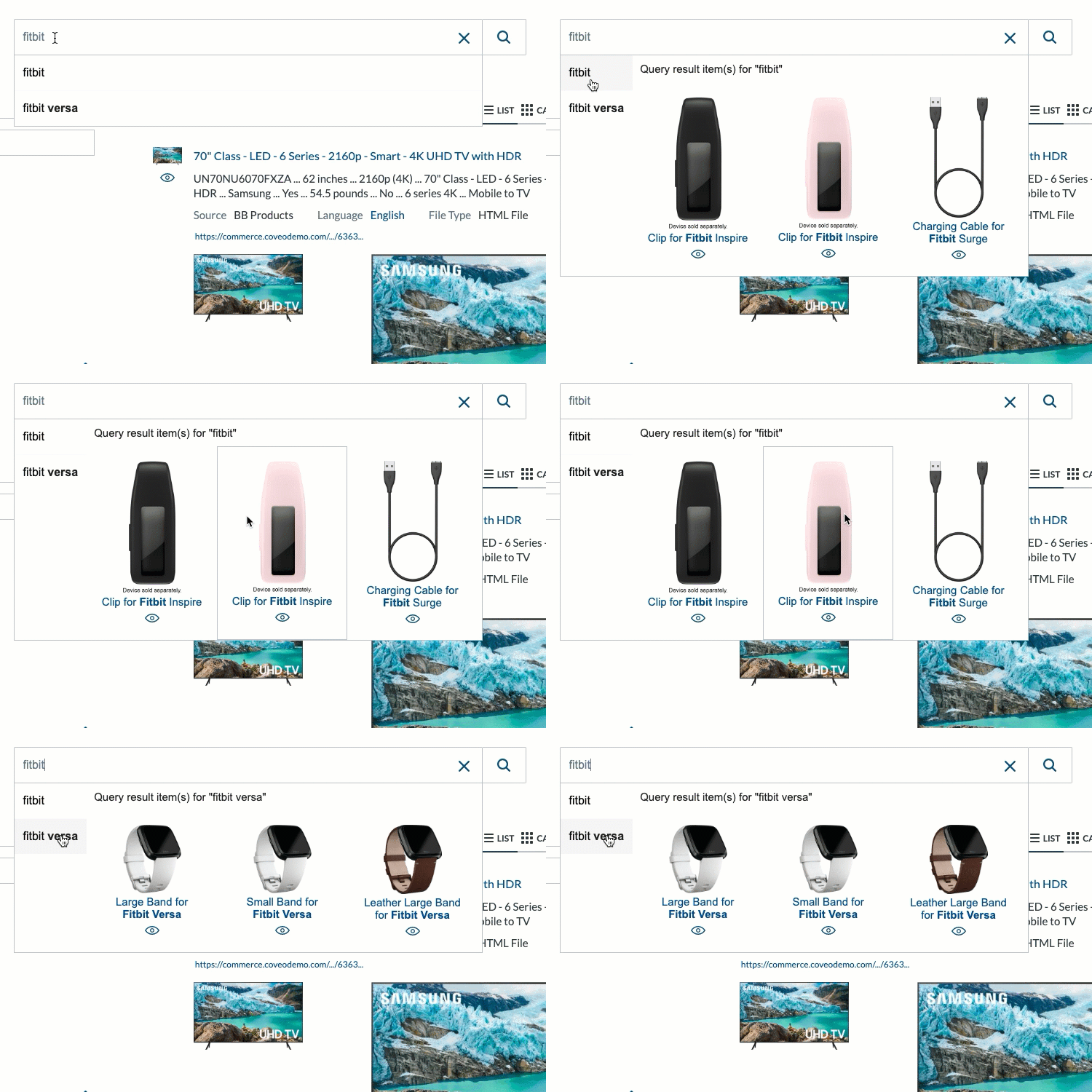
In some search interfaces, particularly in the context of commerce, you may want to render previews of the most relevant results when focus is on a query suggestion.
To do so, your search interface must initialize a [`QuerySuggestPreview`](https://coveo.github.io/search-ui/components/querysuggestpreview.html) component.
> **Note**
>
> The `QuerySuggestPreview` component isn't compatible with field value suggestions.
**Example**
With the following configuration, when focus is on a query suggestion for 200 milliseconds (See the [`executeQueryDelay`)(https://coveo.github.io/search-ui/components/querysuggestpreview.html#options.executeQueryDelay) option.], the `QuerySuggestPreview` component requests the top three (See the [`numberOfPreviewResults`)(https://coveo.github.io/search-ui/components/querysuggestpreview.html#options.numberOfPreviewResults) option.] results matching the focused query, and renders those results using a simple default template (See the [Using custom Query Suggest Preview result templates)(#using-custom-query-suggest-preview-result-templates) below.].
```html
```
#### Using custom Query Suggest Preview result templates
Two options are available to customize the way the `QuerySuggestPreview` component visually renders results:
* Option 1: Use the [`resultTemplate`](https://coveo.github.io/search-ui/components/querysuggestpreview.html#options.resultTemplate) option to specify a previously registered template to apply to all results.
**Example**
[,html]
```
```
* Option 2: Embed a set of conditional templates inside the element bound to the `QuerySuggestPreview` component instance.
This is essentially the same approach you would use to [specify custom result templates](https://docs.coveo.com/en/413#registering-your-own-templates) for a `ResultList` component.
By using this approach, for each result to render, the first template whose [condition](https://docs.coveo.com/en/413#assigning-conditions-to-your-templates) is satisfied by the result will apply.
Therefore, the last embedded template should typically have no condition, and be considered the default template.
**Example**
[,html]
```
```
For more information on result templates, see [JavaScript Search Framework result templates](https://docs.coveo.com/en/413/).
## Providing facet value suggestions
[jsui-new Coveo JavaScript Search Framework v2.5395]
You can use the [`FacetValueSuggestions`](https://coveo.github.io/search-ui/components/facetvaluesuggestions.html) component to provide end users with scoped [query suggestions](https://docs.coveo.com/en/1015/) based on the values of a specific facet-enabled [field](https://docs.coveo.com/en/200/).
### Basic usage
The following code sample provides a minimal working example of a `FacetValueSuggestions` component:
```html
```
> **Notes**
>
> . The `FacetValueSuggestions` component requires an `Omnibox` to work.
> By default, the `Searchbox` initializes an `Omnibox`.
> . Minimally, you must set the [`field`](https://coveo.github.io/search-ui/components/facetvaluesuggestions.html#options.field) option of a `FacetValueSuggestions` component to the `@`-prefixed name of a field whose Facet option is enabled (for example, `data-field="@author"`).
> If the target field has high cardinality (that is, if it has many possible values), you can enable its [Use cache for nested queries](https://docs.coveo.com/en/1833#use-cache-for-nested-queries) option to improve performance.
> You can initialize many `FacetValueSuggestions` components in the same search interface, as long as each instance references its own unique field.
> . The [`useQuerySuggestions`](https://coveo.github.io/search-ui/components/facetvaluesuggestions.html#options.usequerysuggestions) option of the `FacetValueSuggestions` component is set to `true` by default and sends an additional POST HTTP call to `+https://platform.cloud.coveo.com/rest/search/v2/querySuggest+` (see [Get query suggestions](https://docs.coveo.com/en/1459/)).
> The `FacetValueSuggestions` component normally requires that the [`enableQuerySuggestAddon`](https://coveo.github.io/search-ui/components/omnibox.html#options.enablequerysuggestaddon) option be set to `true` on the `Omnibox`, which is the case by default.
> This implies that a Coveo ML QS model must be available in the target query pipeline.
> If these conditions aren't satisfied, you must set the [`useQuerySuggestions`](https://coveo.github.io/search-ui/components/facetvaluesuggestions.html#options.usequerysuggestions) option of each `FacetValueSuggestions` component to `false`, or the components won't work.
> . While not mandatory, include a corresponding [`Facet`](https://coveo.github.io/search-ui/components/facet.html) component for each `FacetValueSuggestions` component.
> This will allow end users to intuitively interact with the filters that apply when selecting a scoped query suggestion.
> . If you can't or don't want to use facets in your search interface, include a [`HiddenQuery`](https://coveo.github.io/search-ui/components/hiddenquery.html) component instead.
> Otherwise, selecting a scoped query suggestion provided by a `FacetValueSuggestions` component won't have the desired effect, as no additional filter will be applied.
### Providing scoped query suggestions based on a multi-value field
[jsui-new Coveo JavaScript Search Framework v2.5395]
You can use the [`isCategoryField`](https://coveo.github.io/search-ui/components/facetvaluesuggestions.html#options.iscategoryfield) and [`categoryFieldDelimitingCharacter`](https://coveo.github.io/search-ui/components/facetvaluesuggestions.html#options.categoryfielddelimitingcharacter) options of a `FacetValueSuggestions` component to provide scoped query suggestions based on a field whose [**Multi-value facet** option](https://docs.coveo.com/en/1833#facet-and-multi-value-facet) is enabled.
When you do so, include a corresponding [`CategoryFacet`](https://coveo.github.io/search-ui/components/categoryfacet.html) in your search interface.
**Example**
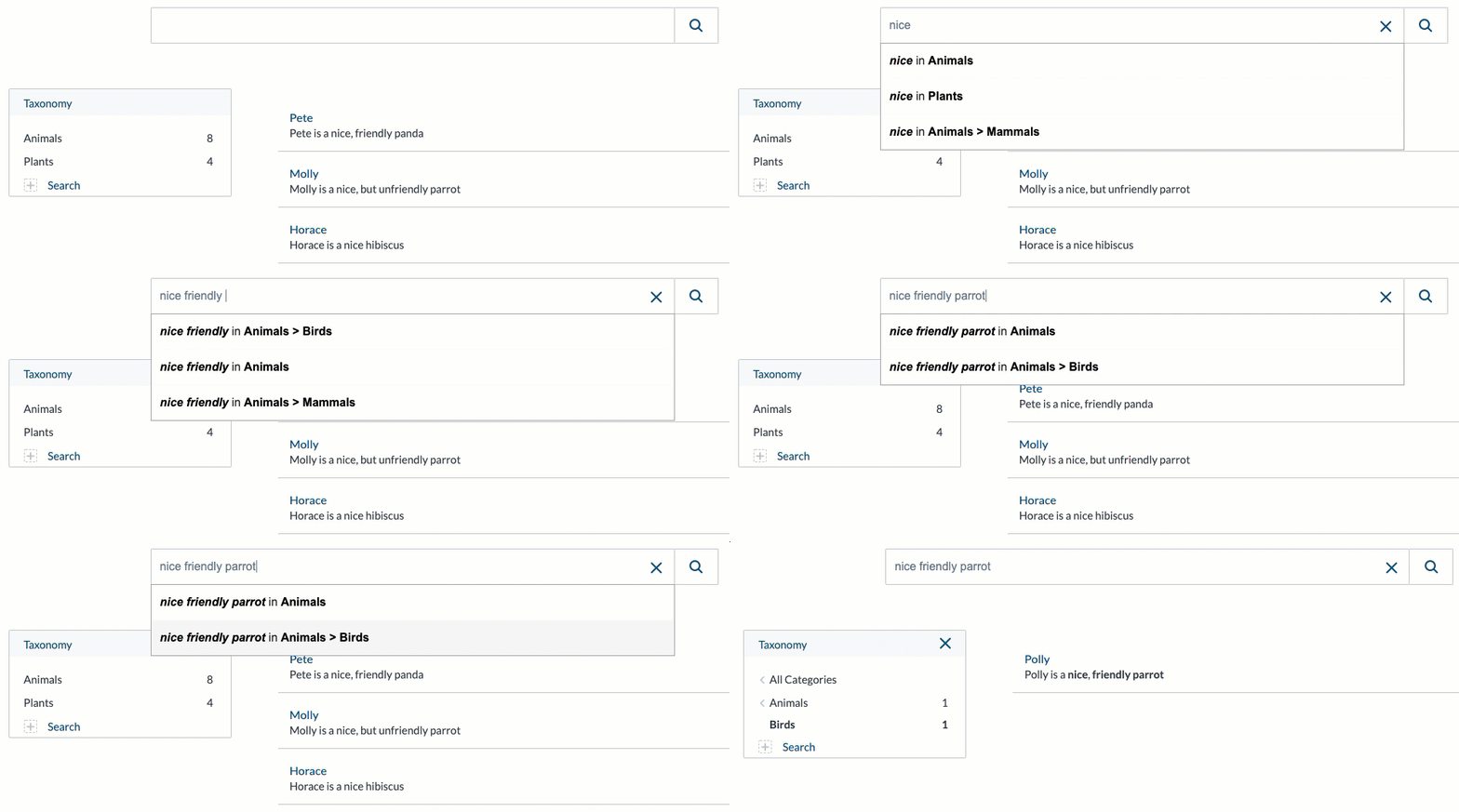
In your [Coveo organization](https://docs.coveo.com/en/185/), you've created a [source](https://docs.coveo.com/en/246/) called **Living Things**.
In that source, each [item](https://docs.coveo.com/en/210/) describes a specific plant or animal.
The `@simpletaxonomy` multi-value field gets populated by [metadata](https://docs.coveo.com/en/218/) representing the hierarchical categories to which each **Living Things** item belongs.
For example, the field value is:
* `Animals;
Animals > Mammals;` for items describing dogs, cats or horses.
* `Animals;
Animals > Birds;` for items describing parrots, eagles or crows.
* `Plants;
Plants > Trees;` for items describing maples, oaks or firs.
In your search interface, you configure a `FacetValueSuggestions` component (and a `CategoryFacet`) based on the `@simpletaxonomy` field:
```html
```
Your `Omnibox` can now provide scoped query suggestions similar to what's shown in the following animation:
### Using custom templates for facet value suggestions
You can use the [`templateHelper`](https://coveo.github.io/search-ui/components/facetvaluesuggestions.html#options.templatehelper) option of the `FacetValueSuggestions` component to specify a custom template to apply when rendering scoped query suggestions in the `Omnibox`.
> **Note**
>
> You can't set this option directly in the markup configuration of a `FacetValueSuggestions` component;
> you must rather set it in the [`init`](https://coveo.github.io/search-ui/globals.html#init) (or [`options`](https://coveo.github.io/search-ui/globals.html#options)) top-level function call (see [Configuring components](https://docs.coveo.com/en/346#configuring-components)).
When specified, the `templateHelper` option must be set to a function that returns a string or [template literal](https://developer.mozilla.org/en-US/docs/Web/JavaScript/Reference/Template_literals), and receives the following arguments:
. A reference to the current [`IFacetValueSuggestionRow`](https://coveo.github.io/search-ui/interfaces/ifacetvaluesuggestionrow.html) object.
. A reference to the `Omnibox` in which to render the scoped query suggestions.
Typically, the function should leverage some attributes of the first argument (for example, [`keyword`](https://coveo.github.io/search-ui/interfaces/ifacetvaluesuggestionrow.html#keyword), [`value`](https://coveo.github.io/search-ui/interfaces/ifacetvaluesuggestionrow.html#value), etc.) to generate a template literal (which may contain HTML).
**Example**
Consider the following markup:
```html
```
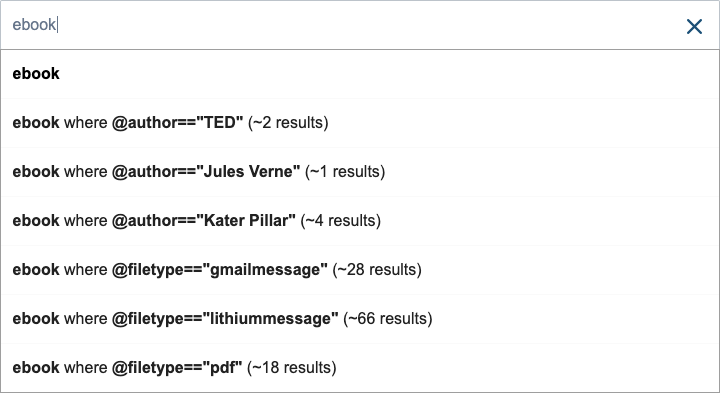
You could specify a generic custom template function to execute when rendering suggestions for each `FacetValueSuggestions` component:
```javascript
Coveo.init(document.getElementById("search"), {
FacetValueSuggestions: {
templateHelper: (row, omnibox) => {
return `${row.keyword} where ${row.field}=="${row.value}" (~${row.numberOfResults} results)`;
}
}
});
```
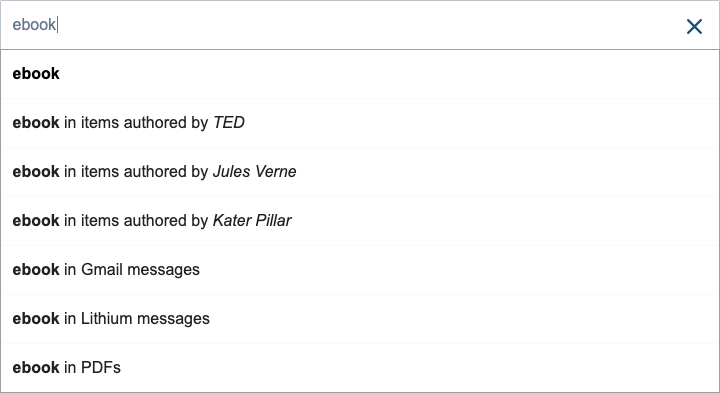
You could also specify a specific custom template function for each component instance by targeting its HTML `id` attribute in the `init` (or `options`) top-level function call:
```javascript
Coveo.init(document.getElementById("search"), {
authorFacetValueSuggestions: {
templateHelper: (row, omnibox) => {
return `${row.keyword} in items authored by ${row.value}`;
}
},
filetypeFacetValueSuggestions: {
templateHelper: (row, omnibox) => {
const normalizedRowValues = {
"gmailmessage": "Gmail message",
"lithiummessage": "Lithium message",
"pdf": "PDF"
}
const normalizedRowValue = normalizedRowValues[row.value] || row.value;
return `${row.keyword} in ${normalizedRowValue}s`;
}
}
});
```
## Providing field suggestions
> **Leading practice**
>
> Consider [providing Coveo ML query suggestions](#providing-coveo-machine-learning-query-suggestions-recommended) rather than field suggestions, as the former yields better performance and relevance.
The [`FieldSuggestions`](https://coveo.github.io/search-ui/components/fieldsuggestions.html) component can provide `Omnibox` suggestions based on [field](https://docs.coveo.com/en/200/) values.
To enable basic field suggestions in a search interface:
. Ensure that the search interface initializes an `Omnibox` component.
. Initialize a `FieldSuggestions` component in your search page, and set its [`field`](https://coveo.github.io/search-ui/components/fieldsuggestions.html#options.field) option to the `@`-prefixed name of the field on which you want to base the suggestions.
**Example**
[,html]
```
```
> **Notes**
>
> * You can add several `FieldSuggestions` components in a search interface to provide query completion suggestions based on different fields.
> * Ensure that the [**Facet** option](https://docs.coveo.com/en/1833#facet-and-multi-value-facet) is enabled on each field you use to provide field suggestions.