---
title: Coveo Dynamic Numeric Facet Range
slug: '3208'
canonical_url: https://docs.coveo.com/en/3208/
collection: coveo-for-sitecore-v5
source_format: adoc
---
# Coveo Dynamic Numeric Facet Range
> **Legacy feature**
>
> The Coveo Hive Framework is now in maintenance mode and is no longer recommended for new implementations.
>
> To build new search experiences, use one of Coveo's more modern, lightweight, and responsive libraries.
> To get started, see the [Build search](https://docs.coveo.com/en/2473/) article.
[.version.c4sc.c4sc-new.5-0-642-2.April-1&-2020]
[Coveo for Sitecore 5.0.642.2](https://docs.coveo.com/en/3204#release-notes)
Implements the [Coveo JavaScript Search Framework](https://docs.coveo.com/en/187/) [DynamicFacetRange](https://coveo.github.io/search-ui/components/dynamicfacetrange.html) component to display a [facet](https://docs.coveo.com/en/198/) whose values are expressed as numeric ranges.
The **Coveo Dynamic Numeric Facet Range** is an evolution over the [Coveo Numeric Facet Range](https://docs.coveo.com/en/3028/) rendering, particularly because it implements [Dynamic Navigation Experience](https://docs.coveo.com/en/3383/).
The **DynamicFacetRange** extends the [DynamicFacet](https://coveo.github.io/search-ui/components/dynamicfacet.html) component and supports most of its component options.
## Usage notes
* The Sitecore field which the facet is based on must be included for indexing in the **Templates** table of the **Indexing Manager** (see [About the Indexing Manager - Fields](https://docs.coveo.com/en/2566#fields)).
* To use the **{doctitle}** rendering with custom numeric ranges, create a content tree structure, such as the one below, containing a `Custom Numeric Ranges` item with children `Numeric Range` items.
This structure can be placed anywhere in the content tree.
You will reference the location of the `Custom Numeric Ranges` item in the `Facet value ranges` data source option (see [Configure custom ranges for a date range or numeric range facet](https://docs.coveo.com/en/2782/)).

* To benefit from the automatic facet reordering functionality, group **{doctitle}** renderings and other dynamic facets (for example, [Coveo Dynamic Facets](https://docs.coveo.com/en/3206/) and [Coveo Dynamic Hierarchical Facets](https://docs.coveo.com/en/3209/)) within a [Coveo Dynamic Facet Manager](https://docs.coveo.com/en/3207/) (see [Use dynamic facets](https://docs.coveo.com/en/2917/)).
* **{doctitle}** renderings may also be used as standalone facets without a **Coveo Dynamic Facet Manager**.
* Any change to the facet range selection triggers a new Search API call.
* You can [display a dynamic facet only when a specific value is selected in another facet](https://docs.coveo.com/en/2788#example-2-display-a-facet-only-when-a-specific-value-is-selected-in-its-parent).
* You can [customize the CSS](https://docs.coveo.com/en/2342/) associated with this rendering.
## Insertion location
Coveo Hive
The Coveo Dynamic Numeric Facet Range rendering is an Allowed Control in the following placeholder(s): Dynamic Facets, Facets
Example insertion sequence for the Coveo Dynamic Numeric Facet Range rendering.
Coveo Hive SXA
When you add the Coveo Dynamic Facet Manager SXA rendering, this adds a coveouidynamicfacetssxa placeholder. Insert your Coveo Dynamic Numeric Facet Range rendering in this coveouidynamicfacetssxa placeholder.
Example insertion sequence for the Coveo Dynamic Numeric Facet Range rendering.
## Data source options
The following table lists the available data source options for this rendering.
[%header,cols="33%,66%"]
|===
|Option name
|Description
|Title
|See the [title](https://coveo.github.io/search-ui/components/dynamicfacet.html#options.title) component option.
|Field
|See the [field](https://coveo.github.io/search-ui/components/dynamicfacet.html#options.field) component option.
|Facet ID
|See the [id](https://coveo.github.io/search-ui/components/dynamicfacet.html#options.id-1) component option.
|Depends on
|The data source `Facet ID` value of another facet that this facet depends on.
See the [dependsOn](https://coveo.github.io/search-ui/components/dynamicfacet.html#options.dependson) component option.
|Enable collapse
|See the [`enableCollapse`](https://coveo.github.io/search-ui/components/dynamicfacet.html#options.enablecollapse) component option.
|Facet collapsed by default
|See the [collapsedByDefault](https://coveo.github.io/search-ui/components/dynamicfacet.html#options.collapsedbydefault) component option.
|Enable search for the facet
|See the [enableFacetSearch](https://coveo.github.io/search-ui/components/dynamicfacet.html#options.enablefacetsearch) component option.
|Scroll back to the top of the page on interaction
|See the [enableScrollToTop](https://coveo.github.io/search-ui/components/dynamicfacet.html#options.enablescrolltotop) component option.
|Exclude folded result parents
|The path to use as the path prefix for every query.
|Notify the breadcrumb component
|See the [includeInBreadcrumb](https://coveo.github.io/search-ui/components/dynamicfacet.html#options.includeinbreadcrumb) component option.
|Facet accuracy determined by the number of scanned results
|See the [injectionDepth](https://coveo.github.io/search-ui/components/dynamicfacet.html#options.injectiondepth) component option.
|Prepend facet search queries with a wildcard
|See the [useLeadingWildcardInFacetSearch](https://coveo.github.io/search-ui/components/dynamicfacet.html#options.useleadingwildcardinfacetsearch) component option.
|Facet value ranges
|Specifies whether to use automatically generated numeric ranges or custom numeric ranges created in Sitecore.
|DOM unique ID
a|{empty}
--
Randomly generated HTML element ID.
--
|Additional data attributes
a|{empty}
--
Allows [use of the Coveo JavaScript Search Framework **DynamicFacetRange** component options](https://docs.coveo.com/en/2776/) that aren't directly available in the data source.
--
|===
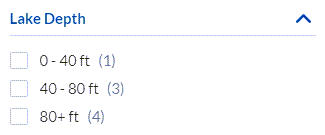
## Sample generated HTML and corresponding visual output
```html
```