---
title: Coveo User Context
slug: '3069'
canonical_url: https://docs.coveo.com/en/3069/
collection: coveo-for-sitecore-v5
source_format: adoc
---
# Coveo User Context
> **Legacy feature**
>
> The Coveo Hive Framework is now in maintenance mode and is no longer recommended for new implementations.
>
> To build new search experiences, use one of Coveo's more modern, lightweight, and responsive libraries.
> To get started, see the [Build search](https://docs.coveo.com/en/2473/) article.

Allows adding user context to page view analytics in Sitecore article items.
In search interfaces, it adds user context to Search API and query suggestion calls.
User context refines search results as well as [Coveo Machine Learning (Coveo ML)](https://docs.coveo.com/en/188/) [content recommendations](https://docs.coveo.com/en/1016/) and [query suggestions](https://docs.coveo.com/en/1015/).
## Usage notes
* For further details regarding the combined use of the **{doctitle}** and [Coveo Page View Analytics](https://docs.coveo.com/en/3013/) renderings to add user context in your Sitecore article items, see [Leverage User Context for Coveo Machine Learning](https://docs.coveo.com/en/2360/).
* To have the **{doctitle}** rendering provide the visitor current country in the user context, insert a [position provider rendering](https://docs.coveo.com/en/2999/) in your page.
* Coveo ML-powered content recommendations are only available with the Enterprise Cloud edition.
## Insertion location
Coveo Hive
The Coveo User Context rendering is an Allowed Control in the following placeholder(s): UI Resources
Example insertion sequence for the Coveo User Context rendering.
Coveo Hive SXA
Coveo for Sitecore SXA rendering insertion locations are not limited by placeholder Allowed Controls. The Coveo User Context rendering may therefore be inserted throughout the partial design, whether in Coveo for Sitecore or Sitecore placeholders.
Example insertion sequence for the Coveo User Context rendering.
## Data source options
The following table lists the available data source options for this rendering.
[%header,cols="33%,66%"]
|===
|Option name
|Description
|Use anonymity in context
|Specifies whether to add an `isAnonymous` key and its value to the user context, indicating whether the user is anonymous.
|Use country in context
|Specifies whether to add the visitor current country to the user context.
|Use device in context
|Specifies whether to add the visitor current device to the user context.
|Use profile cards in context
|Used to specify the profile cards you want to add to the user context.
|Enable context pipeline
|Specifies whether to run the `coveoUserContext` pipeline when computing the context (see [UserContextPipeline](https://docs.coveo.com/en/2360#usercontextpipeline)).
|Custom context
|Static key and value pairs to add to the user context.
|DOM unique ID
a|{empty}
--
Randomly generated HTML element ID.
--
|===
## Sample Generated HTML and Corresponding Output
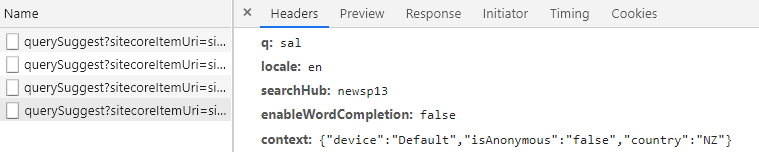
In the following example, you have inserted the **{doctitle}** rendering in a search page and enabled the `Use anonymity in context`, `Use country in context`, and `Use device in context` data source options.
A logged New Zealander visits your search page.
**Generated HTML**:
```html
```
**Generated query suggestion call**: