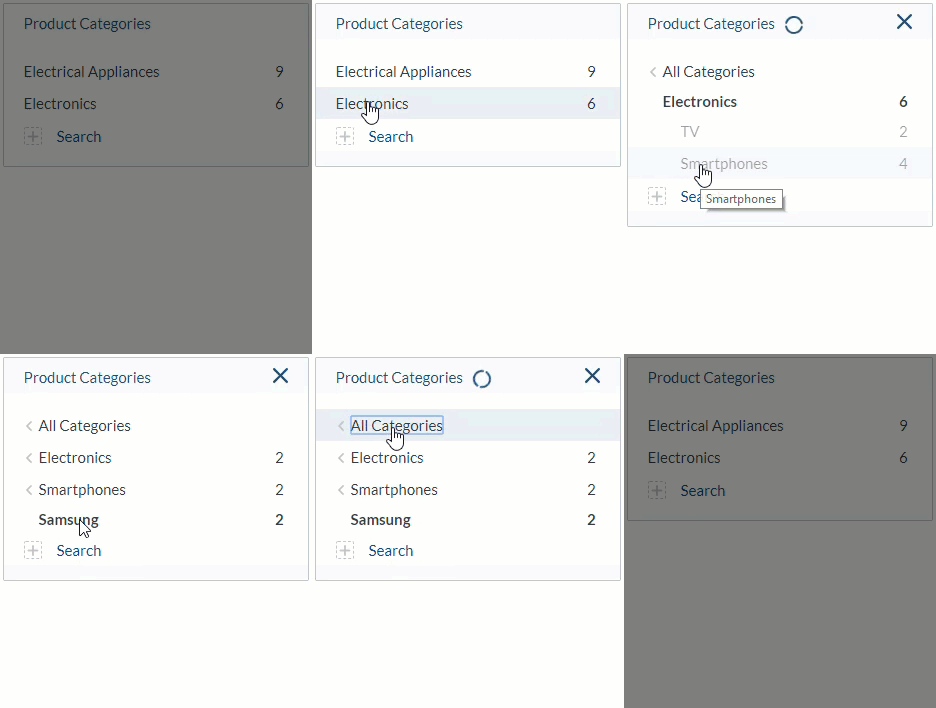
---
title: Coveo Category Facet
slug: '3068'
canonical_url: https://docs.coveo.com/en/3068/
collection: coveo-for-sitecore-v5
source_format: adoc
---
# Coveo Category Facet
> **Legacy feature**
>
> The Coveo Hive Framework is now in maintenance mode and is no longer recommended for new implementations.
>
> To build new search experiences, use one of Coveo's more modern, lightweight, and responsive libraries.
> To get started, see the [Build search](https://docs.coveo.com/en/2473/) article.
> **Leading practice**
>
> The [Coveo Dynamic Hierarchical Facet](https://docs.coveo.com/en/3209/) is now recommended over the **Coveo Category Facet** rendering.
Implements the [Coveo JavaScript Search Framework](https://docs.coveo.com/en/187/) [CategoryFacet](https://coveo.github.io/search-ui/components/categoryfacet.html) component to display a [facet](https://docs.coveo.com/en/198/) that renders values in a hierarchical fashion.
## Usage notes
* To use the **{doctitle}** rendering, you first need to:
** have a content tree structure, such as the one below.

** create a `Single-Line Text` (or `Multi-Line Text`) field, such as the `ParentCategories` field in the example below, listing the paths to each parent folder of the item.
See [Insert a Category Facet - Example](https://docs.coveo.com/en/2791#example) for more details about the format of values for this field.

** index that `Single-Line Text` or `Multi-Line Text` field as a [multi-value facet](https://docs.coveo.com/en/2377/).
* Every time you change the category selection in the facet, a new Search API call is triggered.
* You can [customize the CSS](https://docs.coveo.com/en/2342/) associated with this rendering.
## Insertion location
Coveo Hive
The Coveo Category Facet rendering is an Allowed Control in the following placeholder(s): Facets
Example insertion sequence for the Coveo Category Facet rendering.
Coveo Hive SXA
Coveo for Sitecore SXA rendering insertion locations aren't limited by placeholder Allowed Controls. The Coveo Category Facet rendering may therefore be inserted throughout the partial design, whether in Coveo for Sitecore or Sitecore placeholders.
Example insertion sequence for the Coveo Category Facet rendering.
## Data source options
The following table lists the available data source options for this rendering.
[%header,cols="33%,66%"]
|===
|Option name
|Description
|Title
|See the [title](https://coveo.github.io/search-ui/components/facet.html#options.title) component option.
|Field
|See the [field](https://coveo.github.io/search-ui/components/facet.html#options.field) component option.
|Facet ID
|See the [id](https://coveo.github.io/search-ui/components/facet.html#options.id-1) component option.
|Number of values
|See the [numberOfValues](https://coveo.github.io/search-ui/components/facet.html#options.numberofvalues) component option.
|Enable search for the facet
|See the [enableFacetSearch](https://coveo.github.io/search-ui/components/facet.html#options.enablefacetsearch) component option.
a|{empty}
--
[.version.c4sc.c4sc-new.5-0-900-5.February-12&-2021]
[Coveo for Sitecore 5.0.900.5](https://docs.coveo.com/en/3445#release-notes)
--
Display search as a button
|See the [displaySearchButton](https://coveo.github.io/search-ui/components/facet.html#options.displaysearchbutton) component option.
a|{empty}
--
[.version.c4sc.c4sc-new.5-0-900-5.February-12&-2021]
[Coveo for Sitecore 5.0.900.5](https://docs.coveo.com/en/3445#release-notes)
--
Display search above the facet values
|See the [displaySearchOnTop](https://coveo.github.io/search-ui/components/facet.html#options.displaysearchontop) component option.
|Number of values to display in the facet search results
|See the [numberOfValuesInFacetSearch](https://coveo.github.io/search-ui/components/facet.html#options.numberofvaluesinfacetsearch) component option.
|Enable more/less button
|See the [enableMoreLess](https://coveo.github.io/search-ui/components/facet.html#options.enablemoreless) component option.
|Number of additional facet values to fetch when 'More' is clicked
|See the [pageSize](https://coveo.github.io/search-ui/components/facet.html#options.pagesize) component option.
|FacetBasePath
|See the [basePath](https://coveo.github.io/search-ui/components/facet.html#options.basepath) component option.
|Facet accuracy determined by the number of scanned results
|See the [injectionDepth](https://coveo.github.io/search-ui/components/facet.html#options.injectiondepth) component option.
|Maximum number of levels to traverse in the hierarchy
|See the [`maximumDepth`](https://coveo.github.io/search-ui/components/facet.html#options.maximumdepth) component option.
|Delimiting character that specifies the hierarchical dependency
|See the [`delimitingCharacter`](https://coveo.github.io/search-ui/components/facet.html#options.delimitingcharacter) component option.
|Delay in milliseconds before a search is sent to the server
|See the [facetSearchDelay](https://coveo.github.io/search-ui/components/facet.html#options.facetsearchdelay) component option.
|Depends on
|See the [dependsOn](https://coveo.github.io/search-ui/components/facet.html#options.dependson) component option.
|DOM unique ID
a|{empty}
--
Randomly generated HTML element ID.
--
|Additional data attributes
a|{empty}
--
Allows [use of the Coveo JavaScript Search Framework **CategoryFacet** component options](https://docs.coveo.com/en/2776/) that aren't directly available in the data source.
--
|===
## Sample generated HTML and corresponding visual output
```html
```