---
title: Coveo Results Preferences
slug: '3060'
canonical_url: https://docs.coveo.com/en/3060/
collection: coveo-for-sitecore-v5
source_format: adoc
---
# Coveo Results Preferences
> **Legacy feature**
>
> The Coveo Hive Framework is now in maintenance mode and is no longer recommended for new implementations.
>
> To build new search experiences, use one of Coveo's more modern, lightweight, and responsive libraries.
> To get started, see the [Build search](https://docs.coveo.com/en/2473/) article.
Implements the [Coveo JavaScript Search Framework](https://docs.coveo.com/en/187/) [ResultsPreferences](https://coveo.github.io/search-ui/components/resultspreferences.html) component which allows website visitors to specify search result related preferences when selecting the **Preferences** option in the Settings popup menu (see [Coveo Preferences Panel](https://docs.coveo.com/en/3058/)).
## Usage notes
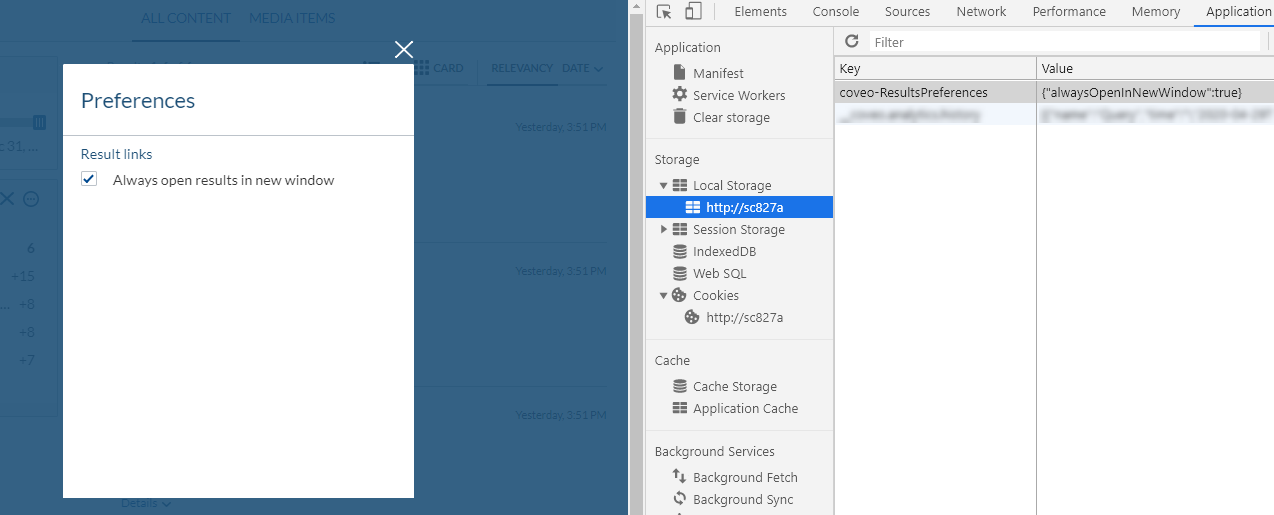
* Result preferences are saved in the browser local storage.
## Insertion location
Coveo Hive
The Coveo Results Preferences rendering is an Allowed Control in the following placeholder(s): Preferences Panel
Example insertion sequence for the Coveo Results Preferences rendering.
Coveo Hive SXA
When you add the Coveo Preferences Panel SXA rendering, this adds a Preferences Panel placeholder, accessible by selecting the Preferences option in the Settings popup menu. Insert your Coveo Results Preferences rendering in this Preferences Panel placeholder.
Example insertion sequence for the Coveo Results Preferences rendering.
## Data source options
The following table lists the available data source options for this rendering.
[%header,cols="33%,66%"]
|===
|Option name
|Description
|Enable the 'Open in New Window' option
|See the [enableOpenInNewWindow](https://coveo.github.io/search-ui/components/resultspreferences.html#options.enableopeninnewwindow) component option.
|Enable the 'Open in Outlook' option
|See the [enableOpenInOutlook](https://coveo.github.io/search-ui/components/resultspreferences.html#options.enableopeninoutlook) component option.
|Additional data attributes
a|{empty}
--
Allows [use of the Coveo JavaScript Search Framework **ResultsPreferences** component options](https://docs.coveo.com/en/2776/) that aren't directly available in the data source.
--
|===
## Sample Generated HTML and Corresponding Behavior
**Generated HTML**:
```html
```
When website visitors change their **Always open results in new window** preference in the modal, the new value for this preference is stored in the browser local storage.