---
title: Coveo Global Searchbox
slug: '3040'
canonical_url: https://docs.coveo.com/en/3040/
collection: coveo-for-sitecore-v5
source_format: adoc
---
# Coveo Global Searchbox
> **Legacy feature**
>
> The Coveo Hive Framework is now in maintenance mode and is no longer recommended for new implementations.
>
> To build new search experiences, use one of Coveo's more modern, lightweight, and responsive libraries.
> To get started, see the [Build search](https://docs.coveo.com/en/2473/) article.
The **{doctitle}** rendering implements the [Coveo JavaScript Search Framework](https://docs.coveo.com/en/187/) [Omnibox](https://coveo.github.io/search-ui/components/omnibox.html) component.
The **{doctitle}** rendering also provides data source options so you can configure it as a global searchbox.
The **{doctitle}** rendering triggers search and query suggestion calls to the Search API through the reverse proxy.
## Usage notes
* Ensure you set the `Override search hub` data source value properly (see [About the search hub](https://docs.coveo.com/en/3302/)).
* When used solely in article pages, the **{doctitle}** is initialized as a standalone search box which redirects to the search page specified in the `Search page URI` data source field (see [Scenario 1: Different search boxes in and out of the search results page](https://docs.coveo.com/en/2329/?c4scV5HiveType=tab-hive#scenario-1-different-search-boxes-in-and-out-of-the-search-results-page)).
* When used in both your article and search results page header, insert the **{doctitle}** rendering in an **External Components Section**.
This links the **{doctitle}** to the Coveo Search Interface specified in the **External Components Section** data source and ensures the **{doctitle}** behaves as if it were inserted within that Coveo Search Interface (see [Scenario 2: Same search box in and out of the search results page](https://docs.coveo.com/en/2329/?c4scV5HiveType=tab-hive#scenario-2-same-search-box-in-and-out-of-the-search-results-page)).
* You can [customize the CSS](https://docs.coveo.com/en/2342/) associated with this rendering.
## Insertion location
Coveo Hive
When adding the Coveo Global Searchbox solely to your article headers, insert the Coveo Global Searchbox rendering as illustrated in the video below.
When linking the Coveo Global Searchbox to a search interface, the External Components Section rendering adds a Global Searchbox placeholder. Insert your Coveo Global Searchbox rendering in this Global Searchbox placeholder.
Example insertion sequence for the Coveo Global Searchbox rendering. A placeholder whose Placeholder Key value is ArticleHeaderPlaceholder was created and its Allowed Controls were edited to include the Coveo Search Resources (a mandatory rendering), Coveo Global Searchbox, and Coveo Page View Analytics renderings. The ArticleHeaderPlaceholder was inserted in an article layout .cshtml file. This insertion sequence applies to scenario 1 in Insert and configure a global search box in which the Coveo Global Searchbox is added solely to your article headers.
Coveo Hive SXA
When adding the Coveo Global Searchbox solely to your article headers, insert the Coveo Global Searchbox rendering in the partial design header Sitecore placeholder.
When linking the Coveo Global Searchbox to a search interface, the External Components Section SXA rendering adds a coveouiexternalcomponentssxa placeholder. Insert your Coveo Global Searchbox rendering in this coveouiexternalcomponentssxa placeholder.
Example insertion sequence for the Coveo Global Searchbox rendering. This insertion sequence applies to scenario 1 in Insert and configure a global search box in which the Coveo Global Searchbox is added solely to your article headers.
## Data source options
The following table lists the available data source options for this rendering.
[%header,cols="33%,66%"]
|===
|Option name
|Description
|Placeholder text
|See the [placeholder](https://coveo.github.io/search-ui/components/omnibox.html#options.placeholder) component option.
|Height
|See the [height](https://coveo.github.io/search-ui/components/searchbox.html#options.height) component option.
|Search page URI
|The search page on which to redirect when there's a query (see the [initSearchbox](https://coveo.github.io/search-ui/globals.html#initsearchbox) component option).
|Enable partial match
|See the [enablePartialMatch](https://coveo.github.io/search-ui/components/querybox.html#options.enablepartialmatch) component option.
|Partial match minimum number of keywords
|See the [partialMatchKeywords](https://coveo.github.io/search-ui/components/querybox.html#options.partialmatchkeywords) component option.
|Partial match threshold
|See the [partialMatchThreshold](https://coveo.github.io/search-ui/components/querybox.html#options.partialmatchthreshold) component option.
|Enable wildcards
|See the [`enableWildcards`](https://coveo.github.io/search-ui/components/querybox.html#options.enablewildcards) component option.
|Enable question marks
|See the [enableQuestionMarks](https://coveo.github.io/search-ui/components/querybox.html#options.enablequestionmarks) component option.
|Enable lowercase operators
|See the [enableLowercaseOperators](https://coveo.github.io/search-ui/components/querybox.html#options.enablelowercaseoperators) component option.
|Enable query syntax
|See the [enableQuerySyntax](https://coveo.github.io/search-ui/components/querybox.html#options.enablequerysyntax) component option.
|Query suggest character threshold
|See the [querySuggestCharacterThreshold](https://coveo.github.io/search-ui/components/omnibox.html#options.querysuggestcharacterthreshold) component option.
|Clear filters on new query
|See the [clearFiltersOnNewQuery](https://coveo.github.io/search-ui/components/omnibox.html#options.clearfiltersonnewquery) component option.
|Enable Coveo Machine Learning query suggestions
|See the [enableQuerySuggestAddon](https://coveo.github.io/search-ui/components/omnibox.html#options.enablequerysuggestaddon) component option.
|Enable field suggestions after typing @ in searchbox
|See the [enableFieldAddon](https://coveo.github.io/search-ui/components/omnibox.html#options.enablefieldaddon) component option.
|Enable field suggestions in searchbox
|See the [enableFieldAddon](https://coveo.github.io/search-ui/components/omnibox.html#options.enablefieldaddon) component option.
|Enable suggestions of query extensions
|See the [enableQueryExtensionAddon](https://coveo.github.io/search-ui/components/omnibox.html#options.enablequeryextensionaddon) component option.
|Query pipeline
|See the [pipeline](https://coveo.github.io/search-ui/components/searchinterface.html#options.pipeline) component option.
|Maximum age
|See the [maximumAge](https://coveo.github.io/search-ui/components/searchinterface.html#options.maximumage) component option.
|Override search hub
|Used to specify a search hub to override the search hub used for query suggestions in the `Search page URI` (see [About the search hub](https://docs.coveo.com/en/3302/)).
|Initialization file name
|Specifies the `cshtml` file to use to initialize the search box (see [Use custom initialization scripts](https://docs.coveo.com/en/2788/)).
|DOM unique ID
a|{empty}
--
Randomly generated HTML element ID.
--
|Additional data attributes
a|{empty}
--
Allows [use of the Coveo JavaScript Search Framework **Omnibox** component options](https://docs.coveo.com/en/2776/) that aren't directly available in the data source.
--
|===
## Sample generated HTML and corresponding rendering behavior
In the following example, the **{doctitle}** rendering is inserted directly in an article page header (that is, not in an **External Components Section**).
The data source is set with the following values:
* `Search page URI`: `Content/Site4/CoveoSearch`
* `Override search hub`: `ArticleHeaderSearchHub`
**Generated HTML**:
```html
```
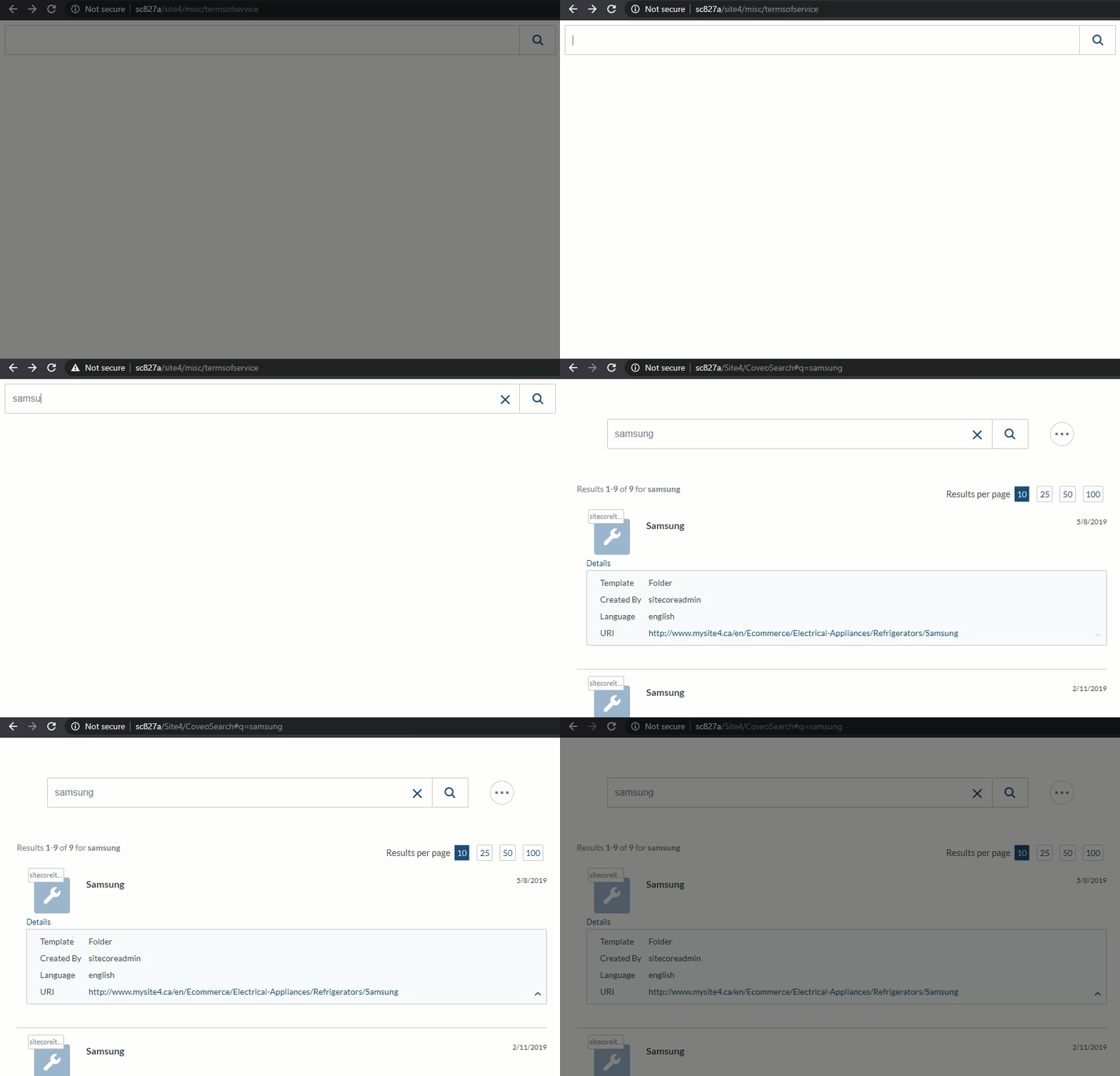
**Global Searchbox behavior**: