---
title: Automatic boosting
slug: '3037'
canonical_url: https://docs.coveo.com/en/3037/
collection: coveo-for-sitecore-v5
source_format: adoc
---
# Automatic boosting
> **Legacy feature**
>
> The Coveo Hive Framework is now in maintenance mode and is no longer recommended for new implementations.
>
> To build new search experiences, use one of Coveo's more modern, lightweight, and responsive libraries.
> To get started, see the [Build search](https://docs.coveo.com/en/2473/) article.
[.version.c4sc.c4sc-edition.enterprise]
[Enterprise edition^,role=version-tag](https://www.coveo.com/en/pricing/sitecore)
> **Important**
>
> This feature was meant primarily for old on-premises implementations and should no longer be used.
> [Coveo Machine Learning (Coveo ML)](https://docs.coveo.com/en/188/) now drastically improves the quality of results provided to users automatically, without drawing any information from Sitecore pattern and profile cards.

Implements the **CoveoForSitecoreRankingExpression** component using rules defined by the Sitecore xDB profiles.
This component adds a [query ranking function (QRF)](https://docs.coveo.com/en/237/) to the [advanced query expression (`aq`)](https://docs.coveo.com/en/175/) of queries to boost documents that match the Pattern Card, assigned to the visitor by Sitecore, based on items previously viewed by the visitor.
## Usage notes
* The **{doctitle}** rendering is added automatically with the **Coveo Search Interface** rendering.
* Automatic Boosting requires the following:
** You have a Sitecore instance with xDB installed.
** You've defined Profiles, Profile Cards, and Pattern Cards in your Sitecore instance and have assigned Profile Cards to your items (see [Use automatic boosting](https://docs.coveo.com/en/2614/)).
** You've indexed documents with the parameter `indexAnalyticsFields` set to `true` (see [About the Coveo Search Provider configuration file](https://docs.coveo.com/en/2562/)).
** You've enabled and configured automatic boosting in the rendering data source.
The `Enable automatic boosting` option is disabled by default.
## Insertion location
Coveo Hive
The Automatic Boosting rendering is an Allowed Control in the following placeholder(s): UI Header, Recommendations Components
Example insertion sequence for the Automatic Boosting rendering.
Coveo Hive SXA
The Coveo for Sitecore SXA Automatic Boosting rendering is meant to be inserted in specific placeholders (that is, UI Header, Recommendations Components).
Example insertion sequence for the Automatic Boosting rendering.
## Data source options
The following table lists the available data source options for this rendering.
[%header,cols="33%,66%"]
|===
|Option name
|Description
|Enable automatic boosting
|Enables automatic boosting and allows setting the boosting parameters.
|Focusfootnote:data-source[If custom profiles are added to the default Sitecore profiles, the data source will list these as well.]
|Allows setting the boosting parameters based on the `Focus` profile.
|Functionfootnote:data-source[If custom profiles are added to the default Sitecore profiles, the data source will list these as well.]
|Allows setting the boosting parameters based on the `Function` profile.
|Personafootnote:data-source[If custom profiles are added to the default Sitecore profiles, the data source will list these as well.]
|Allows setting the boosting parameters based on the `Persona` profile.
|Scorefootnote:data-source[If custom profiles are added to the default Sitecore profiles, the data source will list these as well.]
|Allows setting the boosting parameters based on the `Score` profile.
|Boosting influence (%)
|Setting used to specify boosting of current profile (`Focus`, `Function`, `Persona`, etc.) relative to the other profiles being boosted.
|Boosting weight range
|Setting used to be more or less restrictive about the boosting.
A larger value lets you boost profile keys with percentages further from the pattern, and a smaller value makes your boosting affect only items with the exact same profile key percentage as the pattern.
|Dominant keys boosting influence (%)
|Setting used to increase the maximum boost value of the dominant profile key of a pattern by the amount specified.
Its default value is `50%`.
|===
## Sample generated HTML and corresponding visual output
In the Sitecore Marketing Control Panel, under the `Focus` profile, you have set up a profile card called `Do it yourselfer` with the profile key values shown to the right.

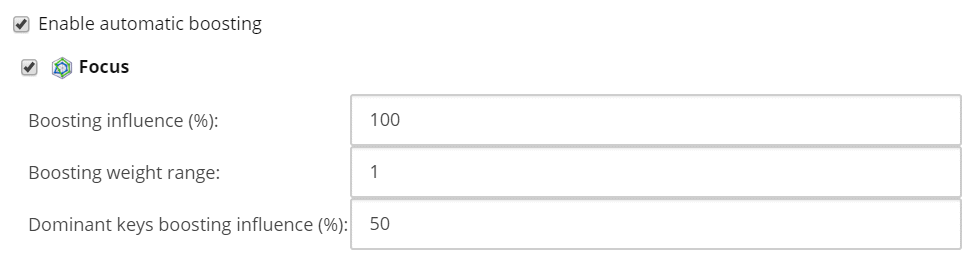
You've then associated the `Do it yourselfer` profile card to several items, reindexed those items, and configured your **Coveo Search Interface** data source as follows.
**Generated HTML:**
```xml
```
**Search API call `aq`:**
After viewing a few items with the `Do it yourselfer` profile card, Sitecore assigns the `Do it yourselfer` pattern to the visitor.
Subsequent Coveo-powered search page calls to the Search API show the following `aq`.
