---
title: Coveo Distance Facet Range
slug: '3026'
canonical_url: https://docs.coveo.com/en/3026/
collection: coveo-for-sitecore-v5
source_format: adoc
---
# Coveo Distance Facet Range
> **Legacy feature**
>
> The Coveo Hive Framework is now in maintenance mode and is no longer recommended for new implementations.
>
> To build new search experiences, use one of Coveo's more modern, lightweight, and responsive libraries.
> To get started, see the [Build search](https://docs.coveo.com/en/2473/) article.
> **Leading practice**
>
> The [Coveo Dynamic Distance Facet Range](https://docs.coveo.com/en/3212/) is now recommended over the **Coveo Distance Facet Range** rendering.
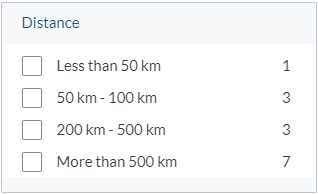
Implements the [Coveo JavaScript Search Framework](https://docs.coveo.com/en/187/) [FacetRange](https://coveo.github.io/search-ui/components/facetrange.html) component to display a [facet](https://docs.coveo.com/en/198/) whose values are expressed as numeric ranges.
The facet is based on an item-user distance value computed by the Coveo index.
## Usage notes
* To use the **{doctitle}** rendering, you must:
** Add the [Coveo Distance Resources rendering](https://docs.coveo.com/en/2272/) and a [Position Provider rendering](https://docs.coveo.com/en/2999/) to automatically calculate the user-item distance and store it in a field.
** Select the name of the `Distance field` to store the distances in.
By default, Coveo for Sitecore suggests `distance` as the name of this field (which comes from the `List Value Parameter` item located in the `/sitecore/system/Settings/Indexing and Search/Coveo/Distance Field Names` folder).
Refrain from creating custom `List Value Parameter` items: these items are either not located by the Coveo for Sitecore data source or deleted during an upgrade.
* To use the **{doctitle}** rendering with custom numeric ranges, create a content tree structure, such as the one below, containing a `Custom Numeric Ranges` item with children `Numeric Range` items.
This structure can be placed anywhere in the content tree.
You will reference the location of the `Custom Numeric Ranges` item in the `Facet value ranges` data source option (see [Configure custom ranges for a date range or numeric range facet](https://docs.coveo.com/en/2782/)).

* Any change to the facet range value selections triggers a new Search API call.
* You can [customize the CSS](https://docs.coveo.com/en/2342/) associated with this rendering.
## Insertion location
Coveo Hive
The Coveo Distance Facet Range rendering is an Allowed Control in the following placeholder(s): Facets
Example insertion sequence for the Coveo Distance Facet Range rendering.
Coveo Hive SXA
Coveo for Sitecore SXA rendering insertion locations aren't limited by placeholder Allowed Controls. The Coveo Distance Facet Range rendering may therefore be inserted throughout the partial design, whether in Coveo for Sitecore or Sitecore placeholders.
Example insertion sequence for the Coveo Distance Facet Range rendering.
## Data source options
The following table lists the available data source options for this rendering.
[%header,cols="33%,66%"]
|===
|Option name
|Description
|Title
|See the [title](https://coveo.github.io/search-ui/components/facet.html#options.title) component option.
|Distance field
|See the [field](https://coveo.github.io/search-ui/components/facet.html#options.field) component option.
|Facet ID
|See the [id](https://coveo.github.io/search-ui/components/facet.html#options.id-1) component option.
|Number of values
|See the [numberOfValues](https://coveo.github.io/search-ui/components/facet.html#options.numberofvalues) component option.
|Sort
|See the [sortCriteria](https://coveo.github.io/search-ui/components/facet.html#options.sortcriteria) component option.
|Ignore accents in facet search
|See the [facetSearchIgnoreAccents](https://coveo.github.io/search-ui/components/facet.html#options.facetsearchignoreaccents) component option.
|Allowed facet values
|See the [`allowedValues`](https://coveo.github.io/search-ui/components/facet.html#options.allowedvalues) component option.
|Facet value caption
|This option is exposed for legacy reasons.
|Enable collapse button
|See the [`enableCollapse`](https://coveo.github.io/search-ui/components/facet.html#options.enablecollapse) component option.
|Enable settings button
|See the [`enableSettings`](https://coveo.github.io/search-ui/components/facet.html#options.enablesettings) component option.
|Sort criteria displayed in the settings menu
|See the [`availableSorts`](https://coveo.github.io/search-ui/components/facet.html#options.availablesorts) component option.
|Enable search for the facet
|See the [enableFacetSearch](https://coveo.github.io/search-ui/components/facet.html#options.enablefacetsearch) component option.
|Number of values to display in the facet search results
|See the [numberOfValuesInFacetSearch](https://coveo.github.io/search-ui/components/facet.html#options.numberofvaluesinfacetsearch) component option.
|Enable more/less button
|See the [enableMoreLess](https://coveo.github.io/search-ui/components/facet.html#options.enablemoreless) component option.
|Number of additional facet values to fetch when 'More' is clicked
|See the [pageSize](https://coveo.github.io/search-ui/components/facet.html#options.pagesize) component option.
|Include facet values in the omnibox
|This option is exposed for legacy reasons.
It's not recommended to use it.
Specifies if the facet should push data to the Omnibox component.
|Include facet values in the breadcrumb
|See the [includeInBreadcrumb](https://coveo.github.io/search-ui/components/facet.html#options.includeinbreadcrumb) component option.
|Maximum number of facet values displayed in the breadcrumb
|See the [numberOfValuesInBreadcrumb](https://coveo.github.io/search-ui/components/facet.html#options.numberofvaluesinbreadcrumb) component option.
|Computed field
|See the [`computedField`](https://coveo.github.io/search-ui/components/facet.html#options.computedfield) component option.
Not to be confused with a Sitecore computed index field.
|Computed field operation
|See the [computedFieldOperation](https://coveo.github.io/search-ui/components/facet.html#options.computedfieldoperation) component option.
|Computed field format
|See the [computedFieldFormat](https://coveo.github.io/search-ui/components/facet.html#options.computedfieldformat) component option.
|Computed field caption
|See the [computedFieldCaption](https://coveo.github.io/search-ui/components/facet.html#options.computedfieldcaption) component option.
|Is multi-value field
|See the [isMultiValueField](https://coveo.github.io/search-ui/components/facet.html#options.ismultivaluefield) component option.
|Facet uses the AND operator
|See the [`useAnd`](https://coveo.github.io/search-ui/components/facet.html#options.useand) component option.
|Allows user to select the facet operator
|See the [enableTogglingOperator](https://coveo.github.io/search-ui/components/facet.html#options.enabletogglingoperator) component option.
|Facet accuracy determined by the number of scanned results
|Sets the [injectionDepth](https://coveo.github.io/search-ui/components/facet.html#options.injectiondepth) component option to a preset value.
|Enable 'Save Facet State' option in Settings menu
|See the [enableSettingsFacetState](https://coveo.github.io/search-ui/components/facet.html#options.enablesettingsfacetstate) component option.
|Preserve facet position under mouse on new facet query
|See the [`preservePosition`](https://coveo.github.io/search-ui/components/facet.html#options.preserveposition) component option.
|Facet value ranges
|Specifies whether to use automatically generated date ranges or custom date ranges created in Sitecore.
|DOM unique ID
a|{empty}
--
Randomly generated HTML element ID.
--
|Additional data attributes
a|{empty}
--
Allows [use of the Coveo JavaScript Search Framework **FacetRange** component options](https://docs.coveo.com/en/2776/) that aren't directly available in the data source.
--
|===
## Sample generated HTML and corresponding visual output
```html
```