---
title: Remove Fields From Search Results
slug: '2714'
canonical_url: https://docs.coveo.com/en/2714/
collection: coveo-for-sitecore-v5
source_format: adoc
---
# Remove Fields From Search Results
> **Legacy feature**
>
> The Coveo Hive Framework is now in maintenance mode and is no longer recommended for new implementations.
>
> To build new search experiences, use one of Coveo's more modern, lightweight, and responsive libraries.
> To get started, see the [Build search](https://docs.coveo.com/en/2473/) article.
It's quite common to use the `coveoProcessParsedRestResponse` pipeline to modify or remove existing fields.
The following tutorial shows how you can implement a custom processor that removes fields from search results displayed in a search page (published in the `web` database).
It also demonstrates how you can translate field names from the Sitecore format to the index format.
. Assuming that you already have a C# project set up, you need to add these assembly references:
.. `Coveo.Framework.dll`
.. `Coveo.SearchProvider.Rest.dll`
.. `Sitecore.ContentSearch.dll`
.. `Sitecore.ContentSearch.Linq.dll`
. Create a new class named `RemoveCreatedByAndUpdatedByFields` based on the sample code below.
[example.code]
#### **RemoveCreatedByAndUpdatedByFields.cs**
[source,c#]
```
using System.Collections.Generic;
using Coveo.Framework.ContentSearch;
using Coveo.Framework.Items;
using Coveo.Framework.Processor;
using Coveo.SearchProvider.Rest.Pipelines;
using Coveo.SearchProvider.Rest.Serialization;
using Sitecore.ContentSearch;
namespace Tutorials.Lib.Processors.coveoProcessParsedRestResponse
{
///
/// Custom processor that removes the "Created By" and "Updated By" fields when retrieving an item
/// from the web database.
///
public class RemoveCreatedByAndUpdatedByFields : IProcessor
{
///
/// The "Process" method is called by the pipeline. The "p_Args" instance
/// is transferred from one processor to another until the pipeline ends.
///
/// The pipeline arguments.
public void Process(CoveoProcessParsedRestResponseArgs p_Args)
{
// This pipeline is invoked on a different HTTP request than
// the one that renders the search page, so we can't rely on "Sitecore.Context.Item".
// We must use the "CurrentContextItem" from the arguments instead.
// When the current item (that is, the search page) comes from the "web" database,
// we remove some fields.
if (p_Args.CurrentContextItem != null && p_Args.CurrentContextItem.DatabaseName == "web") {
// Get a list of fields that we want to remove from the search results.
// Those field names need to match the field names in the Coveo search index.
IEnumerable fieldsToRemove = GetFieldNamesToRemove(p_Args.CurrentContextItem);
SearchResponse response = p_Args.ResponseContent;
foreach (SearchResult result in response.Results) {
// Let's remove the fields from the result instance.
RemoveFieldsFromResult(result, fieldsToRemove);
}
}
}
///
/// Removes a list of fields from the search result.
///
/// The search result from which fields are removed.
/// The list of fields to remove.
private void RemoveFieldsFromResult(SearchResult p_Result,
IEnumerable p_FieldsToRemove)
{
foreach (string fieldToRemove in p_FieldsToRemove) {
p_Result.Raw.Remove(fieldToRemove);
}
}
///
/// Gets the that matches the current context item.
///
/// The current context item (that is, the search page).
/// The for the associated search index.
private IFieldNameTranslator GetFieldNameTranslator(IItem p_CurrentItem)
{
// Instead of hardcoding the name of the search index, we use the context item
// to retrieve the right search index. Then we can get to the field name translator.
ISearchIndex searchIndex = new ContentSearchManagerWrapper().GetIndex(p_CurrentItem.ToIndexable());
return searchIndex.FieldNameTranslator;
}
///
/// Returns the index field names to remove from the results, translated in the index format.
///
/// The current context item (that is, the search page).
/// The field names to remove translated in the index format.
private IEnumerable GetFieldNamesToRemove(IItem p_CurrentItem)
{
IFieldNameTranslator fieldNameTranslator = GetFieldNameTranslator(p_CurrentItem);
return new [] {
fieldNameTranslator.GetIndexFieldName("parsedcreatedby").TrimStart('@'),
fieldNameTranslator.GetIndexFieldName("parsedupdatedby").TrimStart('@')
};
}
}
}
```
####
. Build the project and copy the resulting assembly to the website `bin` folder.
For this tutorial, the assembly is named `Tutorials.Lib.dll`.
. Finally, modify the configuration file to tell Sitecore when the new processor must be called:
.. Open the `Coveo.SearchProvider.Rest.Custom.config` file.
> **Note**
>
> In a more formal project, you would want to use a separate include file and register the processor there.
.. Under `sitecore`, add the following element, and insert your processor definition.
```xml
```
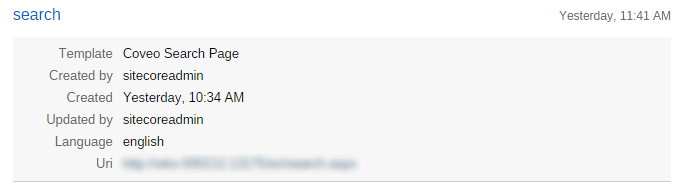
. Validate that the `Created By` and `Updated By` fields are displayed when viewing the search page in **Preview** mode.
When visiting the page in **Normal** mode, the fields won't appear in the results.
.. In **Preview** mode.
.. In **Normal** mode.
