---
title: Synchronize security identities
slug: '2516'
canonical_url: https://docs.coveo.com/en/2516/
collection: coveo-for-sitecore-v5
source_format: adoc
---
# Synchronize security identities
Coveo for Sitecore can handle and replicate item `Read` access rights specified in Sitecore.
When you require Sitecore users to login to view items, and you configure Coveo for Sitecore to index Sitecore permissions, an item only appears in search page results if the querying user has the `Read` access right on that item in Sitecore.
Sitecore supports _users_ and _roles_.
Changes to these security accounts in Sitecore can occur frequently, and they can have an impact on a Sitecore user's right to view an item in search results.
When a user queries the Coveo index, the [security identity cache](https://docs.coveo.com/en/241/) is interrogated to quickly determine which users can and can't view a given item in search results.
The goal of this article is to provide information on the various mechanisms in Coveo for Sitecore that ensure that the security identity cache remains synchronized with Sitecore security account data.
## Automatic security identity synchronization
Coveo for Sitecore automatically synchronizes [Coveo Platform](https://docs.coveo.com/en/186/) security identities with Sitecore security account data when:
* The index is initialized for the first time and the Sitecore identities have not been pushed once yet.
* You start a Sitecore index rebuild operation, if the `pushPermissionsOnRebuild` flag is set to true.
> **Note**
>
> These actions trigger PUT requests to the Push API endpoint which updates the Coveo security identities and the security identity cache.
>
> For more details on the HTTP requests that are done in the background, see [Manage batches of security identities](https://docs.coveo.com/en/55/).
> See [Validate routes and ports](https://docs.coveo.com/en/2535/) for a complete list of Coveo for Sitecore outbound communications with Coveo services.
> See [IP addresses to allowlist](https://docs.coveo.com/en/1831/) for a complete list of IP addresses Coveo uses for its inbound and outbound communications.
## Automatic security identity cache refresh
The security identity cache is fully refreshed by default each night.
Furthermore, by default, Coveo for Sitecore also hooks itself to the following Sitecore events to maintain the security identity cache up to date.
[%header,cols="2"]
|===
|Event
|Handler
|user:updated
|OnUserUpdated
|user:deleted
|OnUserDeleted
|role:created
|OnRoleCreated
|role:deleted
|OnRoleDeleted
|roles:usersAdded
|OnUsersAddedToRole
|roles:usersRemoved
|OnUsersRemovedFromRole
|roles:rolesAdded
|OnRolesAddedToRoles
|roles:rolesRemoved
|OnRolesRemovedFromRoles
|===
Hence, in the `Coveo.SearchProvider.config` file, you can see the following elements.
```xml
...
```
## Manual security identity synchronization
To manually synchronize security identities
. Open the Coveo Search section of the Sitecore Control Panel (see the [Coveo Control Panel](https://docs.coveo.com/en/2195/)).
. Choose **Indexing Manager**.

. In the **Command Center** menu, select **Security**.
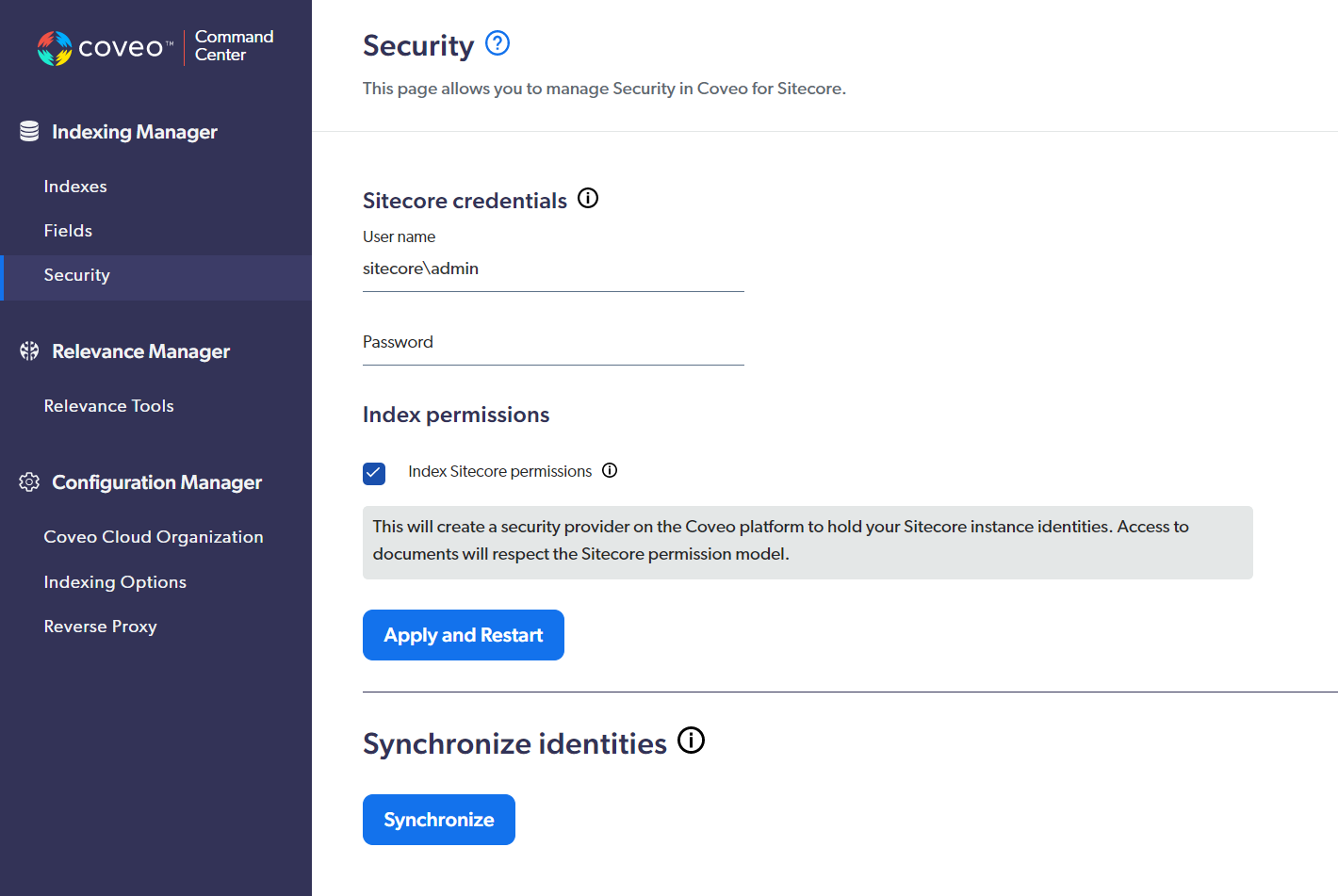
> **Note**
>
> You can also access the **Security** section of the **Command Center** using the URL `\http:///coveo/command-center/index.html#security`, where `` is the name of your Sitecore instance.
> Non-Sitecore administrators can only access the **Command Center** by URL (see [Give access to the Command Center](https://docs.coveo.com/en/2843/)).
. In the **Synchronize identities** section, click **Synchronize**.
> **Note**
>
> These actions trigger PUT requests to the Push API endpoint which updates the Coveo security identities and the security identity cache.
>
> For more details on the HTTP requests that are done in the background, see [Manage batches of security identities](https://docs.coveo.com/en/55/).
> See [Validate routes and ports](https://docs.coveo.com/en/2535/) for a complete list of Coveo for Sitecore outbound communications with Coveo services.
> See [IP addresses to allowlist](https://docs.coveo.com/en/1831/) for a complete list of IP addresses Coveo uses for its inbound and outbound communications.