---
title: Coveo Distance Resources
slug: '2272'
canonical_url: https://docs.coveo.com/en/2272/
collection: coveo-for-sitecore-v5
source_format: adoc
---
# Coveo Distance Resources
> **Legacy feature**
>
> The Coveo Hive Framework is now in maintenance mode and is no longer recommended for new implementations.
>
> To build new search experiences, use one of Coveo's more modern, lightweight, and responsive libraries.
> To get started, see the [Build search](https://docs.coveo.com/en/2473/) article.
Implements the [Coveo JavaScript Search Framework](https://docs.coveo.com/en/187/) [DistanceResources](https://coveo.github.io/search-ui/components/distanceresources.html) component.
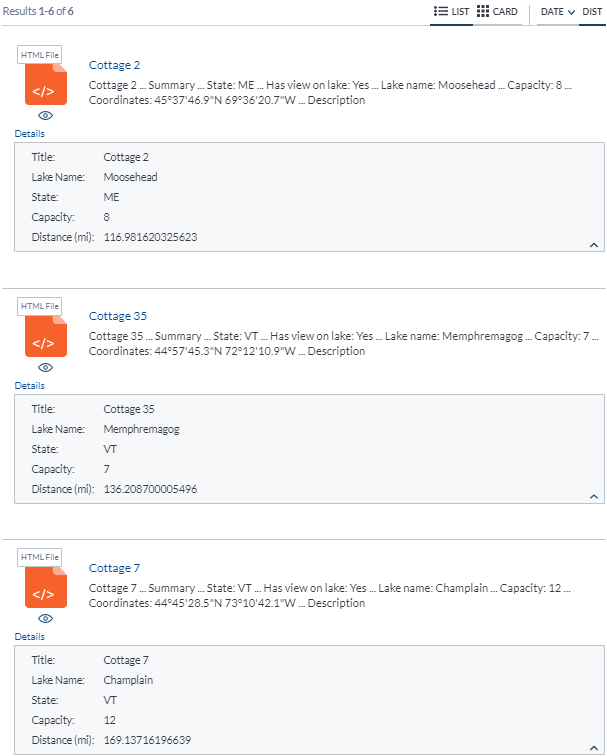
This component is used to define options and register events to resolve the distance between the website visitor and results, where the website visitor coordinates are fetched using a position provider, and result coordinates are specified in Sitecore item latitude and longitude fields.
## Usage notes
* In your Sitecore items, you must indicate the latitude and longitude values in decimal degrees.
The example item below shows proper latitude and longitude values for the Coveo Québec City office.

* After inserting the **{{ page.title }}** rendering, add one or several position provider renderings in the `Distance Providers` placeholder.
The available position providers are: [Coveo Google API Position Provider](https://docs.coveo.com/en/2306/), [Coveo Navigator Position Provider](https://docs.coveo.com/en/2392/), and [Coveo Sitecore Position Provider](https://docs.coveo.com/en/2502/).
* Position providers are resolved in order of appearance in the `Distance Providers` placeholder.
If a position provider fails to return a position, the next provider is used as a fallback.
* This rendering is typically used in combination with the [Coveo Distance Sort](https://docs.coveo.com/en/3063/) rendering.
In the **Experience Editor**, when no position provider rendering resolves the user position, the **Coveo Distance Sort** rendering caption is red and its tooltip message is `Disabled. Please configure the distance resources component.`
## Insertion location
Coveo Hive
The Coveo Distance Resources rendering is an Allowed Control in the following placeholder(s): UI Header
Example insertion sequence for the Coveo Distance Resources rendering.
Coveo Hive SXA
Coveo for Sitecore SXA rendering insertion locations are not limited by placeholder Allowed Controls. The Coveo Distance Resources rendering may therefore be inserted throughout the partial design, whether in Coveo for Sitecore or Sitecore placeholders.
Example insertion sequence for the Coveo Distance Resources rendering.
## Data source options
The following table lists the available data source options for this rendering.
[%header,cols="33%,66%"]
|===
|Option name
|Description
|Latitude field
|See the [`latitudeField`](https://coveo.github.io/search-ui/components/distanceresources.html#options.latitudefield) component option.
|Longitude field
|See the [`longitudeField`](https://coveo.github.io/search-ui/components/distanceresources.html#options.longitudefield) component option.
|Unit type
|Used to indicate the distance units.
In effect, this sets the `unitConversionFactor` value required to convert the computed distance from meters to the selected unit type (see the [unitConversionFactor](https://coveo.github.io/search-ui/components/distanceresources.html#options.unitconversionfactor) component option).
|Trigger a new query when a new position is set
|See the [triggerNewQueryOnNewPosition](https://coveo.github.io/search-ui/components/distanceresources.html#options.triggernewqueryonnewposition) component option.
|Cancel the query until the first position is resolved
|See the [cancelQueryUntilPositionResolved](https://coveo.github.io/search-ui/components/distanceresources.html#options.cancelqueryuntilpositionresolved) component option.
|Distance field
|See the [`distanceField`](https://coveo.github.io/search-ui/components/distanceresources.html#options.distancefield) component option.
|DOM unique ID
a|{empty}
--
Randomly generated HTML element ID.
--
|Additional data attributes
a|{empty}
--
Allows [use of the Coveo JavaScript Search Framework **DistanceResources** component options](https://docs.coveo.com/en/2776/) that aren't directly available in the data source.
--
|===
## Sample Generated HTML and Corresponding Visual Effect
```html
```