---
title: Create a computed date field
slug: '2237'
canonical_url: https://docs.coveo.com/en/2237/
collection: coveo-for-sitecore-v5
source_format: adoc
---
# Create a computed date field
Suppose you want to create some kind of archiving system in Sitecore by adding a computed field.
For example, you would like to add an `archivedate` whose value would be one year after the item creation date (that is, `created` field in the example below).
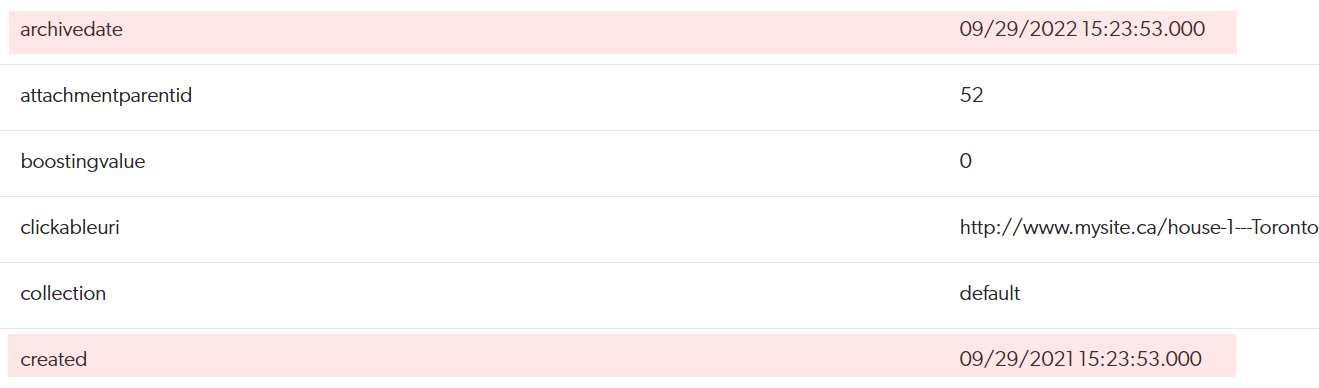
This article provides the steps to achieve this.
> **Important**
>
> The [Coveo Platform](https://docs.coveo.com/en/186/) system date field and Coveo for Sitecore date field formats are incompatible.
> You can't use a mapping to populate a [Coveo Platform](https://docs.coveo.com/en/186/) system date field with a Coveo for Sitecore computed date field.
> **Note**
>
> If necessary, see [Implement and configure a computed field in your index](https://docs.coveo.com/en/2320/) for more details on each step.
## Step 1: Create the required C# project
. Create a new C# project named `Coveo.Custom` that references the `Sitecore.ContentSearch` and `Sitecore.Kernel` assemblies.
. Create a new class named `ArchiveDateField` in the `Coveo.Custom` namespace with the following code.
[source,c#]
```
using System;
using Sitecore;
using Sitecore.ContentSearch;
using Sitecore.ContentSearch.ComputedFields;
namespace Coveo.Custom
{
public class ArchiveDateField : IComputedIndexField
{
// The 'Z' at the end of the format string tells Coveo
// that the date value represents Universal time.
private const string COVEO_INDEX_DATE_FORMAT = "yyyy/MM/dd@HH:mm:ssZ";
private const string SITECORE_CREATED_FIELD = "__Created";
///
public string FieldName { get; set; }
///
public string ReturnType
{
get
{
return "datetime";
}
set
{
}
}
///
public object ComputeFieldValue(IIndexable p_Indexable)
{
SitecoreIndexableItem indexableItem = p_Indexable as SitecoreIndexableItem;
if (indexableItem != null)
{
IIndexableDataField dateField = indexableItem.GetFieldByName(SITECORE_CREATED_FIELD);
if (dateField != null)
{
DateTime itemCreationDate = DateUtil.ParseDateTime(dateField.Value.ToString(), DateTime.MaxValue);
// Ensure that the date uses universal time
if (itemCreationDate.Kind != DateTimeKind.Utc)
{
itemCreationDate = itemCreationDate.ToUniversalTime();
}
return itemCreationDate.AddYears(1).ToString(COVEO_INDEX_DATE_FORMAT);
}
}
return null;
}
}
}
```
> **Important**
>
> To create a computed date field, the `ReturnType` property must return the `datetime` string and the `ComputeFieldValue` method must return the date formatted as `yyyy/MM/dd@HH:mm:ssZ`.
. Compile your project.
. Copy the resulting assembly (`Coveo.Custom.dll`) to the `bin` folder of your Sitecore instance.
## Step 2: Configure the computed field
. In `Coveo.SearchProvider.Custom.config`, add the following element as a child of the `` element.
```xml
Coveo.Custom.ArchiveDateField, Coveo.Custom
```
. In `Coveo.SearchProvider.Custom.config`, add the following element as a child of the `
```
## Step 3: Rebuild your indexes
[Rebuild your search indexes](https://docs.coveo.com/en/2426#rebuilding-a-search-index-manually), or at least [re-index the Sitecore items which need the new field](https://docs.coveo.com/en/2426#re-indexing-a-section-of-your-content-tree-in-the-content-editor).
## Step 4: Validate the computed field has been added
Validate that your new field has been added on your items using the [**Content Browser**](https://platform.cloud.coveo.com/admin/#/orgid/content/browser/) ([platform-ca](https://platform-ca.cloud.coveo.com/admin/#/orgid/content/browser/) | [platform-eu](https://platform-eu.cloud.coveo.com/admin/#/orgid/content/browser/) | [platform-au](https://platform-au.cloud.coveo.com/admin/#/orgid/content/browser/)).
Its value should be one year after the item creation date.
> **Warning**
>
> When running computed field code, check your logs for computed field errors indicating items aren't being indexed.
> Implement proper exception handling to avoid these issues.
> For example, you might want to stop the process or set a fallback value for a computed field when suitable.